
What Is a Meta Description? SEO Tips, Examples, and Templates
Vincent
13/03/2023
30
A meta description is an HTML tag that summarizes a page for search engines and users. As part of a broader meta tag setup, it can help Google understand the page summary when that summary matches the visible content. Strong descriptions match search intent, highlight page value, and help users decide whether the result deserves a click.
What is a meta description?
A meta description is a short page summary placed inside the HTML <head> section. It tells search engines what the page covers, while giving users a preview of the content in search results.
Here is a simple HTML example:
<meta name=”description” content=”Learn how to write meta descriptions that match search intent, improve click appeal, and scale across important SEO pages.”>
Google can use this tag to create a snippet in search results, but it may also choose text from the page when that text better fits the user’s query. Google’s documentation explains that snippets are generated from page content, meta description tags, or other sources when they help users understand the result.
That means the meta description is useful, but it does not fully control the search snippet.
Meta description vs Google snippet
The written meta description and the displayed Google snippet are related, but they are not always the same.
| Item | Meaning | Who controls it |
| Meta description | The HTML tag added to the page | Website owner |
| Google snippet | The text shown in search results | |
| Social preview | Text shown on social platforms | Often Open Graph or platform fields |
For example, a service page may have one meta description. Google might still show a different snippet when a user searches a more specific question that appears in the body copy. This behavior is normal, especially when a page ranks for many search terms.
A better meta description can improve the chance that Google uses your preferred summary. The description should be specific, accurate, and close to the visible content on the page.
Do meta descriptions affect SEO?
Meta descriptions should be treated as a search appearance element, not a direct ranking shortcut. They help explain the page in search results, which can improve click appeal and traffic quality. The title tag carries the main search result headline, so teams should review SEO title tag guidance together with the description when an important page has impressions but weak clicks.
For SEO teams, the value is practical:
| SEO value | How it helps |
| Clearer search preview | Users understand the result faster |
| Better intent match | The snippet reflects the query more closely |
| Stronger click appeal | The page value becomes easier to compare |
| Fewer weak snippets | Important pages avoid vague summaries |
| Better page differentiation | Similar pages do not share the same preview |
A description that overpromises can attract the wrong visitors. A vague one may get ignored even when the page ranks well. The strongest version gives users enough context to choose the result confidently.
How long should a meta description be?
There is no fixed character limit that guarantees full display. Google truncates snippets based on available space, device width, query context etc. As a practical writing range, many SEO teams use about 145–155 characters for standard pages.
This range is a guide rather than a rule. A shorter description can work when it is specific, while a longer one may still be useful because Google can extract the most relevant part.
Use this approach:
| Page situation | Practical length guidance |
| Blog post | 145–155 characters |
| Service page | 140–155 characters |
| Product page | 120–155 characters |
| Homepage | 140–155 characters |
| Category page | 130–155 characters |
| Large template page | Keep key value early |
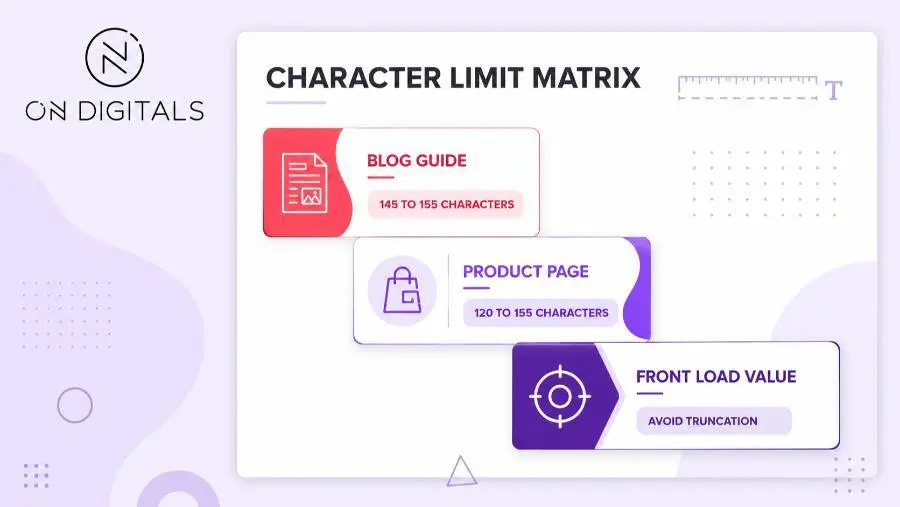
Put the most important message near the beginning. If Google truncates the snippet, users should still understand the page topic and value.
What makes a good meta description?
A good meta description gives users a clear reason to click without sounding forced. It should summarize the page, match the search intent, and reflect what the visitor will actually find. When the page has a clear target keyword, the description is easier to keep specific without turning into keyword repetition.
Use this checklist:
| Element | What to do |
| Page-specific summary | Describe this URL, not the whole website |
| Search intent match | Reflect the user’s main need |
| Natural keyword use | Include the target phrase only when it fits |
| Clear value point | Show what the user will learn or get |
| Useful detail | Add price, location, scope etc. when relevant |
| Unique copy | Avoid using the same line across many pages |
| Honest promise | Keep the snippet aligned with page content |
A meta description should not read like a keyword list. Google’s documentation also recommends avoiding descriptions that are only strings of keywords because they do not help users understand the page.
Meta description examples by page type
Different pages need different descriptions. A blog guide should promise a useful answer, while a service page should explain the offer and audience.
| Page type | Example meta description |
| Blog guide | Learn what a meta description is, how long it should be, and how to write better snippets for SEO pages. |
| Service page | Get technical SEO support for websites with crawl, indexation, speed, and site structure issues. |
| Product page | Shop lightweight running shoes with breathable materials, size options, and everyday training support. |
| Category page | Explore CRM tools for small teams. Compare use cases, features, and pricing considerations before choosing. |
| Local page | Find SEO services in Vietnam for audits, content planning, technical fixes, and long-term growth support. |
| Homepage | On Digitals helps brands plan SEO, performance marketing, and digital strategy with practical execution. |
Each example matches a different page job: service pages speak to user problems, product pages highlight concrete details, while category pages help visitors compare options before they click deeper.
How to write a meta description step by step
Writing a meta description is easier when the page purpose is clear. Start with the user need, then turn that need into a short summary.
Step 1: Identify the page intent
Ask why the user would search for this page. Blog readers may want an explanation. Service visitors may need help solving a specific business problem. Product visitors may compare features before buying.
Step 2: Choose the main value point
Pick one strong reason to click. That reason could be a clear answer, a product benefit, a service outcome, or a useful template.
Weak description:
- Learn about meta descriptions and SEO.
Better description:
- Learn what a meta description is, how to write one for SEO, and why Google may show a different snippet.
The second version gives the user more context and sets clearer expectations.
Step 3: Write one clear summary
Use plain language. Avoid repeating the keyword too often. If the page targets “meta description,” include the phrase naturally once.
Step 4: Add a soft CTA when useful
A call to action can help, but it should fit the page. Blog posts usually need softer language, while product and service pages can be more direct.
| Page type | CTA style |
| Blog guide | Learn, compare, review |
| Service page | Get support, see how it works |
| Product page | Shop, explore, compare |
| Local page | Find, request, review options |
Step 5: Compare against the SERP
Search the keyword manually and review competing snippets. Look for what they emphasize. Then write a description that is more specific to your page, rather than copying common phrasing.
Why Google rewrites meta descriptions
Google may rewrite a meta description when another part of the page seems more helpful for the query. This can happen even when the written tag is technically valid.
| Cause | Common signal | Better fix |
| Description is too generic | Google shows body text instead | Summarize the page more specifically |
| Query intent differs | Snippet changes across searches | Add matching content sections |
| Keyword list | Snippet feels unnatural | Rewrite as a readable summary |
| Duplicate descriptions | Several URLs show the same preview | Write page-level descriptions |
| Missing key details | Product or service value is unclear | Add useful details where relevant |
If Google rewrites the snippet often, review the page content first. The visible copy may not support the description strongly enough. Stronger SEO headings can clarify the page structure, while a clearer opening paragraph or more specific section can help the page and snippet align.
How to audit meta descriptions across a site
For a small site, manual review may be enough. For larger websites, treat meta descriptions as an audit task because missing or duplicated descriptions can appear across many templates.
Use this workflow:
Export URLs
↓
Find missing and duplicate descriptions
↓
Prioritize important pages
↓
Rewrite high-value pages manually
↓
Use templates for scalable page sets
↓
Review snippets after recrawling
Prioritize pages that already have impressions, revenue value, rankings, or internal importance. A homepage, service page, product category, or high-traffic blog post usually deserves a custom description.
| Page situation | Best action |
| High impressions, low clicks | Rewrite with stronger intent match |
| Important page missing description | Add a custom summary |
| Duplicate descriptions | Create unique page-level copy |
| Product pages at scale | Use templates with unique product data |
| Low-value archive pages | Deprioritize unless they affect index quality |
A sitewide audit prevents teams from spending too much time on low-value pages while important URLs keep weak snippets.
Can you use AI for meta descriptions?
AI can help draft meta descriptions, especially for large websites. Human review still matters because descriptions need page context, business accuracy, and search intent alignment.
Use AI for:
| Task | Good use |
| First draft | Generate options from page content |
| Bulk templates | Create descriptions for similar page sets |
| Rewrite variations | Test clearer wording |
| Character trimming | Shorten without losing meaning |
Review every output for accuracy. AI may create descriptions that sound polished but do not match the page. It can also repeat phrases across similar URLs, which weakens uniqueness.
A simple prompt:
Write 5 meta description options for this page. Keep each option under 155 characters. Match the page intent, include the main topic naturally, and avoid exaggerated claims.
For product or category pages, add structured inputs such as product type, audience, location, key feature etc. This helps the draft stay specific.
Meta description FAQ
Does Google always use the meta description?
Google may use the written tag, but it can also create a snippet from visible page content. This often happens when another passage better matches the query.
Are meta descriptions a ranking factor?
Treat meta descriptions as a search appearance and click relevance element. They help users evaluate results, but they should not be treated as a direct ranking shortcut.
Should every page have a unique meta description?
Important indexable pages should have unique descriptions. Large sites can use templates for scalable pages when the output remains specific to each URL.
Can I leave meta descriptions blank?
Low-value pages may not need manual descriptions. Important pages should have them because a clear summary can improve the search preview.
How do I fix duplicate meta descriptions?
Group duplicated URLs by template or page type. Rewrite important pages manually, then create a scalable rule for similar pages that still includes unique details.
Final thoughts
A strong meta description helps users understand why a page deserves their click. Write custom descriptions for important URLs, keep summaries specific, and review Google snippets after the page is indexed.
For larger websites, combine manual writing with a sitewide audit process. Prioritize pages with business value, fix duplicates, and use templates only when they create useful page-level summaries.

NEWEST POSTS
- Advertising Industry In Vietnam: The 2026 Trends, Channels and Market-Entry Strategy
- Best SEO Company in Vietnam: Latest Shortlist For Businesses
- How To Leverage Social Media For Customer Service Like A Pro?
- Social Media Post Tips – 8 Ways To Boost Engagement
- How To Use Social Media for Sales – In-depth Beginner Guide
Read more