
Technical Site Audit: A Practical Framework for Site Health
Vincent
06/07/2024
15
A technical site audit checks whether search engines can reach and index a website correctly. It then reviews rendering quality and Core Web Vitals. Schema markup and internal link paths are checked next. For marketing and web teams, this turns hidden site issues into a prioritized action plan.
What is a technical site audit?
A technical site or technical SEO audit is a structured review of the systems that affect organic visibility before content quality is judged. It checks whether priority pages can be found and indexed. It also reviews loading behavior and technical clarity for search engines. The goal is to remove barriers that stop useful pages from performing.
This is different from a content audit. A content audit asks whether the page answers the right topic and search intent. A technical audit checks whether Google can access the page and read its signals. It also reviews whether rendering or canonical setup creates friction.
For On Digitals, a useful audit does not stop at a long export of errors. It should translate findings into business priorities, starting with what blocks indexing. From there, teams can separate ranking issues from UX or conversion problems.
When should a business run a technical site audit?
A business should run a technical site audit before major website changes and after visibility drops. It is useful during regular SEO maintenance too. The audit matters most for large websites and active content hubs. Multilingual sites and recent CMS changes need the same attention.
The common trigger is a traffic decline, but waiting for a drop is risky. Technical issues often build quietly as old redirects stack up or templates slow down. Important URLs may also disappear from the sitemap.
Run a technical SEO audit in these situations:
- Before launching a new website or redesign.
- Before and after a domain, CMS, or URL migration.
- When Google Search Console shows indexing or crawl errors.
- When rankings drop after a core update or technical release.
- When organic traffic grows but conversions do not follow.
- Every quarter for large websites and active content hubs.
What should a technical site audit check first?
A technical SEO audit should start with crawlability and indexability. These checks decide whether search engines can reach priority pages. After that, review architecture and redirects before moving into performance. Schema and internal links help the audit connect access issues with quality signals.
Start with these checks:
- Crawlability: robots.txt, blocked paths, crawl depth, and orphan URLs.
- Indexability: noindex tags, canonicals, sitemap coverage, and URL inspection status.
- Status codes: 404s, 410s, soft 404s, redirect chains, and temporary redirects.
- Architecture: navigation, breadcrumbs, hub pages, and links to priority URLs.
- Performance: Core Web Vitals, image weight, JavaScript, and server response.
- Structured data: schema type, validation status, and page-content alignment.
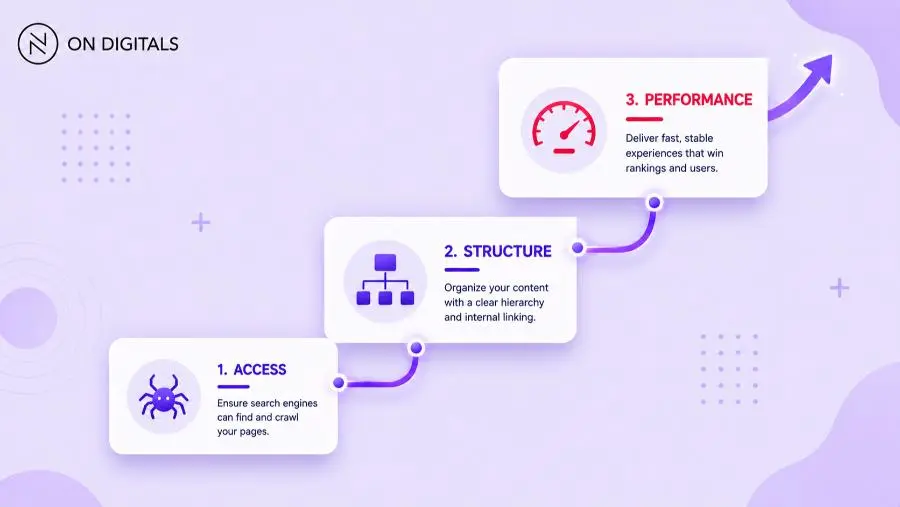
This order keeps the audit focused. A slow page can still rank if it is useful and accessible. A blocked page has almost no chance, even when the content is strong.
How to run a technical site audit step by step?
A strong technical site audit follows a repeatable workflow. Define the scope first, then collect search data and crawl the site. From there, compare signals and classify issues before assigning owners. After implementation, verify that the fixes work as expected.
Step 1: Define the audit scope
Start by deciding which URLs matter most. For a service business, priority pages usually include service pages and industry pages. Case studies can matter too when they support lead generation.
Write down the site section and target market before crawling. For multilingual sites, also confirm the language version and business goal.
Step 2: Export data from search and analytics tools
Use Google Search Console to review indexing and coverage. For performance context, compare queries with impressions and clicks. Crawl activity should be checked in the same export, while GA4 connects landing pages with sessions and conversions.
Step 3: Crawl the website
Choose the crawler before reviewing URL-level issues. Common options include:
- Screaming Frog.
- Sitebulb.
- Semrush Site Audit.
- SE Ranking.
- Ahrefs.
Crawl as a normal user agent and, when relevant, Googlebot smartphone.
Review crawl depth, response codes, canonical tags, headings, and robots directives. Then check internal links, image sizes, and structured data. If the website uses heavy JavaScript, test whether the rendered HTML contains the main content and links.
Step 4: Compare crawl data with Google Search Console
The crawl shows what your tool can access. Google Search Console shows what Google discovered and how it handled those URLs. Comparing both views helps catch mismatches that a single tool may miss.
For example, a page may appear valid in a crawl but still sit under “Discovered, currently not indexed.” Another page may be indexed even though the internal team no longer wants it visible. Because those cases require different fixes, severity review should start after the data comparison.
Step 5: Classify findings by severity
Not every issue deserves immediate development time. Classify findings by crawl impact and indexation risk before reviewing ranking impact. UX and conversion impact should be assessed after that. Each issue should then be tied to affected URLs and a recommended owner.
Use four severity levels:
- Critical: blocks key pages from crawling, indexing, or conversion. Fix immediately.
- High: affects important templates or commercial pages. Add to the current sprint.
- Medium: affects quality or scale but does not block visibility. Plan it in the SEO roadmap.
- Low: cleanup item with limited business impact. Batch it after larger blockers.
Step 6: Turn findings into an implementation brief
A good audit report should name the issue and affected URLs. It should explain business impact, ownership, and validation. Add the recommended fix in plain language so developers do not have to infer the request.
For each priority issue, include:
- Problem: what is broken.
- Evidence: crawl export, GSC screenshot, URL examples, or log data.
- Impact: visibility, UX, conversion, or tracking risk.
- Recommendation: what should change.
- Owner: SEO, content, developer, analytics, or product team.
- Validation: how the fix will be checked after deployment.
How should teams prioritize technical SEO issues?
Teams should prioritize technical SEO issues by impact and page value first. After that, weigh implementation effort and risk because page value changes the priority. A small fix on a high-value service page can matter more than hundreds of warnings on archived pages.
Use this decision logic:
- Fix crawl and index blockers on business-critical URLs.
- Fix redirect, canonical, and internal link issues created by migrations.
- Improve templates that affect many important pages.
- Address Core Web Vitals on real landing pages.
- Clean up low-value warnings after the main blockers are handled.
This is where many tool-led audits fall short. A tool can detect 115+ checks, but it cannot always decide which five issues matter most for your business this month.
Which tools should be used in a technical site audit?
A technical site audit works best when crawler data and search-console data are reviewed together. Performance testing adds page-experience context. Analytics connects the findings to sessions, leads, and revenue signals.
Use tools to collect evidence, not to replace judgment. The audit becomes useful when findings are mapped to page priority and business outcomes.
What are the most common technical site audit mistakes?
The most common audit mistake is treating all warnings equally. Teams also lose value when they ignore search intent. The same happens when they skip implementation details or forget validation after deployment. A technical site audit should improve organic performance, not create a long list that no one owns.
Avoid these mistakes:
- Auditing every URL without separating commercial, informational, and low-value pages.
- Reporting tool warnings without explaining business impact.
- Fixing title tags while index blockers remain unresolved.
- Ignoring JavaScript rendering on websites where content loads client-side.
- Forgetting hreflang and canonical logic on multilingual websites.
- Measuring success only by a better tool score.
The last point matters. A higher audit score is useful, but it is not the main outcome. The real goal is cleaner indexation and better crawl efficiency. Faster templates should support stronger visibility for important pages.
How should audit results be reported to stakeholders?
Technical site audit results should be reported in a format that different teams can act on. Executives need the business risk, while marketers need page priority. Developers need clear technical requirements before implementation starts.
A clear report can use three layers, starting with the executive summary. This summary should explain the main risk and priority roadmap. The SEO findings should list affected URLs and severity. They should also include search data and recommended actions. The technical brief should include URL examples and expected behavior. Add implementation notes and validation steps for the developer.
If the audit is part of a monthly SEO program, connect the report to movement in Google Search Console and conversion data. This keeps technical work tied to visibility, qualified traffic, and business value.
How often should a technical site audit be repeated?
Most websites should run a light technical SEO audit monthly and a deeper audit every quarter or before major releases. The right frequency depends on website size and publishing volume. CMS complexity also matters when templates change often.
Use this cadence as a starting point:
- Monthly: GSC coverage, crawl errors, status codes, Core Web Vitals, and broken links.
- Quarterly: full crawl, template review, schema validation, and internal link review.
- Before launch: migration mapping, redirects, robots.txt, sitemaps, canonicals, tracking, and QA crawl.
- After launch: GSC monitoring, redirect testing, crawl comparison, traffic checks, and conversion checks.
For fast-moving ecommerce or multilingual websites, monthly checks may need to be more detailed. For a small B2B website, a quarterly review can be enough if the site changes slowly.
Technical site audit checklist
A technical site audit checklist should be short enough to use. It still needs enough coverage to catch issues that block search performance. Use it as a working checklist, then adapt it to your website type.
Check these items before closing the audit:
- Priority URLs are crawlable and not blocked by robots.txt or access rules.
- Priority URLs are indexable, with no unintended noindex or canonical conflict.
- XML sitemap includes indexable priority URLs only.
- Old URLs redirect to relevant new URLs with minimal chains.
- Service, category, and pillar pages receive relevant internal links.
- LCP, INP, and CLS are checked on real landing pages.
- Main content and links are visible in rendered HTML.
- Schema matches the page type and does not overstate the content.
- Canonicals, parameters, and page variants are handled correctly.
- Key landing pages, events, and conversions are measured reliably.
Frequently Asked Questions (FAQs)
What is included in a technical site audit?
A technical SEO audit reviews crawlability, indexability, and architecture first. It also checks internal links, redirects, and status codes. It should also check page speed and Core Web Vitals. Structured data and mobile usability should be reviewed before the report is closed. Duplicate content and tracking need the same final check. The output should always include priorities, affected URLs, and recommended fixes.
How long does a technical site audit take?
A small website can often be audited in a few days. A large ecommerce, multilingual, or enterprise website may need several weeks. The timeline depends on page count and crawl complexity. Available data, developer access, and log-review depth also affect the schedule.
Is a technical site audit different from an SEO audit?
Yes. A technical site audit focuses on systems that affect crawling and indexing. It also reviews rendering, speed, schema, and site structure. A broader SEO audit may also review content quality and keyword targeting. Backlink profile and competitor review can sit in that wider scope. Conversion paths and reporting setup may also be included.
Which technical SEO issues should be fixed first?
Fix issues that block important pages from being crawled or indexed first. Conversion blockers on those pages should move with the same urgency. Common examples include unintended noindex tags and broken redirects. Blocked service pages and canonical conflicts also need early attention. Severe template performance issues should move into the same priority group. Lower-impact warnings can be batched after critical pages are stable.
Can a technical site audit improve rankings?
A technical SEO audit can support rankings when it removes barriers that prevent strong pages from performing. It does not guarantee higher positions. Even so, it can improve crawl efficiency and indexation. Page experience, internal linking, and rich-result eligibility may improve as well.
Do small websites need technical site audits?
Small websites still need technical site audits, especially before redesigns or migrations. New service launches are another good trigger. The scope can be lighter, but the checks are still important. A blocked service page, broken form, or slow landing page can directly affect leads.
Key takeaways
A technical site audit is most useful when it turns hidden website issues into a prioritized action plan. Therefore, start with crawlability and indexability, then review architecture and speed before moving into schema and reporting. Every recommendation should have an owner and a validation method.
On Digitals supports businesses with SEO audits and SEO strategy in our SEO service. The team can also help with content optimization and website structure. Analytics and integrated digital planning can support the same roadmap. If your team needs a second view on crawl and indexation issues, request a technical SEO consultation.

NEWEST POSTS
- Advertising Industry In Vietnam: The 2026 Trends, Channels and Market-Entry Strategy
- Best SEO Company in Vietnam: Latest Shortlist For Businesses
- How To Leverage Social Media For Customer Service Like A Pro?
- Social Media Post Tips – 8 Ways To Boost Engagement
- How To Use Social Media for Sales – In-depth Beginner Guide
Read more