
LSI Keywords and How to Improve Content Relevance Safely
Vincent
01/06/2024
11
LSI keywords are often described as related words that help search engines understand a page. In an advanced keyword discovery workflow, that idea needs careful handling because the phrase can mislead content teams into chasing keyword lists. A better approach uses semantic keywords, related entities, and subtopics to make the page clearer for users.
What are LSI keywords?
LSI keywords are commonly used in SEO to describe words or phrases that are related to a target keyword. For example, an article about “cold brew coffee” may naturally mention filter, water temperature, coffee grounds etc. These terms can help explain the topic, but calling them “LSI keywords” is not technically accurate.
LSI stands for latent semantic indexing. It is an older information retrieval method designed to identify relationships between words inside a document collection. In SEO, the phrase “LSI keywords” later became a shortcut for related terms, but that shortcut does not describe how modern search systems evaluate web content.
For content teams, the practical lesson is simple. Keep “LSI keywords” as the user-facing search phrase, then build the actual workflow around semantic relevance.
LSI keywords vs semantic keywords
The phrase “semantic keywords” is more useful for SEO work. Semantic keywords are terms that help clarify a topic, user intent, or entity relationship. They can include examples, attributes, questions, use cases etc.
|
Term |
Meaning |
Better SEO use |
|
LSI keywords |
Common SEO label for related terms |
Use only as a user-facing search phrase |
|
Semantic keywords |
Terms that support topic meaning |
Use to clarify scope and intent |
|
Synonyms |
Words with similar meanings |
Use when they sound natural |
|
Entities |
People, places, products, concepts etc. |
Use when they identify the topic |
|
Subtopics |
Supporting sections within a topic |
Use to improve content coverage |
A synonym is only one kind of related term. For example, “running” and “jogging” are close in meaning, while a useful running guide may also mention shoes, warm-up, pace, injury prevention etc. Those related terms add context, not just word replacement.
Why the term became confusing
The phrase “LSI keywords” became popular because it sounded like a technical explanation for related keywords. Many tools and older SEO guides used it as a label for terms that appear around the same topic.
That creates a problem during content production. Writers may think they need to collect a fixed LSI keyword list and place those terms across titles, headings, alt text etc. A safer process starts with the page’s intent, then uses related terms only where they improve the answer.
Does Google use LSI keywords?
For practical SEO, do not treat LSI keywords as a ranking checklist. Google’s public SEO guidance focuses on helping search engines understand content while helping users decide whether a page is useful from Search. That is a better lens than trying to optimize a hidden list of LSI terms.
Google’s John Mueller has also publicly rejected the phrase “LSI keywords” as an SEO tactic. He announced that there is no such thing as LSI keywords in that SEO sense.
This does not make related terms useless. It means the label is wrong. Related language can still improve clarity when it supports the user’s question, page scope, and content structure.
What to focus on instead
A modern SEO workflow should focus on meaning, not a mechanical keyword list.
Use related terms to support:
- main search intent
- important subtopics
- entity clarity
- user questions
- page type
- helpful examples
- natural language
The result should be a clearer page, not a longer list of terms pushed into the copy.
Why related terms still matter for SEO
Related terms still matter because they help content explain a topic in a way users recognize. They also reduce the need to repeat one exact keyword across every paragraph.
They clarify topic scope
A page about “technical SEO audit” may naturally mention crawlability, indexation, redirects, Core Web Vitals etc. These terms help users understand what the audit covers.
For a blog article, related terms also show whether the page answers the expected subtopics. A guide about “LSI keywords” should explain semantic keywords, synonyms, Google’s position, keyword stuffing, and safe usage. Leaving those ideas out creates an intent gap.
They help answer user questions
Related terms often reveal what users need next. If people search around “LSI keyword tools,” they may also wonder whether tool suggestions are accurate. When users ask whether LSI keywords are a ranking factor, the article should address that before recommending any workflow.
Many of those questions become long-tail keywords because users express a more specific problem, comparison, or use case. Related terms help the writer notice those patterns before the article becomes too broad.
They reduce exact-match repetition
Exact-match repetition can make content sound unnatural. Related terms give writers more ways to explain the same topic without forcing the primary keyword into every line.
For a page targeting “LSI keywords,” useful related phrases may include:
- semantic keywords
- related terms
- topic relevance
- subtopic coverage
- entity context
- natural language
These terms should support the explanation. They should not be added as a hidden checklist.
How to find semantic keywords and related terms
The best way to find related terms is to combine SERP review, competitor analysis, search data, and content judgment. Tools can speed up discovery, but each suggestion still needs review.
Start with the page’s primary topic before collecting related terms. For new content, seed keywords can define the broader theme first, then semantic terms can help the team decide which subtopics belong on the same URL.
Use Google autocomplete and related searches
Google autocomplete can show how users expand a topic. Type the main keyword into Google and look at the suggested phrases. Then repeat the process with modifiers such as “tools,” “examples,” “SEO,” or “ranking factor.”
Related searches can reveal adjacent topics. For “LSI keywords,” those results may point toward semantic keywords, keyword stuffing, keyword research tools etc. Use them as research clues, then decide which ideas truly belong on the page.
Review People Also Ask and SERP titles
People Also Ask boxes often reveal user concerns. SERP titles show the dominant angle Google is rewarding.
For this topic, top pages focus heavily on whether LSI keywords are real and whether Google uses them. That signals a clear content priority: myth clarification should come before tool recommendations.
These patterns can also support long-tail keyword research because they show how users refine a broad topic into specific questions, comparisons, or concerns.
Check top-ranking pages for shared subtopics
Review the top-ranking pages and mark repeated themes. If several strong results discuss semantic keywords, synonyms, and Google’s position on LSI, those subtopics likely belong in your page.
For a faster review, Google advanced search operators can help narrow competitor pages by domain, title, file type, or exact phrase. This is useful when the team needs to compare subtopics across a specific site before writing or refreshing a page.
Use this table table during review:
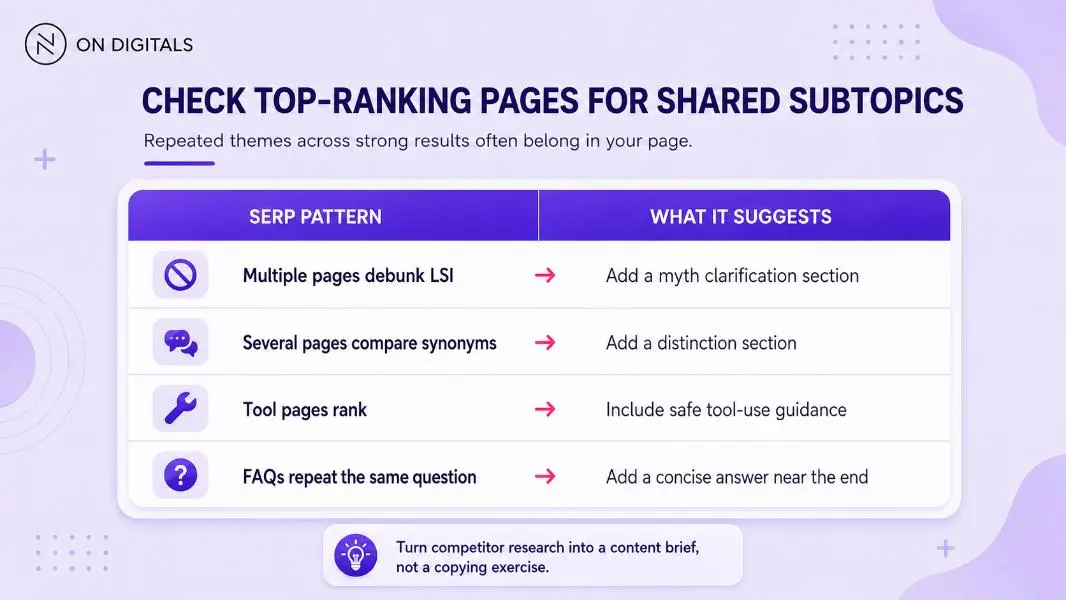 Repeated SERP patterns can help identify which supporting sections to add, from myth clarification and distinction content to tool guidance and concise FAQ answers.
This method turns competitor research into a content brief instead of a copying exercise.
Use Search Console for existing pages
For an existing article, Search Console can show the queries that already bring impressions. If the page appears for “semantic keywords,” “LSI keyword tools,” or “does Google use LSI,” those queries can guide a refresh.
A high-impression query with weak clicks may need a clearer title or intro. A query with strong impressions but poor engagement may show that the page answers the wrong intent.
Use tools carefully
Keyword tools can generate related terms quickly, but their output often mixes useful phrases with tangents. A phrase may look related to the main topic, while the actual intent belongs on a different page.
Before adding any term to the content brief, check whether it:
- supports the user’s main search need
- fits the current URL instead of another page
- deserves a separate section or its own page
- sounds natural in the sentence
- answers a real reader question
- improves the page instead of only expanding the keyword list
A related term that fails these checks should be removed, parked for another page, or kept only for internal research.
How to use related terms without keyword stuffing
Google’s spam policies define keyword stuffing as filling a page with keywords or numbers to manipulate rankings, often through unnatural lists, groups, or out-of-context placements. Related terms can create the same issue when they are forced into a page for SEO rather than usefulness.
Build a subtopic checklist
Start with the primary keyword and list the subtopics users expect. For “LSI keywords,” a strong checklist may include:
- LSI definition
- Google’s position
- semantic keywords
- synonyms
- related terms
- tools
- keyword stuffing
- content refresh workflow
Each subtopic should support the user path. If a term points to a separate intent, create a new page or internal link instead of forcing it into the article.
Add terms where they improve the answer
Related terms should appear where they make the explanation clearer. A section about Google’s search systems may mention semantics and entities. A section about writing may mention natural language and subtopic coverage.
Headings should stay readable. If a related term makes a heading awkward, use it in the body copy or leave it out.
Decide when a term needs a separate page
Some related terms deserve their own URL. For example, “keyword stuffing” may be a supporting explanation inside an LSI keywords article. A full guide about keyword stuffing would need its own page because the user intent is different.
Use this rule:
|
Related term type |
Best action |
|
Supports the same question |
Add as a section |
|
Expands a small detail |
Mention briefly |
|
Has separate intent |
Create or link to another page |
|
Creates a tangent |
Remove from the brief |
|
Helps conversion path |
Use as an internal link opportunity |
This prevents one article from becoming a broad SEO glossary.
Keep the primary keyword clear
The page still needs a clear primary keyword. Related terms should support the main topic, not replace it. For a page targeting “LSI keywords,” the title, H1, and first paragraph should make the topic clear. After that, semantic terms can help explain the modern SEO approach.
This is where keyword prominence matters. The primary term should appear in the places that shape first impressions, while related terms should only be added when they improve meaning.
Example: turning an LSI keyword list into a better content brief
Imagine a service page about “technical SEO audit.” A tool may suggest many related terms, but the content team should sort them before writing.
|
Candidate term |
Decision |
Reason |
|
crawlability |
Keep as subtopic |
Core audit area |
|
indexation |
Keep as subtopic |
Strong user relevance |
|
Core Web Vitals |
Mention or link |
Important but may need its own guide |
|
redirect chains |
Keep in technical checks |
Fits audit scope |
|
social media analytics |
Remove |
Different channel |
|
paid search keywords |
Park for another page |
Different intent |
This workflow is more useful than adding every suggested term. It helps the writer decide what belongs on the page, what deserves a deeper guide, and what should be ignored.
Common LSI keyword mistakes
Many LSI keyword mistakes come from treating tool output as a final instruction.
|
Mistake |
Why it hurts |
Better approach |
|
Treating LSI as a ranking factor |
The premise is inaccurate |
Use semantic relevance instead |
|
Adding every tool suggestion |
The page becomes unfocused |
Validate each term by intent |
|
Confusing synonyms with related terms |
Coverage stays shallow |
Include examples, attributes, use cases etc. |
|
Stuffing terms into headings |
The structure feels unnatural |
Write headings for users first |
|
Ignoring page ownership |
One article becomes too broad |
Move separate intents to separate URLs |
|
Using related terms without context |
The copy feels mechanical |
Add them only where they clarify meaning |
The best content briefs use related terms as judgment prompts. They do not treat them as mandatory words.
LSI keyword FAQ
Does Google use LSI keywords?
For practical SEO, do not treat LSI keywords as a Google ranking checklist. Google’s public guidance focuses on understandable, helpful content, while John Mueller has publicly rejected the “LSI keywords” phrase as an SEO tactic. (Google for Developers)
What should I use instead of LSI keywords?
Use semantic keywords, related terms, entities, and subtopics. These help the content cover the topic clearly without depending on an outdated label.
Are semantic keywords the same as synonyms?
They are different. Synonyms are words with similar meanings. Semantic keywords can include concepts, attributes, examples, questions, entities etc. that help explain the topic.
Where should related keywords appear?
Related terms should appear where they improve the answer. They may fit in headings, body sections, examples, image captions, FAQ answers etc., but only when the placement feels natural.
Can LSI keyword tools help?
They can help with brainstorming, but tool suggestions should be reviewed before they enter a content brief. Keep terms that support intent and remove terms that create tangents.
How many related keywords should I use?
There is no fixed number. Use enough related terms to answer the topic fully, then stop when the content starts to feel repetitive or unfocused.
Final thoughts
LSI keywords remain a popular search term, but the better SEO practice is to think in terms of semantic relevance. A useful page does not need a hidden list of LSI terms. It needs a clear primary topic, strong subtopic coverage, and related language that helps users understand the answer.
If your existing content still relies on outdated LSI keyword lists, On Digitals can help turn those terms into a cleaner semantic SEO brief. We review the target page, search intent, related terms, internal links, and page ownership so each update improves content relevance instead of adding more keywords without direction.

NEWEST POSTS
- Advertising Industry In Vietnam: The 2026 Trends, Channels and Market-Entry Strategy
- Best SEO Company in Vietnam: Latest Shortlist For Businesses
- How To Leverage Social Media For Customer Service Like A Pro?
- Social Media Post Tips – 8 Ways To Boost Engagement
- How To Use Social Media for Sales – In-depth Beginner Guide
Read more