
What Is a Keyword in SEO? Meaning, Examples, and Use
Vincent
19/07/2023
30
A keyword in SEO is the word or phrase a page targets so it can match what users search for in Google. Strong keyword choices reflect user intent, page purpose, and business value. For business owners or SEO beginners, keywords help turn broad topics into focused pages, clearer content briefs, and more effective keyword strategy.
What is a keyword?
A keyword is a planned word or phrase that gives a page one clear search focus. In SEO, marketers use keywords to decide what a page should answer, who it should attract, and how the page should appear in search results.
For example, a company selling accounting software may choose “accounting software for small business” as a target keyword. That phrase gives the content owner a clearer direction than a broad topic like “accounting.” It suggests the user has a business need, the page should explain software value, and the offer should fit smaller companies.
Can a keyword be more than one word?
Yes. A keyword can be one word, although SEO keywords are often phrases. A single word such as “CRM” is broad and difficult to interpret. A phrase such as “CRM software for real estate agents” gives stronger context about the audience and page angle.
| Keyword example | What it suggests |
| “CRM” | Broad topic |
| “best CRM software” | Commercial research |
| “CRM software for real estate agents” | Specific business use case |
| “how to build a CRM workflow” | Informational intent |
| “CRM pricing comparison” | Evaluation stage |
Longer keywords usually reveal clearer intent. Search demand may be lower, yet the page can attract users who are closer to a useful action.
Keyword meaning in SEO vs other fields
The word “keyword” can mean different things outside SEO. In programming, a keyword is a reserved word with a fixed function in a language. In academic writing, a keyword can represent an important concept or theme.
In SEO, the meaning is more practical. A keyword is the phrase a page targets because users search for it. This article uses the SEO meaning throughout.
Why are keywords important in SEO?
Keywords connect user language with page content. When a page targets the right keyword, the SEO owner can define the page purpose, while the content owner can write around a clearer user need.
Strong keyword planning helps with:
| SEO task | How keywords help |
| Page planning | Decide what each page should focus on |
| Content briefs | Define intent, sections, examples etc. |
| Site structure | Group related pages into topic clusters |
| Internal linking | Connect support pages to priority pages |
| Performance review | Track whether target pages gain visibility |
For a business website, keyword value depends on the user path. A blog keyword may support awareness, while a service keyword should connect more directly to leads, bookings, demos etc.
Keywords support organic and paid search differently
SEO keywords guide organic pages. Meanwhile, PPC keywords guide ad targeting. Both use search language, but the planning process is different.
| Area | SEO keyword | PPC keyword |
| Main use | Organic page targeting | Ad targeting |
| Timeframe | Medium to long term | Faster testing |
| Asset | Page or content cluster | Ad group and landing page |
| Risk | Wrong intent or cannibalization | Wasted spend |
| Review data | Rankings, clicks, conversions etc. | Search terms, cost, conversion data etc. |
A PPC keyword can match many search terms inside a campaign, while an SEO keyword should usually map to one main page intent.
Keyword vs search term vs search query
Marketers use keywords as planned targets, while users create search terms through the exact phrases they type into Google. Search query often means the same thing as search term, especially inside analytics or search platforms.
| Term | Meaning | Example |
| Keyword | Planned target phrase | “SEO audit checklist” |
| Search term | Exact phrase a user searches | “free SEO audit checklist for website” |
| Search query | User search input in data systems | Query shown in Search Console |
This difference matters because one keyword can match many user searches. Before choosing a target keyword, review real search terms to understand how users describe the same need in different ways.
For example, a page targeting “technical SEO audit” may also earn visibility for searches around crawl errors, site speed, index coverage etc. Those terms can become supporting sections when they share the same intent.
Types of SEO keywords
Keyword types help teams decide how to plan pages. The type should connect with intent and page purpose, instead of becoming a label that sits unused in a spreadsheet.
| Keyword type | Example | Best use |
| Primary keyword | “technical SEO audit” | Main page focus |
| Secondary keyword | “technical SEO checklist” | Supporting section |
| Seed keyword | “SEO” | Research starting point |
| Long-tail keyword | “technical SEO audit for ecommerce” | Specific page angle |
| Branded keyword | “On Digitals SEO services” | Brand demand |
| Local keyword | “SEO agency Vietnam” | Location or service page |
| Negative keyword | “free template” for a paid service campaign | PPC exclusion |
A page usually needs one primary keyword. Secondary keywords can support the same intent when they help explain the topic naturally. If another phrase shows a different intent, it may deserve a separate page.
Meta keywords are outdated for Google ranking
Older SEO advice often mentioned the meta keywords tag. Google has stated that it does not use the keywords meta tag in web search ranking.
Modern SEO should focus on visible content, useful structure, accurate title tags, clear headings, and helpful internal links. Hidden keyword repetition does not replace a page that answers the search intent.
How to choose quality SEO keywords
A good keyword fits the page, the user, and the business. Search demand matters, while intent decides whether the page can satisfy the search.
Use this decision matrix before assigning a keyword to a page.
| Signal | What it tells you | Page-level decision |
| Search intent | What the user wants | Choose page type |
| Search volume | Demand size | Prioritize effort |
| Keyword difficulty | Ranking effort | Estimate resources |
| Business value | Revenue relevance | Decide priority |
| SERP format | What Google rewards | Match content format |
| Existing page fit | Whether a page already exists | Optimize or create |
| Cluster support | Topic authority | Add internal support |
Search volume answers whether enough demand exists. Use a separate keyword search volume review when the team needs to compare demand across markets or keyword variations.
Keyword difficulty answers a different question. It estimates how hard ranking may be. A SEMrush keyword difficulty check can help decide whether the opportunity needs a quick refresh, supporting cluster, or longer authority plan.
Match the keyword to search intent
Search intent decides the page format. When Google rewards guides, a product page may struggle. When users expect a service provider, a general blog post may miss the commercial path.
| Intent | User need | Better page type |
| Informational | Learn something | Blog guide or glossary |
| Commercial | Compare options | Comparison or solution page |
| Transactional | Take action | Product or service page |
| Local | Find nearby provider | Location page |
| Navigational | Reach a known brand | Brand or login page |
For a business page, intent is usually more important than raw volume. A low-volume commercial keyword can bring stronger leads than a high-volume informational topic.
How to do keyword research for a page
Keyword research should start with the page goal. A page built for leads, education, ecommerce, or support will need different keyword choices.
Step 1: Start with the page goal
Ask what the page should do before choosing a keyword. For service pages, the priority is usually qualified prospects. Blog guides often support early-stage education, while local pages need to match location-based demand.
Once the goal is clear, keyword research becomes easier. The team can reject phrases that look popular but do not support the page path.
Step 2: Build a seed keyword list
Seed keywords are broad starting points. They help the team explore related terms, user questions, and page angles.
| Seed topic | Possible keyword direction |
| CRM | CRM software |
| CRM workflow | CRM workflow examples |
| CRM migration | CRM migration checklist |
| CRM sales team | CRM for sales teams |
The final target should be narrower than the seed topic. Broad seeds support research, while final keywords guide page creation.
Step 3: Use SERP listening
SERP listening means checking the live search results before writing. Search the keyword manually, then review what types of pages already rank.
For example, a team considering “SEO audit checklist” may find that Google rewards blog guides with checklists, templates, and step-by-step sections. That signal suggests a resource page is more suitable than a sales page. For “technical SEO agency,” the results may lean toward service pages, agency lists, and commercial comparisons. That query needs a different page angle.
Check:
- Ranking page types
- People Also Ask questions
- Related searches
- Featured snippets
- Local or product results
- Brands dominating the page
- Freshness of ranking content
This step prevents the team from forcing the wrong asset into the SERP. It also helps the SEO owner explain why one keyword should become a blog guide while another belongs on a service page.
Step 4: Create a keyword map
A keyword map connects each target keyword to one page. This protects the site from cannibalization, where several pages compete for the same intent.
| Keyword | Intent | Page type | Existing URL | Action |
| “SEO audit checklist” | Informational | Blog guide | /seo-audit-checklist/ | Refresh |
| “technical SEO agency” | Commercial | Service page | /technical-seo/ | Optimize |
| “SEO agency Vietnam” | Local/commercial | Location/service page | Missing | Create |
| “On Digitals pricing” | Navigational/commercial | Brand support | Missing | Consider FAQ |
One page can cover several related phrases when they share intent. Different intents need different assets. If two pages target the same keyword intent, consolidate one page or adjust the angle so each URL has a clear role.
Where to use keywords on a page
A keyword should appear where it helps users understand the page. Natural placement matters more than repetition. The title tag is usually one of the first places to review, especially when the page needs clearer SEO title tag guidance before broader on-page updates.
| Placement | Use case |
| Title tag | Show main topic and value |
| H1 | Confirm page focus |
| First paragraph | Answer intent early |
| H2/H3 sections | Organize subtopics |
| Body copy | Explain the topic in context |
| Image alt text | Describe relevant visuals |
| URL slug | Keep the topic clear |
| Internal links | Point users to related pages |
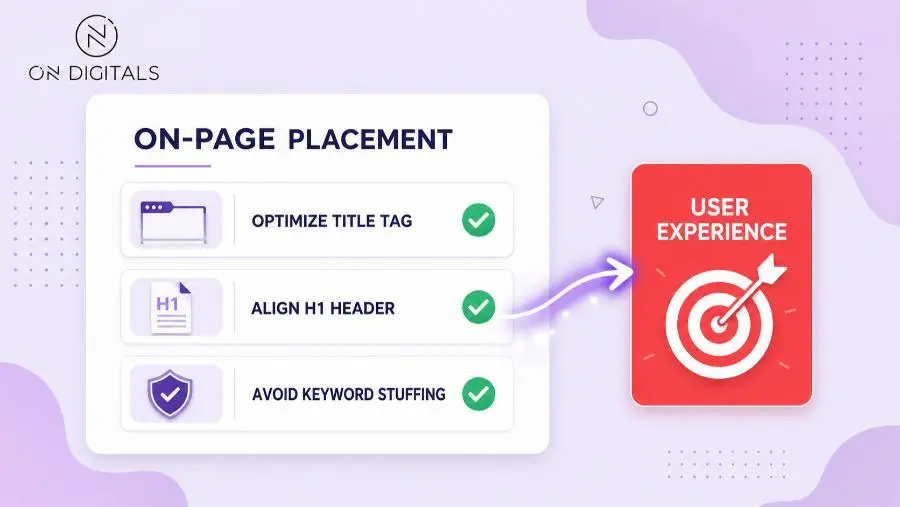
Avoid forcing exact-match phrases into every section. If the page reads awkwardly, the keyword is being used too heavily.
Common keyword mistakes
Many beginner SEO mistakes come from treating keywords as magic words instead of planning signals.
| Mistake | What happens | Better fix |
| Keyword stuffing | Copy sounds unnatural | Rewrite around intent |
| Wrong intent | Page fails to satisfy users | Change page type |
| Same keyword on many pages | Pages compete internally | Map one intent to one URL |
| Chasing only volume | Traffic is unqualified | Add business value check |
| Ignoring SERP format | Content misses ranking pattern | Review live results first |
| Relying on meta keywords | Effort goes to an outdated tag | Focus on visible page elements |
For example, two blog posts targeting “technical SEO checklist” may weaken each other. One should become the main guide, while the other can support a more specific angle.
Keyword FAQ
Is a keyword always one word?
A keyword can be one word, but SEO keywords are often phrases. Longer phrases usually give clearer intent and help teams create more focused pages.
What is the difference between a keyword and a search term?
A keyword is the planned target phrase, while a search term is the exact phrase a user enters into a search engine. Search terms can help teams refine keyword choices.
How many keywords should one page target?
One page should usually have one primary keyword intent. It can include secondary keywords when those phrases support the same user need.
Where should I put keywords on a page?
Use keywords in places that help users understand the content, such as the title tag, H1, opening paragraph, headings, body copy etc. Placement should feel natural.
Do meta keywords help SEO?
Google does not use the keywords meta tag for web search ranking. It is vital to focus on useful content, clear structure, search intent, and visible on-page elements.
What makes a keyword good?
A good keyword fits the user intent, page purpose, business value, and competitive reality. The strongest choices also match a clear page type.
Final thoughts
A keyword is useful when it connects user language with a clear page purpose. For business and SEO beginners, the strongest workflow starts with intent, checks demand and difficulty, then maps one keyword opportunity to the right URL.
When each page has a clear keyword focus, the content team can avoid overlap, build stronger topic clusters, and make SEO decisions with more confidence.

NEWEST POSTS
- Advertising Industry In Vietnam: The 2026 Trends, Channels and Market-Entry Strategy
- Best SEO Company in Vietnam: Latest Shortlist For Businesses
- How To Leverage Social Media For Customer Service Like A Pro?
- Social Media Post Tips – 8 Ways To Boost Engagement
- How To Use Social Media for Sales – In-depth Beginner Guide
Read more