
Keyword Cannibalization: Find the Right Page to Fix
Vincent
20/07/2023
24
Keyword cannibalization happens when multiple pages on the same website compete for the same search intent and reduce total organic performance. For teams managing search-focused content production, the same keyword appearing across several pages is only the first clue. The real issue appears when Google struggles to identify the best URL, rankings fluctuate, clicks split between pages, or users land on a weaker page.
A strong fix starts with diagnosis. Before merging or redirecting anything, check whether the competing URLs serve the same user need and whether the overlap is hurting traffic, conversions, etc.
What is keyword cannibalization?
Keyword cannibalization occurs when two or more URLs on the same website target the same keyword with the same search intent. Instead of one clear page becoming the strongest result, several pages compete against each other.
For example, a website may have three posts about “technical SEO audit”:
|
URL |
Intent |
|
/technical-seo-audit-guide/ |
Full educational guide |
|
/technical-seo-audit-checklist/ |
Checklist for execution |
|
/technical-seo-audit-service/ |
Commercial service page |
These pages mention the same keyword, but they may not be cannibalizing each other if each page serves a different intent. The problem starts when two pages try to answer the same query in the same way.
A better definition is:
Keyword cannibalization is an SEO issue where multiple URLs target the same search intent, causing rankings, clicks, internal links, or conversions to split between pages.
Keyword cannibalization vs content cannibalization
Keyword cannibalization focuses on keyword and search intent overlap. Content cannibalization is broader because pages may compete even when keywords are slightly different.
|
Issue |
What happens |
Example |
|
Keyword cannibalization |
Several URLs target the same keyword and intent |
Two guides for “SEO audit checklist” |
|
Content cannibalization |
Several URLs cover the same topic with little unique value |
Five thin posts about SEO audit basics |
|
Duplicate content |
Similar or identical content appears across URLs |
Printer-friendly versions or URL variants |
|
Content overload |
Too many pages exist without a clear role |
Large blog cluster with repeated subtopics |
This distinction matters because each issue needs a different fix. A duplicate URL may need canonicalization. Two overlapping blog posts may need consolidation. A page with a different intent may only need clearer internal links.
If a cluster has too many repeated pages without clear roles, the issue may be closer to SEO content overload than a single cannibalization problem.
When keyword overlap is not a problem
Multiple pages ranking for the same keyword can be healthy when each URL answers a different need. Google may show more than one page from a site when the pages serve different intents, user types, locations, or funnel stages.
Keyword overlap is usually acceptable when:
- One URL is a guide, while another is a tool page
- A product page and a blog post serve different search needs
- Location pages target different cities or countries
- A pricing page answers commercial questions
- A comparison page helps users evaluate options
- A support article gives step-by-step help
For example, a SaaS brand may have a beginner guide for “keyword research,” a product page for its keyword tool, and a comparison article about keyword research tools. These pages can mention the same keyword while serving different users.
A location-based business may also have several pages with similar keywords. Country pages, city pages, or branch pages can stay separate when each page has real local information and distinct service relevance.
Why keyword cannibalization can hurt SEO
Keyword cannibalization can weaken performance when the wrong URL ranks, stronger pages lose signals, or users land on content that does not match their intent.
Rankings may become unstable
When several URLs compete for the same query, Google may switch between them. One page ranks this week, another page appears next week, then rankings drop again.
Ranking swaps are a stronger signal than simple keyword overlap. If traffic declines while several URLs take turns ranking for the same query, the website may need consolidation or clearer targeting.
Google may choose a weaker URL
A weaker page can outrank the page you actually want users to visit. This often happens when an older post has more links, a thin article uses the exact keyword more often, or internal links point to the wrong URL.
This can hurt conversions when users land on the wrong page. Someone who needs a service page may end up on a blog post, while a newer guide with better information may be pushed below an outdated article.
Internal links become unclear
Internal links tell search engines which page matters most. When the same anchor text points to several similar URLs, the preferred page receives weaker signals.
A clear internal link structure should guide users toward the most useful page. Stronger website content structure helps every URL keep a clear role, from pillar pages to supporting articles.
Crawl budget may matter on larger sites
For small websites, keyword cannibalization usually affects clarity and content quality more than crawl budget. Large websites need more caution because duplicate or low-value URLs can affect how efficiently Googlebot crawls important pages.
Google’s crawl budget guidance explains that large sites should avoid wasting crawl resources on low-value URLs.
How to check keyword cannibalization
A quick search can reveal possible overlap, but real diagnosis needs data. Start with the target query, then review which pages receive impressions, clicks, rankings, and internal links.
Use Google Search Console to compare URLs
Google Search Console is the best free starting point.
Follow this workflow:
- Open Performance.
- Go to Search results.
- Filter by the target query.
- Open the Pages tab.
- Compare clicks, impressions, CTR, and average position.
- Open each URL and review search intent.
- Decide whether the pages compete or serve separate needs.
A few patterns can guide the review:
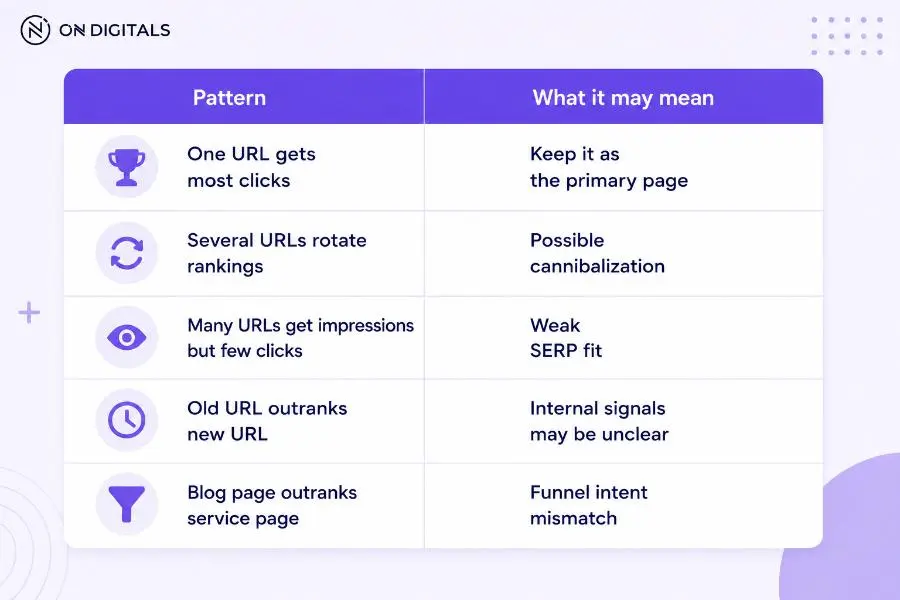 URL comparison patterns in Google Search Console can help identify the primary page, possible cannibalization, weak SERP fit, unclear internal signals, or funnel intent mismatch.
This process prevents random fixes. The data shows which URL Google already connects with the query.
Use site search carefully
A site: search can help find possible overlap.
Example:
site:example.com keyword cannibalization
This search shows pages on your site that mention the keyword. It does not prove cannibalization. A page can mention the same keyword while serving a different intent.
Use site search as a discovery step, then confirm with Search Console and manual review.
Review ranking history
Historical rankings can reveal patterns that one snapshot misses. If two pages take turns ranking for the same query, check whether the total clicks for the topic are falling.
Ranking history is useful when:
- A new post replaced an old post
- A service page competes with a blog post
- Two guides were published for the same topic
- A category page competes with a product page
- Several pages rank beyond page two
SEO tools can help show URL swaps over time, while Search Console gives the best view of clicks and impressions.
Is it a real issue or a false alarm?
Before fixing anything, decide whether the overlap is actually hurting performance.
Real cannibalization checklist
A cannibalization issue is more likely when:
- Multiple URLs target the same intent
- Rankings switch between those URLs
- Clicks split across similar pages
- The wrong page ranks for the main query
- Internal links point to competing URLs
- One page is outdated but still ranks
- Similar pages have weak engagement
False alarm checklist
Keyword overlap may be safe when:
- Each page serves a different intent
- Pages target different locations
- One page is informational and one is commercial
- A support page answers a narrow question
- A product page and category page serve different needs
- Total traffic for the topic is growing
- Users have clear paths between pages
Score each URL before taking action
Use a simple URL value score before merging, redirecting, or noindexing.
|
Factor |
What to check |
|
Intent fit |
Which page best satisfies the query? |
|
Traffic |
Which URL gets stable clicks? |
|
Conversions |
Which URL supports leads or sales? |
|
Backlinks |
Which page has stronger external signals? |
|
Internal links |
Which URL receives clearer internal support? |
|
Freshness |
Which page has updated information? |
|
Content quality |
Which page gives the better answer? |
The primary URL should usually have the best mix of intent fit, content quality, and SEO signals.
How to fix keyword cannibalization
The safest fix depends on why the pages overlap. Use a decision matrix before changing URLs.
|
Situation |
Recommended action |
|
Two near-identical posts, one stronger |
Merge and 301 redirect |
|
Similar pages with different intent |
Keep separate and clarify targeting |
|
Duplicate URL variants |
Canonical or redirect |
|
Old page replaced by a new page |
Redirect old URL |
|
Thin page with no value |
Remove or noindex after review |
|
Main page weak but topic is valuable |
Rewrite the primary page |
|
No page fully satisfies the query |
Create a stronger primary page |
Merge and redirect overlapping pages
Merge pages when two URLs answer the same query with little difference. Choose the stronger URL, move useful sections from the weaker page, then set up a 301 redirect.
This fix works well for:
- Duplicate blog posts
- Old guides replaced by newer guides
- Near-identical service pages
- Thin articles targeting the same keyword
- Repeated FAQ-style posts
After the redirect, update internal links so they point to the preferred URL.
Re-optimize pages with different intent
Some pages can stay separate after their purpose becomes clearer. If two pages mention the same keyword but serve different users, adjust the targeting.
You may need to update:
- Title tag
- H1
- Intro
- H2 structure
- Internal links
- CTA
- Examples
- Supporting keywords
For example, an ecommerce site may keep a “best running shoes” category page and a “running shoes comparison” article if the category page helps buyers shop while the comparison article helps users evaluate options.
Use canonical tags only for duplicate pages
Canonical tags can help when similar or duplicate URLs exist. They tell Google which URL should be treated as the preferred version.
Google’s canonical guidance explains how site owners can consolidate duplicate URLs through canonical tags, redirects, sitemap signals, etc.
Canonical tags should be used carefully. They are most suitable for duplicate pages, near-duplicate pages, product variants, tracking URL versions, or similar technical cases. Two pages with different intent should usually be clarified, merged, or kept separate instead.
Noindex or delete only after value review
Noindex removes a page from search results. Deleting a page can remove traffic, backlinks, internal links, and user access.
Use these options only when the page has little value and no better role. Before taking action, check traffic, backlinks, conversions, user purpose, and internal links.
Keyword cannibalization fixes to avoid
Some fixes look simple but can reduce organic performance.
Deleting pages too quickly
Deleting a page can create 404 errors, break internal links, and remove backlinks. A redirect is usually safer when the deleted URL has traffic, links, or topic relevance.
Noindexing valuable pages
A noindexed page cannot rank in Google Search. If the page still earns long-tail traffic, supports conversions, or brings backlinks, noindexing may remove more value than it saves.
Canonicalizing pages that are not duplicates
Canonical tags are not a shortcut for every cannibalization case. If two pages serve different intents, a canonical tag may suppress a useful page. Clarify targeting first.
Removing keywords without fixing intent
De-optimizing a page by removing keywords can hurt long-tail performance. If the page still has a clear purpose, refine its intent rather than weakening the content.
How to prevent keyword cannibalization
Prevention starts before a new page is written. Every content brief should define the target query, primary intent, existing related URLs, and internal link role.
Create a keyword-to-URL map
A keyword map connects each primary keyword or intent to one preferred URL.
|
Field |
Example |
|
Primary query |
keyword cannibalization |
|
Preferred URL |
/what-is-keyword-cannibalization/ |
|
Intent |
Learn and diagnose |
|
Supporting pages |
Content overload, duplicate content, SEO audit |
|
Internal link role |
Pillar or supporting article |
|
Action if overlap appears |
Merge, redirect, or reposition |
This map helps teams avoid publishing another page for the same intent.
Review old content before creating new pages
Before approving a new article, check whether an existing URL can be updated instead. Many cannibalization issues start when teams publish new content while leaving old pages live with the same purpose.
This step should be part of a wider SEO content planning workflow, especially when teams manage large blog clusters, service content, glossary pages, etc.
Refresh the older URL if it already has backlinks, rankings, or a better place in the cluster.
Build topic clusters with clear roles
A strong cluster needs one main page for the broad intent and supporting pages for subtopics. Supporting articles should link back to the primary page, while the primary page should guide users to deeper resources when needed.
A weak cluster grows randomly. A strong cluster makes every URL’s role clear.
FAQs about keyword cannibalization
Is keyword cannibalization always bad?
Keyword cannibalization is only harmful when multiple URLs serve the same intent and weaken organic performance. Several pages can mention the same keyword if they answer different needs.
How do I find keyword cannibalization in Google Search Console?
Filter the target query in Search Console, then open the Pages tab. If several URLs receive impressions for the same query, compare clicks, CTR, position, and intent. Confirm overlap manually before making changes.
Should I delete cannibalized pages?
Deleting should be a last step after reviewing traffic, links, conversions, and user purpose. Merging and redirecting is often safer when the old page still has value.
Should I use canonical tags for keyword cannibalization?
Canonical tags are best for duplicate or near-duplicate pages. If two pages serve different search intents, clarify the targeting or keep them separate instead.
Can two pages target the same keyword?
Two pages can mention the same keyword when they serve different intents. For example, a guide, tool page, service page, and comparison page may overlap on the keyword but answer different needs.
What is the difference between keyword cannibalization and duplicate content?
Keyword cannibalization happens when pages compete for the same search intent. Duplicate content means similar or identical content appears across URLs. The issues can overlap, but they are not the same.
For cases where the concern is copied or reused text from another page or website, a plagiarism review tool may be more relevant than a cannibalization audit. This Copyscape alternatives guide covers tools that can help with originality checks before publishing.
How to check for keyword cannibalization?
Review important clusters every quarter, or after publishing major new content. Large websites, ecommerce sites, and active blogs should check more often because overlap appears faster.
Final thoughts
Keyword cannibalization is easier to fix when the diagnosis comes first. The same keyword appearing on multiple pages does not automatically mean a problem exists. Search intent, performance data, URL value, and internal links should guide the decision.
Start with Google Search Console, compare the URLs, confirm whether the pages serve the same intent, then choose the safest action. Merge pages when the overlap is real, keep them separate when the intent differs, and avoid risky fixes that remove useful pages from search.

NEWEST POSTS
- Advertising Industry In Vietnam: The 2026 Trends, Channels and Market-Entry Strategy
- Best SEO Company in Vietnam: Latest Shortlist For Businesses
- How To Leverage Social Media For Customer Service Like A Pro?
- Social Media Post Tips – 8 Ways To Boost Engagement
- How To Use Social Media for Sales – In-depth Beginner Guide
Read more