
Copyscape Alternatives: Find the Right Plagiarism Checker
Vincent
11/08/2023
31
Looking for Copyscape alternatives usually means one thing: you need a practical way to check whether content is original before publishing, submitting, or updating it. For teams managing SEO-focused publishing workflows, Copyscape is still a known plagiarism checker, but many teams need different features now, from free one-off scans to AI-content review and team-based content QA.
The best option depends on the content workflow. Bloggers may care more about website monitoring, while SEO teams often need bulk checks for outsourced drafts. Academic users usually need clearer source reports, and brands using AI-assisted content may want plagiarism review with AI-content signals.
What is plagiarism?
Plagiarism happens when someone uses another person’s words, ideas, structure, or creative work without proper credit. In digital content, it can appear as copied paragraphs, lightly rewritten articles, reused product descriptions, duplicate landing pages, scraped posts, etc.
For SEO, plagiarism is different from ordinary duplicate content. Google has explained that duplicate content is usually handled through filtering and canonicalization unless it is deceptive or manipulative. The bigger risk comes from copied content used at scale, low-value pages, scraped material, or pages with little original value.
That is why plagiarism checkers should be part of a content quality workflow. They help teams protect originality and review outsourced work before publishing. Stronger website content also reduces the chance of accidental duplication, weak rewrites, and pages that feel too similar to existing sources.
How to choose the best Copyscape alternative
Before comparing tools, decide what the tool needs to do. A free checker may be enough for a single blog post, while agencies and publishers usually need stronger reporting, saved history, file upload, or URL monitoring.
|
Need |
Best-fit tool type |
Why it helps |
|
Quick free check |
DupliChecker, Small SEO Tools, Plagiarism Detector |
Useful for short drafts and one-off scans |
|
Writing + originality review |
Grammarly, ProWritingAid |
Combines writing suggestions with originality checks |
|
Source matching reports |
Quetext, Plagium |
Better for reviewing matched sources |
|
Website monitoring |
CopyGator |
Useful for bloggers and publishers |
|
AI-era content QA |
Copyleaks, Originality.AI |
Adds AI-content review or modern detection workflows |
|
Agency workflow |
Quetext, Copyleaks, ProWritingAid |
Helps teams review repeated drafts |
When choosing a tool, check these points first:
- Free limit
- Word count limit
- URL scanning
- File upload
- Report clarity
- Source matching
- AI detection
- Team access
- Export options
- Pricing changes
Pricing and free-plan limits can change quickly. Always confirm the provider’s latest details before using a tool for important work.
Best Copyscape alternatives for plagiarism checks
The tools below fit different needs. Some are better for quick free checks, while others are more suitable for professional content teams.
1. Grammarly
Best for: writers who want grammar feedback and plagiarism checks in one workflow.
Grammarly is widely known for writing assistance, but its premium plans also include plagiarism checking. It can compare text against online sources and highlight passages that may need rewriting or citation.
This makes Grammarly useful for writers who want one tool for clarity, tone, grammar, and originality review. It is less ideal when the only task is checking many URLs or monitoring copied website content.
Main strengths
- Easy writing workflow
- Clear suggestions
- Good for individual writers
- Strong editing interface
Main limitation
The plagiarism checker is usually tied to premium access, so it may not fit users looking for a fully free Copyscape alternative.
2. ProWritingAid
Best for: long-form writers who need editing support with plagiarism review.
ProWritingAid combines style suggestions, grammar feedback, readability checks, and plagiarism reports. It is a better fit for writers working on long-form drafts, reports, books, academic-style content, etc.
For SEO teams, ProWritingAid can help improve draft quality before publication. The plagiarism feature adds another check before a blog post, guest post, or landing page goes live.
Main strengths
- Strong long-form writing support
- Useful style reports
- Good for writers and editors
- Helpful for repeated draft review
Main limitation
Plagiarism checks may require a paid plan or add-on, so it should be reviewed as an editorial tool rather than a simple free scanner.
3. Quetext
Best for: users who need source matching and clearer plagiarism reports.
Quetext is a strong Copyscape alternative for users who want a cleaner plagiarism review experience. Its reports can show matched text, source links, and similarity signals that help users understand what needs attention.
Quetext is useful for content writers, educators, students, freelancers, and SEO teams reviewing outsourced drafts. It is especially helpful when the reviewer needs more than a simple “pass or fail” result.
Main strengths
- Clear match reporting
- Useful source review
- Good for professional content checks
- Better workflow than many free tools
Main limitation
Free usage may be limited, so frequent checks usually require a paid plan.
4. DupliChecker
Best for: quick free plagiarism checks.
DupliChecker is a simple option for users who need a fast scan without a complex workflow. It can be useful for short blog sections, meta copy, student drafts, or small content updates.
Its main advantage is accessibility. Users can paste text, run a check, and review matches quickly. This makes it a practical choice for occasional use.
Main strengths
- Easy to use
- Free access available
- Works for quick checks
- No heavy setup
Main limitation
Free tools often come with word limits, ads, slower workflows, or less detailed reporting.
5. Plagiarisma
Best for: users who need broad language support.
Plagiarisma has been mentioned across older plagiarism-checking lists because of its multilingual support. It can be useful when content teams handle international copy or translated drafts.
This tool may fit users who need a simple scan across different languages. However, the interface and experience may feel less modern than newer alternatives.
Main strengths
- Multilingual angle
- Simple checking workflow
- Useful for basic scans
- Supports different input types
Main limitation
The user experience can feel dated, so teams should test it before relying on it for regular QA.
6. Small SEO Tools Plagiarism Checker
Best for: SEO users who want a free checker inside a larger toolkit.
Small SEO Tools includes a plagiarism checker alongside other SEO utilities. It is useful for quick checks when a user already works with basic SEO tools and wants to review a short piece of content.
This tool can help with simple originality checks, but it should not replace deeper editorial review for important pages.
Main strengths
- Free access
- Simple interface
- Part of a larger SEO toolkit
- Good for quick checks
Main limitation
Reports may be less detailed than paid plagiarism tools, especially for professional content review.
7. CopyGator
Best for: bloggers and publishers who want to monitor copied content.
CopyGator is different from many Copyscape alternatives because it focuses on monitoring copied content through RSS feeds. This makes it useful after publication, especially for blogs and publishers worried about content scraping.
A plagiarism checker helps before publishing. A monitoring tool helps after the content is live. CopyGator fits the second use case better.
Main strengths
- Website monitoring angle
- Useful for publishers
- Helps detect copied posts
- Good for RSS-based workflows
Main limitation
It is less useful for checking a single draft before publication.
8. Plagium
Best for: quick searches and deeper source review.
Plagium can be useful for checking whether a section of content appears elsewhere online. It offers quick search and deeper search options, which makes it more flexible than very basic free checkers.
For content teams, Plagium can support manual review when a draft looks suspicious or when a passage feels too similar to an existing source.
Main strengths
- Quick search option
- Deeper source review available
- Useful for manual checking
- Simple workflow
Main limitation
Frequent or deeper searches may require paid usage.
9. Plagiarism Detector
Best for: beginners who need a basic free plagiarism checker.
Plagiarism Detector is a straightforward tool for users who need a simple scan. It can be helpful for short drafts, school assignments, small blog sections, etc.
This type of tool is best used as a first check. For client work, legal-sensitive content, academic work, or high-value SEO pages, a stronger reporting tool may be safer.
Main strengths
- Beginner-friendly
- Free access available
- Useful for short checks
- Fast setup
Main limitation
Free checks may come with word limits or less detailed reports.
10. Copyleaks
Best for: AI-era content workflows and team review.
Copyleaks is a modern alternative for teams that need plagiarism detection plus AI-content review features. It is especially relevant for content operations where human editors work with AI-assisted drafts, outsourced content, or large volumes of submissions.
This type of tool can help agencies, publishers, schools, and businesses review originality in a more structured way.
Main strengths
- Plagiarism detection
- AI-content review options
- Team-oriented use cases
- Better fit for modern content QA
Main limitation
It may be more advanced than necessary for users who only need a quick free check.
Copyscape alternatives for AI-era content checks
AI writing tools have changed how teams review originality. A plagiarism checker can show whether text matches existing sources, while AI-content detection tries to estimate whether text may have been generated by AI.
These are different tasks.
|
Check type |
What it detects |
Best use |
|
Plagiarism check |
Text matching existing sources |
Originality review |
|
Duplicate content check |
Similar content across URLs |
SEO QA |
|
AI-content detection |
Likelihood of AI-generated text |
Editorial review |
|
Manual review |
Accuracy, usefulness, brand fit |
Final publishing decision |
AI detectors should not be treated as perfect proof. Use them as one signal in a broader review process. The final decision should still consider accuracy, originality, source quality, tone, and whether the content helps the reader.
Free vs paid plagiarism checkers
Free Copyscape alternatives work well for basic checks, but they often have limits. Paid tools usually become more useful when the content matters to revenue, reputation, or compliance.
|
Option |
Best for |
Tradeoff |
|
Free checker |
Occasional short checks |
Word limits and lighter reports |
|
Paid plagiarism tool |
Professional review |
Better reports but added cost |
|
Writing suite |
Writers and editors |
May not support URL monitoring |
|
Website monitor |
Publishers and bloggers |
Better after publication |
|
AI-era tool |
Teams using AI-assisted drafts |
Needs human review |
If the content will be published on a high-value page, use more than one check. A tool can find matches, but an editor still needs to decide whether to rewrite, cite, merge, or remove the content.
What to do if your content is copied
Finding copied content can be frustrating, but the response should be practical. First, confirm the copied material. Then collect evidence before contacting anyone.
Use this simple process:
- Save the copied URL.
- Take screenshots.
- Compare publish dates if possible.
- Check whether the copied page is indexed.
- Contact the site owner politely.
- Request credit, removal, or correction.
- Review legal options if the issue is serious.
For SEO, also check whether the copied page is outranking the original. If copied or repeated content starts spreading across your own site, review whether the issue has become content overload that affects SEO instead of only a plagiarism problem.
A strong original page should still be useful beyond the copied text. Add unique examples, original visuals, expert insights, data, FAQs, or screenshots that a scraper cannot easily replicate.
How to build a plagiarism-checking workflow
A plagiarism checker works best when it is part of a publishing process rather than a last-minute panic check.
For SEO and content teams, use this workflow:
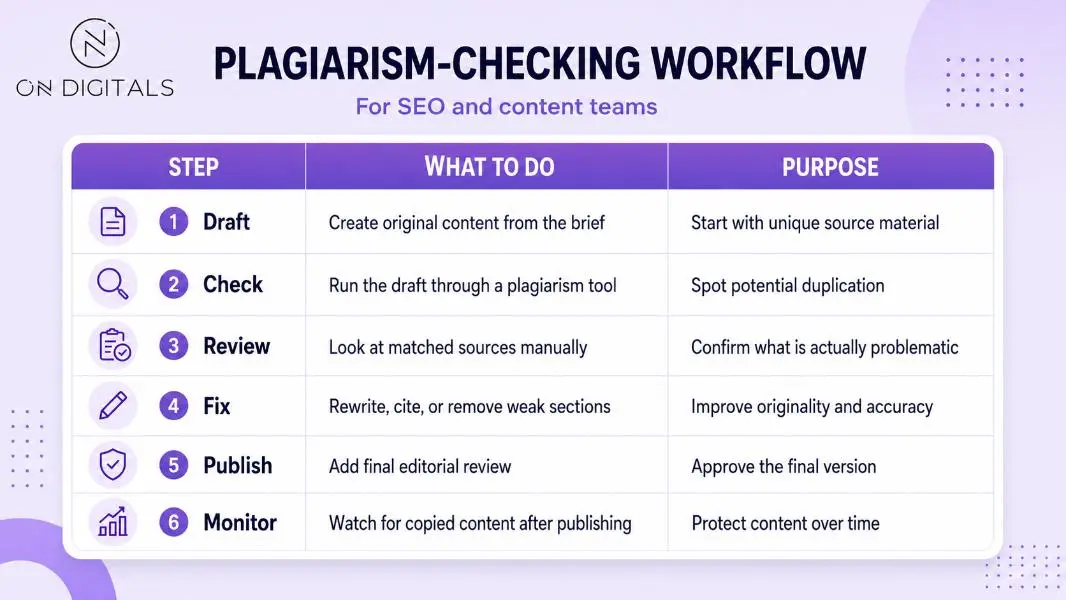 A structured plagiarism-checking workflow helps SEO and content teams review originality, fix weak sections, and protect published content over time.
This workflow should sit inside a broader SEO content marketing strategy, especially when teams publish guest posts, freelancer drafts, landing pages, or client blogs at scale. Ecommerce teams can also use it to check supplier descriptions before indexing product pages.
FAQs about Copyscape alternatives
Which Copyscape alternative is best for agencies?
Agencies should consider tools with clear reports, export options, team access, and reliable source matching. Quetext, Copyleaks, ProWritingAid, or similar professional tools may fit better than basic free checkers.
Can plagiarism checkers detect AI-written content?
Traditional plagiarism checkers detect matches with existing sources. AI detectors estimate whether content may have been generated by AI. Some modern tools include both features, but AI detection should be treated as a supporting signal rather than final proof.
Are free plagiarism checkers accurate enough?
Free plagiarism checkers can help with basic screening, especially for short content. For important pages, academic work, legal-sensitive content, or client deliverables, use a stronger tool and review the matched sources manually.
What should I do if another website copies my content?
Document the copied page, contact the website owner, and request removal or credit. If the issue affects search visibility, check indexing, canonical signals, internal links, and the quality of the original page. Serious cases may require legal guidance.
Final thoughts
The best Copyscape alternative depends on the content workflow. Free tools are useful for quick checks, while paid tools can provide stronger reporting, better source review, and features built for teams.
For simple scans, start with DupliChecker, Small SEO Tools, or Plagiarism Detector. For writing support, Grammarly or ProWritingAid may fit better. For professional plagiarism reports, Quetext or Plagium can help. For AI-era content QA, Copyleaks or Originality.AI-style tools deserve consideration.
A plagiarism checker should support better publishing decisions. Use it to catch copied text, review source matches, protect brand trust, and improve content before it reaches users.

NEWEST POSTS
- Advertising Industry In Vietnam: The 2026 Trends, Channels and Market-Entry Strategy
- Best SEO Company in Vietnam: Latest Shortlist For Businesses
- How To Leverage Social Media For Customer Service Like A Pro?
- Social Media Post Tips – 8 Ways To Boost Engagement
- How To Use Social Media for Sales – In-depth Beginner Guide
Read more