
301 Redirect .htaccess Guide for Safe URL Changes
Vincent
05/07/2024
14
A 301 redirect in .htaccess tells Apache to permanently send an old URL to a new destination. It is useful for URL changes, domain moves, canonical cleanup etc., especially when teams need to manage an HTTPS migration rule safely. The strongest setup uses the right rule, maps each old URL to a relevant replacement, then tests the final status code.
Quick .htaccess 301 redirect examples
Most users searching for 301 redirect htaccess need working code first. The examples below are for Apache or LiteSpeed-compatible hosting where .htaccess rules are enabled. Apache documents Redirect and RedirectMatch as directives for sending clients to a different URL, while RewriteRule can issue redirects through the [R] flag.
Before pasting any snippet, replace the example domain with your real domain and back up the current .htaccess file.
|
Use case |
Snippet |
|
Redirect one exact URL |
Redirect 301 /old-page/ https://example.com/new-page/ |
|
Redirect one exact file with regex |
RedirectMatch 301 ^/contact\.php$ https://example.com/contact-us.php |
|
Redirect a folder to a new folder |
See folder example below |
|
Redirect HTTP to HTTPS |
Use RewriteCond %{HTTPS} off |
|
Redirect non-www to www |
Use host-based RewriteCond |
|
Redirect old domain to new domain |
Use host-based RewriteCond |
Redirect one exact page
Use Redirect 301 when one old URL has one clear replacement.
Redirect 301 /old-service/ https://example.com/new-service/
This rule fits simple page moves, such as a service URL changed during a redesign. Keep the destination relevant. Sending every deleted page to the homepage can weaken the user path because the visitor loses the original context.
Redirect one exact file
Use an anchored pattern when you need exact matching. A broad pattern can catch nested URLs by accident.
RedirectMatch 301 ^/contact\.php$ https://example.com/contact-us.php
The ^ marks the start of the path, while $ marks the end. This helps prevent /team/contact.php from matching when only /contact.php should redirect.
Redirect a folder while preserving paths
Use RewriteRule when the old folder has many child URLs that should move to a new folder structure.
RewriteEngine On
RewriteRule ^old-folder/(.*)$ https://example.com/new-folder/$1 [R=301,L]
This rule sends /old-folder/page-a/ to /new-folder/page-a/. During a migration, use this only when the new folder keeps the same path logic.
Redirect HTTP to HTTPS
Use this when the site has a valid SSL certificate and the final canonical version should be HTTPS.
RewriteEngine On
RewriteCond %{HTTPS} off
RewriteRule ^(.*)$ https://%{HTTP_HOST}%{REQUEST_URI} [R=301,L]
Google says 301 and 308 status codes mean a page has permanently moved, and it recommends permanent server-side redirects when a URL needs to change in search results.
Redirect non-www to www
Use this when the www version is the canonical domain.
RewriteEngine On
RewriteCond %{HTTP_HOST} ^example\.com$ [NC]
RewriteRule ^(.*)$ https://www.example.com/$1 [R=301,L]
Redirect www to non-www
Use this when the root domain is the canonical version.
RewriteEngine On
RewriteCond %{HTTP_HOST} ^www\.example\.com$ [NC]
RewriteRule ^(.*)$ https://example.com/$1 [R=301,L]
Choose one canonical domain. If root redirects to www while www redirects back to root, the site can enter a redirect loop.
What is a 301 redirect in .htaccess?
A 301 redirect is a permanent server-side redirect from an old URL to a new URL. In .htaccess, it is usually handled by Apache directives such as Redirect, RedirectMatch, or RewriteRule. Apache also notes that simple redirects can often be handled by Redirect or RedirectMatch instead of RewriteRule.
For SEO, a 301 redirect helps users and search engines reach the new location after a URL change. It works best when the new URL satisfies the same intent as the old one. For example, an old service page should point to the updated service page, not a generic homepage.
The .htaccess method is useful when the server uses Apache or a compatible setup. Nginx-only hosting does not rely on .htaccess, so the redirect should be configured in the server block or hosting control panel instead.
Before editing .htaccess
Editing .htaccess can affect the whole website. A small syntax error may cause a server error, while a broad redirect rule can send users into a loop. Treat this file as a release item, especially when the affected template involves leads, product pages, checkout, login etc.
Use this checklist first:
|
Check |
Why it matters |
|
Confirm Apache or compatible hosting |
.htaccess rules need server support |
|
Back up the file |
Restores the site quickly if a rule fails |
|
Find the correct document root |
Prevents editing the wrong file |
|
Review existing rules |
Avoids duplicate HTTPS or domain rules |
|
Test on staging if possible |
Protects business-critical pages |
|
Clear server or plugin cache |
Shows the current redirect behavior |
For WordPress, place custom redirects above the default WordPress rewrite block unless a developer confirms another placement. CMS-generated rules may rewrite requests before your custom redirect gets a chance to run.
When should you use a 301 redirect in .htaccess?
Use a 301 redirect in .htaccess when the move is permanent and the old URL has a relevant new destination. The decision should be based on user intent, page priority, internal links, backlinks etc.
|
Situation |
Recommended action |
|
Service URL changed |
Redirect to the updated service page |
|
Blog post merged into a stronger guide |
Redirect to the merged article |
|
Product category moved |
Redirect to the closest active category |
|
HTTP moved to HTTPS |
Redirect to HTTPS version |
|
www and non-www both load |
Choose one canonical version |
|
Deleted page has no close replacement |
Use 404 or 410 instead |
A 301 redirect should preserve usefulness. If the old URL and new URL do not match intent, users may land somewhere confusing. That can reduce trust even when the status code is technically correct.
Which .htaccess redirect directive should you use?
The safest directive depends on the redirect pattern. Simple redirects should stay simple. Complex host, protocol, or path conditions usually need RewriteRule.
|
Use case |
Best option |
Why |
|
One exact URL |
Redirect 301 |
Simple and readable |
|
Exact URL with regex |
RedirectMatch 301 |
Controls pattern matching |
|
Folder with child paths |
RewriteRule |
Captures path values |
|
Domain migration |
RewriteCond + RewriteRule |
Checks host before redirect |
|
HTTP to HTTPS |
RewriteCond %{HTTPS} off |
Applies only to HTTP requests |
|
Complex conditions |
RewriteRule |
Handles protocol, host, path etc. |
Redirect 301
Redirect 301 is the cleanest choice for one old path and one new destination.
Redirect 301 /old-page/ https://example.com/new-page/
Use this for low-risk cases where the old URL is exact and the replacement is obvious.
RedirectMatch 301
RedirectMatch 301 supports regular expressions. It is useful when pattern matching is required, but it also creates risk when the pattern is too broad.
RedirectMatch 301 ^/old-page/$ https://example.com/new-page/
Use anchors when the match should be exact. This prevents the rule from catching URLs that only contain the same phrase.
RewriteRule with R=301
RewriteRule is better for domain, protocol, folder, and advanced redirects. Apache’s [R] flag issues a redirect to the browser, while [R=301] sets the permanent status.
RewriteEngine On
RewriteRule ^old/(.*)$ https://example.com/new/$1 [R=301,L]
Use this when you need to preserve paths or apply conditions.
How to add a 301 redirect in .htaccess
A safe .htaccess update should follow a small release workflow. This prevents broken pages, redirect chains, and accidental site-wide issues.
- Open the correct file
Find .htaccess in the website document root through FTP, SFTP, cPanel, or hosting file manager. Enable hidden files if needed. - Back up the existing file
Save a copy before editing. A rollback file is faster than rebuilding rules during an outage. - Choose the right rule
Use Redirect 301 for one exact URL. Use RewriteRule for protocol, host, folder etc. - Place the rule carefully
Add custom redirects above CMS rewrite blocks when appropriate. Avoid placing new rules between lines generated by WordPress unless the technical owner approves it. - Save and clear cache
Clear server cache, CDN cache, CMS cache etc. so the new rule is visible. - Test the redirect
Confirm the status code, final destination, hop count, and page relevance.
Redirect map template for SEO teams
A redirect map helps SEO, development, content etc. agree on what should happen before code is added. It is especially important during migrations because one wrong pattern can affect hundreds of URLs.
|
Old URL |
New URL |
Reason |
Page priority |
Owner |
Status |
Test result |
|
/old-service/ |
/new-service/ |
Service URL change |
High |
SEO/Dev |
Pending |
301 expected |
|
/old-blog/ |
/new-guide/ |
Content merge |
Medium |
Content |
Pending |
301 expected |
|
/expired-offer/ |
No replacement |
Campaign expired |
Low |
SEO |
Review |
404 or 410 |
For high-priority URLs, check traffic, backlinks, internal links etc. before deciding. A pricing page or lead page deserves more review than an obsolete tag page.
Common .htaccess redirect mistakes
Most redirect failures come from broad matching, duplicate rules, or weak destination choices. Use this table before publishing changes.
|
Mistake |
Why it hurts |
Better approach |
|
Broad RedirectMatch |
Redirects unintended URLs |
Use anchors for exact match |
|
Redirecting deleted pages to homepage |
Weakens user intent |
Redirect only to a close match |
|
Multiple HTTPS rules |
Creates chains or loops |
Keep one canonical HTTPS rule |
|
Editing without backup |
Slows rollback |
Save a copy first |
|
Ignoring WordPress placement |
Rule may fail silently |
Place redirects before CMS rewrites |
|
Using .htaccess on Nginx-only hosting |
Rule will not apply |
Use server config instead |
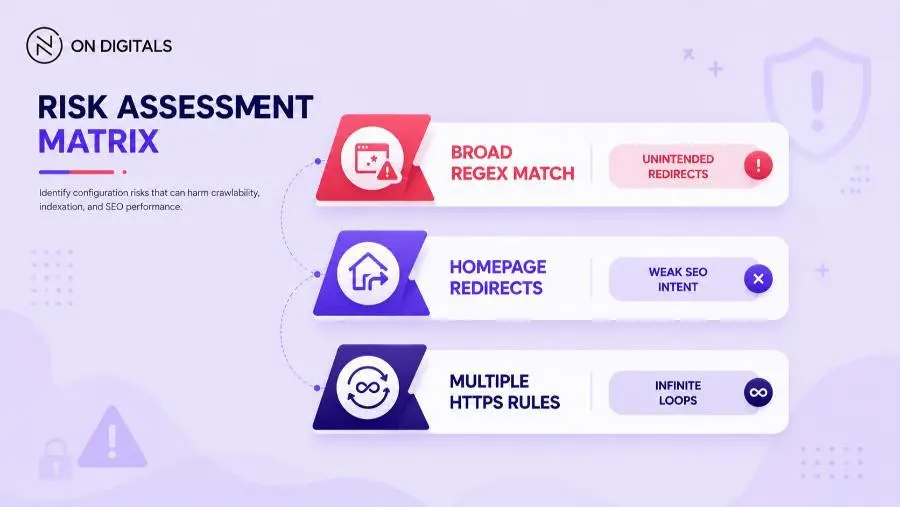 Broad matching via RedirectMatch without proper anchors often catches unintended URLs, creating infinite redirect loops. Be extremely precise with your regex patterns and never blindly redirect deleted pages to the homepage.
Redirect loops are especially risky after HTTPS migration or domain canonical cleanup. Test http://, https://, root domain, www etc. before closing the task. If the browser keeps cycling between the same URLs, troubleshoot the repeating redirect path before adding more rules.
How to test your 301 redirect
Testing is part of the implementation, not a final afterthought. A redirect can look fine in the browser while still creating multiple hops or landing on the wrong template.
|
Test |
Pass condition |
|
Status code |
Returns 301 |
|
Final URL |
Lands on intended destination |
|
Hop count |
One hop where possible |
|
Intent match |
New page answers the old URL’s purpose |
|
Loop check |
No repeated URL |
|
Canonical |
Final page uses correct canonical |
|
Internal links |
Updated to final URL |
|
Sitemap |
Uses final URL only |
Use a header checker, crawler, browser DevTools, or command line test. For example:
curl -I https://example.com/old-page/
The response should show a 301 status and a Location header pointing to the new URL. After migration, crawl internal links so the site links directly to final URLs instead of relying on redirects.
301 redirect .htaccess FAQ
Where should I place 301 redirects in .htaccess?
Place custom redirects near the top of the file, before CMS rewrite blocks when appropriate. WordPress sites often have a generated rewrite section, so avoid editing inside that block unless the technical owner confirms the change.
Should I use Redirect 301 or RewriteRule?
Use Redirect 301 for a simple one-to-one URL move. Use RewriteRule when the redirect depends on host, protocol, folder pattern etc. Apache also recommends simpler redirect directives for simple redirection cases.
Does .htaccess work on Nginx?
.htaccess is an Apache configuration file. Nginx-only hosting needs redirect rules in the Nginx server configuration or hosting panel. Some LiteSpeed-compatible environments may support .htaccess.
Can a 301 redirect hurt SEO?
A 301 redirect can create SEO issues when the destination is irrelevant, the rule creates a loop, or the redirect chain becomes too long. Google recommends permanent server-side redirects when a page permanently moves, but the destination still needs to match the old page’s intent.
Should deleted pages always be redirected?
Redirect deleted pages only when a close replacement exists. If a page has no relevant alternative, a 404 or 410 response can be cleaner. Forcing every deleted URL to the homepage creates poor user experience.
How do I know if my .htaccess redirect is working?
Check the HTTP status, final destination, and hop count. The redirect should return 301 and land on the intended URL. Also crawl internal links and update sitemap entries so the site points to the final URLs directly.
Final thoughts
A 301 redirect in .htaccess is useful when the old URL has a clear, permanent replacement. The strongest setup starts with a redirect map, uses the simplest safe rule, and verifies the result before the page goes live.
For business-critical templates, the redirect decision should involve SEO and development together. SEO can judge page priority and intent match, while the technical owner checks .htaccess, caching, server behavior etc. That workflow protects users, search signals, and migration quality.

NEWEST POSTS
- Advertising Industry In Vietnam: The 2026 Trends, Channels and Market-Entry Strategy
- Best SEO Company in Vietnam: Latest Shortlist For Businesses
- How To Leverage Social Media For Customer Service Like A Pro?
- Social Media Post Tips – 8 Ways To Boost Engagement
- How To Use Social Media for Sales – In-depth Beginner Guide
Read more