
Google Business Profile for Multiple Locations: Add, Verify & Manage in 2026
Vincent
02/09/2025
23
Use one Google Business Profile for each customer-facing location. Do not create separate profiles for virtual offices, empty rentals, or branches without staff and signage. For service-area businesses, each profile must represent a staffed base with its own service area.
When should a business create multiple Google Business Profiles?
Create multiple Google Business Profiles only when each location is a real branch that can serve customers independently. Each profile needs a legitimate address or eligible service area, clear ownership, accurate hours, and location-specific contact details. Creating extra profiles for keyword coverage or fake coverage areas increases suspension risk.
A multi-location setup is suitable for retail stores, restaurants, clinics, showrooms, offices, franchise branches, and staffed service locations. It is not suitable for online-only businesses, virtual offices, empty rental properties, temporary event spaces, or duplicate listings at the same address.
How to add multiple locations in the 2025–2026 GBP interface
Use the workflow that matches your scale. Add small sets manually, organize growing portfolios with business groups, and use bulk upload when you manage 10 or more eligible locations. The safest sequence is structure first, data second, verification third, then optimization after every location is live.
For 2-9 locations, sign in to Business Profile Manager and choose Add profile. Add the branch details, then complete the available verification method. Repeat this for every branch, but use a master spreadsheet to keep naming and contact details consistent.
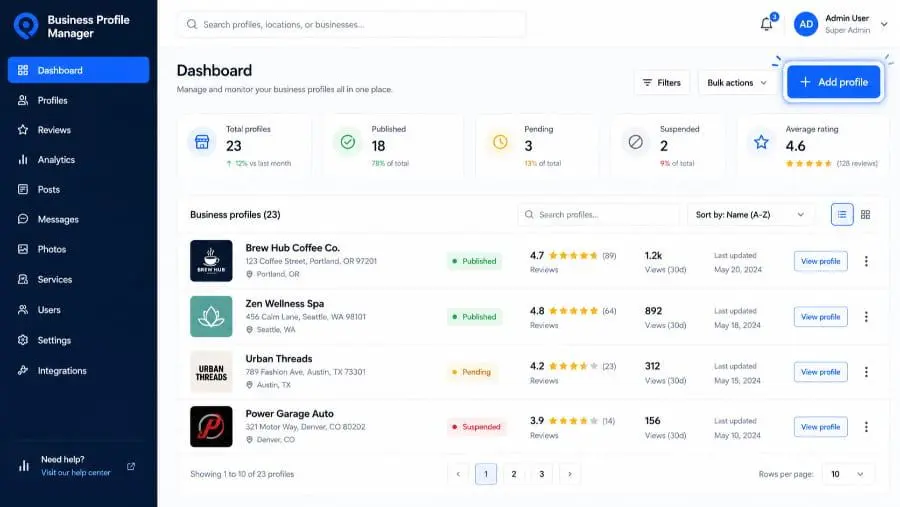
For a growing brand, create a business group before adding more locations. A business group works like a shared folder for profiles, so owners and managers can access a set of locations without sharing passwords.
Screenshot 2: Business group dropdown and “Create group” option.
Alt text: Business Profile Manager showing how to create a location group for multiple Google Business Profiles.
For 10 or more locations, build a bulk upload spreadsheet. Include a unique store code, real-world name, address, phone or website, primary category, hours, labels, attributes, and photo URLs.
How to verify multiple Google Business Profile locations?
Verification is where most multi-location projects fail. Google chooses the available verification method, and some businesses must use more than one method. For multi-location brands, prepare video proof, phone access, business documents, and bulk verification eligibility before you submit profiles.
For individual branches, Google may offer video recording, phone, text, email, live video call, or mail. The available option depends on the business type, public information, region, and hours. Do not assume postcards are always available.
Video verification usually needs three proof types. Show the location with nearby signs or building numbers. Show the business with permanent signage, equipment, products, or branded materials. Then prove management access with staff-only areas, keys, POS systems, work vehicles, permits, invoices, or utility bills.
Bulk verification can help when the business has 10 or more eligible locations under the same brand. It is not the same as bulk upload. Bulk upload adds or updates profile data; bulk verification is Google’s process for verifying a qualified account or business group at scale.
Common rejection reasons are predictable:
- Fewer than 10 eligible locations.
- Duplicate, suspended, or already-owned profiles.
- Service-area branches that are not customer-facing.
- Names with store codes, keywords, or taglines.
- Call-center numbers instead of branch-level numbers.
- Missing fields, wrong postal codes, or poor phone formatting.
What should you do when a GBP location gets suspended?
Treat a suspension as an evidence problem, not a publishing problem. Do not create a replacement profile while the appeal is under review. Review the violated policy, correct the profile, collect documents that match the business name and address, then submit the appeal through Google’s appeals tool.
Suspensions happen more often in multi-location portfolios because small inconsistencies repeat at scale. The usual triggers are keyword-stuffed names, duplicate profiles, virtual offices, bad addresses, mismatched phone numbers, unsupported service-area setups, and ownership confusion.
Before appealing, create a location-level reinstatement file. Include the Business Profile ID, store code, real-world name, address proof, phone, location page, license, utility bill, and signage photos.
For more than 10 suspended profiles, Google allows a spreadsheet with evidence and Business Profile IDs. This is why multi-location brands should keep a clean NAP database before trouble starts. Reinstatement becomes faster when every branch already has matching documentation.
How to optimize each location after verification?
A verified profile is only the starting point. Each location needs its own local relevance, proof of activity, review flow, and website support. The goal is to help Google and customers understand what that branch offers, where it operates, and why it deserves to appear for nearby searches.
Start with a NAP master spreadsheet. Track business name, address, phone, website URL, primary category, secondary categories, hours, special hours, attributes, store code, UTM-tagged GBP URL, review link, and profile status.
Then optimize each branch as its own local asset:
- Use one consistent primary category per business type.
- Link to a dedicated location page when possible.
- Write a unique business description for the branch.
- Upload photos from the actual storefront, team, menu, showroom, or worksite.
- Add holiday hours before holidays, not after customer complaints.
- Respond to reviews with local context and a clear service tone.
Duplicate content is a bigger issue than many teams expect. A city name swapped into the same paragraph does not create local relevance. Strong location pages mention neighborhood context, parking, nearby landmarks, branch services, staff expertise, booking options, and real customer questions.
How should agencies and enterprises manage GBP at scale?
Agencies and enterprises need governance before optimization. Use business groups, defined access levels, naming rules, update logs, and a location database that stays outside any single employee’s account. This prevents ownership loss and keeps edits traceable when multiple people manage the same portfolio.
Business group owners can add or remove account users, transfer ownership, and manage the group. Managers can add, edit, and delete locations inside the business group, so that role should be assigned carefully.
For agency accounts, separate clients into different business groups. Do not combine unrelated brands into one verification request. Third-party platforms can help with bulk edits, duplicate monitoring, review workflows, and reporting, but Google ownership should stay inside the client or brand-controlled account.
What changes for multi-location GBP in AI Search and GEO?
In AI Search, each location becomes a recommendation surface. Ranking in Google’s local pack does not guarantee that ChatGPT, Gemini, or Perplexity will recommend the same branch. AI systems look for confidence, consistency, freshness, reviews, and local relevance across a wider digital footprint.
SOCi’s 2026 Local Visibility Index found that AI assistants recommend far fewer locations than Google’s local results. Search Engine Land reported a sharp gap. ChatGPT recommended 1.2% of locations, Gemini 11%, and Perplexity 7.4%, while Google’s local 3-pack showed 35.9%.
This changes the GBP playbook. Do not optimize only for Maps rank. Optimize every location for answer confidence:
- Keep GBP, website, directories, and social profiles consistent.
- Build dedicated location pages with natural-language service answers.
- Earn recent reviews and respond with specific local details.
- Add LocalBusiness schema with address, hours, phone, services, and geo data.
- Monitor ChatGPT, Perplexity, Gemini, Google AI Overviews, and AI Mode prompts by location.
FAQs
Can I have two Google Business Profiles at the same address?
Usually no. Google says businesses should not create more than one profile for each location. Exceptions may apply for eligible departments or individual practitioners that operate separately. If two brands share one building, each profile must represent a distinct real-world business with its own name, signage, phone, and customer-facing presence.
Should every location use a separate Google account?
No. A separate account for every branch creates ownership risk and makes agency handovers harder. Use a business group under a brand-controlled account, then assign owners and managers based on responsibility. Agencies should manage through permissions, not by holding the only login that owns the profiles.
Does adding a new location affect reviews from existing locations?
No. Reviews belong to the specific Business Profile where customers left them. A new branch starts with its own review profile. Do not try to move reviews from one location to another unless Google support is handling a legitimate merge, relocation, or duplicate issue.
How many locations can one business add to Google Business Profile?
Google does not publish a simple universal cap for normal business growth. For bulk workflows, the key threshold is 10 or more eligible locations from the same business. Large brands should still phase uploads, clean spreadsheet errors, and prepare evidence before requesting verification.
Final takeaways
Google Business Profile multiple locations works when every branch is treated as a real operating unit, not a copied listing. The setup is straightforward, but verification, suspension prevention, permissions, and AI visibility require a cleaner system than most brands start with.
If you manage several branches, start with one database, one access model, one verification evidence folder, and one optimization checklist per location. From there, local SEO and GEO become measurable instead of reactive.
On Digitals helps multi-location brands strengthen local visibility across Google Search, Maps, and AI discovery surfaces. For a practical next step, request a local SEO and AI visibility audit before adding more locations or appealing suspended profiles.

NEWEST POSTS
- Advertising Industry In Vietnam: The 2026 Trends, Channels and Market-Entry Strategy
- Best SEO Company in Vietnam: Latest Shortlist For Businesses
- How To Leverage Social Media For Customer Service Like A Pro?
- Social Media Post Tips – 8 Ways To Boost Engagement
- How To Use Social Media for Sales – In-depth Beginner Guide
Read more