
Insights
XML Sitemap – What Is It And Why Does Google Need It?
On Digitals
14/01/2026
34
XML sitemap acts as a roadmap for your website, guiding Google to all of your most important pages. It is especially valuable for SEO because it helps search engines discover and crawl key content faster, even when your internal linking structure isn’t perfect.
This article explains what it is, how it works, and why it plays an important role in improving your search rankings.
What does an XML sitemap do for search engines?
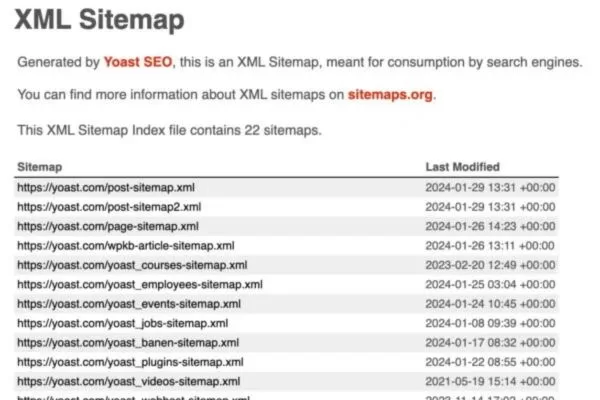
For beginners asking what is sitemap XML, it is essentially a structured file designed for search engines that lists all the important pages on a website. Similar to a digital directory, it shows search engines what content exists and how to access it. It can also include helpful details such as last update dates and the relative importance of each page.
These files give search engines a clear, centralized overview of your website’s content in one place. They help crawlers understand the site structure faster, especially during the first visit. They also make it easier for search engines to quickly find and index newly published or updated pages.
It’s important to distinguish this format from regular or HTML sitemaps. HTML versions are designed to help visitors navigate a website more easily. This format, however, focuses on supporting search engines with efficient crawling and indexing.
In most cases, creating an XML sitemap is a smart choice, particularly for large or complex websites. Certain situations make it even more important to have one in place. For example, your site may contain a high number of pages, be newly launched or recently redesigned, follow a complicated structure, or rely heavily on dynamic content.
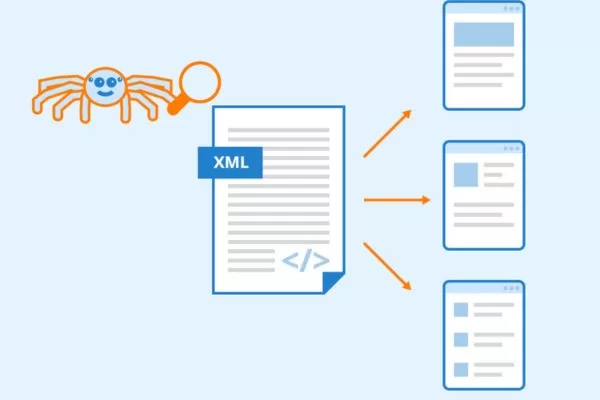
An essential file that organizes URLs for search crawlers
XML sitemap formats for SEO
Specialized sitemaps help search engines discover and index different content formats more efficiently. Using the right type ensures your media and time-sensitive pages are found faster and ranked more accurately. Different formats act as sitemap XML examples for images, videos, news, and mobile content.
Image sitemaps
Image sitemaps help search engines locate visual content across your website, especially on image-heavy pages. Using an XML sitemap for images improves discoverability and increases the chances of appearing in Google Image Search.
Video sitemaps
Video sitemaps provide detailed metadata such as titles, descriptions, duration, categories, and age ratings. This extra information helps search engines better understand and properly index your video content.
News sitemaps
News sitemaps are designed for articles published within the last two days and help content get indexed quickly. An XML sitemap for news should be updated regularly by adding fresh URLs and removing outdated ones to improve visibility in Google News.
Mobile sitemaps
Mobile sitemaps help search engines understand a website’s structure when it includes many mobile-specific pages. They make it easier for crawlers to discover and index mobile content accurately. This is especially useful for sites that still rely on separate mobile URLs.
A standard XML sitemap is limited to 50,000 URLs or a file size of 50 MB. For websites with large volumes of images, videos, or news content, creating specialized sitemaps is a more effective solution. You can refer to Schema.org for the complete list of supported tags and protocols, but the ideal setup ultimately depends on the size and structure of your website.
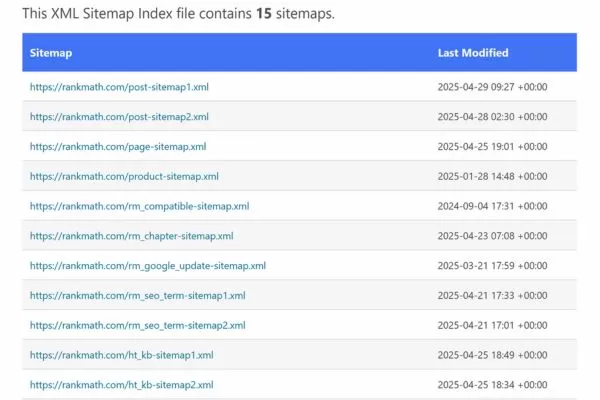
Different sitemap types designed for specific content formats
What does a proper XML sitemap include?
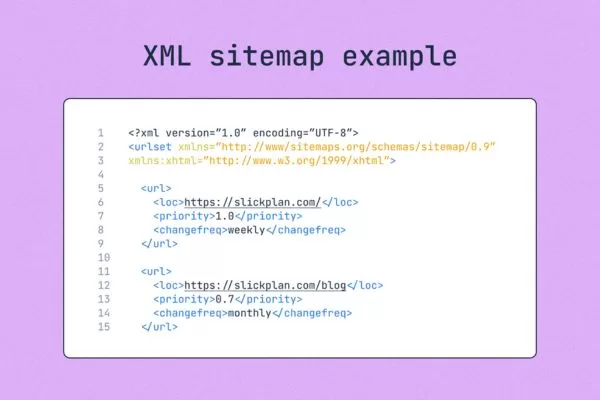
An XML sitemap follows a standardized structure that helps search engines understand and process your website efficiently. Below is a clear XML sitemap example showing the most common elements used by search engines:
- <urlset>: The container that holds all listed URLs.
- <url>: Wraps each individual page entry.
- <loc>: Specifies the exact location of a page URL.
- <changefreq>: Indicates how often the page content is expected to change.
- <lastmod>: Shows the most recent update date of the page.
- <priority>: Signals the relative importance of a page compared to others on the same site, using values from 0.0 to 1.0.
Although it’s helpful to understand this structure and the tags involved, most site owners don’t need to build these files manually. Many CMS platforms automatically generate them, often through built-in features or plugins. For WordPress users, tools like the Yoast SEO sitemap plugin are widely used, and there are several other methods available to generate one easily.
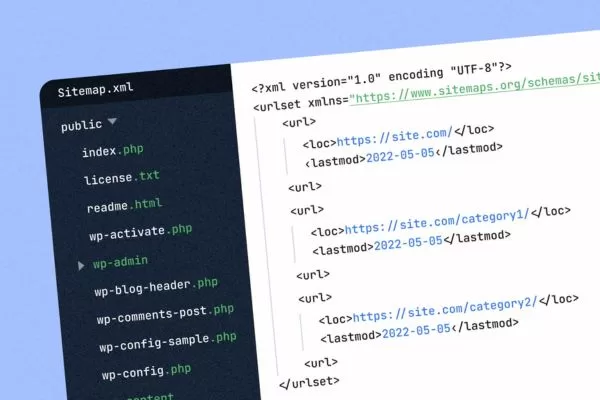
Core elements that define structure and crawling signals
What advantages does an XML sitemap provide?
An XML sitemap plays an important role in helping search engines discover, crawl, and understand your content more effectively. When implemented correctly, it supports better visibility and ensures key pages are not overlooked.
Improve indexing
Search engines don’t always find every page through internal links alone, so pages that are deeply nested or poorly linked can be missed during crawling. A sitemap XML helps ensure all important URLs are discovered and considered for indexing.
Better indexing increases the chances of your pages appearing in search results. It also helps newer or updated pages get recognized faster. Over time, this contributes to stronger overall search visibility.
Enables tracking of indexing progress
Monitoring index status allows you to understand how search engines interact with your website. Tools like Google Search Console show which pages are indexed and highlight potential crawl issues. This visibility helps you fix errors before they impact performance.
Reviewing indexing reports regularly can help you spot missing pages or technical problems early. This insight supports smarter SEO decisions and ongoing optimization. All of this becomes more effective when supported by an XML sitemap.
Increase crawl efficiency
Crawl budgets are limited, especially for large websites. A sitemap guides search engines toward the pages that matter most. This allows crawlers to spend less time on unimportant URLs.
Efficient crawling means search engines process your site more accurately. Updates are detected faster when crawl paths are clear. As a result, content changes are reflected in search results sooner.
Provide additional information
Sitemaps can include useful metadata such as last modified dates and update frequency. This context helps search engines better interpret page relevance and freshness. It also supports smarter crawling decisions.
When combined with an XML sitemap, this added information helps search engines understand page priority more clearly. Important pages receive appropriate attention during crawling. This can positively influence how your site performs in search rankings.
Improved user experience
Ensuring that important pages are properly indexed makes it easier for users to find relevant information. When search engines surface the right pages, visitors spend less time searching and more time engaging.
A well-indexed site also reduces frustration caused by missing or outdated pages. Users are more likely to trust a website that consistently delivers accurate results. Over time, this improves engagement and return visits.
Key benefits that support visibility and indexing performance
How to prepare and submit an XML sitemap efficiently
Creating and submitting a sitemap follows a few straightforward steps that help search engines crawl your website efficiently. You can generate one manually or rely on automated tools, which are usually faster and more accurate for most websites. For long-term SEO performance and easier maintenance, the automated method is generally the best choice when working with an XML sitemap.
Selecting the best sitemap approach
When deciding how to generate a sitemap, automation is usually the most practical option. Sitemap generators – especially those built into CMS platforms like WordPress – can scan your entire website and produce a correctly structured file without manual effort. This approach saves time, reduces errors, and scales well for larger or frequently updated sites.
Several tools are widely used for this purpose, including XML-Sitemaps.com for smaller projects, Screaming Frog SEO Spider for advanced technical audits, and WordPress plugins such as Yoast SEO and Rank Math SEO. These solutions not only create the file but also keep it updated as your content changes, making sitemap management far more efficient with an XML sitemap.
Manual creation is best suited for very small websites or users with specific technical requirements. This method involves building the file from scratch and defining each page using proper XML tags. While it offers full control, it requires strong technical knowledge and is rarely necessary for most websites.
Sitemap setup process
Choosing the right way to build a sitemap depends on your website’s size and technical needs. The steps below explain how to create XML sitemap files based on different website needs:
Using a generator
Using a generator is the fastest and most efficient option for most websites. You simply enter your site’s URL, and the tool automatically scans your pages to create a ready-to-use sitemap file. After generation, the sitemap.xml file can be downloaded and uploaded directly to your website. This method is ideal for beginners learning how to make sitemap XML without technical complexity.
Potential sitemap generators for you to use include XML-Sitemaps.com, Yoast SEO, Rank Math, and more. While most of them come with a fee or a premium subscription, there are still many free web-based generators for you to experiment with and learn about XML sitemaps.
Manual creation
Manual creation is less common and is best suited for very small websites or advanced technical configurations. This method involves building the file by hand using a defined XML structure and adding each page individually. A manually created sitemap typically includes elements such as <loc> for URLs, <lastmod> for update dates, and <changefreq> and <priority> to indicate page importance and update frequency.
Making your sitemap accessible to search engines
Save your sitemap file using the standard filename sitemap.xml to ensure it is easily recognized by search engines. Using a clear and consistent naming convention helps avoid confusion during crawling. This step is essential for proper setup of an XML sitemap.
Next, upload the sitemap.xml directly to the root of your website. Placing it at the root allows search engines to locate it quickly and without errors. For example, it should be accessible at a URL like https://www.example.com/sitemap.xml
Search engine sitemap submission process
Once your sitemap is accessible, the next step is to notify search engines about its location. This ensures your website can be crawled and indexed more efficiently.
Google Search Console
Google Search Console provides a dedicated section for XML sitemap submission within each verified property. The process requires logging into your account and selecting the correct website property. The file is submitted by navigating to the Sitemaps section, entering the sitemap file path, and confirming the submission.
- The website owner signs in to Google Search Console using a verified account.
- The correct website property is selected from the dashboard.
- The sitemap path is entered in the “Enter new sitemap” field.
- The sitemap is sent to Google by clicking the submit button.
Bing Webmaster Tools
Bing Webmaster Tools offers a similar workflow for sitemap submission and management. The platform requires website verification before allowing sitemap uploads. Once verified, the sitemap is added through the sitemap submission interface.
- The site owner verifies the website inside Bing Webmaster Tools.
- The sitemap URL is provided through the sitemap submission section.
- The sitemap is successfully registered after confirmation within the platform.
Best strategies for keeping your sitemap up to date
Regular maintenance ensures your sitemap continues to support search engine crawling and indexing effectively. A well-managed XML sitemap helps keep your website visible and up to date in search results.
Keep it updated
Your sitemap should reflect any meaningful changes made to your website. When pages are added, removed, or significantly updated, the sitemap needs to be refreshed accordingly. Most generators and CMS plugins handle these updates automatically, reducing manual effort.
Monitor for errors
Your sitemap should reflect any meaningful changes made to your website. When pages are added, removed, or significantly updated, the sitemap needs to be refreshed accordingly. Most generators and CMS plugins handle these updates automatically, reducing manual effort.
A step-by-step process for setup and search engine submission
Important pages for your XML sitemap
When building a sitemap, the focus should be on pages that represent the core value of your website. Including the right URLs helps search engines understand your content hierarchy and prioritize what matters most.
Homepage
The homepage serves as the main gateway to your website and often receives the most traffic. It introduces your brand and directs visitors to key sections. Adding it ensures search engines recognize it as a central hub.
About Page
The About page explains who you are and what your website or business stands for. This page helps establish credibility and transparency with users. Including it in an XML sitemap also helps search engines better understand your brand identity.
Contact Page
The contact page provides essential information for users who want to reach out. It plays an important role in trust, conversions, and customer support. Including it helps search engines surface reliable contact details.
Blog Posts or Articles
Blog content showcases expertise and keeps your website fresh with regular updates. Individual posts often target specific keywords and search intent. Including them helps search engines discover and index new content faster.
Product Pages
Product pages are critical for websites that sell physical or digital goods. These pages contain detailed information that users actively search for. Proper inclusion in an XML sitemap helps ensure products appear in relevant search results.
Service Pages
Service pages outline what you offer and who it’s for. They help search engines understand the scope of your business activities. Including them improves visibility for service-related queries.
Category Pages
Category pages organize related content or products into logical groups. They improve site navigation for users and clarify structure for search engines. Adding them helps reinforce topical relevance and hierarchy.
Including these pages creates a clear and comprehensive overview of your website. This improves crawlability, indexing accuracy, and overall search performance. The exact selection may vary by website, but the goal remains the same: make your most valuable content easy to find.

Pages that represent core value and site structure
Sitemap issues that can damage your search rankings
Even a well-built sitemap can underperform if common mistakes are overlooked. Understanding these issues helps ensure search engines can crawl and index your site efficiently.
Infrequent sitemap updates
An XML sitemap that isn’t updated can cause search engines to miss new pages or waste resources on removed ones. This leads to slower indexing and reduced visibility. Automating updates through CMS tools or plugins helps keep everything accurate.
Indexing thin content pages
Adding every possible URL can weaken the overall value of your sitemap. Thin, duplicate, or non-canonical pages reduce crawl efficiency. Focus only on pages that offer real value and are meant to rank.
Invalid URL formatting
An XML sitemap with malformed URLs can create crawling errors. Issues like relative paths, session IDs, or improper encoding confuse search engines. Always use clean, absolute URLs that follow standard formatting rules.
Ignoring sitemap URL limits
Large sitemaps that exceed size or URL limits are harder for search engines to process. This can delay crawling or cause parts of the sitemap to be ignored. Splitting them into smaller files improves reliability.
Outdated lastmod information
Search engines rely on accurate timestamps to judge content freshness. An XML sitemap with outdated or misleading lastmod values can reduce trust signals. Update these tags only when real content changes occur.
Poor sitemap structure
Large websites often require multiple sitemap files. Without an index file, managing and crawling them becomes inefficient. An index sitemap helps organize everything in a clear hierarchy.
Ignoring image and video URLs
An XML sitemap that ignores images, videos, or alternate language pages limits discoverability. Media and international content often need specialized handling. Using image, videos, or hreflang-supported sitemaps expands visibility.
Inaccurate priority tagging
Incorrect priority signals can misguide crawl behavior. Less important pages may be crawled before key ones. Assign priority values carefully to reflect real importance.
Robots.txt configuration errors
An XML sitemap that isn’t referenced in robots.txt may be harder for crawlers to find. Syntax errors can also block access entirely. Including the correct sitemap location improves discovery. Ignoring performance data can allow small issues to grow. Regular checks reveal crawl errors, warnings, and indexing problems early. Consistent monitoring ensures long-term health and accuracy.
Overlooking Search Console feedback
Ignoring performance data can allow small issues to grow. Regular checks reveal crawl errors, warnings, and indexing problems early. Consistent monitoring ensures long-term health and accuracy.
Common issues that reduce crawling and indexing efficiency
Essential FAQs guide on website sitemaps
Understanding sitemaps can improve your site’s SEO and indexing efficiency. These FAQs cover common questions to help you optimize and manage your sitemap effectively:
Why is a sitemap necessary, and what does it do for my site?
A XML sitemap is a structured file that lists all important pages on your website. It enables search engines to locate and index pages faster and more accurately. Without a sitemap, some pages might remain unindexed, reducing your visibility in search results.
When should you revise or refresh your sitemap?
XML sitemap should be updated whenever you add, remove, or significantly modify content on your website. Frequent updates ensure that search engines always see the latest version of your site. Automated tools and CMS plugins can handle this process to minimize manual work.
Can I create several sitemaps for one website?
Yes, especially if your website has thousands of pages or multiple types of content like images, videos, and news articles. You can use a sitemap index file to link multiple sitemaps together. This approach makes crawling more efficient and ensures search engines don’t miss important pages.
What types of content should I include in my sitemap?
Include all essential pages that represent your site’s core value, such as homepage, product or service pages, blog posts, and category pages. Specialized sitemaps can cover images, videos, and mobile pages. Avoid including thin, duplicate, or low-value content to maintain XML sitemap quality.
How do I get my sitemap recognized by search engines?
You can submit your sitemap using tools like Google Search Console or Bing Webmaster Tools. Simply log in, select your website property, and provide the sitemap file location. Submission ensures search engines know where to find your content and can crawl it more efficiently.
Conclusion
An XML sitemap plays a vital role in helping search engines discover, crawl, and index your most important pages efficiently. When created and maintained correctly, it improves visibility, crawl accuracy, and overall SEO performance.
Sitemap strategies implemented by On Digitals ensure websites stay optimized, accessible, and ready to scale in search results. Their comprehensive SEO services also help businesses boost rankings, attract targeted traffic, and achieve long-term online growth.
Read more