
Crawl Budget for Large Sites: How to Prioritize Valuable Pages at Scale?
Vincent
19/01/2026
47
Crawl budget for large sites is the process of helping Googlebot spend crawl resources on high-value URLs instead of duplicate or low-quality pages. It matters for ecommerce and multilingual websites because scale increases crawl waste, indexing delays, and technical SEO risk.
Why is the crawl budget different for large sites?
Crawl budget is more complex for large sites because every technical decision affects thousands or millions of URLs. A small mistake in any on-page elements can create massive crawl waste.
- For a small website, a few duplicate URLs may not create serious crawl pressure.
- For a large ecommerce website, one product filter can generate thousands of URL combinations.
- For a publisher, archives, tags, pagination, and old content can compete with new articles.
- For a multilingual site, each language version multiplies the URL inventory.
Large-site SEO requires a shift from page-by-page thinking to template and segment thinking. Therefore, teams need to manage URL groups.
The priority is simple: Googlebot should reach important pages quickly, refresh them often enough, and avoid spending excessive resources on pages that cannot drive traffic, leads, or revenue.
Which large websites need crawl budget optimization?
Large websites need crawl budget optimization when important URLs compete with duplicate, low-value, or technically inefficient URLs. The need is strongest when the website grows quickly or changes often.
Common examples include:
- Ecommerce websites with products, categories, filters, and discontinued items.
- Marketplaces with user-generated listings and location pages.
- Publishers with news, tags, authors, archives, and pagination.
- Travel websites with destination, date, and availability parameters.
- SaaS platforms with templates, help centers, and programmatic pages.
- Multilingual websites with country, language, and hreflang structures.
- Enterprise websites with multiple CMSs, subfolders, and legacy sections.
Large sites often experience two opposite problems at the same time. Some high-value pages are under-crawled, while low-value templates are over-crawled. Crawl budget optimization identifies this imbalance and fixes it through site architecture, content rules, and technical controls.
Build a crawl priority model before making fixes
A crawl priority model defines which pages deserve crawl attention. Without this model, large-site teams may fix random issues while the most valuable sections remain under-crawled.
Start by grouping URLs by template and business role. Then assign each group a crawl priority:
| URL group | Crawl priority | Reason |
| Revenue category pages | High | Drive search demand and conversions |
| Active product pages | High | Need discovery and updates |
| Evergreen guides | Medium to high | Support organic traffic and internal links |
| Expired product pages | Low or conditional | Keep only if demand exists |
| Filtered parameter URLs | Low unless unique | Often duplicate or thin |
| Login and account pages | No SEO priority | Not useful for organic search |
| Internal search results | Usually no priority | Can create infinite crawl paths |
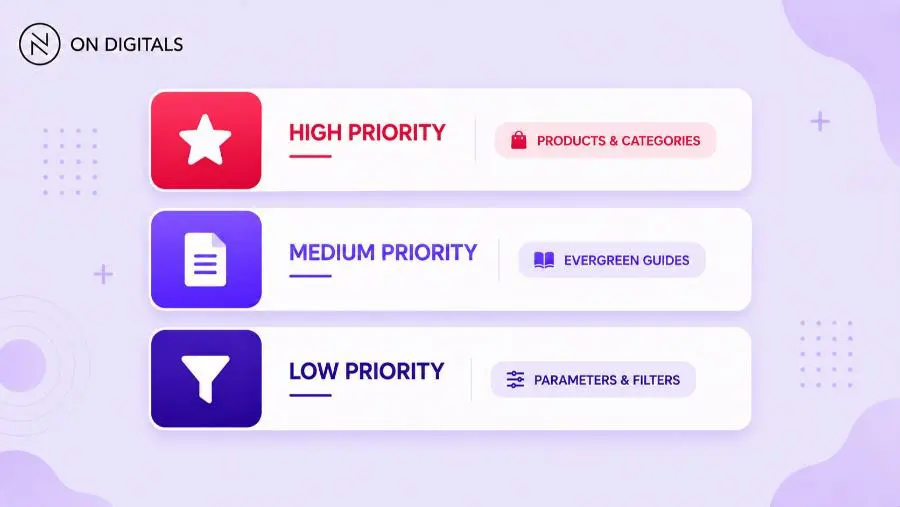
This model helps SEO, content, product, and development teams align. It also gives monitoring tools a clear segmentation structure. A crawl report is far more useful when it shows bot behavior by priority group.
Control faceted navigation and URL parameters
Faceted navigation is one of the biggest crawl budget risks for large sites. Filters can generate many URLs that are useful to users but weak for search.
The solution is not to block every filter. Some filtered pages may target valuable long-tail demand. For example, “black leather office chairs” may deserve an indexable landing page if it has search demand or inventory. In contrast, a random combination with no search demand should not consume crawl attention.
Use a decision framework:
- Indexable: Filtered pages with search demand, unique value, stable inventory, and internal links.
- Canonicalized: Useful user paths that duplicate a stronger category page.
- Blocked or restricted: Parameters that create crawl traps, session URLs, sorting orders, or endless combinations.
- Removed from sitemaps: Any URL that should not be discovered as a search landing page.
Avoid handling faceted navigation only with one rule. Robots.txt, canonical tags, noindex, internal links, and sitemap logic all serve different purposes. Large sites need a controlled policy that developers can implement consistently.
Keep XML sitemaps clean and segmented
XML sitemaps are essential for large sites because they help search engines discover priority URLs. However, messy sitemaps can waste crawl signals by submitting broken, redirected, duplicate, or non-indexable pages.
For large sites, a single sitemap is rarely enough. Segment sitemaps by URL type, language, category, or business priority. This makes diagnostics easier because Search Console can show which submitted groups have indexing problems.
A large-site sitemap structure may include:
- /sitemap-categories.xml
- /sitemap-products-active.xml
- /sitemap-products-new.xml
- /sitemap-blog-evergreen.xml
- /sitemap-news.xml
- /sitemap-en.xml
- /sitemap-vi.xml
Each sitemap should include only canonical, indexable, 200-status URLs. Remove other URLs that do not deserve indexing. Update lastmod values only when meaningful content changes, not for minor template changes.
Clean sitemaps do not force Google to index pages. They help search engines understand which URLs the website owner considers important.
Improve internal linking depth at scale
Internal linking depth strongly affects crawl discovery on large websites. Important URLs buried many clicks from the homepage may receive weak crawl signals, even if they are included in a sitemap.
Large sites should use hub structures that connect priority pages naturally. While ecommerce sites can use category hubs, publishers can use topic hubs, and B2B enterprise sites can use service hubs, etc.
Focus on these internal linking checks:
- High-value URLs should be reachable within a reasonable click depth.
- Important templates should receive links from relevant hubs.
- Orphan pages should be linked, merged, removed, or excluded.
- Anchor text should describe the destination clearly.
- Pagination should not be the only path to important pages.
- Internal links should not point heavily to noindex or redirected URLs.
Large websites often need internal linking rules inside the CMS. Manual linking cannot scale across thousands of pages. Use automated modules carefully, and monitor whether they strengthen priority pages or create repetitive, low-value links.
Reduce crawl waste from obsolete and low-value pages
Large sites accumulate obsolete pages quickly. Expired products, old campaigns, thin tags, outdated articles, duplicate location pages, and empty search pages can consume crawl resources long after they stop supporting SEO.
Content pruning should not mean deleting pages without review. Some old pages may still have backlinks, traffic, conversions, or seasonal value. Others may deserve consolidation into stronger pages. The right action depends on value and replacement options.
Use this cleanup logic:
- Improve pages with search demand but weak content.
- Merge overlapping pages with the same intent.
- Redirect removed pages to a relevant replacement.
- Return 404 or 410 when no useful replacement exists.
- Noindex pages users need but searchers do not.
- Block crawling only when the page should not consume crawler access.
Review sitemaps and internal links after cleanup. Removing a page is not enough if the website continues linking to it or submitting it through XML sitemaps.
Use log file analysis for large-site crawl decisions
Log file analysis is critical for large sites because crawler behavior at scale cannot be understood through surface-level reports alone. Logs show which URLs Googlebot actually requests, when it requests them, and how the server responds.
A strong log analysis process should segment Googlebot activity by:
- URL type or template.
- Folder or subfolder.
- Language or country version.
- Status code.
- Response time.
- Crawl frequency.
- Device crawler type.
- Indexable vs. non-indexable URLs.
This data can reveal problems that standard crawls miss. Googlebot may spend heavy activity on parameter URLs that are not included in a crawl seed. It may continue visiting old redirects after a migration. It may ignore deep product pages because internal links are weak.
Log analysis also helps measure implementation impact. After fixing internal links, sitemap entries, or parameter rules, teams can check whether bot activity moves toward priority pages over the next few weeks.
Common crawl budget mistakes on large sites
Large sites often waste crawl budget because technical rules are inconsistent across teams. SEO may define the right policy, but the CMS, filters, product database, or development backlog may apply it unevenly.
Common mistakes include:
- Submitting non-indexable URLs in XML sitemaps.
- Allowing infinite filtered URL combinations.
- Treating every product filter as an SEO landing page.
- Keeping expired pages without traffic or replacement logic.
- Linking heavily to redirected or noindex URLs.
- Using robots.txt to hide pages that need indexation control.
- Ignoring server response time during bot-heavy periods.
- Reviewing crawl data without segmenting URL types.
Another major mistake is relying only on one crawl. Large-site crawl budget is a moving system. Product inventory changes, content gets updated, links shift, and new templates launch. Monitoring must be ongoing, especially after releases.
Large-site crawl budget workflow
A large-site crawl budget workflow should combine audit, prioritization, implementation, and monitoring. The process works best when SEO, developers, content, and product teams share the same URL segmentation model.
Use this workflow:
- Create a URL inventory. Export URLs from sitemaps, CMS, crawlers, analytics, Search Console, and logs.
- Group URLs by template. Separate categories, products, filters, blogs, tags, languages, and legacy pages.
- Assign crawl priority. Mark each group as high, medium, low, or no SEO priority.
- Compare crawl and indexation. Identify over-crawled low-value groups and under-crawled valuable groups.
- Fix technical waste. Address errors, redirects, duplicate parameters, and slow templates.
- Improve discovery signals. Update sitemaps, internal links, hubs, and navigation modules.
- Measure trend changes. Monitor logs, Crawl Stats, and indexing for several weeks.
This workflow prevents teams from treating crawl budget as a one-time technical cleanup. Large sites need a repeatable operating system because crawl behavior changes as the site grows.
Frequently asked questions about crawl budget for large sites
How many pages make a website large enough for crawl budget optimization?
There is no fixed page count that makes crawl budget optimization necessary. The issue becomes important when valuable URLs are not crawled or indexed efficiently. A site with 20,000 messy parameter URLs may need crawl budget work more urgently than a clean site with 100,000 well-structured pages.
Do ecommerce filters waste crawl budget?
Ecommerce filters can waste crawl budget when they create many near-duplicate URLs with no unique search value. Some filtered pages can be useful landing pages if they match demand, have stable inventory, and contain unique content. The key is to define which filter combinations deserve crawling and indexing.
Should large sites block low-value URLs in robots.txt?
Robots.txt can help manage crawler traffic, but it should be used carefully. Blocking may stop Googlebot from crawling pages, but it does not always remove URLs from search results. Large sites should choose between robots.txt, noindex, canonicals, redirects, or removal based on the page’s purpose.
How often should large sites review crawl budget?
Large sites should review crawl budget monthly at minimum. Ecommerce sites, publishers, marketplaces, and websites undergoing migrations should monitor crawl activity weekly or continuously. Review frequency should increase whenever new templates, filters, CMS rules, or URL structures are released.
What is the most important crawl budget metric for large sites?
No single metric is enough. Large sites should track crawl distribution by URL group, crawl-to-index ratio, response code distribution, server response time, and time to first crawl for new priority pages. Segmentation matters more than total crawl volume because large sites contain many URL types.
Conclusion
Crawl budget for large sites is about prioritization at scale. The goal is to help Googlebot discover and refresh valuable pages while reducing waste from duplicates, filters, obsolete URLs, technical errors, and weak site architecture.
Large websites need a structured process: classify URL groups, define crawl priority, control faceted navigation, clean sitemaps, improve internal links, analyze logs, and monitor results after each implementation. Without this process, crawl waste can grow quietly as the website expands.
On Digitals, with our technical services, helps large and complex websites turn technical SEO data into a clear crawl budget roadmap, connecting crawl efficiency with indexation, organic visibility, and business value.

NEWEST POSTS
- Advertising Industry In Vietnam: The 2026 Trends, Channels and Market-Entry Strategy
- Best SEO Company in Vietnam: Latest Shortlist For Businesses
- How To Leverage Social Media For Customer Service Like A Pro?
- Social Media Post Tips – 8 Ways To Boost Engagement
- How To Use Social Media for Sales – In-depth Beginner Guide
Read more