
Crawl Budget Monitoring Tools for Better Indexation and Technical SEO
Vincent
15/01/2026
31
Crawl budget monitoring tools help SEO teams track how Googlebot crawls a website, where crawl waste occurs, and which pages deserve faster discovery. They combine several on-page elements and indexation metrics to support technical SEO decisions for growing websites.
What are crawl budget monitoring tools?
Crawl budget monitoring tools are platforms or reports that show how search engine bots access your website. They help technical SEO teams compare crawl activity with indexation, traffic, site architecture, and page value.
For On Digitals, crawl budget monitoring belongs inside technical SEO because it connects infrastructure, website structure, content quality, and organic growth. A monitoring tool should answer five practical questions:
- Which URLs does Googlebot crawl most often?
- Which valuable pages receive too little crawl attention?
- Which errors or redirects waste bot requests?
- Which URL patterns create duplicate or low-value crawl paths?
- Did recent technical changes improve crawling and indexing?
When these questions are clear, crawl budget becomes easier to manage. Teams can prioritize fixes based on data instead of assumptions.
Why crawl budget monitoring matters for SEO performance?
Crawl budget monitoring matters because Google cannot index a page before it crawls that page. When crawl activity is wasted on weak URLs, important pages may be discovered later, refreshed less often, or left outside the index longer than expected.
This is especially important for websites that publish frequently, manage thousands of URLs, or rely on time-sensitive organic traffic. Ecommerce category pages, product pages, blog hubs, programmatic landing pages, and multilingual pages can all compete for crawler attention.
Monitoring helps separate two different issues. A page may have an indexing problem because Google crawled it and chose not to index it. Another page may have a discovery problem because Googlebot rarely reaches it. These require different fixes.
| Problem | What monitoring shows | Likely action |
| Crawl waste | Repeated bot hits on thin, duplicate, or parameter URLs | Consolidate, block, canonicalize, or remove |
| Slow discovery | New pages receive few or delayed bot visits | Improve internal links and sitemap signals |
| Server pressure | Googlebot reduces activity after slow responses or 5xx errors | Improve hosting, caching, and response time |
| Indexing gap | URLs are crawled but not indexed | Improve content quality, intent match, and canonical signals |
Strong monitoring also protects SEO teams during migrations, redesigns, JavaScript changes, and CMS updates. A sudden spike in 404s, a drop in HTML requests, or unusual crawling of staging URLs can reveal problems before rankings decline.
Core data sources for crawl budget monitoring
Effective crawl budget monitoring uses more than one data source because no single tool shows the full picture. Google Search Console shows Google-reported crawl activity, while server logs reveal every bot request recorded by the server.
Google Search Console is the easiest place to start. Its Crawl Stats report enough metrics to make decisions. This helps SEO teams spot broad crawl trends and server availability issues.
Meanwhile, server logs add a deeper layer. They show raw requests with timestamps, requested URLs, user agents, status codes, and response times. This makes them useful for identifying crawl traps, over-crawled URL patterns, under-crawled sections, and bot behavior after a site change.
Website crawlers such as Screaming Frog SEO Spider, Sitebulb, or enterprise crawlers add another layer. They simulate how a crawler navigates your site. When combined with log data, they help compare how your site can be crawled with how Googlebot actually crawls it.
A practical monitoring stack usually includes:
- Google Search Console for crawl trends and host status.
- Server log files for raw Googlebot behavior.
- SEO crawler data for internal links, status codes, canonicals, and depth.
- Indexation data from Search Console or URL inspection exports.
- Analytics or CRM data to identify pages that support traffic, leads, or revenue.
This combined view prevents teams from optimizing crawl activity in isolation. A frequently crawled page is not automatically valuable. A low-crawled page is not automatically a problem. Business value, indexability, and technical status must be reviewed together.
Best crawl budget monitoring tools by use case
The best crawl budget monitoring tool depends on website size, log access, technical resources, and reporting needs. Small websites may only need Google Search Console and periodic crawls, while enterprise websites need automated log processing and alerts.
Google Search Console Crawl Stats
Google Search Console is the baseline tool for crawl monitoring. It is free, official, and useful for checking high-level crawl health. SEO teams can review total requests, response time trends, host availability, response codes, file types, and crawl purpose.
Its limitation is granularity. It does not always let teams segment crawl activity by custom page type, template, folder, language, or business priority. For deeper diagnosis, Search Console should be paired with log files and a crawler.
Screaming Frog Log File Analyser
Screaming Frog Log File Analyser is useful for technical SEOs who need to process server logs locally. It can identify search bot activity, group URLs, detect uncrawled pages, review status codes, and compare bot behavior with imported crawl data.
It suits small to mid-sized websites, agencies, and teams that want control over log data. It can be especially useful after migrations, content pruning, sitemap cleanup, and internal linking updates.
Botify
Botify is designed for large and complex websites that need automated crawl intelligence. It combines log analysis, crawl data, and performance insights to help teams understand how search engines interact with site architecture.
It is better suited for enterprise websites, ecommerce platforms, marketplaces, and publishers. These sites need segmentation, forecasting, alerting, and scalable reporting across millions of URLs.
Oncrawl
Oncrawl combines website crawling, log file analysis, and SEO data visualization. It is useful when teams need to compare crawl frequency, indexability, depth, content quality, and internal link distribution.
The tool is strong for diagnosing why certain page groups receive too much or too little bot activity. It is also useful for visual reporting across templates, folders, or business categories.
JetOctopus
JetOctopus is a cloud-based crawler and log analyzer built for fast data processing. It helps technical SEO teams inspect crawl behavior, identify anomalies, and monitor large websites without relying only on manual exports.
It is suitable for teams that need frequent crawl reviews and faster reporting cycles. For larger sites, its value often comes from speed, segmentation, and automation.
How to choose the right crawl budget monitoring tool?
Choose crawl budget monitoring tools by matching tool capability to website complexity, not by buying the most advanced platform first. A 500-page B2B website and a 500,000-page ecommerce site do not need the same monitoring stack.
Use these criteria before choosing a tool:
- Log file access: Can your hosting, CDN, or server team provide usable logs?
- URL segmentation: Can the tool group URLs by folder, template, parameter, or language?
- Bot verification: Can it distinguish real Googlebot from spoofed crawlers?
- Indexation comparison: Can it compare crawled URLs with indexed URLs?
- Error reporting: Can it monitor 3xx, 4xx, 5xx, soft 404s, and blocked resources?
- Dashboard needs: Does the team need recurring reports or one-off audits?
- Data security: Does log processing need to happen locally or in a cloud platform?
For many businesses, the right approach is progressive. Start with Google Search Console and scheduled technical crawls. Add log file analysis when crawl inefficiency becomes visible. Move to enterprise monitoring when URL scale, release frequency, and reporting complexity justify the cost.
Crawl budget metrics SEO teams should monitor
Crawl budget metrics should connect crawl activity to indexation and business value. Raw crawl volume alone can mislead teams because more crawling is not always better.
Track these metrics monthly for stable sites and weekly during migrations or major technical changes:
- Total crawl requests: Shows overall Googlebot activity.
- Average response time: Indicates whether server performance may limit crawl capacity.
- Response code distribution: Reveals wasted requests on 404s, redirect chains, and server errors.
- HTML vs. resource requests: Shows whether bot activity focuses on indexable pages.
- Crawl-to-index ratio: Compares crawled URLs with indexed URLs.
- Crawl distribution by section: Shows whether key templates receive enough attention.
- Time to first crawl: Measures how quickly new pages are discovered.
- Crawl depth: Checks whether important pages sit too far from the homepage.
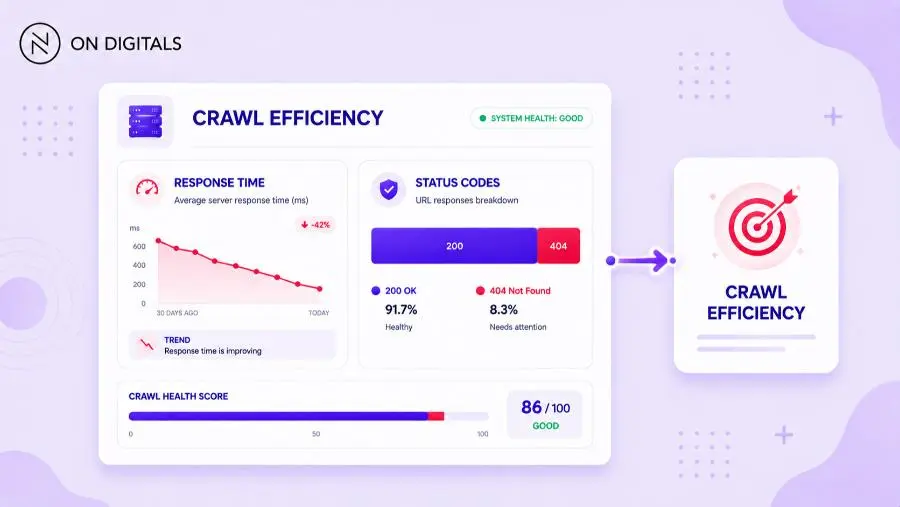
A useful dashboard separates page groups. For example, blog posts, service pages, product pages, category pages, filtered URLs, and archived pages should not be judged together. A healthy blog may show strong crawl-to-index efficiency, while faceted URLs may waste most bot requests.
How to turn crawl monitoring data into action
Crawl monitoring creates value only when it leads to technical fixes, content decisions, and architecture improvements. A report that lists crawl waste without prioritization rarely changes SEO outcomes.
Start by ranking issues by impact and effort. Fix server errors and redirect chains first because they waste crawl resources and create poor user experience. Then review duplicate and parameter URLs because they often consume large amounts of crawl attention. After that, improve internal links and XML sitemaps for high-value pages that are under-crawled.
A practical crawl budget action workflow looks like this:
- Export crawl data from Google Search Console.
- Process server logs for real Googlebot activity.
- Run a technical crawl of the full website.
- Group URLs by template, folder, language, and business value.
- Compare crawled, indexable, indexed, and traffic-driving URLs.
- Prioritize technical waste, under-crawled assets, and indexing gaps.
- Implement fixes in batches and monitor changes for 2–4 weeks.
Common actions include removing expired URLs from sitemaps, flattening internal link depth, fixing redirect chains, improving server response time, consolidating duplicate pages, updating canonical tags, and blocking unimportant crawl paths when appropriate.
Common crawl budget monitoring mistakes
The most common crawl budget monitoring mistake is treating crawl volume as the main goal. A site can receive more bot requests and still perform poorly if crawlers spend that time on low-value URLs.
Another mistake is using robots.txt without understanding its role. Robots.txt manages crawling, but it is not a reliable method for removing pages from Google Search results. For pages that should not appear in search, teams must use the right indexation control, such as noindex where crawling is allowed, or removal and status code handling when pages no longer exist.
Teams also make decisions from small samples. One week of crawl data may reflect seasonality, a deployment, a temporary server issue, or a Google crawling fluctuation. Crawl trends are more useful when reviewed over several weeks with context from releases, content publishing, and site changes.
Finally, monitoring often fails when SEO, developers, and content teams work separately. Crawl budget depends on server health, page quality, internal links, canonical rules, and CMS behavior. The best monitoring process assigns each issue to the team that can actually fix it.
Frequently asked questions (FAQs)
Do small websites need crawl budget monitoring tools?
Small websites usually do not need advanced crawl budget monitoring if important pages are crawled and indexed quickly. However, they should still check Google Search Console, sitemap health, indexing status, and server errors. Monitoring becomes more important when a small site uses JavaScript, filters, duplicate templates, or frequent content updates.
What is the best free tool for crawl budget monitoring?
Google Search Console is the best free starting point because it reports Google crawl activity, host status, response codes, crawl purpose, and average response time. It does not replace server logs, but it gives marketers and SEO teams a reliable first view of crawl health.
How often should crawl budget be monitored?
Stable small and mid-sized websites can review crawl data monthly or quarterly. Large websites, ecommerce sites, publishers, and websites undergoing migrations should monitor crawl activity weekly or continuously. After major changes, review crawl trends for at least 2–4 weeks before judging the result.
Can crawl budget monitoring improve rankings directly?
Crawl budget monitoring does not improve rankings by itself. It supports rankings by helping search engines discover, refresh, and index valuable pages more efficiently. The ranking benefit usually comes from the fixes that follow monitoring, such as faster servers, cleaner URLs, better internal links, and stronger content quality.
Which crawl budget monitoring tool should enterprise teams use?
Enterprise teams should use tools that combine log file analysis, site crawling, segmentation, alerts, and integration with Search Console or analytics data. Botify, Oncrawl, and JetOctopus are often more suitable than basic tools when websites manage large inventories, multilingual structures, faceted navigation, and frequent releases.
Conclusion
Crawl budget monitoring tools help technical SEO teams turn Googlebot behavior into measurable action. The right setup shows where crawl resources go, which valuable pages need more attention, and which technical issues waste discovery opportunities.
For most websites, Google Search Console and regular technical crawls are enough to establish a baseline. For larger websites, server log analysis and automated monitoring become essential. The best results come from connecting crawl data with indexation, internal links, content quality, and business value.
If your website has crawl waste, slow indexation, or complex technical SEO issues, On Digitals can help review your crawl data and build a practical SEO roadmap.

NEWEST POSTS
- Advertising Industry In Vietnam: The 2026 Trends, Channels and Market-Entry Strategy
- Best SEO Company in Vietnam: Latest Shortlist For Businesses
- How To Leverage Social Media For Customer Service Like A Pro?
- Social Media Post Tips – 8 Ways To Boost Engagement
- How To Use Social Media for Sales – In-depth Beginner Guide
Read more