
Insights
Cumulative Layout Shift Optimization: Step-By-Step Guide
On Digitals
14/01/2026
44
Cumulative layout shift is a Core Web Vitals metric that measures unexpected layout movements affecting user experience and page stability. It directly impacts usability, engagement, and search rankings on Google. Find out more about how to reduce layout shifts and optimize page performance effectively below to further enhance the technical SEO side of your website.
How is Cumulative Layout Shift defined?
Cumulative Layout Shift (CLS) is one of the three Core Web Vitals introduced by Google Search in January 2021 as ranking signals. Each metric focuses on a different aspect of user experience: loading speed, interactivity, and visual stability. Together, they offer a clearer framework for measuring what Google considers the foundations of a high-quality user experience for developers, designers, and SEO professionals.
CLS specifically evaluates how visually stable a webpage remains as it loads and during interaction. This explanation helps clarify the cumulative layout shift meaning for both technical and non-technical users. Its purpose is to ensure smooth navigation without sudden movements that disrupt user actions. Poor layout stability can frustrate users on both mobile and desktop devices, often leading to higher bounce rates and accidental clicks.
Unexpected layout shifts usually occur when late-loading elements such as ads, images, or dynamic content push existing content out of place. In contrast, planned movements like animations, transitions, or user-triggered actions are considered normal behavior. In other words, this can cause users to inadvertently click on unwanted ads, especially if it drags on for too long, leading them to leave the website out of frustration. To account for this, Google excludes layout shifts that happen within 500 milliseconds of user interaction from CLS calculations.
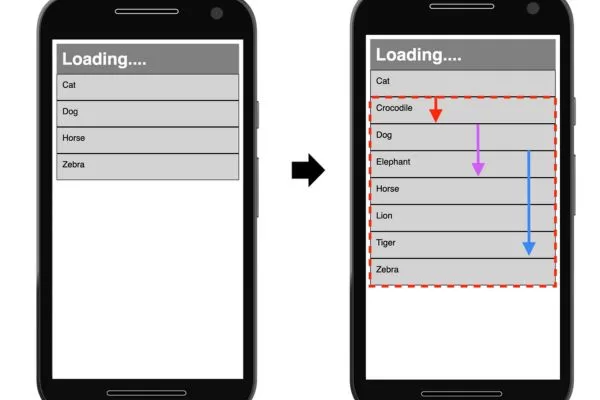
This metric explains how visual stability is measured during page loading
Why does CLS matter for SEO performance?
CLS has become more relevant as Google increasingly prioritizes user experience through Core Web Vitals. As part of Core Web Vitals CLS, layout stability reflects how reliable and user-friendly a page feels. For SEOs, this means layout stability now plays a measurable role in overall site quality.
Cumulative Layout Shift carries a lower weight in Lighthouse compared to metrics like LCP and FID, accounting for only a small percentage of the total score. This suggests it is unlikely to outweigh performance or interactivity when ranking pages. However, being part of Core Web Vitals means it still contributes to how Google evaluates page experience.
SEO should not treat CLS as optional, especially as it influences rankings and user satisfaction. For businesses investing in professional SEO services, layout stability is no longer optional, as CLS directly reflects overall page quality and user experience. Auditing layout shifts using tools like Chrome DevTools helps identify problem areas early. Improving visual stability ensures a smoother experience and supports long-term SEO performance, making CLS essential to optimize.
Layout stability plays an important role in search visibility and user trust
Why do websites suffer from Cumulative Layout Shift?
Unexpected layout movements usually happen when page elements load without reserved space or change size after rendering. Understanding common causes is essential for improving CLS Core Web Vitals performance and maintaining visual stability across pages. Below are the most common reasons why layout instability occurs and how it impacts user experience:
Responsive images without dimensions
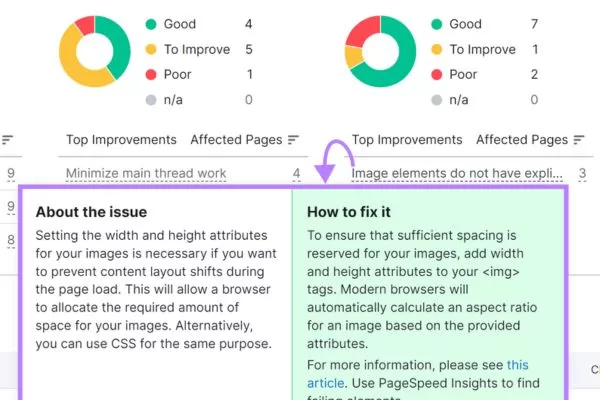
When images are added without fixed width and height, the browser cannot reserve space in advance. As a result, content below the image is pushed down once the image finishes loading. This sudden movement creates a noticeable layout shift that disrupts reading or interaction.
Layout shifts triggered by ads and iframes
Ads and iframes often load asynchronously and may change size multiple times during rendering. When their dimensions are not predefined, they can push surrounding content downward unexpectedly. This behavior significantly increases Cumulative Layout Shift, especially on mobile devices.
On-demand injected content
Embedded content such as YouTube videos, Google Maps, or social media posts is loaded dynamically. These elements can vary in size depending on media, text length, or updates over time. Without sufficient reserved space, they frequently trigger unexpected layout changes.
Font-related Cumulative Layout Shift problems
Custom web fonts can cause layout shifts when fallback fonts are replaced or hidden text becomes visible. This happens due to FOUT (Flash of Unstyled Text) or FOIT (Flash of Invisible Text). If font loading is not handled properly, Cumulative Layout Shift can negatively affect visual stability.
Many sites experience instability due to unreserved space and late-loading elements
How can you check a page’s CLS score?
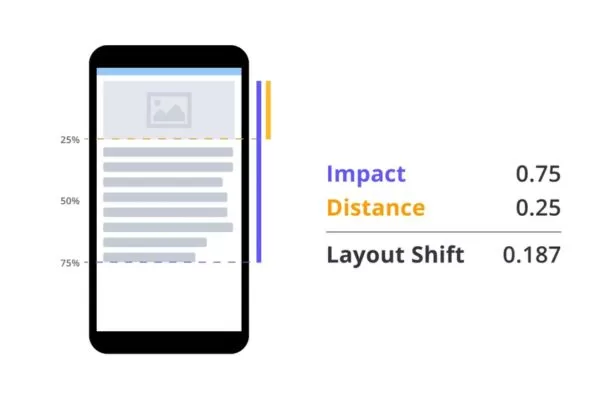
To better understand what is CLS in Core Web Vitals, it’s important to know how layout stability is measured and evaluated. CLS calculates how much of the screen is affected by an unexpected movement and how far that movement travels. The final CLS score is obtained by multiplying the impact fraction by the distance fraction, using either the width or height value, whichever is greater. This formula helps quantify visual instability in a consistent and comparable way.
To evaluate layout stability, teams can rely on either lab data or real-world user data depending on the project stage. Lab measurements are useful during development and testing before a site goes live, while field data reflects actual user experiences on live websites. Choosing the right approach ensures more accurate performance insights.
Common lab tools include Chrome DevTools, Lighthouse, and WebPageTest for controlled testing environments. Field data can be gathered from sources such as the Chrome User Experience Report, PageSpeed Insights, and Google Search Console via the Core Web Vitals report to evaluate Cumulative Layout Shift across real user sessions. These tools together provide a complete view of how layouts behave in real usage.
Page stability can be measured using formulas, lab tests, and real user data
Available tools to analyze CLS scores
Several tools are available to help measure and diagnose CLS issues across different environments. These tools provide both lab and real-user data to identify layout shifts and improve visual stability.
PageSpeed Insights
PageSpeed Insights is one of the easiest tools to analyze CLS performance. It combines Field Data from real users with Lab Data from simulated tests to show how layouts behave during loading. This helps identify both real-world and potential layout shift issues.
The tool provides separate results for mobile and desktop devices. After entering a URL, CLS scores and related insights are displayed clearly. This makes it convenient for quick checks and ongoing performance monitoring.
Chrome Developer Tools
Chrome Developer Tools is a built-in solution for measuring Cumulative Layout Shift in detail. It allows you to track individual layout shifts that occur while a page loads. Using the Lighthouse audit, you can quickly view the CLS score directly in your browser.
For deeper analysis, the Performance and Rendering panels help visualize layout shift regions. By recording page activity, you can pinpoint exactly where and when shifts happen. This is especially useful for debugging and fixing specific CLS problems.
Google Search Console
Google Search Console helps identify CLS issues at scale across an entire website. Instead of running live tests, it reports aggregated data based on real user experiences. This makes it ideal for spotting problematic pages quickly. This makes it a reliable source for tracking Google CLS issues at scale.
Within the Core Web Vitals report, you can review CLS issues separately for mobile and desktop. Pages with layout instability are clearly flagged for improvement. This allows site owners to prioritize fixes that have the biggest SEO impact.

Multiple platforms help evaluate layout behavior across devices and environments
Best ways to optimize Cumulative Layout Shift
Cumulative Layout Shift directly affects usability, conversions, and overall page experience. Improving visual stability is essential for meeting cumulative layout shift Core Web Vitals standards. Optimizing it helps prevent unexpected movements and ensures a stable, user-friendly website across devices.
Images and videos
Images and videos often load after the main content, which can push surrounding elements out of place. This happens when media files lack predefined dimensions in the DOM, forcing the browser to recalculate layout. Cumulative Layout Shift frequently increases when large media assets appear late.
To prevent this, always define width, height, or aspect-ratio values for images and videos. This allows the browser to reserve space before the assets fully load. As a result, visual stability improves and layout shifts are reduced.
Ads
Ads are a common cause of layout instability because they load asynchronously and may resize. When ad containers do not have fixed dimensions, they can push content down unexpectedly. This behavior disrupts reading flow and user interaction.
A simple fix is to limit the parent DIV to a specific width and height. By constraining the ad container, Cumulative Layout Shift is reduced, and the layout remains stable even when ads refresh or load later. This approach minimizes unexpected movement across the page and improves visual stability.
Dynamic content
Dynamic content such as embedded videos, maps, or social posts can be unpredictable in size. These elements are often injected after the initial page load, increasing the risk of layout shifts. Without planning, they can negatively affect page stability.
To manage this, identify where third-party content is likely to appear. Reserve adequate space by setting dimensions on the parent container. This ensures the layout remains consistent when dynamic elements load.
Fonts
Custom fonts can cause visible layout changes when they replace fallback fonts during loading. This results in flashes of unstyled or invisible text that shift content slightly. Cumulative Layout Shift can increase if font loading is not handled correctly.
Using rel=”preload” for font files helps browsers load fonts earlier in the rendering process. You can also apply proper font-display settings to control text rendering behavior. These techniques reduce layout movement and improve visual stability.
FAQs about Cumulative Layout Shift in detail
CLS often raises questions for site owners, developers, and SEO professionals aiming to improve page stability. Below are detailed FAQs to help you understand how CLS works, why it matters, and how to optimize it effectively.
What is cumulative layout shift and how does it affect page stability?
CLS is a Core Web Vitals metric that measures how much a page layout shifts unexpectedly during loading and interaction. It focuses on visual stability and helps evaluate whether content stays in place as users view or interact with a page.
Why is CLS vital for SEO?
CLS affects user experience, which is a key factor in Google’s page experience signals. Pages with frequent layout shifts can frustrate users, increase bounce rates, and potentially perform worse in search results.
What CLS score meets Google’s standards?
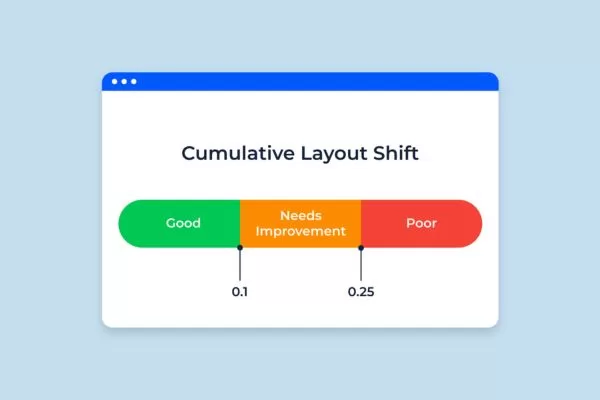
A good CLS score is 0.1 or lower, which indicates minimal layout movement. Scores between 0.1 and 0.25 need improvement, while anything above 0.25 is considered poor and should be addressed.
What commonly causes high CLS?
High Cumulative Layout Shift is often caused by images, ads, or embedded content loading without predefined dimensions. Web fonts and dynamically injected elements can also shift layouts if space is not reserved in advance.
Cumulative Layout Shift: How to improve it on modern websites?
You can reduce CLS by setting fixed dimensions for images, videos, ads, and embeds. Optimizing font loading and reserving space for dynamic content also helps maintain layout stability.

Common questions help clarify measurement, impact, and optimization best practices
Conclusion
Cumulative Layout Shift is a critical Core Web Vitals metric that directly affects visual stability, user experience, and overall website performance. Reducing unexpected layout movements helps improve usability, engagement, and long-term SEO results. Optimizing page stability is a key focus at On Digitals, where user-first experiences are built to support stronger rankings and sustainable growth.
Read more