
Facebook Ads Disapproved: Common Reasons and How to Fix Them
Vincent
13/11/2025
19
Facebook advertising can be disapproved because of the ad content, targeting, landing page or an issue connected to the advertising account. The fastest solution is rarely duplicating the same ad and hoping it passes. Instead, check every part of the customer journey and fix the asset that caused the problem.
Facebook ads disapproved reasons in 60 seconds
When a Facebook ad is rejected, the problem may sit in more than the ad itself. The headline may make an unsupported claim. The image may use content you do not have permission to use. The landing page may not match the offer. In some cases, the issue may relate to the ad account, Page or Business Account.
Start by reading the rejection notice in Meta Ads Manager or Account Quality. Then check whether the concern relates to creative, targeting, destination content or business assets.
|
What you see |
What it may mean |
First action |
|
Ad is still in review |
Meta has not completed its decision |
Avoid making repeated edits before checking the status |
|
Ad is rejected |
A policy issue may exist in the ad, destination or targeting |
Read the policy reason and audit all relevant assets |
|
Ad was approved, then rejected |
The ad or destination may have been reviewed again |
Check the current landing page, offer and account status |
|
Account or Page is restricted |
The issue may go beyond one ad |
Review Account Quality and the status of connected assets |
A rejection does not always mean your entire account is at risk. However, repeated policy issues can create larger delivery problems. It is better to correct the real cause early than keep submitting slightly edited versions of the same ad.
How Meta reviews Facebook ads
Facebook Ads are managed through Meta’s advertising system, which can review ads before they begin delivery and may review them again later. The review can look beyond the visible ad copy.
Meta may assess:
- Headline, primary text and call to action
- Images, video and other visual elements
- Audience targeting and category settings
- Landing pages or other destinations
- Advertiser behaviour and connected business assets
This is why an ad can still be rejected after the copy has been changed. The issue may be on the landing page. It may also relate to the product category, targeting setup or account status.
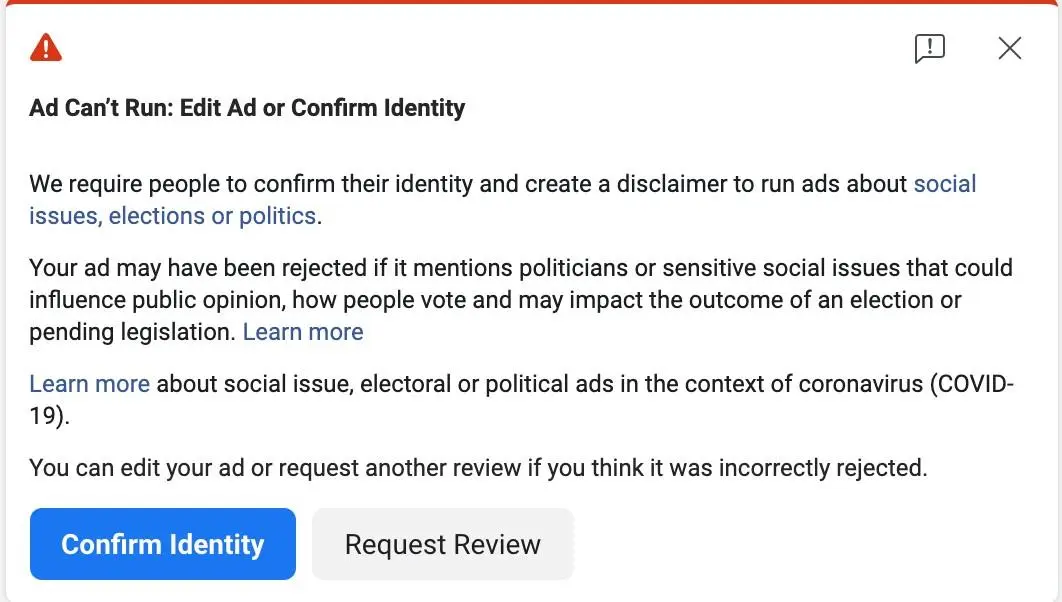
Review systems are designed to protect users from misleading experiences, prohibited offers and unsafe content. This means your campaign needs to be consistent from the first line of copy to the page where the user lands.
A useful rule is simple: if the ad promises something, the landing page should clearly deliver that same thing.
1. The product is not allowed
One of the most direct Facebook ads disapproved reasons is that the advertised product or service is prohibited. Some offers cannot be promoted at all. Others may be allowed only when specific conditions are met.
Examples of high-risk categories include:
- illegal products
- illicit drugs
- dangerous goods
- adult products
- deceptive financial offers
- services designed to help people act dishonestly
The question is not only whether the ad looks professional. You need to confirm whether the offer itself is permitted in the country where the campaign will run.

Restricted categories require more care. Alcohol, gambling, dating, financial services, cosmetic procedures and health-related products may need age limits, country restrictions, additional disclosures or other approvals.
Do not assume a product is approved simply because competitors appear to advertise something similar. Their campaign may have different permissions, market restrictions or account-level eligibility.
Before launching, check whether your offer is permitted in the target market and whether it requires special targeting or documentation. This step is particularly important for businesses in regulated industries.
2. The ad makes misleading claims
Misleading claims are a common advertising mistake for rejection because they can affect safety and user decision-making. A claim becomes risky when it promises an outcome that cannot be supported or when the actual offer is different from what the user expects.
Examples include:
- Guaranteed financial results
- Unsupported health outcomes
- Fake scarcity or false countdowns
- “Get rich quickly” style offers
- Prices or promotions that disappear on the landing page
- Claims that hide important conditions
A message does not need to be dramatic to cause problems. Even ordinary marketing language can become risky when it overstates what a product can do.
For example, “Reduce the appearance of fine lines” is very different from “Erase wrinkles permanently in seven days.” The first statement is more cautious and can be supported by a realistic product benefit. The second creates an absolute outcome that is difficult to verify.
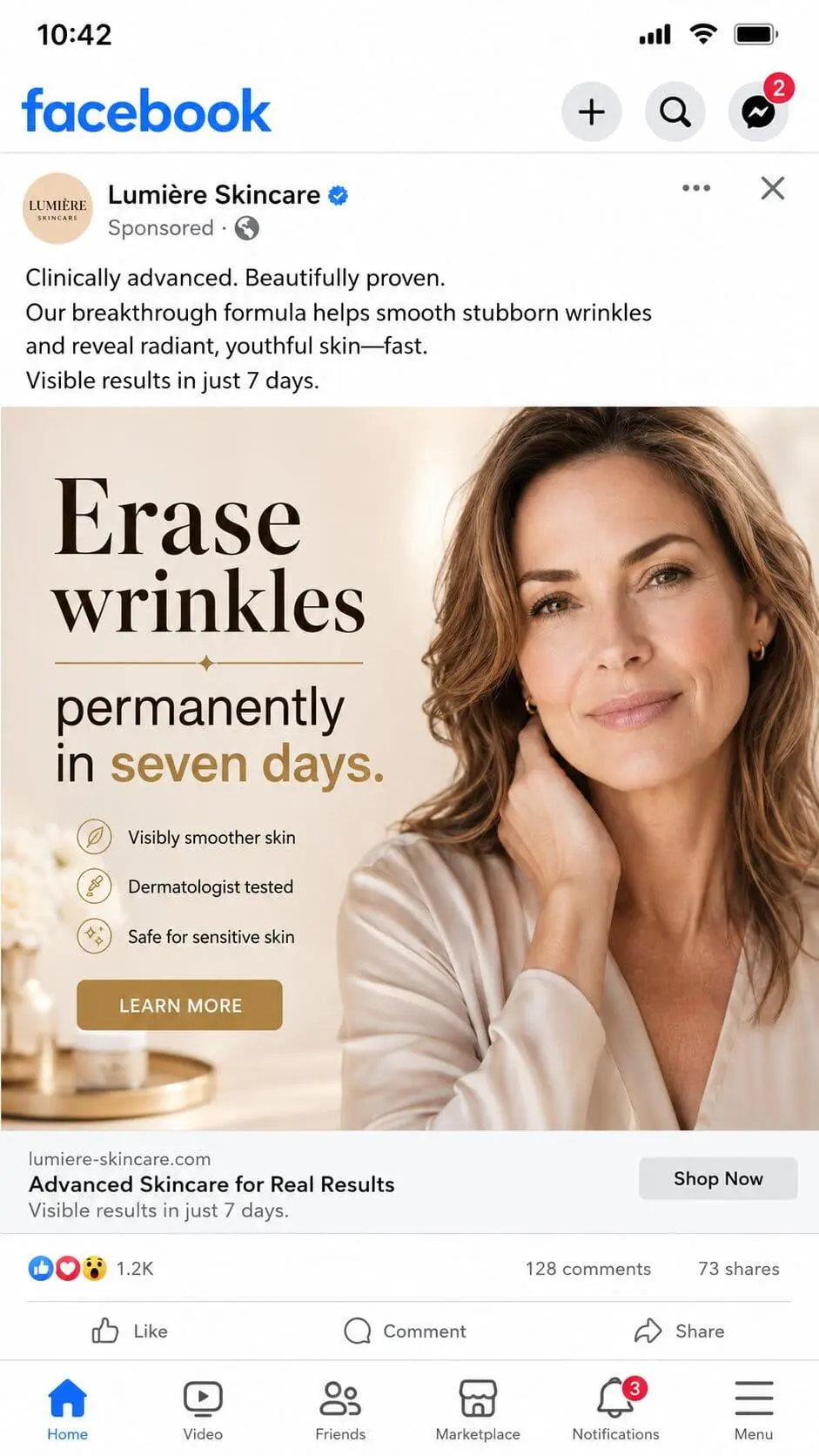
Use claims that the business can explain and support. Make terms, pricing and limitations visible. If a promotion requires conditions, do not hide them in small text or on a separate page that customers are unlikely to read.
3. The ad refers to sensitive characteristics
Ads should not directly state or imply that the person seeing the ad has a sensitive personal characteristic. This is especially important for health, weight loss, financial services, dating, housing, employment and personal-care advertising.
A message such as “Are you struggling with debt?” can be risky because it assumes something about the audience. A safer approach is to focus on the service without making a personal claim, such as “Explore practical ways to organise household finances”.
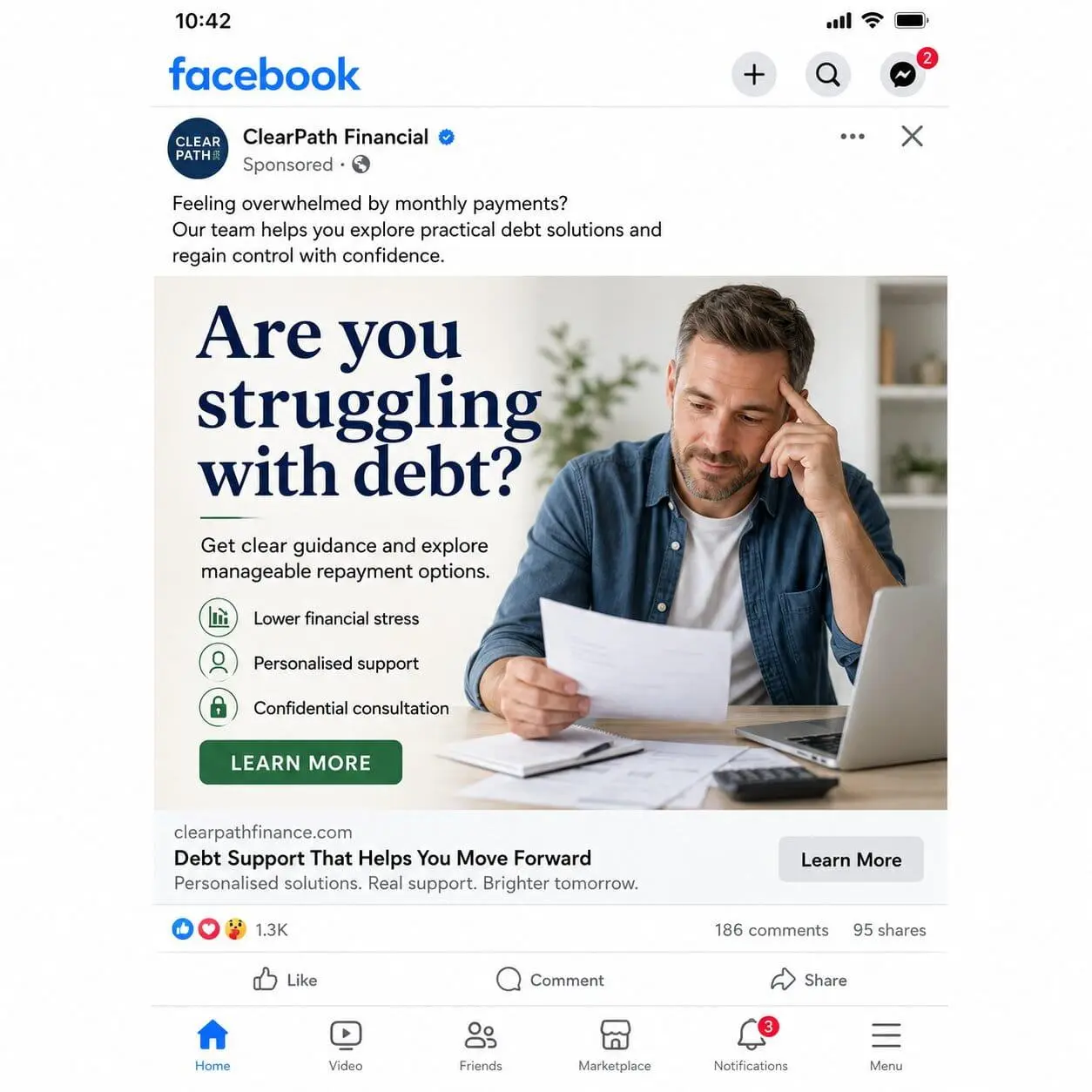
The same principle applies to health and appearance. Avoid language that makes people feel singled out because of their body, age, condition or personal circumstances. Before-and-after style messaging, negative self-image tactics and exaggerated transformation claims can create policy concerns.
Some advertising categories also have special rules because they can affect access to housing, employment, credit or political information. These campaigns may face stricter targeting limits or additional authorisation requirements.
The safer approach is to describe the offer, the use case and the available next step. Let the audience decide whether the message is relevant rather than telling them what is wrong with them.
4. The creative is misleading
An image or video can cause rejection even when the written copy looks acceptable. Creative should be clear, appropriate and honest about what the user will receive.
Ads can face problems when they include:
- Explicit or overly sexualised content
- Violent, shocking or disturbing imagery
- Harassment, hate speech or insulting language
- Fake buttons, fake notifications or false interface elements
- Copyrighted images, logos or videos used without permission
- Celebrity images or endorsements that are not authorised
A fake play button or notification may seem like a small design choice, but it can mislead users into expecting functionality that does not exist. The same applies to visuals that imitate another company’s app, website or product page.
Intellectual property issues are also easy to overlook. A business should not use another brand’s logo or customer testimonial unless it has permission. This includes creator content. A video may perform well organically, but it should not be used in a paid ad unless the rights are clear.
Creative should make the offer easier to understand. It should not rely on confusion, shock value or borrowed credibility.
5. The landing page doesn’t match the ad
A strong-looking ad can still be rejected because the destination page is broken, misleading or inconsistent with the campaign message. This is one of the most important Facebook ads disapproved reasons to check, especially when the creative appears compliant.
Your landing page should be:
- Publicly accessible
- Mobile-friendly
- Free from broken links or unusual redirects
- Consistent with the ad offer
- Clear about pricing, product details and key terms
- Free from hidden prohibited products or misleading content
For example, an ad may promote a discount, but the landing page shows a different price or no promotion at all. Or, a service ad may promise a consultation, but the page only contains vague brand information.
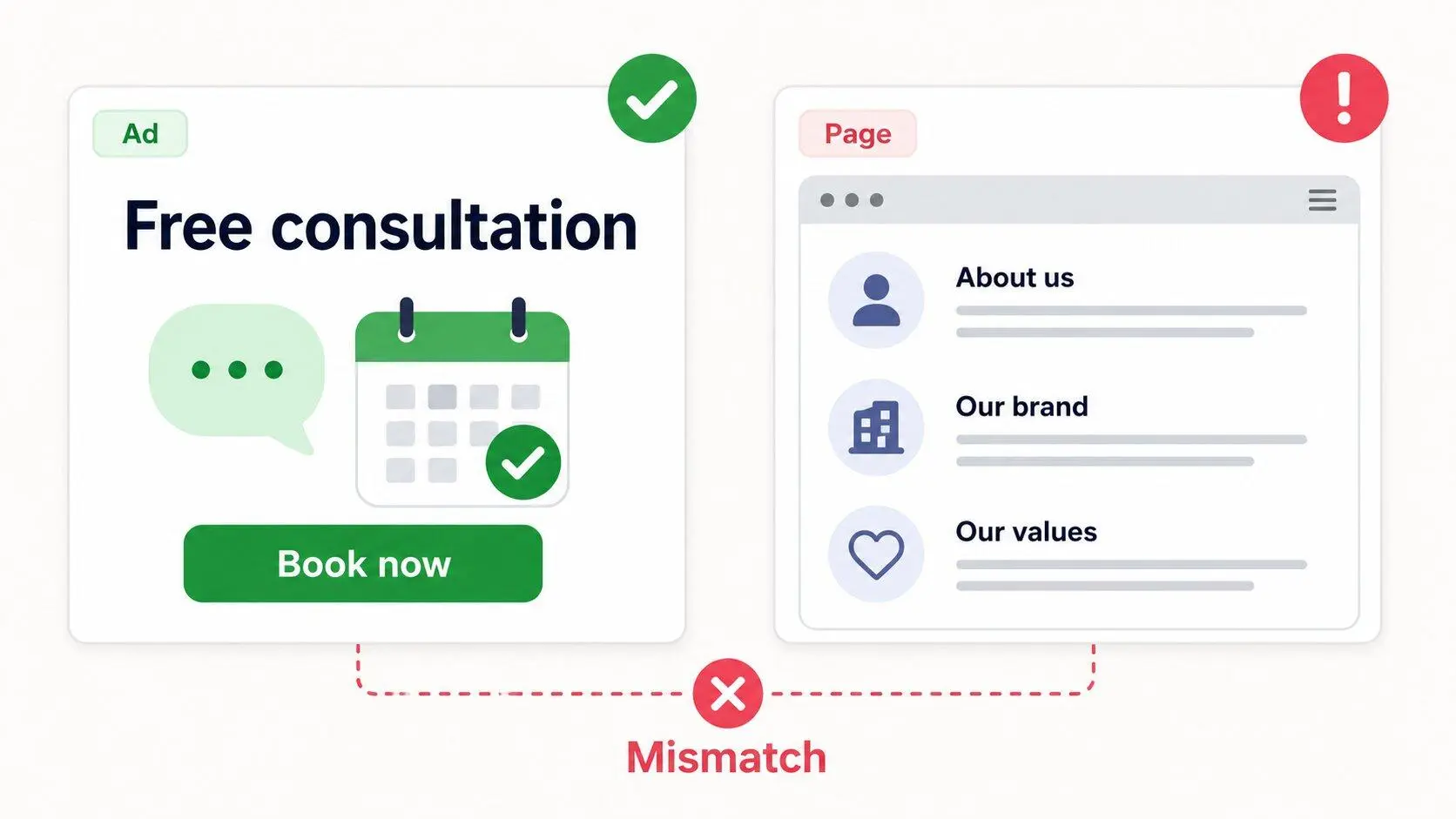
These mismatches create a poor user experience. They can also make Meta question whether the ad is presenting the offer honestly.
Check the destination in a private browser window and on mobile before submitting the campaign. Make sure the URL loads correctly without requiring unexpected login steps. Review every page in the conversion path, including product pages, checkout pages and thank-you pages.
The landing page should continue the conversation started by the ad. A person who clicked because of a product benefit, consultation offer or pricing message should see that same information immediately.
6. The targeting setup isn’t appropriate
Targeting can create compliance issues when it does not match the product category, local requirements or audience restrictions. This is especially relevant for restricted goods and services.
For example, an alcohol campaign may need age restrictions, a financial service may need clearer eligibility information, and a housing, employment or credit campaign may face limits on how audiences can be selected.
Targeting can also become a problem when the ad language and audience selection create discriminatory outcomes. Businesses should not use Meta’s advertising tools to exclude or target people unfairly based on protected characteristics.
Keep the targeting relevant to the offer. Avoid trying to bypass restrictions through vague language or unusual audience combinations. If the product has age, location or legal limits, make those conditions clear in both the campaign setup and the landing page.
When in doubt, reduce the complexity. A clear offer, appropriate audience and transparent landing page are safer than a campaign designed to push the edge of a policy category.
7. The problem is linked to business assets
Sometimes the creative looks compliant, the landing page works and the ad still does not pass. In these cases, the issue may be linked to an account-level or asset-level concern.
Check whether there are unresolved warnings involving:
- Ad account status
- Facebook Page status
- Business Account status
- Connected domain
- Product catalog
- Payment setup
- Previous rejected ads
- Required authorisations
This means advertisers should not focus only on the headline or image when the rejection notice appears unclear.
A campaign can also be affected if a product catalog contains prohibited or inaccurate items. A landing domain may have changed. A Page may have restrictions. A connected user account may need verification or may have limited permissions.
Use Account Quality or Meta Business Support Home to review the broader status of your advertising assets. This is more useful than repeatedly cloning the same campaign and waiting for a different result.
What to do when a Facebook ad is rejected
A clear process can save time and reduce the chance of repeated rejection.
1. Read the rejection notice carefully
Start with the policy reason Meta provides. Do not assume the visible copy is the only issue. The notice may point to a restricted category, destination problem or asset-level concern.
2. Identify which part of the campaign caused the issue
Review the ad as a complete system:
- Copy and headline
- Image or video
- Call to action
- Audience and location settings
- Landing page
- Product catalog, where relevant
- Account and Page status
This prevents you from making random edits that do not solve the underlying problem.
3. Fix the actual policy concern
Edit the relevant asset before resubmitting. If the claim is too strong, revise the claim. If the landing page is broken, repair the page. If the offer is restricted, confirm the correct age, location or approval conditions.
Do not simply duplicate the rejected ad with a small wording change. Meta may identify the same issue again because the underlying offer or destination has not changed.
4. Create a new compliant version when necessary
Some edits are easier to manage in a new version of the ad. This can be useful when the creative concept, audience or destination needs substantial revision.
Keep the revised version simple. Make one clear promise, use truthful proof and link to a landing page that supports the message.
5. Request another review when the decision appears incorrect
A review request is appropriate when you have checked the policy, corrected any obvious issues and believe the ad was rejected in error.
Do not use review requests as a shortcut around a clear violation. If the ad still contains a restricted offer, misleading claim or broken destination, fixing it first is more effective.
6. Document the reason and fix
Keep a simple record of the rejected campaign, the policy issue and what changed. This helps the team avoid repeating the same problem in future launches.
Over time, this record becomes a practical compliance checklist for your brand, industry and market.
Why an approved Facebook ad can be rejected later
An ad may be approved at first and later become rejected. This can feel confusing, but it does not always mean the system made a random decision.
The reasons can be various. For example, landing pages may have changed after the campaign launched; or a promotion may have expired, etc. The ad may have been reviewed again after a policy update or a new signal related to the business asset.
This is why compliance should not be treated as a one-time task before launch. Review the ad and destination whenever you update information or campaign messaging.
A campaign that stays consistent is easier to manage. When the ad and actual customer experience all match, there is less room for policy confusion.
Facebook Ads compliance checklist before launch
Use this short checklist before publishing a new campaign:
- Confirm that the product or service can be advertised in the target market.
- Check whether age, location or category restrictions apply.
- Make sure claims are realistic and can be supported.
- Remove wording that assumes personal attributes.
- Use only images, videos and brand assets you have permission to use.
- Check that the landing page loads properly on mobile.
- Match the offer, price and call to action across the ad and landing page.
- Review Account Quality for unresolved restrictions or warnings.
This process will not guarantee approval. Meta can make decisions based on policy context and available information. However, it can reduce preventable issues before they interrupt campaign delivery.
Frequently asked questions (FAQs)
Why are my Facebook ads disapproved?
Facebook ads can be disapproved because of issues in the creative, copy, targeting, landing page or connected business assets. Start with the rejection notice, then check the entire campaign journey. The problem may not be visible in the headline or image alone.
How long does Facebook ad review take?
Review times vary. Many ads are reviewed relatively quickly, but some campaigns may take longer when the category, destination or business asset requires additional checks. Avoid making repeated edits while an ad is still under review unless you have found a clear issue that needs correction.
Should I edit the ad or request another review?
Edit the ad when the policy concern is clear. For example, revise a misleading claim, replace unauthorised creative or repair a broken landing page. Request another review when you have checked the campaign and believe the decision was incorrect.
Can Facebook reject an ad after approving it?
Yes. Ads can be reviewed again after they begin delivery. This may happen if the landing page changes, the promotion expires, the product status changes or Meta identifies a new policy concern. Keep the destination and campaign message consistent throughout the campaign.
Why is my Facebook ad still rejected after I changed the copy?
The issue may sit elsewhere. Check the image, video, targeting, landing page, product category and account status. A copy edit will not solve a broken URL, an unsupported product claim or an unresolved account-level restriction.
Can rejected ads affect my Facebook ad account?
One rejected ad does not automatically mean the account will be disabled. However, repeated policy violations or unresolved asset-level concerns may lead to advertising restrictions. Check Account Quality when rejections recur or when multiple assets are affected.
Fix the real cause before launching again
Facebook ad disapproval is not only a copywriting problem. It can involve the offer, creative, targeting, landing page and account assets behind the campaign.
The best response is to diagnose the exact issue, fix the relevant component and submit a compliant version. Use review requests when the decision genuinely appears incorrect, not as a replacement for policy checks.
A careful compliance process protects campaign delivery and the long-term health of your Meta advertising account. Check out our Meta ads management for further effective ads running.

NEWEST POSTS
- Advertising Industry In Vietnam: The 2026 Trends, Channels and Market-Entry Strategy
- Best SEO Company in Vietnam: Latest Shortlist For Businesses
- How To Leverage Social Media For Customer Service Like A Pro?
- Social Media Post Tips – 8 Ways To Boost Engagement
- How To Use Social Media for Sales – In-depth Beginner Guide
Read more