
Facebook Ad Formats: How to Choose the Right Creative for Each Goal
Vincent
11/11/2025
38
Facebook ad formats are the creative structures used in Meta Ads Manager. The right format depends on what a customer needs before taking action. They may need to understand one offer, see a product in use, compare options, submit a form or start a conversation with your team.
Choosing a format is only one part of campaign planning. A useful Meta campaign also needs the right objective, placement, destination and conversion signal. An attractive video or carousel cannot compensate for an unclear offer, weak product page or slow lead follow-up.
Facebook ad formats in 60 seconds
The best Facebook ad format is not always the most complex one. A single image may be enough when the offer is clear. A video may help when the customer needs to see how something works. A carousel can explain several products or steps. A collection can support product browsing. Instant Forms and click-to-message ads can reduce friction when customers are ready to enquire.
|
If your audience needs to… |
Consider starting with… |
|
Understand one simple offer quickly |
Single image |
|
See a product, process or proof in action |
Video |
|
Compare products, features or steps |
Carousel |
|
Browse a wider product range |
Collection or catalog-led creative |
|
Submit details without leaving Meta |
Instant Form |
|
Ask questions before deciding |
Click-to-message |
|
Return to products they viewed before |
Catalog-led or remarketing creative |
The format should follow the customer decision. It should not be chosen only because another advertiser uses it or because it looks more advanced in Ads Manager.
What are Facebook ad formats?
A Facebook ad format is the visual layout of an ad. It determines how the creative is structured and how many images or videos it can contain.
The main formats are:
- Single image
- Video
- Carousel
- Collection
However, Meta advertising includes more than format. People often confuse ad formats with placements, campaign objectives or destinations. Understanding the difference makes campaign planning easier.
|
Layer |
What it controls |
Example |
|
Campaign objective |
What Meta should optimise for |
Awareness, traffic, leads or sales |
|
Ad format |
How the creative is structured |
Image, video, carousel or collection |
|
Placement |
Where the ad appears |
Feed, Reels, Stories or other eligible surfaces |
|
Destination |
Where the person goes after interacting |
Website, Instant Form, messaging or Instant Experience |
For example, a vertical video may appear in Reels or Stories. Reels and Stories are placements, not the core creative format itself. The video is the format. The placement determines where and how the user sees it.
This distinction matters because a format can be suitable for more than one objective. A carousel may support product discovery, lead generation or remarketing. A video may build awareness, explain a service or encourage a consultation. There is no format that belongs permanently to one funnel stage.
Facebook ad formats vs placements
Placements affect how an ad is viewed. Feed placements usually allow more context because people can pause and read. Reels and Stories are full-screen, mobile-first environments where the main idea needs to be clear quickly. A creative that works in Feed may crop poorly or lose key information in a vertical placement.
A business can sometimes use one creative asset across multiple placements. That does not mean it will look equally effective everywhere. A landscape product video may feel natural in Feed but waste screen space in Stories. A vertical video may work well in Reels but need adaptation for a traditional Feed layout.
Use placement previews before launch. Check whether the product, headline and call to action remain visible. Create placement-specific variations when the core message would otherwise be cropped, hidden or difficult to understand.
Technical requirements also change over time. Meta’s Ads Guide should be the reference point for current image ratios, safe zones, file types and placement availability. The practical rule is more stable: create assets around the way people actually view each placement, then review every preview before publishing.
Single image ads
Single image ads are useful when a business needs to communicate one message quickly. They work well for simple offers, product launches, promotions, customer proof or retargeting messages.
A strong image ad does not need to include every feature. It should make one reason to care easy to understand. That may be a product benefit, a clear offer, a relevant customer problem or a visual proof point.
For example, a skincare brand may use one image to show the product texture and a specific concern it addresses. A local service business may use one image to highlight its service area and booking process. A B2B company may use a clear visual with a practical claim, then direct the user to a page that explains the claim in more detail.
Single image ads are often a practical starting point when a brand wants to test several creative angles. They are faster to produce than video, but they still need a strong concept. A generic stock image with vague copy rarely gives people a reason to stop scrolling.
Use single image when:
- The offer is easy to understand.
- One product or benefit is the focus.
- The audience already knows the category.
- The business wants to test several message directions.
- The destination page provides the detail after the click.
Avoid relying on one image for a complex offer that needs explanation. In that case, video, carousel or a stronger destination experience may be more useful.
Video ads
Video is useful when movement, sequence or demonstration makes the offer easier to understand. A video can show how a product works, what a service process looks like, how a customer uses an item or why a particular problem matters.
The purpose of video is not simply to create engagement. A high number of views does not automatically mean the campaign supports a commercial outcome. The video should help the customer move toward the next action, whether that is viewing a product, comparing options, submitting an enquiry or remembering the brand later.
A product demonstration may be useful for ecommerce. A short process walkthrough may help a service business reduce uncertainty. A customer story may be useful when trust is a major barrier. A technical B2B company may use video to make a complex concept easier to understand before directing viewers to a guide or consultation page.
The first moments matter because users make quick decisions while browsing social content. However, there is no universal rule that every video must be under a certain number of seconds. The right length depends on the message. A short offer-led video may work for discovery. A longer product explanation may be appropriate when the audience already has interest.
Use video when:
- The product benefits from demonstration.
- The service process needs explanation.
- A customer story can reduce hesitation.
- The audience needs visual proof.
- The business can develop multiple creative concepts over time.
Reels, Stories and Feed video should be treated as placement choices. The core video concept can stay consistent, but the framing, crop and pace may need to change.
Carousel ads
Carousel ads allow a business to show multiple images or videos within one ad. Each card can support a different product, feature, step or call to action. This makes carousel useful when the customer needs to compare options or understand a sequence.
A carousel can work well for ecommerce, but it is not limited to product catalogues. A service business can use each card to explain a different stage of its process. A software company can show a problem, workflow, result and case study. A retailer can present a curated group of products around one customer need rather than simply showing every item in stock.
The strongest carousel has a clear structure. Every card should support the same message. A carousel that mixes unrelated products, offers and visual styles can create confusion.
Use carousel when:
- Customers need to compare products or features.
- The story works better in a sequence.
- Multiple products support one shopping need.
- Each card can lead to a relevant product or service page.
- A remarketing audience needs more proof before converting.
Carousel should not be used only because the business has many products. A long product range may be better served through collection or catalog-led creative. The question is whether the customer benefits from actively swiping through a selected set of cards.
Collection ads
Collection ads are designed for mobile product exploration. They can combine a primary image or video with products from a catalogue, helping users browse several options in a more immersive experience.
This can be useful for ecommerce brands with accurate product information, sufficient inventory and a clear shopping journey. A collection should make it easier for customers to explore relevant products, not simply display a large number of items without context.
For example, a fashion retailer may use a collection around a seasonal category. A homeware brand may build a collection around one room or design style. A beauty brand may group products around a routine, concern or bundle.
Collection ads depend on more than creative. Product titles, images, prices, availability and landing-page quality all affect the experience. If a product is unavailable, incorrectly priced or linked to a weak page, the campaign can create frustration even when the ad itself looks strong.
Use collection when:
- The business has a reliable product catalogue.
- Customers benefit from browsing several related items.
- Product images and descriptions are accurate.
- The mobile shopping experience is ready.
- The campaign has a clear product or category theme.
Collection is not automatically the best ecommerce format. A manual carousel may be better for storytelling or curated comparison. Catalog-led ads may be more useful for re-engagement. The right choice depends on the customer’s stage and the role of the campaign.
Beyond creative format
Not every Meta campaign sends people to a website. Some campaigns are designed to reduce friction by collecting information or starting a conversation inside Meta’s environment.
These are not creative formats in the same sense as image, video or carousel. They are conversion experiences or destinations that can be paired with different creative formats.
Instant Forms for lead generation
Instant Forms allow people to submit details without leaving the app. They can be useful when a business wants to reduce friction for newsletter sign-ups, quote requests, consultation enquiries or content downloads.
The benefit is convenience. The risk is lead quality.
A low-friction form may produce more submissions, but the business still needs to qualify and contact those leads. Before using Instant Forms, define what a useful lead looks like. Add questions that help the sales team understand fit without making the form unnecessarily difficult.
Instant Forms are most useful when:
- The business can follow up quickly.
- The offer is clear enough for a short form.
- Lead qualification is built into the process.
- The sales team can track outcomes after submission.
- The business measures booked meetings or qualified leads, not form volume alone.
Click-to-message ads for assisted decisions
Click-to-message ads send people into a conversation through Messenger, Instagram Direct or WhatsApp. They can be useful when customers need answers before they can decide.
This approach often suits higher-consideration services, customised products, appointment-based businesses or offers where people want reassurance before submitting a form. It can also work for ecommerce products that need sizing, availability or delivery clarification.
The message destination must be ready. A campaign that generates many chats without a response process can create a poor customer experience. Set expectations for response time, staff availability and handoff to sales.
Use click-to-message when:
- Customers often ask questions before buying.
- The business can respond within a practical timeframe.
- The product or service needs consultation.
- The team can track meaningful conversations.
- The next step after the chat is clear.
Instant Experience for richer storytelling
Instant Experience is a full-screen mobile destination that can combine images, video, carousel elements and text. It can help a brand explain more than a standard ad allows while keeping the user inside the Meta environment.
This can be useful when the product needs visual storytelling or when the business wants to build an immersive path before sending users to a website. It should not be used simply because it looks more advanced. The experience needs a clear narrative and a useful next action.
Catalog-led creative for product relevance
Catalog-led ads use product data to show relevant products based on the campaign setup and available customer signals. They are especially useful for ecommerce, product browsing and remarketing.
Catalog-led creative is not just another format. It depends on product feed quality, inventory accuracy, pricing and destination pages. A strong catalogue can help match people with relevant products. A weak one can amplify errors across many ads.
For returning shoppers, catalog-led ads can remind someone about products they viewed or related products that may fit their interest. However, they should use exclusions carefully. Existing customers do not always need to see the same first-purchase message again.
For more on audience stages, exclusions and returning-customer messaging, see our guide to Facebook remarketing.
How to choose a Facebook ad format by business goal
The format should support the specific action the business needs next.
|
Business goal |
Better starting direction |
Destination |
What to measure |
|
Introduce one simple product or offer |
Single image or short video |
Product or service page |
Qualified visits and next-step actions |
|
Explain a complex service |
Video or carousel |
Service page or Instant Experience |
Engaged visits, lead quality and consultation requests |
|
Sell several related products |
Carousel, collection or catalog-led creative |
Product or category page |
Product clicks, cart activity and sales quality |
|
Generate service enquiries |
Image, video or carousel with Instant Form |
Instant Form or landing page |
Qualified leads and booking rate |
|
Start sales conversations |
Image or video with click-to-message |
Messenger, Instagram Direct or WhatsApp |
Response time and converted conversations |
|
Bring shoppers back |
Catalog-led creative, carousel or proof-led video |
Relevant product page |
Returning purchases, frequency and exclusions |
This table is a starting point, not a fixed rule. A single image may produce sales. A video may generate qualified leads. The key is whether the format gives the user the information they need before taking the next step.
Choose format by customer journey
Different customers need different information at different stages.
|
Customer stage |
What they need |
Format direction |
|
New to the brand |
Fast explanation or visual relevance |
Single image or video |
|
Interested but uncertain |
Proof, comparison or education |
Video or carousel |
|
Browsing products |
Product variety and clear navigation |
Collection or catalog-led creative |
|
Ready to enquire |
A low-friction path to contact |
Instant Form or click-to-message |
|
Returning visitor |
A reason to revisit the offer |
Catalog, proof-led video or stage-specific carousel |
A new customer may not need a detailed product catalogue. They may need one clear reason to care. A returning visitor may not need the same introductory video. They may need proof, reviews, delivery information or a direct path back to the product they viewed.
This is why format choice should connect with audience strategy. The creative and destination should reflect what the person already knows about the brand.
How to plan creative for Feed, Stories and Reels
Meta placements require different creative treatment. Feed allows users to pause, read and examine the visual. Stories and Reels are full-screen environments where the message needs to work vertically and quickly.
A practical asset plan often includes:
- A vertical version for full-screen placements.
- A feed-friendly version that preserves the main message.
- Clear product or brand visibility early in the creative.
- Copy that remains readable without relying on tiny text.
- Placement previews before launch.
- Variations when key information would be cropped or hidden.
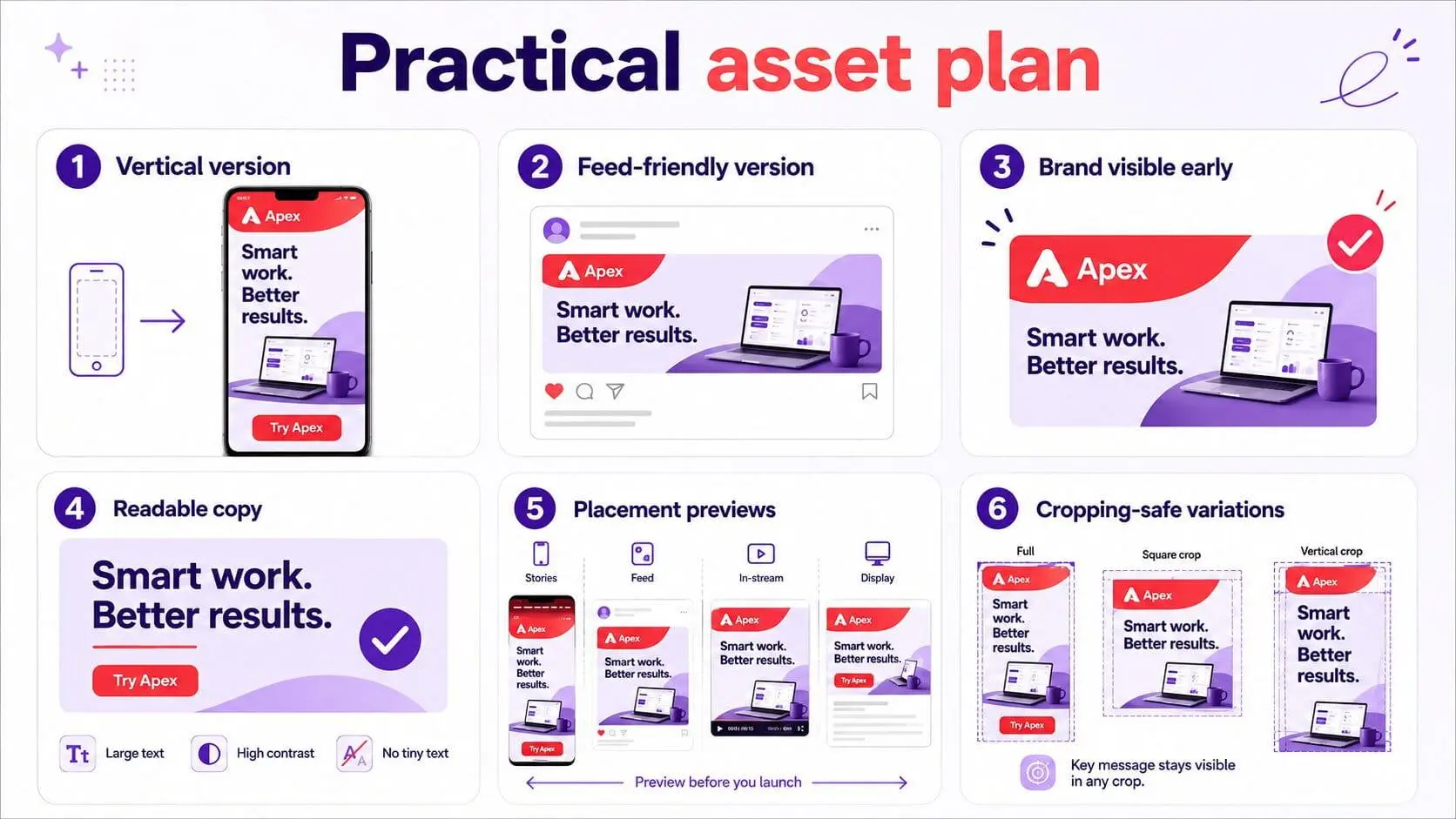
Do not assume a single square image or video will work equally well in every placement. Creative customisation can reduce waste and help the message remain clear across Facebook and Instagram surfaces.
How to test formats without creating misleading results
A format test should answer one specific question. It should not change the format, audience, offer, landing page and budget at the same time.
Start with a clear creative hypothesis. For example, does the customer respond better to product demonstration, expert proof or price transparency? Create two or three concepts around that question. Then choose formats that support each concept.
Keep the destination and conversion event consistent where possible. This makes it easier to understand whether the creative approach influenced results. Review quality, not only surface metrics.
For example:
- Video views do not automatically mean sales interest.
- High carousel click-through rate does not guarantee purchases.
- Low-cost Instant Form leads may not become qualified conversations.
- Many message starts do not matter if the team cannot respond.
A useful test looks at the customer action that matters after the ad interaction. This may be a qualified lead, booked consultation, add-to-cart, purchase or verified conversation.
For a broader framework on campaign structure, creative testing and weak conversion paths, explore our guide to common Facebook ad mistakes.
Technical requirements and creative compliance
Technical specifications matter, but they should not become the entire creative strategy. A correctly sized asset can still underperform if the offer is unclear. A visually strong ad can still be rejected if the claim, destination or category creates a policy issue.
Before publishing:
- Check current requirements in Meta’s Ads Guide.
- Preview assets across selected placements.
- Confirm that the ad promise matches the destination page.
- Use original media or content with the appropriate rights.
- Keep product claims accurate and supportable.
- Make sure offers, prices and availability are clear.
- Review lead forms and messaging flows before sending traffic.
Ad approval is not determined by dimensions alone. Creative, copy, targeting, landing pages and related account factors can all affect whether an ad is approved or later reviewed.
For a closer look at common rejection scenarios and how to diagnose them, read Facebook ad disapproval reasons.
Common Facebook ad format mistakes
Treating Reels and Stories as standalone formats
Reels and Stories are placements. The core creative may be image, video, carousel or another eligible format. Plan the asset around the placement rather than treating the placement name as the entire strategy.
Choosing a format before defining the customer action
A collection, carousel or video should not be selected just because it appears more sophisticated. Start with the action you need: product discovery, comparison, form completion, message conversation or purchase.
Using one asset for every placement without checking it
One creative can appear differently across placements. Always review previews and build variations when important product detail, copy or calls to action would be lost.
Using Instant Forms without a follow-up process
Low-friction forms can create high lead volume. They only create value when the business can contact, qualify and track those leads after submission.
Running catalog-led ads with inaccurate product data
Catalog campaigns depend on product titles, prices, stock status, images and landing pages. Weak feed data can create a poor customer experience at scale.
Measuring only the platform metric closest to the ad
CTR, video views, leads and message starts are useful signals. They should not be the final measure. Evaluate what happens after the interaction.
Expecting one creative to perform indefinitely
Creative fatigue, changing competition and audience saturation can affect performance. Build a repeatable process for developing and testing new concepts rather than waiting until results collapse.
Frequently asked questions (FAQs)
What are the main Facebook ad formats?
The main creative formats are single image, video, carousel and collection. These formats can be used with different campaign objectives and placements. Businesses can also choose destinations such as websites, Instant Forms, messaging and Instant Experiences.
Are Reels and Stories Facebook ad formats or placements?
Reels and Stories are generally placements or viewing environments. A video, image or other eligible creative format can be adapted to appear there. The placement affects how the creative should be framed, cropped and paced.
Which Facebook ad format is best for ecommerce?
There is no single best format. Single images and videos can introduce products. Carousel can support comparison or curated product stories. Collection and catalog-led creative can help customers browse more products. The best option depends on product range, feed quality and customer journey.
Which Facebook ad format is best for lead generation?
Image, video or carousel can all support lead generation when paired with a strong offer and suitable destination. Instant Forms can reduce friction, while landing pages may be better when the business needs more qualification. The important measure is qualified lead rate, not form volume alone.
Is carousel better than video ads?
Not always. Carousel is useful when customers need to compare products, features or steps. Video is useful when motion, demonstration or storytelling creates more understanding. The best format depends on the customer question and the next action required.
What is the difference between an Instant Form and a click-to-message ad?
An Instant Form collects customer details inside Meta’s environment. A click-to-message ad starts a conversation in Messenger, Instagram Direct or WhatsApp. Forms are useful for structured lead capture. Messaging is useful when customers need answers before deciding.
Can one creative run across Facebook and Instagram placements?
Yes, but it should be reviewed across each placement. A creative may crop differently or lose important text in full-screen vertical environments. Placement-specific variations can help preserve the intended message.
Where can I find current Meta ad specifications?
Meta’s Ads Guide is the best source for current creative specifications, placement availability and technical requirements. Check it before production because formats and placement rules can change.
Choose the format that helps the customer take the next step
The best Facebook ad format is not the one with the most features. It is the one that gives the customer the right information at the right stage, works in the placement where they see it and leads to an action the business can measure.
A single image can be enough when the offer is simple. Video can help when proof needs to be seen. Carousel can help customers compare. Collection and catalog-led creative can support product exploration. Forms and messaging can reduce friction when people are ready to enquire.
On Digitals helps brands connect Meta creative, audience strategy, conversion tracking and campaign measurement into a paid-social system that supports real business outcomes. Explore our Facebook ads services to build a format and creative strategy around your customer journey.

NEWEST POSTS
- Advertising Industry In Vietnam: The 2026 Trends, Channels and Market-Entry Strategy
- Best SEO Company in Vietnam: Latest Shortlist For Businesses
- How To Leverage Social Media For Customer Service Like A Pro?
- Social Media Post Tips – 8 Ways To Boost Engagement
- How To Use Social Media for Sales – In-depth Beginner Guide
Read more