
Google Search Console Achievements: What the Report Shows
Vincent
03/10/2025
13
Google Search Console Achievements is a click-based milestone report inside a SEO tracking tool like Search Console. It shows one current in-progress target and past achieved milestones using clicks from Google Search over 28-day periods. The report can make SEO progress easier to notice, but it does not measure rankings or profitability.
An Achievements milestone gives teams a simple signal that search traffic has reached a new point. However, the report should be read in context. A new badge can show that your website has gained search clicks. It does not explain which pages caused the growth, whether visitors found the right information, or whether traffic created business results.
What are Google Search Console Achievements?
Google Search Console Achievements are milestones that recognise progress in clicks from Google Search. They appear as achievements inside Search Console and may also trigger an email notification when a milestone is reached.
The report is designed to help website owners track growth in a simple way. It focuses on click milestones rather than technical SEO details or conversion reporting.
For example, a website may receive an achievement after reaching 50 clicks from Google Search within a 28-day period for the first time.
Achievements are useful because they turn search growth into a visible checkpoint. They can help a small business, content team or new website notice that its SEO work is beginning to create results.
They should not be treated as proof that SEO is complete. A click milestone only shows that Google Search traffic has crossed a specific level. It does not measure lead quality, sales, rankings or return on investment.
|
The report can show |
The report does not show |
|
Click milestones from Google Search |
Google ranking factors |
|
One current in-progress target |
Individual keyword rankings |
|
Previously achieved milestones |
Leads, sales or revenue |
|
Growth compared with the prior 28 days |
A complete SEO campaign result |
|
Links to helpful Search Console resources |
A custom KPI dashboard |
Key takeaways: Achievements measures progress in search clicks. It does not explain the full reason behind that progress.
A business may gain clicks because more pages were indexed, content improved, demand increased or rankings changed. To understand why, you need other Search Console reports.
How does the Achievements report work?
The Google Search Console Achievements report has two main sections: In progress and Achieved.
The In progress section shows the milestone your website is currently working toward. The Achieved section shows milestones your property has already completed.
Google selects one current milestone
Google Search Console analyses your property’s Google Search click data and selects one relevant milestone that is currently in progress.
Only one milestone can appear in the In progress section at a time. This is important because the report is not a custom goal-setting tool. You cannot choose a click target, change its threshold or create a milestone based on your own business objective.
The current milestone acts as a progress checkpoint. It can show how traffic compares with the previous 28 days and direct users to the main Insights report or other helpful resources.
This makes the feature easy to understand. It also means the report should not replace a proper SEO plan.
Achievements move into your history
When your website reaches the milestone, it appears in the Achieved section. The report keeps a record of completed milestones so you can look back at search growth over time.
A completed achievement can be useful during monthly reporting. It gives teams a simple way to mark a moment of progress, such as a new website earning its first meaningful level of organic clicks.
The history is not a detailed trend report. It does not show every change in traffic or explain which actions caused growth. It simply records that the milestone was reached.
The report uses 28-day click data
Achievements are based on clicks from Google Search over 28-day periods. Google’s example is a website reaching 50 clicks in 28 days for the first time.
This does not mean every property will follow the same set of milestones. Google does not publish a complete tier system for all websites.
Avoid assuming that every badge follows a fixed sequence. Search Console chooses the in-progress milestone it considers relevant to the property’s current click level.
How to access Google Search Console Achievements
The report is available inside Google Search Console for eligible properties with enough data.
To view it:
- Open Google Search Console.
- Choose the correct website property.
- Open the Achievements report.
- Review the current In progress section.
- Check the Achieved section for past milestones.
New properties may not show data immediately. Google Search Console may need around 28 days to collect enough information for the report.
If you do not see an achievement, this does not mean your website has failed. It may simply be too new, have limited search traffic or not yet have enough data for a milestone.
The report should be treated as an optional progress view. Your main SEO work should still focus on content quality, indexing, technical health and search intent.
What Google Search Console Achievements measure and do not measure
The Achievements report is useful when used for the right purpose. Problems start when a click milestone is treated as a full performance report.
|
Question |
Is Achievements the right report? |
Better place to check |
|
Has Google Search traffic reached a click milestone? |
Yes |
Achievements |
|
Which queries created more clicks? |
No |
Performance report |
|
Which pages have low CTR? |
No |
Performance report |
|
Is a page indexed? |
No |
Page Indexing or URL Inspection |
|
Are visitors submitting forms? |
No |
Google Analytics 4 |
|
Is SEO generating revenue? |
No |
GA4 or CRM reporting |
|
Did a badge improve rankings? |
No |
Achievements do not affect rankings |
A completed achievement is not a ranking signal. Google does not use the report to decide how pages rank.
It is also not a conversion report. A website can gain clicks without gaining leads. For example, a blog article may earn more traffic from broad informational queries, while service enquiries stay unchanged.
This does not make the achievement useless. It simply means the milestone should be read as one part of a wider SEO picture.
How to use Achievements with other Search Console reports
Google Search Console has several reports that answer different questions. Achievements is useful for noticing growth. Other reports explain the detail behind that growth.
Use Performance report to explain click growth
The Performance report is the main place to investigate changes in organic search traffic. It shows clicks, impressions, CTR and average position.
When you receive an achievement, open the Performance report and compare the latest period with the previous period. Look for changes in pages, queries or search appearance.
You may discover that one refreshed article gained visibility. You may also find that several pages improved slightly and created growth together.
The report can help answer questions such as:
- Which page gained the most clicks?
- Which query created new visibility?
- Did impressions grow before clicks?
- Did CTR improve after a title change?
The Achievements report tells you that a milestone happened. The Performance report helps explain what happened around it.
Use Insights report to spot content patterns
Search Console Insights can be useful for website owners who want a more accessible view of content performance.
After a milestone is reached, Insights may help highlight pages that are growing or attracting more attention. This can be useful for content teams deciding which topics deserve further investment.
For example, if several pages about one service category improve at the same time, that may suggest stronger topical relevance. It may also show an opportunity to add related content or improve internal links.
Insights should support your analysis, not replace it. Important SEO decisions still need evidence from detailed Performance data.
Use Page Indexing and URL Inspection for discovery issues
A click milestone may slow down because Google has not discovered or indexed important pages. In that case, Achievements cannot tell you what is wrong.
The Page Indexing report helps identify whether Google can index pages on your website. The URL Inspection tool helps check the indexing status of a specific URL.
These tools are useful when:
- A new article does not appear in search.
- A page is excluded from Google’s index.
- A sitemap contains URLs that are not being processed.
- A technical issue prevents Google from accessing a page.
Use Core Web Vitals for user experience issues
Core Web Vitals is separate from Achievements. It helps website owners review real-world page experience data for indexed URLs.
The report focuses on loading, responsiveness and visual stability. It groups pages by performance status and helps identify broader issues affecting similar URLs.
A Core Web Vitals issue does not automatically explain every traffic change. However, poor user experience can make it harder for visitors to use a website effectively.
If search visibility grows but visitors leave quickly, page speed, mobile usability and content relevance may all deserve review.
How to turn an achievement into a useful SEO checkpoint
An achievement should lead to a useful question: what changed, and what should the team do next? The report is most valuable when it starts a review, not when it ends one.
Check what changed before the milestone
Start with the Search Console Performance report. Compare clicks, impressions, CTR and average position before and after the milestone period.
Then check which pages contributed most to the change. A growing service page may suggest stronger commercial visibility. A growing blog article may show that a topic is gaining demand.
Look at the main queries for those pages. Some queries may show that your content now matches the audience better. Others may reveal a mismatch between traffic and business intent.
Find the next realistic opportunity
A milestone can also help you decide what to improve next.
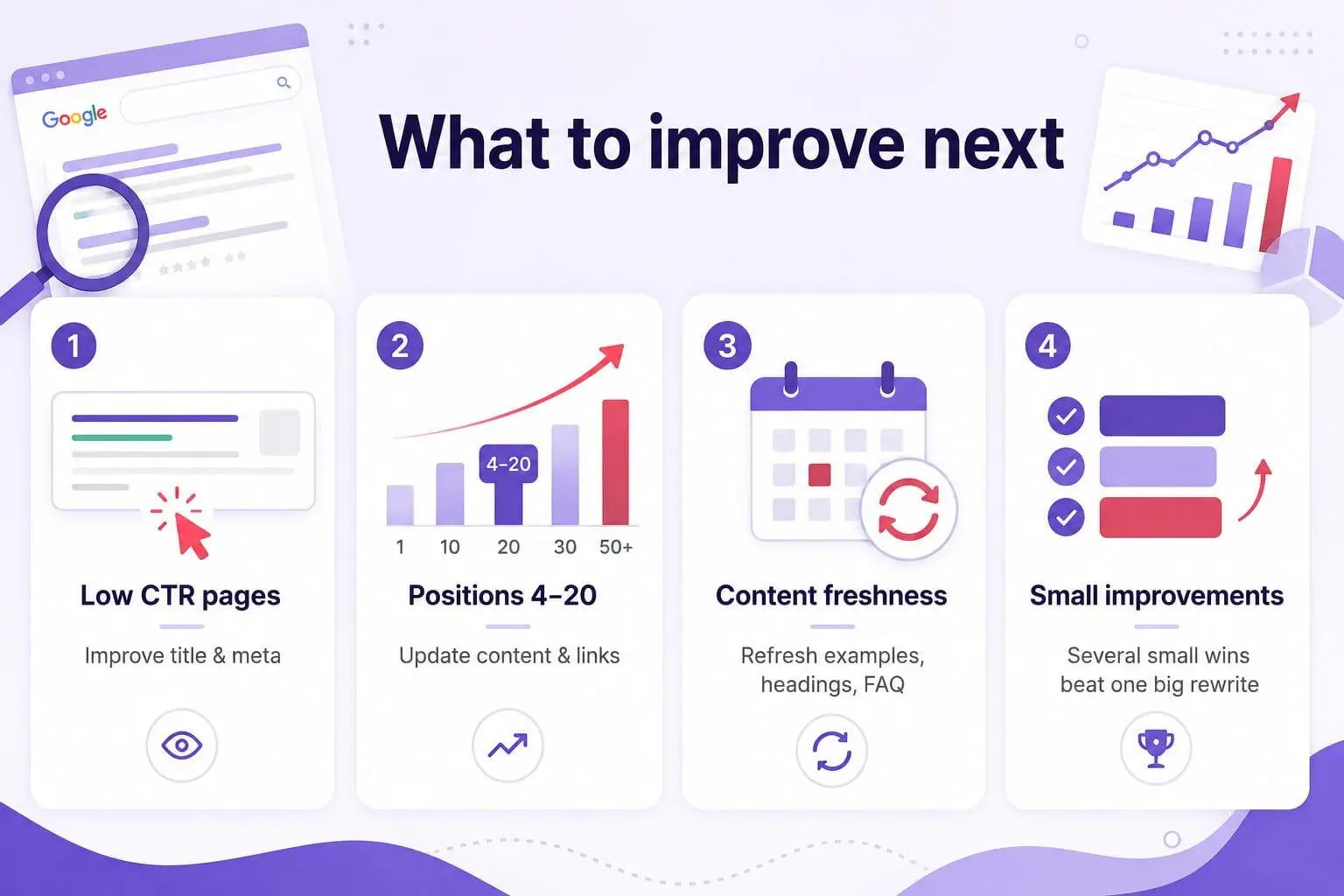
Look for pages with steady impressions but low CTR. These pages may need a better title, clearer meta description or stronger match with the search result.
You can also review pages ranking around positions 4 to 20. These pages may have a realistic opportunity to improve with updated content, clearer structure or stronger internal links.
Another useful check is content freshness. A page may have useful information but outdated examples, weak headings or missing FAQ content.
Small improvements across several pages can create stronger progress than rewriting one page completely.
Connect clicks to business outcomes
Clicks are an early SEO signal. They show that people are reaching your website from Google Search.
The next question is whether those visitors take meaningful action. This is where Google Analytics 4 and CRM data become important.
For a lead-generation website, useful actions may include submitting a form or downloading a brochure. For ecommerce websites, they may include adding a product to cart or completing a purchase.
A healthy SEO report should connect visibility, engagement and outcomes. Achievements only covers the visibility milestone.
Why Achievements can help beginner SEO teams
Google Search Console Achievements can be useful for beginners because it makes progress easier to see.
SEO often moves gradually. A new website may spend weeks building content, fixing technical issues and waiting for Google to process changes. In that situation, a visible click milestone can give the team a simple sign that organic search activity is growing.
The report can also help when communicating with non-specialists. A business owner may not understand the average position or CTR immediately. A completed milestone is easier to discuss.
Achievements can be useful for:
- New websites building their first organic traffic.
- Small teams that need simple reporting checkpoints.
- Content teams tracking early growth.
- Stakeholders who want a quick progress signal.
However, the report should not become the only thing a team watches. A badge can encourage progress, but it does not prove that the work is profitable or complete.
Common misconceptions about Google Search Console Achievements
Google Search Console Achievements is simple, which can make it easy to misunderstand.
|
Misconception |
Reality |
|
Achievements improve rankings |
They do not affect Google’s ranking systems |
|
A new badge proves SEO success |
It proves a click milestone only |
|
More clicks always mean more leads |
Conversion quality must be checked elsewhere |
|
Achievements tracks all SEO metrics |
It focuses on click-based milestones |
|
Teams can create custom milestones |
Google chooses the current in-progress milestone |
|
No badge means SEO is failing |
The property may be new or have limited data |
Another common mistake is using the report as a client KPI. A milestone can be included in a monthly update, but it should not replace clicks, impressions, rankings, leads, revenue or retention data.
A better approach is to use Achievements as a short progress highlight. Then show supporting data from Search Console, GA4 and CRM reports.
Frequently Asked Questions (FAQs)
What are Google Search Console Achievements?
Google Search Console Achievements are click-based milestones that track progress in Google Search traffic. The report shows one current milestone in progress and a record of previous milestones that your website has achieved.
Do Google Search Console Achievements affect rankings?
No. Google Search Console Achievements do not affect Google rankings. The report is designed to recognise progress in search clicks, not to show how Google’s ranking systems evaluate a website.
What does the Achievements report measure?
The report measures click-based milestones from Google Search over 28-day periods. It does not measure rankings, impressions, conversion rate, leads, revenue or customer quality.
Why do I not see any Achievements data?
A new Search Console property may need around 28 days to collect enough data. Low search traffic can also mean that a milestone is not available yet. This does not automatically indicate a technical problem.
Can I create my own Search Console achievement goal?
No. Search Console selects the current in-progress achievement based on your website’s Google Search click data. The feature is not designed as a custom SEO goal-setting system.
Does the report track impressions, CTR or conversions?
No. Achievements focuses on click milestones. Use the Performance report for impressions and CTR. Use Google Analytics 4 or CRM reporting to track conversions and business outcomes.
Should I use Achievements instead of Performance reports?
No. Achievements is a simple progress tracker. The Performance report provides the detailed data needed to analyse clicks, impressions, CTR, positions, pages and queries.
How should I report Achievements to stakeholders?
Present an achievement as a milestone in Google Search clicks. Then add context from Performance reports, GA4 and CRM data. Explain which pages grew, what may have caused the growth and whether the additional traffic supported a business outcome.
Final thoughts
Google Search Console Achievements makes search growth easier to notice and share. It can be a useful checkpoint for new properties, content teams and business owners who want a simple view of progress.
However, a click milestone is only one SEO signal. Meaningful decisions require Performance data, technical checks and conversion reporting.
To build a clearer reporting process across content, technical SEO and business outcomes, learn how On Digitals’ Technical SEO Services can support a more practical search growth plan.

NEWEST POSTS
- Advertising Industry In Vietnam: The 2026 Trends, Channels and Market-Entry Strategy
- Best SEO Company in Vietnam: Latest Shortlist For Businesses
- How To Leverage Social Media For Customer Service Like A Pro?
- Social Media Post Tips – 8 Ways To Boost Engagement
- How To Use Social Media for Sales – In-depth Beginner Guide
Read more