
Insights
How To Battle On Tiktok Live – 5 Steps For Beginners
On Digitals
05/02/2026
45
How to battle on TikTok Live is a popular way for creators to compete, gain gifts, and boost live engagement. PK battles let hosts face off in real time while viewers support their favorite streamer. Let’s explore how to start a battle, score points, and win on TikTok Live.
Overview of the TikTok Live battle scene
Live battles focus on flow and audience energy rather than confrontation. Top creators design each session as a shared narrative where viewers help shape the outcome through timing, reactions, and participation. When expectations are clear and the experience feels balanced, people are more likely to stay and engage, which is essential for how to battle on TikTok Live.
To build confidence with this format, spend time watching experienced hosts in action. Pay attention to how they introduce challenges, manage pacing, and adapt when the mood shifts. Their ability to involve chat and maintain momentum offers practical insight you can apply immediately.
Strong battle hosts know when to slow down and when to move on. They acknowledge comments, reward creativity, and switch beats before attention drops. This sense of timing and control forms the foundation for mastering live battles and sustaining long-term viewer interest.
Live battles thrive when audience energy drives engagement consistently
How to battle on TikTok Live in detail
Understanding how to battle on TikTok Live starts with knowing how the LIVE Match system works and how viewers influence each outcome. A clear step-by-step approach helps creators manage timing, engagement, and competition more effectively.
Step 1: Prepare and schedule the battle
Learning how to battle on TikTok Live begins with proper preparation and coordination between creators. Hosts usually schedule the battle in advance and notify their audience ahead of time. This preparation builds anticipation and ensures viewers are ready to participate once the LIVE starts.
Step 2: Check LIVE match feature availability
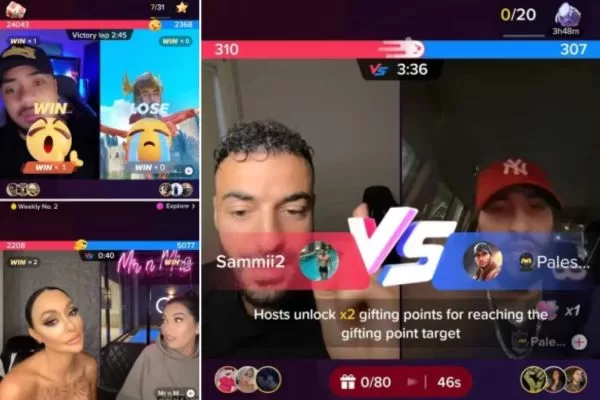
Not all TikTok accounts with LIVE access can use the LIVE Match feature. Creators must go live and look for the red and blue linked circles or the boxing gloves icon on the screen. These indicators confirm that the account is eligible to start a TikTok Battle.
Step 3: Start the LIVE and invite a host
Creators tap the Go LIVE button to begin their stream. Learning how do you battle on TikTok Live ensures you can smoothly invite other creators and kick off the match. Once the LIVE is active, they can select the boxing gloves icon to invite another creator. The battle starts immediately after the invitation is accepted.
Step 4: Engage viewers during the battle
Viewers support their favorite creator by sending virtual gifts using TikTok Coins. Creators keep the energy high by interacting with the chat, performing challenges, or using playful trash talk, which demonstrates how to battle on TikTok Live effectively. This interaction encourages more participation and increases Gift activity.
Step 5: Determine the winner
TikTok tracks the total value of gifts sent during the battle in real time. When the countdown ends, the platform automatically calculates the final scores. The creator with the highest total gift value is announced as the winner.
Understanding the system ensures smooth execution and viewer participation
How much money can you earn from TikTok battles?
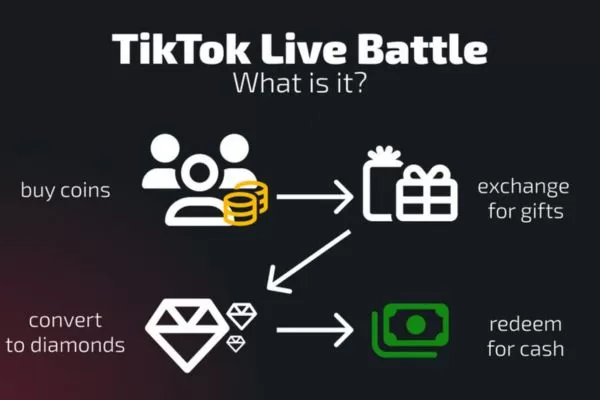
TikTok Battles do more than offer friendly competition or bragging rights. While fans spend real money to buy coins and send virtual gifts, those gifts themselves cannot be converted back into cash. However, winning a battle can boost a creator’s visibility through higher placement on LIVE Weekly Rankings.
Understanding how to battle on TikTok Live also means knowing how monetization really works behind the scenes. Battles help creators attract more viewers, increase engagement, and gain new followers in a short amount of time. A brief five-minute battle can sometimes deliver the same exposure as a much longer regular live stream.
TikTok rewards successful livestreams with Diamonds, which are different from Gifts. Diamonds have a real cash value and are awarded based on gift volume and LIVE ranking performance. The more popular the battle and the higher the ranking, the more Diamonds a creator can earn, though the exact payout depends on region and TikTok’s policies.
Live battle pre-stream checklist
This TikTok Live battle explained guide shows exactly what to prepare and how to engage your audience effectively. Preparation makes a real difference once a live battle is underway, especially when learning how to battle on TikTok Live effectively. A simple, repeatable pre-stream routine prevents wasted setup time and helps you stay focused when you go live. This consistent cadence also makes your stream feel more polished and professional to first-time viewers.
- Confirm the structure: Plan a strong opening hook, a short warm-up challenge, the main battle rounds, and a clear cooldown or call to action.
- Curate prompts and challenges: Prepare 6–8 prompts that fit your niche and energy, plus a few rapid-fire options to maintain fast pacing.
- Check tech and space: Ensure front-facing lighting, a clear microphone baseline, a clean background, and a stable internet connection.
- Define roles if collaborating: Decide who leads the stream, who moderates the chat, and who handles prompts or humor.
- Plan a safe, positive tone: Set clear boundaries for chat behavior and outline how you will manage interruptions or trolling.
In addition, map out a few backup ideas in case the energy drops. A well-timed shift, such as a rapid-fire round or a collaborative mini-challenge, can quickly re-energize the room without breaking your flow.

Preparing content, tech, and roles improves performance and professionalism
Techniques to make live broadcasts more interactive and entertaining
Once the stream is live, your performance depends on how well you control pacing, attention, and audience interaction when applying how to battle on TikTok Live effectively. The techniques below help you run engaging battles while staying natural and authentic:
- Start with a strong hook: Open with a clear teaser of what’s coming and invite viewers to join in from the very first second.
- Invite audience involvement: Ask questions, request specific prompts, or let viewers vote on outcomes in real time.
- Maintain a dynamic pace: Switch between quick rounds and relaxed, playful banter to avoid viewer fatigue.
- Use clean transitions: Clearly signal when you move to the next round and acknowledge chat reactions to maintain momentum.
- Balance talk and action: Avoid over-commentary and let actions lead, using words only to enhance the moment.
Visual and sound optimization for live battles
Technical quality plays a major role in retaining viewers during live battles. Even when focusing on production, knowing how do TikTok live battles work ensures your visuals and audio match the flow of the battle. Clear visuals, crisp audio, and a clean setup help your stream feel more professional and easier to follow. These details are especially important when learning how to battle on TikTok Live effectively.
- Lighting: Use front-facing light to evenly illuminate your face and avoid harsh side lighting that creates shadows.
- Camera position: Keep the camera at eye level or slightly above, and frame your upper body so movements and expressions are clear.
- Sound quality: Prioritize a reliable microphone and a quiet environment, as clear audio matters more than flashy visuals.
Background: Choose a calm, non-distracting backdrop, adding minimal branding only if it enhances recognition. - On-screen prompts: Use simple visual cues or lower-thirds to guide viewers without interrupting immersion.
Small visual and audio improvements add up over time. A consistent look and sound help viewers recognize your channel faster and support long-term audience growth during future live battles.
Clear audio and visuals make streams more engaging and accessible
Stream structure for live battles
A clear and repeatable structure helps keep viewers engaged from the first minute to the last. Aim for a format that is flexible enough to adapt in real time but consistent enough for viewers to recognize and follow. A proven flow usually includes a quick opening, several short rounds, a mid-stream shift, a strong final push, and a clear close with a call to action.
- Opening (2-3 minutes): Welcome viewers, explain the battle format, and introduce the main challenge or topic.
- Round segments (3-5 minutes): Run short prompts or tasks, either competitive or collaborative, while letting audience input influence each round.
- Pivot moment (1-2 minutes): Change the format or introduce a surprise element to refresh energy and attention.
- Final round (4-6 minutes): Build toward a memorable finish án encourage a final wave of chat interaction and support.
- Closing (2 minutes): Thank viewers, tease the next stream, and prompt follows, shares, or other actions.
Always align the tone with your brand identity when practicing how to battle on TikTok Live. A humor-driven channel should lean into playful banter, while an educational channel benefits from clear explanations and demonstrations. The strongest adjustments come from reading the chat and adapting in real time without losing your authentic voice.
Methods for encouraging audience interaction and maintaining control
Audience engagement grows strongest when viewers feel noticed and respected. Moderation should be treated as an integral part of the live experience rather than an afterthought. Proactive chat control helps reduce noise and maintain a positive atmosphere, especially during longer battles.
- Set chat rules early: Clearly outline expectations at the beginning of the stream and make them visible to everyone.
- Assign moderation support: Use a moderator or a prompt queue to organize questions and manage message flow.
- Acknowledge key contributors: Recognize top supporters and active participants to reinforce community connection.
- Balance chat and direction: Allow audience reactions while guiding the stream toward the next segment.
Positive and inclusive interaction creates momentum that carries across streams. When viewers feel their contributions matter, they are more likely to return, participate longer, and invite others. This sense of community plays a critical role in mastering how to battle on TikTok Live and sustaining long-term growth.
Battle performance review and growth
After each stream, spend a few minutes reviewing what worked and what fell flat. Knowing what is a TikTok live battle allows you to evaluate performance accurately and plan improvements for next time. This reflection is how a single live battle turns into long-term improvement. Pay close attention to viewer retention, chat spikes, and moments that felt especially shareable, as these insights guide your next moves.
- Identify standout moments: Note funny lines, smart prompts, or strong reactions that triggered visible engagement in the chat.
- Gather audience feedback: Ask viewers what they enjoyed most and what they would like to see next time.
- Repurpose content: Turn highlights into short clips for promotion and cross-post them to extend reach beyond the live stream.
- Iterate your format: Experiment with new round types, pacing, or transitions in future battles to keep content fresh.
Consistency is just as important as creativity when mastering how to battle on TikTok Live. By refining your structure and acting on audience insights, you can steadily raise the quality of your live battles. Over time, this approach helps build a sustainable growth cycle and a loyal viewer base.

Reviewing metrics allows continuous improvement and stronger content
Top mistakes creators make in TikTok Live battles
Even experienced creators make missteps during live battles. Knowing what are TikTok live battles helps avoid common pitfalls and run a smoother, more engaging stream. Recognizing common pitfalls early – and knowing how to fix them – can help you keep streams smooth and engaging.
- Overloading the chat with prompts: Keep prompts focused and relevant to the moment to prevent confusion and chaotic interaction.
- Ignoring pacing: Long monologues or extended setup phases drain energy, so balance commentary with active moments.
- Neglecting audio and lighting: Poor sound or visuals quickly reduce engagement, even if the content is strong.
- Skipping a clear conclusion: Always end with a brief recap and a direct call to action so viewers know what comes next.
Addressing these issues quickly helps maintain a polished, professional feel when learning how to battle on TikTok Live. Even during spontaneous or improvised moments, a strong foundation keeps viewers engaged and willing to return.
Frequently asked questions (FAQs) about TikTok Live battles
TikTok Live battles raise many questions for both new and experienced creators. This FAQ section covers the most common concerns to help you better understand how battles work and what to expect when going live.
Why are TikTok Live battles so popular?
Creators join TikTok battles to entertain their audience, increase visibility, and compete with other creators in real time while learning how to battle on TikTok Live. Battles generate excitement and drive engagement through gifts and active chat participation. For many creators, these battles also provide opportunities to earn income from viewer support.
Does TikTok pay creators for live battles?
TikTok does not pay creators directly for participating in battles. Earnings come from virtual gifts sent by viewers during the live stream. The total income depends on the number of gifts received, their value, and TikTok’s revenue share.
How do creators enter a TikTok battle?
To join a TikTok Live battle and apply how to battle on TikTok Live, start a live stream and tap the battle or “swords” icon on the screen. Then invite another creator to compete with you. Once the invitation is accepted, the battle begins, and viewers can send gifts in real time.
What do TikTok gifts pay creators?
TikTok gifts vary in value depending on the type of gift sent. Smaller gifts may be worth only a few cents, while premium gifts can be worth several dollars. TikTok takes a percentage of the gift value before creators receive their earnings.

Common questions highlight areas where creators need guidance most
Conclusion
How to battle on TikTok Live helps creators increase engagement, attract new viewers, and build momentum through real-time competition. With the right structure and audience strategy, live battles can become a reliable growth tool. For creators and brands seeking expert support, On Digitals offers proven TikTok Live solutions.
Related contents
Read more