
How To Use Semrush With Real Agency SEO Practical Workflows?
Vincent
13/07/2023
17
Semrush is a SEO tool for content, on-page, technical optimization and AI visibility. The useful question for SEO teams is which workflow turns Semrush data into action. Official Semrush documentation is the right place to learn every button. This guide has a narrower job through showing how an agency can turn Semrush data into a client-ready SEO workflow.
The old way to use Semrush is to open a tool, export a table, and call it research. That indeed is not a strategy. A better process starts with the business goal, then uses Semrush to decide what to build, fix, monitor, and report.
What is Semrush, and who should use it?
Semrush is useful when you need one workspace for search visibility, competitive intelligence, and etc. It is strongest for teams that need repeatable workflows. Currently, Semrush’s AI visibility features also matter for teams tracking answer engines.
Use Semrush when you need to:
- Validate content topics
- Compare competitors
- Audit technical issues
- Track rankings
- Build client reports
- Monitor AI visibility
Meanwhile, you shouldn’t begin by exploring every menu. Instead, begin with which pages should you update this month to improve qualified organic leads.
Set up Semrush before you touch the tools
A clean Semrush setup saves hours later because projects, folders, markets, keyword limits, and access shape every workflow after onboarding. Before research or audits, create the project structure, connect first-party data, set target markets, and define report ownership. Otherwise, the output becomes hard to compare across clients.
For an agency setup, use this order:
- Create one folder per client or business unit.
- Add the main domain as a project.
- Set target country, city, language, and device.
- Connect Google Analytics 4 and Google Search Console where access is approved.
- Define user permissions and report owners.
Semrush Academy’s getting-started course covers workspace setup, rank tracking, site auditing, user access, reporting, and connecting Google Analytics and Search Console. That confirms why setup is not admin work. It is the base layer for reliable SEO decisions.
Be careful when giving every teammate full access. A strategist may need every project tool, while a content writer may only need keywords and brief data.
Workflow 1: Build a keyword map
The best Semrush keyword workflow does not end with a spreadsheet of high-volume terms. It turns search demand into page decisions. Start with existing rankings, then expand with Keyword Magic Tool, and move on with listed steps below:
- Check current rankings first: Open Organic Research or Google Search Console. Find terms where the site already has impressions or positions near page one.
- Expand the topic: Use Keyword Magic Tool to collect related terms, questions, and long-tail variants. Keep only terms that match the audience, offer, and funnel stage.
- Check intent before volume: Open the SERP for each cluster. If Google shows comparison pages, do not write a basic definition.
- Group keywords into page clusters: One page can target close variants when the intent is the same. Split clusters when the user needs a different answer.
- Turn the cluster into a brief: Add target intent, primary keyword, secondary terms, internal links, screenshot needs, FAQ, and conversion path.
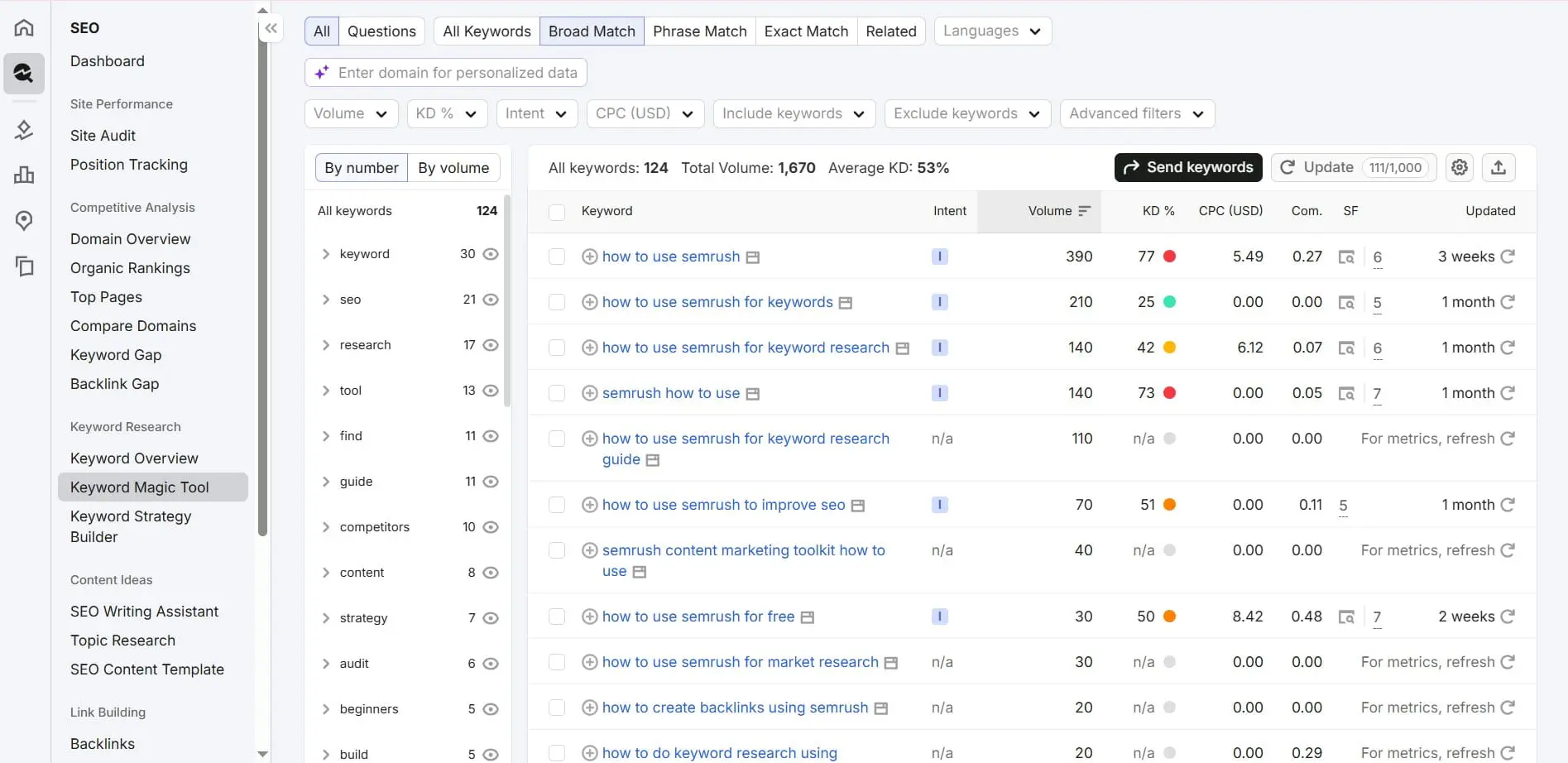
Semrush’s 2026 keyword research guidance says modern research has shifted in three ways. It now moves from volume-first to business-value-first, from Google-only to search-everywhere, and from query matching to prompt research. That is why a keyword export alone is not enough.
Workflow 2: Use competitor analysis to find real gaps
Competitor analysis in Semrush should answer one question. Where are competitors earning visibility that your site can realistically win? The goal is not to copy their keywords. It is to find page types, topic gaps, link patterns, and SERP features that explain why they appear more often.
Start with three competitor groups:
- direct business competitors
- search competitors
- AI visibility competitors
Then run Organic Research and export top pages. Compare domains in Keyword Gap, then check whether each winning URL is a blog, service page, tool page, or category page.
The useful output is a gap map. It should say which page to create, which page to update, and which competitor angle to avoid. Semrush also frames competitor analysis as a way to find gaps across traditional and AI search, then organize keywords into clusters.
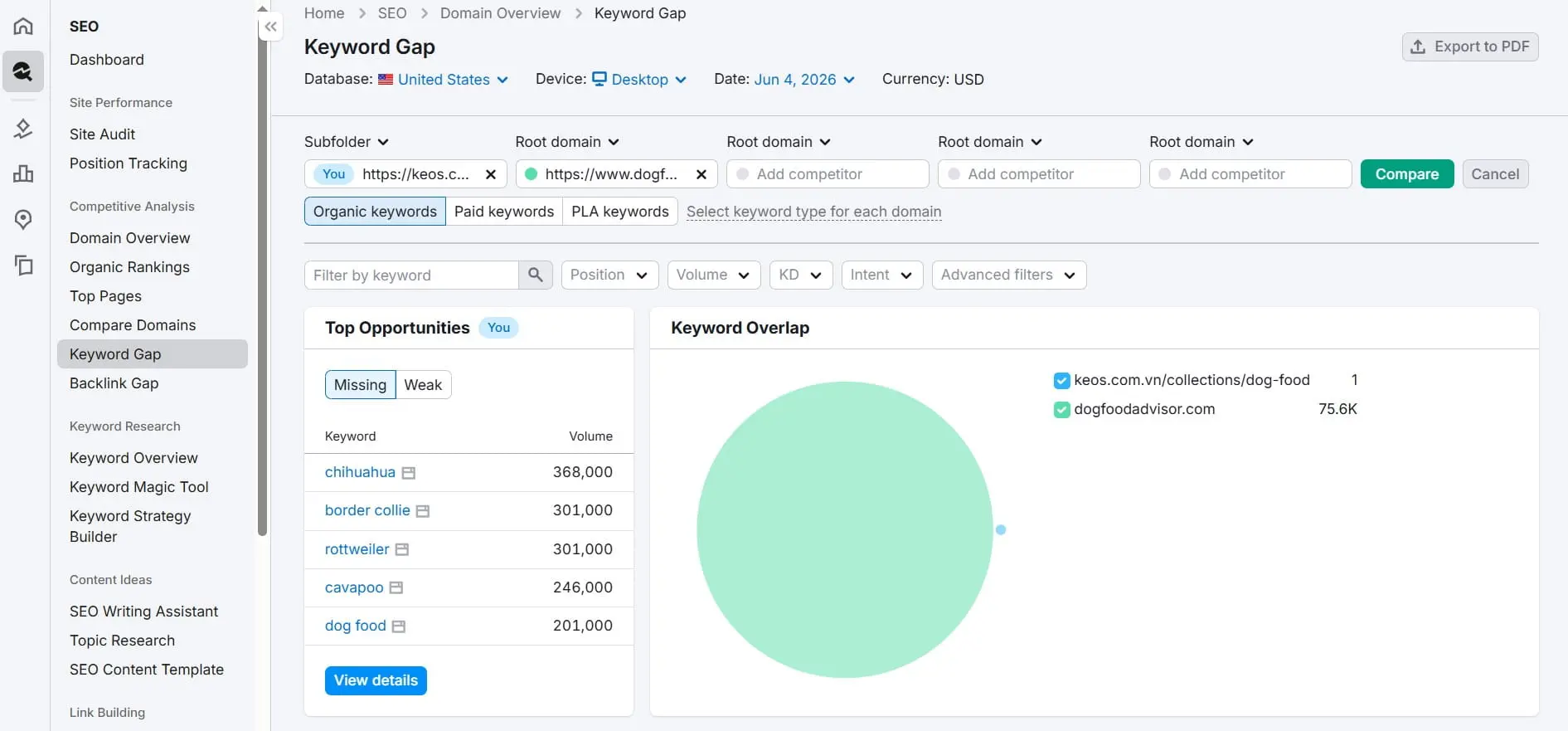
A competitor’s ranking keyword is not automatically your next article title. Check whether the business can serve that demand first.
Workflow 3: Run Site Audit and prioritize fixes
Site Audit is most useful when you treat it as a triage system, not a task dump. Semrush scans websites for technical and SEO issues, then groups them by severity. Your job is to translate errors, warnings, and notices into a fix queue based on crawlability, indexation, templates, and business impact.
Run this workflow before a major content sprint:
- Configure crawl scope, user agent, crawl limit, allowed paths, and schedule.
- Read crawlability first, because blocked pages cannot rank.
- Separate template issues from one-page issues.
- Prioritize pages tied to leads, transactions, or sales conversations.
- Assign fixes by owner: content, SEO, design, or development.
Semrush states that Site Audit can scan for over 140 technical site health and SEO mistakes. It groups issues into errors, warnings, and notices, while also considering frequency. The platform also recommends using filters and Google Analytics integration to work on money-making pages first.
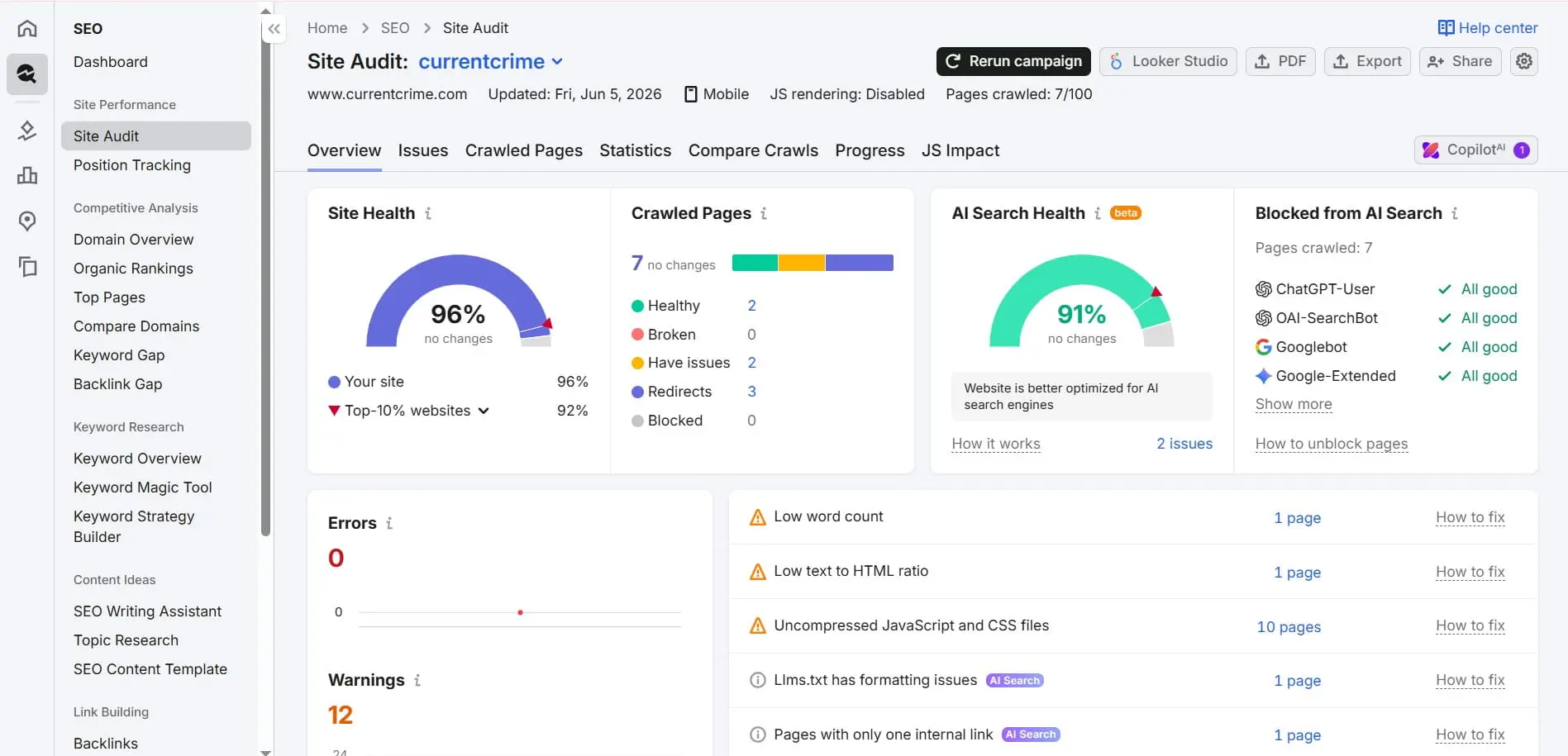
Clients do not need a raw tool dump. They need a decision list with issue, affected URLs, owner, impact, effort, and status.
Workflow 4: Track rankings and report client progress
Position Tracking turns SEO work into measurable movement when configured around markets, devices, search engines, and keyword groups. Track fewer keywords well rather than hundreds badly. For client reporting, tag keywords by topic, funnel stage, page type, and priority. That way, rank movement connects to actual work.
A practical setup includes brand terms, non-brand terms, priority commercial pages, active content clusters, local markets, mobile tracking, desktop tracking, and true search competitors. The tags matter because they explain why one ranking movement matters more than another.
Semrush Position Tracking monitors daily rankings for specific keywords across devices and locations down to postal code. It supports Google, Bing, Baidu, ChatGPT Search, and Google AI Mode. It also tracks SERP features, including AI Overviews. Exports, PDFs, and custom reports can combine GA4 and Google Search Console data.
For agency reporting, avoid a ranking-only dashboard. Use a three-layer report:
- Visibility movement: rankings, SERP features, AI visibility, and share of voice.
- Traffic quality: organic sessions, engaged visits, conversions, and assisted leads.
- Work completed: pages updated, issues fixed, links built, and next priorities.
Use Semrush for AI visibility in 2026
AI search changes how you use Semrush because visibility no longer lives only in ten blue links. Teams now need to track brand mentions in AI answers. They also need to find prompts that trigger competitors and blockers that stop AI crawlers from reading the site.
Start with three workflows. First, benchmark whether the brand appears in AI-generated answers. Second, treat prompts as demand signals for content planning. Third, review AI crawler blockers, entity clarity, structured sections, and FAQ answers.
Semrush says the AI Visibility Toolkit can benchmark brand mentions, analyze sentiment, discover prompts, track daily visibility, and audit AI crawler blockers. It can also turn AI data into reports. Copilot analyzes Semrush tools and reports to recommend prioritized SEO activities.
This is where On Digitals’ Search and AI Marketing work should connect naturally. A classic SEO workflow may improve rankings. An AI search workflow also needs quotable passages, clean entities, structured internal links, and content that answers decision prompts.
Pros, cons, and when not to use Semrush
Semrush is a strong fit for teams that need one platform for research, audits, tracking, competitive analysis, and reporting. It is not always the right tool for every business. If your site is small, your market is narrow, or your team cannot act, a lighter setup may be enough.
Pros:
- Broad SEO, content, advertising, social, and AI visibility coverage.
- Strong competitor analysis for content and market planning.
- Useful Site Audit workflow for technical prioritization.
- Position Tracking across locations, devices, and AI search surfaces.
- Reporting options that fit agency and in-house teams.
Cons:
- The interface can overwhelm beginners.
- Exports can create false confidence without strategy.
- Plan limits matter for agencies with many clients.
- Some AI visibility features need separate budget.
- Tool data still needs validation against GA4, GSC, and CRM results.
The practical rule is simple. Semrush is worth it when the team has enough content, technical, or reporting work to act on the data every month. Otherwise, start smaller and upgrade when execution capacity improves.
Frequently Asked Questions (FAQs)
These FAQs answer the decisions most teams face after setup: first workflow, beginner fit, agency use, AI search, and plan choice. They focus on first actions, limits, and business fit rather than repeating tool descriptions.
What is the first thing to do in Semrush?
The first step is to create a project for your domain, set the target market, and connect approved first-party data. After that, set up Site Audit and Position Tracking. This gives you a baseline before you start keyword research, content planning, or competitor analysis.
Is Semrush good for beginners?
Semrush can work for beginners, but it is easier when you follow workflows instead of exploring every menu. Start with one task: find keyword opportunities, audit your site, or track priority rankings. Beginners should avoid large exports until they understand search intent and page mapping.
How do agencies use Semrush for clients?
Agencies use Semrush to build repeatable workflows across research, audit, tracking, and reporting. A good setup separates each client into a clean project and tags keyword groups. It also connects GA4 and GSC, then turns tool data into actions with owners and deadlines.
Can Semrush help with AI search optimization?
Yes. Semrush now supports AI visibility work through tools that track AI mentions, prompts, competitors, sentiment, AI crawler blockers, and AI-aware ranking surfaces. The tool is most useful when paired with content changes such as clear entities, FAQ answers, structured sections, and source-worthy passages.
Which Semrush plan should a small business choose?
A small business should choose based on projects, keyword tracking needs, user access, reports, and AI visibility requirements. Do not choose a plan only by price. List the workflows you will run each month, then check current Semrush pricing and limits before subscribing.
Final thoughts
If you only do one thing after opening Semrush, set up one real project first. Then run the four core workflows in order: keyword map, competitor gap, site audit, and rank tracking. That sequence turns Semrush from a dashboard into an operating system for SEO decisions.
When your team needs a second view on keyword mapping or AI visibility, On Digitals can review your search setup. The goal is to turn Semrush data into a practical SEO roadmap.

NEWEST POSTS
- Advertising Industry In Vietnam: The 2026 Trends, Channels and Market-Entry Strategy
- Best SEO Company in Vietnam: Latest Shortlist For Businesses
- How To Leverage Social Media For Customer Service Like A Pro?
- Social Media Post Tips – 8 Ways To Boost Engagement
- How To Use Social Media for Sales – In-depth Beginner Guide
Read more