
Insights
Linkedin Sponsored Content – Can It Improve Brand Awareness?
On Digitals
10/02/2026
17
LinkedIn Sponsored Content is a powerful B2B advertising format that places sponsored posts directly into the feed of your target audience. It helps brands increase visibility, engage decision makers, and generate high-quality leads through precise professional targeting.
This guide explains how the platform works, key formats to use, and best practices to maximize campaign performance.
What does Linkedin Sponsored Content mean?
LinkedIn Sponsored Content is a native advertising format that lets brands promote posts directly in the LinkedIn feed. Its main purpose is to support networking, lead generation, and long-term brand building. These ads look like regular posts but are labeled as sponsored.
There are several ways to create content on LinkedIn, especially if you are already familiar with its ad formats. Unlike organic company page posts that only reach followers, paid posts can appear in the feeds of a wider, targeted audience. Understanding what is Linkedin Sponsored Content helps brands decide when to use paid distribution instead of organic posts. This broader exposure increases the chances of engagement and conversions.
Another powerful option is Direct Sponsored Content, which does not appear on your company page. It allows advertisers to personalize messages and run A/B tests without cluttering their feed. This approach makes it easier to optimize performance and improve results over time.
Explain how paid posts appear natively within professional feeds
A range of sponsored content formats available
A range of sponsored content formats available, designed to support different marketing goals. Each format helps brands reach, engage, and convert professional audiences effectively. These Linkedin Sponsored Content examples show how different formats support awareness, engagement, and conversion goals.
Single image ads
Single Image ads are a core format within LinkedIn Sponsored Content, featuring one large visual that blends naturally into the LinkedIn feed experience. Each ad includes a headline, detailed body copy, a clear call to action, and a destination link that guides users to learn more. This format is simple yet highly effective for capturing attention quickly.
Brands often rely on single image ads to drive website traffic, promote content, or highlight key offers. Real-world Linkedin Sponsored Content Ad examples often focus on clear value propositions. The clean structure makes messages easy to scan while still allowing space for persuasive copy. It performs well across awareness, consideration, and conversion-focused campaigns.
Carousel image ads
Carousel Image ads allow users to swipe through multiple images within one ad placement. These requirements are part of the official Linkedin Sponsored Content specs that advertisers should follow. They support between two and ten images, each with its own caption and descriptive text to support the message. This interactive format encourages users to spend more time engaging with the ad.
Marketers use carousel ads to tell step-by-step stories or showcase multiple products or features. Each card can communicate a unique benefit or message within the same campaign. A call to action button can also be added, especially when paired with lead generation forms.
Video ads
Video ads appear similar to single image ads but replace static visuals with video content. They autoplay in the feed, helping brands quickly capture attention in a crowded environment. This format works especially well for storytelling and emotional engagement.
Within LinkedIn Sponsored Content, video ads allow brands to explain complex ideas more clearly and memorably. They are often used for product demonstrations, customer testimonials, or campaign launches. Strong visuals, captions, and concise messaging help improve performance.
Single job ads
Single Job ads are designed to promote one specific open role on LinkedIn. They use LinkedIn’s built-in job listing and application system to create a seamless user experience. Users can review job details and apply directly without leaving the platform.
This format helps recruiters connect with professionals who match specific criteria. Advanced targeting ensures the job reaches relevant and qualified candidates. It simplifies the hiring process while improving the quality of applications received.
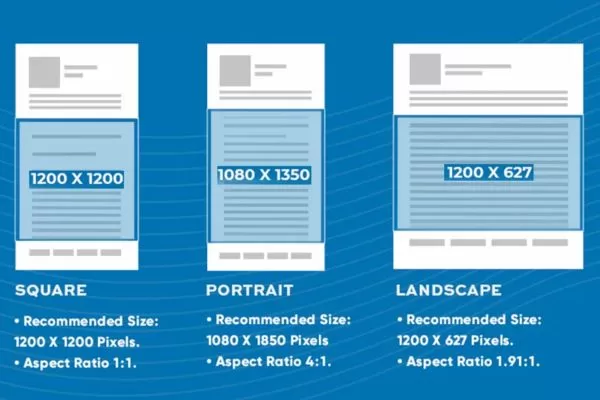
Outlines multiple ad formats designed for different marketing goals
How to build LinkedIn Sponsored Content campaigns
Building effective campaigns requires a clear objective, precise audience targeting, and the right ad format. With a structured approach, brands can increase reach, engagement, and lead quality more efficiently. This is the foundation of successful LinkedIn Sponsored Content.
Launch a new LinkedIn campaign
Begin by opening LinkedIn Campaign Manager, then select the campaign group you want to use and click Create Campaign. Next, choose an objective that matches your marketing goal, with Website Visits being a strong choice when the main focus is driving traffic to a landing page or website.
Configure audience targeting
This step helps ensure your ads reach the most relevant professionals based on their roles, skills, company details, and interests through LinkedIn Sponsored Content. A structured approach to targeting improves ad performance and keeps your audience size focused and qualified.
- Set up targeting after choosing your objective: Once your campaign objective is selected, move to the Audience section to begin targeting. For this example, assume you are promoting a social media marketing conference and want to reach social media marketers.
- Open audience attributes: In the Audience section, scroll to Who Is Your Target Audience? and select Audience Attributes from the left-hand menu.
- Target by skills under job experience: Choose Job Experience on the right, then select Member Skills. Use the search box to enter “social media” and select relevant skills such as Social Media Marketing, Social Media Optimization, Social Media Advertising, and Social Media Measurement.
- Review and refine audience size: After selecting these skills, you’ll see a very large audience size. Aim for a more focused range, ideally between 20,000 and 80,000 people.
- Narrow by company size: Click Narrow Audience Further, then go to Company > Company Size. Select company sizes with 51 or more employees to filter out smaller businesses.
- Narrow by job seniority: Click Narrow Audience Further again and choose Job Experience > Job Seniorities. Select Manager to focus on decision-makers relevant to your event.
- Filter by interests: Narrow the audience once more by selecting Interests and Traits > Member Interests > Marketing and Advertising > Digital Marketing. Choose Social Media Marketing to reach users actively engaging with related content.
- Confirm final audience size: After applying all filters, confirm your audience size falls within your target range.
- Disable audience expansion: As a final step, make sure Enable Audience Expansion is unchecked to keep your targeting precise and controlled.
Decide on your sponsored ad format
LinkedIn Sponsored Content at this stage requires you to decide which ad format best fits your campaign goals. Although LinkedIn offers video and carousel options, a single-image ad is often the most efficient choice. Video production usually demands higher budgets, while carousel ads require multiple assets without delivering strong performance gains.
You’ll also notice an option to activate the LinkedIn Audience Network in the Placement settings. This feature can help increase exposure when your audience pool is very limited. For a well-defined audience of around 47,000 users, activating it is generally unnecessary.
Set your budget and campaign timeline
In the Budget & Schedule section, choose a daily spend that fits your comfort level, starting as low as $10 per day. For bidding, cost per click is a safer option when launching a new campaign. Make sure to turn off automatic bid optimization so you can observe how your audience reacts without algorithmic adjustments.
When setting your bid, LinkedIn may suggest a relatively high amount per click. Entering a lower value lets you identify the minimum bid required, which helps control costs when running LinkedIn Sponsored Content campaigns. Using the lowest accepted bid allows you to test performance while keeping spending efficient.
This approach helps you understand whether your budget is fully utilized or needs adjustment. If daily spend falls short of your limit, increasing the bid may be necessary to gain more traffic. Before exiting, rename your campaign clearly to reflect targeting details such as skills, seniority level, interests, and location.
Design your LinkedIn sponsored ad
Once everything is prepared, you can begin building your ad by clicking Create New Ad on the next screen. A Linkedin Sponsored Content Ad should focus on one clear message and a single primary action. Start with the introductory text, as this is the most critical element of the ad. It should clearly explain why the audience should care and include a strong call to action such as “Register now.”
LinkedIn Sponsored Content requires a destination URL to complete the setup process. After you enter the full URL, including UTM parameters if you use tracking, LinkedIn automatically pulls the page’s first image, title tag as the headline, and meta description as the ad description. This helps speed up ad creation while keeping content consistent with your landing page.
If you want to use a different image, remove the default one and upload a new file sized at 1200 by 627 pixels. Using the correct Linkedin Sponsored Content image size helps ensure visuals display clearly across devices. The headline should clearly describe the offer and give it a recognizable name, while the description field can be filled freely since it is rarely displayed. Finish by choosing an appropriate CTA such as Learn More, Register, or Attend, then click Create to add the ad directly to your campaign.
Activate your LinkedIn campaign
At this stage, your ad will show a status indicating it is still in draft mode. Clicking Next allows you to review all selected settings before making the campaign active. Once everything is confirmed, select Launch Campaign to make it live as LinkedIn Sponsored Content.
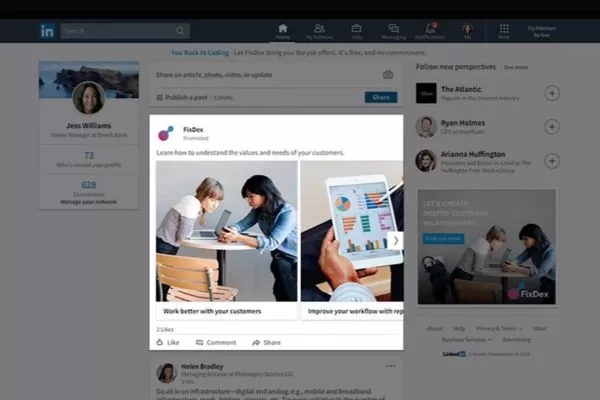
Break down the steps needed to launch effective paid campaigns
Sponsored content objectives and distribution
Sponsored content objectives define what you want your ads to achieve on LinkedIn, from awareness to conversions. Placement and objective selection work together to determine how your ads are delivered and optimized across the platform.
Grow visibility using sponsored content
This objective is designed to maximize ad visibility in the LinkedIn feed using LinkedIn Sponsored Content. Ads are delivered to a broad but relevant professional audience. The goal prioritizes impressions over clicks or conversions. It works best for increasing brand recognition and recall. This option is ideal for early-stage awareness campaigns.
Website click campaigns
Website Visits aims to drive users from LinkedIn to external pages. Ads encourage clicks to blogs, landing pages, product pages, or homepages. Performance is measured primarily by traffic volume. This objective supports content distribution and traffic growth. It is commonly used at the top of the marketing funnel.
Boosting engagement on sponsored content
LinkedIn Sponsored Content with this objective focuses on interactions with the ad itself. It prioritizes likes, comments, and shares on LinkedIn posts. Ads are delivered to users with high engagement potential. The format functions similarly to boosted posts on other platforms. It helps increase social proof and post visibility.
Video-focused advertising
Video Views is built to maximize how many people watch your video ads. LinkedIn tracks multiple viewing thresholds and engagement signals. This objective helps measure audience interest more accurately. It is effective for storytelling and visual messaging. Brands often use it to build awareness and recall.
Lead capture with LinkedIn Sponsored Content
This objective allows brands to collect leads directly on LinkedIn. Forms are automatically filled using user profile data. It removes barriers and boosts form completion. Leads can be captured without sending users off-platform. It is widely used in B2B demand generation campaigns.
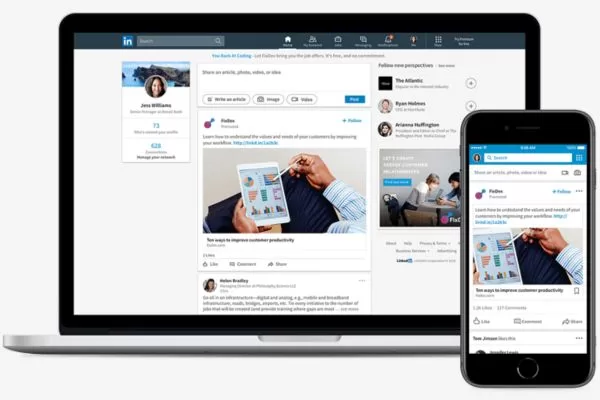
Detail campaign goals and how ads are delivered across feeds
Sponsored content ads: Placement types
Sponsored content ads on LinkedIn can appear in two different placements. Each option affects how ads are displayed, managed, and tested across campaigns.
Native ads
Native ads are a core placement option for LinkedIn Sponsored Content. These ads start as regular posts published on your LinkedIn Page and are later promoted through paid campaigns. They appear organically on your Page feed and look identical to standard posts.
While organic posts are only shown to Page followers, native ads extend beyond that limit. They are delivered to users who match your defined targeting criteria, even if they don’t follow your Page. This placement is ideal for maintaining a public brand presence while increasing reach.
Direct ads
Direct ads are similar in appearance to native ads but are not published on your Page feed. They function as unpublished posts, meaning only targeted users see them through paid delivery. This keeps your Page feed clean while still running active campaigns.
Using LinkedIn Sponsored Content in this format allows for more direct messaging and stronger ad copy. It also makes it easier to test multiple ad variations with different audiences. These variations run simultaneously without appearing publicly on your Page.
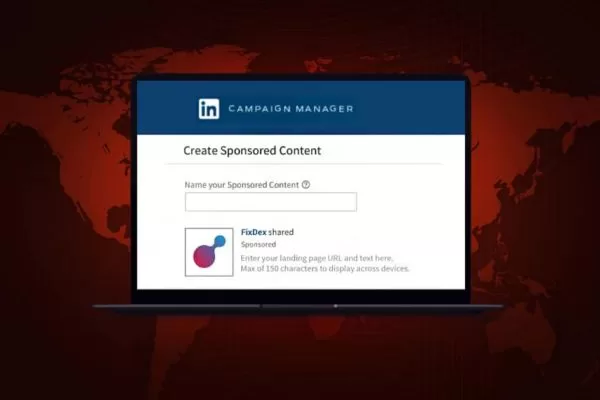
Introduce where ads appear and how placement affects visibility
Proven tips for LinkedIn advertising businesses should know
Here are proven tips for LinkedIn advertising that businesses should know to improve performance and results. These Linkedin Sponsored Content best practices help advertisers improve performance and control ad spend.
Understand your ideal audience
Knowing your audience in depth is essential before running any LinkedIn ads. Compared to platforms like Facebook, LinkedIn offers a more focused environment with fewer but higher-quality targeting options. Most users are professionals connected to companies, with relatively high education levels and a strong interest in career or business growth.
LinkedIn Sponsored Content performs best when targeting is narrow and clearly defined. Reaching smaller, well-segmented audiences allows your messaging to align more closely with user intent. In practice, running two campaigns targeting 50,000 users each is often more cost-effective and efficient than targeting one broad audience of 100,000 with a larger budget.
Consider visibility and format always
When creating ad copy, keep visibility and format in mind since each ad type works a little differently. Headlines are limited to about 150 characters, and shorter text often performs better, though testing is key. Staying within the Linkedin Sponsored Content character limit helps keep messaging concise and readable. Body copy allows more space but is usually truncated, so keeping it under 100 characters tends to be most effective.
Visual quality and bidding strategy also play a major role in performance. Use large, clean visuals to attract attention, then start with a low bid to find the minimum LinkedIn allows before increasing it based on results. Remember that most user interactions count as billable clicks, except likes, shares, and comments when using the engagement objective.
Assess the full interaction path
Think carefully about where users land after clicking your ads and whether the experience feels logical and consistent. The landing page should align with the user’s intent and match their stage in the marketing funnel. Even without algorithmic relevance scores, maintaining message continuity still improves performance and conversions with LinkedIn Sponsored Content.
Use split testing consistently
Split testing is essential for improving ad performance over time. Direct placement in sponsored content makes it easy to test multiple variations and compare results. In almost all cases, running split tests helps optimize outcomes rather than hurt performance.
Common questions about LinkedIn Sponsored Content (FAQs)
Below are some of the most frequently asked questions advertisers have when running sponsored campaigns on LinkedIn. These answers help clarify how the format works, when to use it, and what to expect.
What is the main purpose of this ad format?
This format is designed to promote posts directly inside the LinkedIn feed. LinkedIn Sponsored Content helps brands reach professionals beyond their current followers through paid distribution. It is commonly used for awareness, engagement, traffic, and lead generation objectives.
Where do these ads appear on LinkedIn?
These ads appear natively within the LinkedIn feed as users scroll. They are placed alongside organic posts, making them feel natural and less intrusive. Depending on placement settings, they may or may not appear on your Page feed.
What makes this different from organic content?
Organic posts are limited to your Page followers and rely on algorithmic reach. LinkedIn Sponsored Content removes that limitation by delivering posts to a defined target audience. This allows brands to scale visibility and control who sees their message.
Can you test multiple versions of the same ad?
Advertisers can run multiple variations at the same time. This helps compare headlines, visuals, and messaging to see what performs best. Split testing improves efficiency and reduces wasted ad spend.
Is this ad format suitable for B2B marketing?
It is especially effective for B2B campaigns targeting professionals and decision-makers. LinkedIn Sponsored Content supports precise targeting by job title, industry, company size, and seniority. This makes it ideal for lead generation, thought leadership, and account-based marketing strategies.
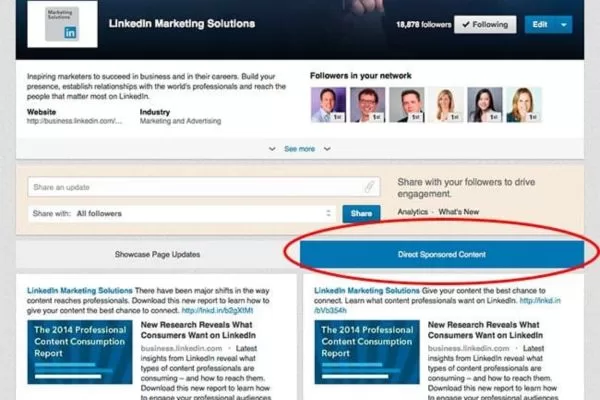
Answers key concerns advertisers often have before launching campaigns
Conclusion
LinkedIn Sponsored Content is a powerful advertising format that helps brands reach the right professionals with native, high-impact messages. When used strategically, it supports awareness, engagement, traffic, and lead generation across every stage of the funnel. For businesses looking to maximize performance and ROI, partnering with experts like On Digitals can help turn LinkedIn campaigns into measurable growth.
Suggested content for you:
Read more