
SEMrush Keyword Difficulty: How to Check and Use KD%
Vincent
03/07/2024
42
SEMrush keyword difficulty helps estimate how hard it may be to rank in Google’s top 10 for a target keyword. The score is useful when you read it with intent, domain strength, SERP competition etc., especially before planning content briefs and keyword research. Search volume can support the decision, but KD% should stay the main focus of this analysis.
What is SEMrush keyword difficulty?
SEMrush keyword difficulty, often shown as KD%, is a 0–100 score that estimates how difficult Semrush predicts it will be to rank for a keyword. A higher percentage means the keyword is more competitive in organic search. Semrush says the calculation uses factors such as referring domains, dofollow/nofollow link ratio, authority score, and SERP-related qualities.
The score should guide prioritization. Before reading KD%, make sure the team has defined the target SEO keyword research clearly because Semrush scores depend on the exact query being checked. A low KD keyword may help a new site build topical coverage, while a high KD keyword may need stronger authority, better content support, or a longer SEO timeline.
For example, a new B2B website may start with KD 15–29 topics to build early visibility. A mature service website can still target KD 50+ keywords when the page supports qualified leads and the domain already has strong topical depth.
SEMrush KD vs Personal Keyword Difficulty
General KD and Personal KD answer different questions. General KD shows market-level difficulty. Personal KD shows how difficult that keyword may be for your own domain. Semrush explains that Personal Keyword Difficulty estimates how hard it will be for a specified domain to reach the top 10 for a specified keyword.
| Metric | What it tells you | Best use |
| SEMrush KD% | General keyword competitiveness | Market-level filtering |
| Personal KD% | Difficulty for your domain | Site-specific prioritization |
| Authority Score | Domain strength signal | Competitor benchmarking |
| Search intent | Why users search | Page type planning |
This distinction matters because the same keyword can create different opportunities for different sites. A keyword may look difficult overall, while a domain with strong topical relevance may still have a realistic path.
SEMrush KD vs Competitive Density
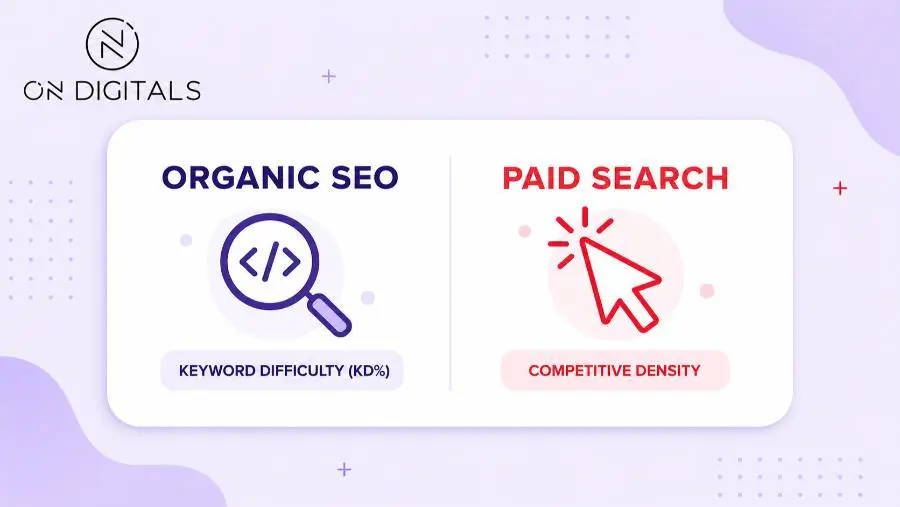
KD% should be separated from Competitive Density. KD% relates to organic SEO difficulty, while Competitive Density relates to paid search competition. Semrush explains that KD% measures organic ranking difficulty, while Competitive Density measures PPC competition.
| Metric | Channel | What it helps with |
| KD% | Organic SEO | Ranking effort estimate |
| Competitive Density | Paid search | PPC competition estimate |
| CPC | Paid search | Commercial demand signal |
| Intent | SEO planning | Page type and funnel fit |
A keyword can have low organic difficulty and strong paid competition. That can mean advertisers value the traffic, while organic results still leave room for a strong page.
How to check keyword difficulty in SEMrush
You can check KD% in Keyword Overview, Keyword Magic Tool, and other Semrush keyword reports. Keyword Overview shows metrics such as intent, volume, trend, keyword difficulty, CPC, Competitive Density, SERP features etc.
Check KD in Keyword Overview
Use Keyword Overview when you already have a keyword in mind.
| Step | What to do | Why it matters |
| 1 | Enter the keyword | Starts the keyword-level report |
| 2 | Choose the target location | KD can change by market |
| 3 | Read KD% | Shows estimated SEO effort |
| 4 | Check intent | Shows expected page type |
| 5 | Review SERP Analysis | Shows real ranking competitors |
| 6 | Compare close variants | Finds easier alternatives |
Location matters. A keyword may be easier in Vietnam than in the US because the ranking pages and competitor strength can differ by market. For international campaigns, check the market where the page will compete.
How to read KD% in Semrush
Read KD% as part of a sequence, instead of treating it as a standalone number.
| Reading order | What to check | Decision signal |
| 1 | KD% range | Estimated ranking effort |
| 2 | Intent | Page type Google expects |
| 3 | SERP Analysis | Actual competitor strength |
| 4 | Personal KD% | Domain-specific opportunity |
| 5 | SERP features | Organic click opportunity |
| 6 | Business value | Budget priority |
A keyword should not be selected because KD% is low alone. The live SERP can also reveal whether the query behaves like a broad search term or a focused keyword worth mapping to one page. If the SERP expects product pages while your content is a blog guide, the page may struggle. If the SERP is full of strong brands, a mid-range KD may still require links or cluster support.
Check KD in Keyword Magic Tool
Use Keyword Magic Tool when you want to expand a seed topic into keyword ideas. Semrush says the free Keyword Tool gives broad match suggestions with core metrics such as search volume, keyword difficulty, CPC, and intent, while Keyword Magic Tool adds deeper research features.
A focused workflow:
- Start with a seed keyword.
- Filter by KD range.
- Check intent.
- Group related terms.
- Map each keyword to a page type.
- Save realistic opportunities.
For example, “crm software” may be too competitive for a new SaaS blog. A long-tail query like “crm workflow examples for sales teams” may have clearer informational intent and a more realistic KD range.
How does Semrush measure keyword difficulty?
Semrush calculates KD% from multiple competitive signals. Its knowledge base mentions referring domains to ranking URLs, link ratio, authority score of ranking domains, and SERP-related qualities.
This means KD is broader than a backlink count. It reflects the competitive shape of the SERP. A keyword with strong ranking domains, rich SERP features, or brand-heavy results can require more effort than the number first suggests.
SERP features can change the real opportunity
A keyword can have a reasonable KD score but still offer weak organic opportunity. SERP features such as AI Overview, People Also Ask, local packs, video results etc. can reduce attention on traditional organic listings.
Before committing content budget, check the live SERP.
| Check | What to look for |
| Page type | Blog, product page, category page, tool page etc. |
| Domain strength | Large brands or niche publishers |
| Content depth | Thin result set or strong guides |
| Freshness | Recently updated pages |
| SERP features | AI Overview, PAA, local pack etc. |
| Link profile | Strong or weak referring domains |
| Business fit | Useful leads or low-value traffic |
This manual review makes KD more reliable. A low-KD keyword with the wrong page type can waste effort, while a higher-KD keyword may deserve investment when it supports an important service page.
Branded keywords need extra caution
Brand-heavy SERPs can distort keyword decisions. A keyword that includes a company name, tool name, or product line may attract searches, but non-brand sites usually face a difficult intent match.
If the top results are owned by the brand, partner pages, review platforms etc., choose a comparison angle or a longer-tail topic. That gives the page a clearer reason to exist.
What to do with SEMrush keyword difficulty
SEMrush KD becomes useful when it helps decide which keywords deserve a new page, supporting cluster, refresh, or long-term authority plan.
Use KD ranges as action signals
Semrush groups KD into six levels, from Very Easy at 0–14 to Very Hard at 85–100. Use those ranges as a starting point, then adjust based on site maturity and business value.
| KD range | Best use case | Content action |
| 0–14 | Early topical coverage | Publish focused content quickly |
| 15–29 | New site or niche cluster | Build supporting pages |
| 30–49 | Growing site | Create a stronger guide or cluster page |
| 50–69 | Site with authority | Add internal links and promotion |
| 70–84 | Competitive category | Build cluster support first |
| 85–100 | Enterprise or brand-heavy SERP | Consider PPC, PR, or long-tail alternatives |
A high-KD keyword can still be worth targeting when it maps to a priority service page. A lower-value blog topic may need a much easier KD range to justify the same effort.
Build a KD-focused opportunity score
To avoid overlap with a search volume article, keep this framework centered on KD. Use volume only as a supporting signal after the keyword passes difficulty and intent checks. Use search volume only as a supporting signal after the keyword passes difficulty and intent checks.
| Factor | Why it matters |
| KD% | Shows ranking effort |
| Personal KD% | Shows domain-specific difficulty |
| Intent | Confirms page type |
| SERP strength | Shows real competitors |
| Business value | Confirms priority |
| Supporting cluster | Shows readiness |
| Volume | Confirms demand after fit is clear |
A simple working rule: keyword opportunity = realistic KD + matching intent + business value + enough demand.
For ecommerce, a high-KD category keyword can remain important because it captures buyers. A lower-KD product guide may work as support content that strengthens the category page.
Match KD with page type
Intent should decide the format before writing starts.
| Intent | Best page type | KD use |
| Informational | Blog guide or resource page | Build topical authority |
| Commercial | Comparison or solution page | Support lead generation |
| Transactional | Product or service page | Prioritize business value |
| Navigational | Brand or tool page | Avoid when another brand owns intent |
When the SERP is full of guides, a service page may struggle. When Google shows product pages, a blog post may fail even with a low KD score. KD estimates competition, while intent decides the content asset.
SEMrush keyword difficulty vs other tools
Different SEO tools calculate keyword difficulty in different ways, so scores rarely match perfectly. Use one tool consistently for planning, then validate important keywords with a live SERP review.
Ahrefs is often associated with backlink-based difficulty logic. Semrush uses a broader model that includes authority, backlink data, and SERP-related factors. Moz and other tools also use their own formulas.
Google Keyword Planner serves a different purpose. Its competition data supports paid search planning, while Semrush KD% supports organic SEO decisions. Mixing those numbers can lead to poor prioritization.
Use tool comparison only for context. For content planning, choose a primary tool, check the live SERP, then map the keyword to a realistic page type.
SEMrush keyword difficulty FAQ
What is a good Semrush keyword difficulty score?
A good score depends on your domain strength and content goal. New sites often start with KD 0–29. Growing sites can test KD 30–49 when the topic fits their cluster. Established sites may pursue harder keywords when the page supports meaningful business value.
Is Semrush keyword difficulty accurate?
Semrush KD is useful as an estimate, but it should be validated with the live SERP. Check the top 10 pages, domain strength, page type, SERP features etc. before assigning content budget.
What is the difference between KD% and Personal KD%?
KD% estimates general market difficulty. Personal KD% estimates how difficult the keyword may be for your specific domain. Semrush defines PKD as the difficulty for a specified domain to reach the top 10 for a specified keyword.
Should I target high-KD keywords?
Target high-KD keywords when they support a priority page, commercial funnel, or long-term authority plan. For a new site, build easier supporting content first, then link those pages toward the harder target.
Does Google use keyword difficulty scores?
Google publishes no official keyword difficulty score. KD is a third-party SEO tool metric for planning. Use it beside intent, SERP strength, authority, and business value.
How often should I refresh keyword difficulty data?
Refresh KD before major content planning, market expansion, or content refresh decisions. SERPs change when competitors update pages, earn links, or shift intent coverage.
Final thoughts
SEMrush keyword difficulty is useful when it helps SEO teams judge ranking effort. The score should stay focused on competition, domain readiness, and SERP reality. Search volume can support the final decision, but it should not pull this URL into a general keyword metrics article.
For content planning, start with KD%, compare Personal KD when domain context matters, then validate the live SERP before publishing. That workflow keeps this page aligned with the “SEMrush keyword difficulty” intent and gives marketers a clearer way to choose realistic SEO targets.

NEWEST POSTS
- Advertising Industry In Vietnam: The 2026 Trends, Channels and Market-Entry Strategy
- Best SEO Company in Vietnam: Latest Shortlist For Businesses
- How To Leverage Social Media For Customer Service Like A Pro?
- Social Media Post Tips – 8 Ways To Boost Engagement
- How To Use Social Media for Sales – In-depth Beginner Guide
Read more