
How to Name Images for SEO with Clear Filename Examples
Vincent
20/03/2026
36
How to name images for SEO starts with one simple rule: make the filename describe what the image actually shows. For teams building search-optimized content, a good image filename uses lowercase words, hyphens, a useful detail, and a natural keyword when it fits. This helps search engines understand image context before the image appears on your page.
What should you name images for SEO?
Name images with short, descriptive filenames that make sense to a human before they make sense to Google. The filename should explain the main subject of the image, not only the keyword you want the page to rank for.
A simple formula works for most websites:
main-subject-specific-detail-context.filetype
For example:
- technical-seo-audit-checklist.webp
- red-running-shoes-side-view.jpg
- ga4-conversion-event-setup.png
- website-speed-before-after-report.webp
This format keeps the file readable while giving search engines a useful clue. It also helps content teams manage media libraries more easily, especially when a website has hundreds of blog images, product photos, screenshots, etc.
The filename should support the page topic, while the alt text should describe the image for accessibility. They can be related, but they should not be copied word for word.
Why image filenames still matter for SEO
Image filenames matter because they give search engines a small clue about the image subject. They work together with alt text, captions, page copy, image placement, and the broader website content structure around the asset.
A stronger filename still needs the right page context. If an image named best-seo-agency-vietnam.jpg only shows a plain office wall, the mismatch creates noise instead of SEO value. The filename works best when it describes the image honestly and fits the copy around it.
For agency, B2B, and service websites, image naming matters most when the image supports trust or explains a key idea. Prioritize custom filenames for:
- Blog hero images
- Service page visuals
- Original diagrams
- SEO screenshots
- Local proof images
- Case study charts
Decorative images need less attention. Important images deserve clearer filenames because they support search visibility, image discovery, and content clarity.
SEO image filename rules
Good SEO image filenames are clear, specific, and consistent. The rules below are simple, but they prevent most image naming mistakes before upload.
Describe what the image actually shows
The filename should tell someone what the image contains before they open it.
Weak:
seo-image.jpg
Better:
search-console-indexing-report.png
The second filename gives more context. It says the image is a Search Console report related to indexing, which is more useful than a broad SEO label.
For blog images, describe the visual idea. For product images, describe the product detail. For screenshots, describe the interface or report shown on screen.
Use one natural keyword when it fits
A keyword belongs in the filename only when it describes the image naturally. Keyword stuffing makes filenames harder to read and can look spammy.
Weak:
seo-image-seo-optimization-seo-ranking.jpg
Better:
image-seo-filename-examples.webp
The better version still includes the topic, but it stays readable. It also matches the user’s intent more clearly.
When naming images for a page about how to name images for SEO, the phrase can appear in a hero image or diagram filename. It does not need to appear in every image on the page.
Use hyphens between words
Hyphens make filenames easier to read. Use them instead of spaces or underscores.
Use:
seo-image-naming-checklist.webp
Avoid:
seo_image_naming_checklist.webp
Avoid:
seo image naming checklist.webp
A clean hyphenated filename is easier for teams to read in a CMS. It also reduces the risk of messy URLs after upload.
Keep filenames lowercase
Lowercase filenames are easier to manage across CMS platforms, servers, and CDN systems. Mixed capitalization can create inconsistent paths or duplicate-looking files in large libraries.
Use:
local-seo-office-photo.jpg
Avoid:
Local_SEO_Office_Photo.JPG
This matters more when multiple people upload content to the same website. A consistent naming rule makes future audits easier.
Keep it short but useful
A filename should be long enough to explain the image, but short enough to stay readable. Most image filenames work well with 3 to 7 words.
Weak:
final-version-new-image-for-blog-post-about-seo-image-filenames-v3.webp
Better:
seo-image-filename-guide.webp
Remove words that do not add meaning. Terms like “final,” “new,” “edited,” and “version” may help your internal folder, but they rarely help users or search engines.
Match the extension to the real file type
The extension should match the actual file format. Do not rename a .png file to .webp manually unless the file has been properly converted.
Use image formats based on purpose:
|
Format |
Best use |
|
WebP |
Blog visuals, compressed photos, featured images |
|
JPG |
Standard photos where transparency is not needed |
|
PNG |
Screenshots, transparent images, UI details |
|
SVG |
Simple icons, logos, diagrams, vector graphics |
The filename and extension should both make sense. A file named seo-checklist.svg should contain a vector graphic, not a compressed screenshot.
Good vs bad image filename examples
Examples help more than abstract rules. Use the table below as a reference before uploading images to a blog, service page, product page, or case study.
|
Image type |
Weak filename |
Better filename |
Why it works |
|
Blog hero |
image1.jpg |
seo-image-naming-guide.webp |
Describes the page topic |
|
Product photo |
shoe.jpg |
red-running-shoe-side-view.jpg |
Adds product detail |
|
Local business photo |
office.jpg |
digital-agency-ho-chi-minh-office.jpg |
Uses real location context |
|
Screenshot |
screenshot.png |
search-console-indexing-report.png |
Explains the interface |
|
Chart |
chart-final.png |
organic-traffic-growth-chart.png |
Describes the chart topic |
|
Team photo |
team.jpg |
on-digitals-seo-team-workshop.jpg |
Adds subject and context |
|
Case study visual |
before-after.jpg |
website-speed-before-after-report.webp |
Explains the comparison |
|
Infographic |
infographic.png |
image-seo-filename-checklist.png |
Names the resource clearly |
The stronger filenames do not try to force every keyword into the file. They describe the image in a way that supports the page.
How to name many similar images without keyword stuffing
Large image libraries need a naming pattern. Without one, teams often repeat the same keyword across every file or leave default camera names in the CMS.
A good bulk workflow gives each important image a custom filename, while similar supporting images can follow a consistent pattern.
Product images
Product filenames should usually include the product name plus one useful detail. That detail may be color, angle, material, model, or variant.
Pattern:
product-name-specific-detail.filetype
Examples:
- leather-wallet-brown-front.jpg
- office-chair-black-side-view.webp
- wireless-keyboard-white-top-view.jpg
For ecommerce websites, avoid using only SKU codes unless users also search by SKU. A file named sku-83920.jpg helps internal teams, but it does not explain the product to users.
Blog images
Blog images should reflect the section they support. If the article has several visuals, name the most important ones manually.
Examples:
- seo-image-filename-formula.webp
- good-vs-bad-image-filenames.png
- image-naming-checklist-before-upload.webp
If a blog has a gallery with many similar photos, use one clear base filename with a short number.
Example:
company-event-speaker-session-01.jpg
This is better than repeating the same keyword with small variations that do not describe the image.
Local service images
Location terms should appear only when the image has real local context. Use them for office photos, project photos, venue photos, team photos at a real location, etc.
Better:
seo-agency-ho-chi-minh-office.jpg
Weak:
seo-service-ho-chi-minh-keyword-ranking.jpg
The second version sounds like a keyword list, not an image description. For local SEO, the filename should support authenticity. When a photo is genuinely tied to a place, geotagging images for SEO may also support the local content workflow, but it should not be applied to every image by default.
Screenshots and UI images
Screenshots need context because filenames like screenshot-2026.png say nothing useful.
Pattern:
tool-feature-screen.filetype
Examples:
- ga4-key-event-report.png
- search-console-url-inspection.png
- wordpress-media-library-rename-image.png
This is especially useful for SEO tutorials, SaaS blogs, analytics guides, and technical documentation.
Filename vs alt text vs title vs caption
Image filenames are only one part of image SEO. They should work with the other image elements instead of replacing them.
|
Element |
Visible to users? |
Main purpose |
Example |
|
Filename |
Usually no |
Gives search engines a light clue |
technical-seo-audit-report.png |
|
Alt text |
Usually no |
Describes image meaning for accessibility |
“Search Console report showing indexed pages” |
|
Image title |
Sometimes |
Adds an optional label |
“Search Console indexing report” |
|
Caption |
Yes |
Explains why the image matters |
“Use indexing reports to spot pages that need technical review.” |
Alt text should be written for people first. Screen readers use it when an image needs a text alternative. Search engines can also use it as context, but stuffing keywords into alt text creates a worse user experience.
A filename can be shorter than alt text. For example:
Filename:
search-console-indexing-report.png
Alt text:
“Search Console indexing report showing submitted and indexed page counts.”
The filename labels the asset. The alt text explains the image more clearly.
Should you rename images that are already uploaded?
Renaming old images is worth doing when the image supports an important page, product, local landing page, or original resource. For low-value decorative images, the effort may not be worth the risk of broken URLs.
Use this decision table before changing old image filenames:
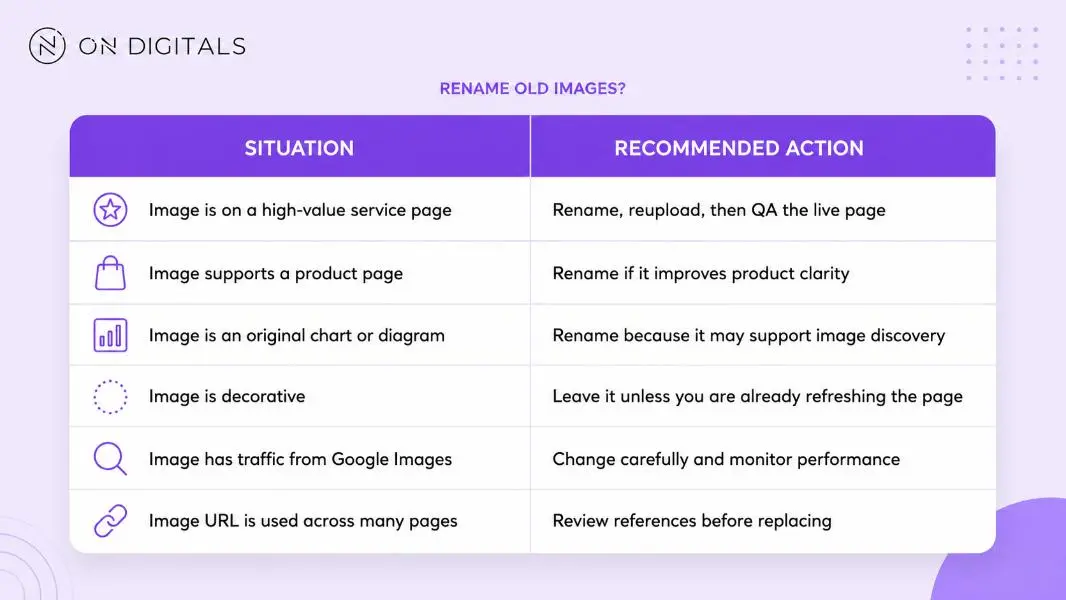 Old image filenames are worth updating when they support high-value pages, but teams should check references, traffic, and live-page quality before replacing them.
After replacing an image, check the page in the CMS and on the live site. Broken images can damage trust faster than a weak filename can hurt SEO.
For WordPress, renaming a file after upload may require a media rename plugin or a reupload. Always confirm the final image URL, especially when a caching plugin or CDN is active.
Image naming workflow before publishing
Use this workflow before uploading images to a website.
- Identify the image purpose.
- Choose the main subject.
- Add one useful detail.
- Remove filler words.
- Convert the filename to lowercase.
- Separate words with hyphens.
- Check that the extension matches the file type.
- Write alt text separately.
- Place the image near relevant copy.
- Compress the image before upload.
- Preview the live page after publishing.
This process keeps image SEO practical. It also helps writers, designers, and SEO teams avoid last-minute cleanup inside the CMS.
Tools that can help with image filename optimization
Tools can speed up image naming, but they should not decide the filename for you. The best workflow still starts with a human checking what the image shows and why the page needs it.
Useful tool types include:
|
Tool type |
Use case |
|
Bulk rename tools |
Rename many similar files before upload |
|
WordPress media rename plugins |
Update filenames already inside WordPress |
|
Image compression tools |
Reduce file size after naming |
|
CMS media library filters |
Find default filenames like IMG_ or screenshot |
|
Spreadsheet templates |
Plan names for product or blog image sets |
For large websites, create a naming convention before the team uploads more images. This saves more time than fixing thousands of filenames later.
Common image naming mistakes
Most image filename problems come from speed. Someone uploads the file quickly, then the weak filename stays on the site for years.
Avoid these mistakes:
- Default camera names like IMG_4821.jpg
- Generic names like image-final.png
- Keyword-stuffed filenames
- Repeating the same keyword across every image
- Spaces inside filenames
- Long filenames with internal notes
- Copying alt text exactly into the filename
- Adding location terms to images without local context
- Changing file extensions without converting the file
- Uploading screenshots with random timestamps
Repeated keyword patterns can also hide a bigger content issue. If several pages use similar image names because they target the same topic, review the pages for keyword cannibalization instead of only renaming the files.
A simple rule helps: if the filename would confuse a person looking at the media library, rewrite it before upload.
SEO image naming checklist
Use this checklist before publishing an important image:
- The filename describes the image subject.
- The filename uses lowercase words.
- Words are separated with hyphens.
- The filename includes a keyword only when natural.
- Internal notes have been removed.
- The file extension matches the real format.
- The image has separate alt text.
- The image appears near relevant page copy.
- The image is compressed before upload.
- The live page displays the image correctly.
This checklist is enough for most blog posts, service pages, product pages, and case study visuals.
FAQs about how to name images for SEO
How many words should an SEO image filename have?
Most SEO image filenames work well with 3 to 7 words. The filename should be long enough to describe the image, while staying short enough to read quickly. Remove filler words such as “final,” “new,” “edited,” or “version” unless they add real meaning.
Should image filenames include keywords?
Image filenames can include keywords when the keyword describes the image naturally. A keyword should never be forced into every image on the page. For example, image-seo-filename-examples.webp works for a filename example graphic, while seo-ranking-best-agency-keyword.jpg looks spammy.
Should image filenames and alt text be the same?
Image filenames and alt text should not be identical by default. The filename labels the file, while alt text explains the image for accessibility and context. A filename can be search-console-indexing-report.png, while the alt text can say “Search Console report showing indexed page totals.”
Should I rename old images already uploaded to WordPress?
Rename old images when they appear on important pages, product pages, local landing pages, or original resources. For decorative images or old posts with little value, leave them unless you are already refreshing the page. After replacing an image, check the live URL to avoid broken image paths.
Can I use numbers in image filenames?
Numbers are fine when they add meaning. Product models, years, version numbers, and image sequence numbers can be useful. For example, company-event-speaker-session-01.jpg is clear for a gallery. Random numbers from a camera file, such as IMG_8392.jpg, do not help users understand the image.
Do image filenames affect Google Images rankings?
Image filenames can help Google understand image context, but they are only one signal. Strong image SEO also depends on alt text, surrounding page copy, image quality, page relevance, loading performance, and how useful the image is to the searcher. Treat filenames as a supporting detail, not a shortcut.
Final thoughts
Image filenames are small details, but they are easy to fix before upload. A clear filename helps search engines understand the image, helps teams manage the media library, and keeps the page more organized.
Start with your most important images first: blog heroes, product photos, service visuals, local proof images, screenshots, original diagrams, and case study assets. Once the naming pattern is clear, make it part of the publishing checklist so every new image supports the page instead of becoming another cleanup task later.

NEWEST POSTS
- Advertising Industry In Vietnam: The 2026 Trends, Channels and Market-Entry Strategy
- Best SEO Company in Vietnam: Latest Shortlist For Businesses
- How To Leverage Social Media For Customer Service Like A Pro?
- Social Media Post Tips – 8 Ways To Boost Engagement
- How To Use Social Media for Sales – In-depth Beginner Guide
Read more