
Website Content That Helps Users Take the Next Step
Vincent
01/05/2023
35
Website content includes the words, visuals, media, proof, structure, and calls to action that help visitors understand a page. Strong content that supports search visibility explains value quickly, reduces user hesitation, and guides people toward the right next step, whether that is reading deeper, comparing options, submitting a form, or making a purchase.
What is website content?
Website content is everything on a website that communicates information to visitors. It can include page copy, blog articles, product details, service descriptions, images, videos, case studies, FAQs, downloadable resources, interactive tools etc.
Good website content does more than fill space. It helps users understand where they are, what the page offers, why it matters, and what they should do next. On a homepage, that may mean a clear value proposition. For service pages, proof and process matter more because users are evaluating whether the team can solve their problem. Product content should support comparison, while blog content should answer the main question before moving into examples or next resources.
Website content vs website copy
Website content is the broader category. It includes copy, visuals, multimedia, page structure, downloadable assets, and supporting elements.
Website copy usually refers to the written text on a page. That includes headlines, descriptions, button text, form labels, page introductions etc.
|
Term |
Meaning |
Example |
|
Website content |
All information and media on the site |
Blog articles, videos, FAQs, case studies |
|
Website copy |
Written words that communicate the message |
Headlines, service descriptions, CTAs |
|
Web design |
Visual layout and interface structure |
Spacing, navigation, page sections |
Copy is part of content, while content also includes the proof, visuals, and structure that help users make decisions.
Website content vs content marketing
Website content lives on your website. Content marketing is the wider strategy for attracting, educating, and engaging audiences across channels. A blog article may support content marketing, while a service page may support conversions. Both still need strong website content to work.
The distinction matters because a website page should have a clear job. Some pages educate. Others build trust, support comparison, or help users contact the business. Treating every page like a blog post can weaken the user path.
Why website content matters
Website content matters because visitors judge a business through the information they find on the page. Weak content can make a good design feel empty. Strong content helps users understand the offer, compare options, and trust the next action.
It explains your value proposition
Every important page should answer one question early: why should this visitor care?
A useful test is simple. Read the first sentence of your homepage, service page, or About page. If the sentence could belong to any competitor, the value proposition needs work.
Strong value messaging should explain:
- who the page is for
- what problem it helps solve
- why the business is relevant
- what makes the offer credible
- what the user can do next
This keeps website content focused on user value instead of company-centered claims.
It helps users find the right next step
Visitors arrive with different levels of awareness. Someone reading a beginner guide may need context before contacting sales. Someone on a service page may need proof, process, and a clear enquiry path.
Website content should match that journey. If users are still learning, offer explanations and internal resources. If they are comparing providers, show evidence and decision criteria. When they are ready to act, make the CTA visible and specific.
It supports SEO and trust
Search-friendly content helps users and search engines understand the page. That does not mean adding keywords everywhere. It means matching the page to the right intent, using clear headings, answering the main question, and making important information easy to find.
Trust also comes from proof. Statistics, expert input, product details, case examples, testimonials, screenshots, and transparent process notes can make content more believable. The right proof depends on the page type.
Main types of website content
Website content can be grouped by the role it plays on the site.
|
Page or content type |
Main user question |
Content should provide |
|
Homepage |
Am I in the right place? |
Value proposition and key paths |
|
Service page |
Can this team solve my problem? |
Offer, process, proof, CTA |
|
Product page |
Is this the right option? |
Benefits, specs, visuals, trust signals |
|
Blog article |
What should I understand or do? |
Direct answer and examples |
|
Case study |
Has this worked before? |
Problem, process, result, context |
|
Careers page |
Should I work here? |
Culture, roles, benefits, team proof |
|
Contact page |
How do I take the next step? |
Form, location, response expectations |
This page-role approach is more useful than only listing content formats. A video, checklist, or FAQ can appear on different pages, but its purpose changes depending on the user path.
How to plan website content before writing
Planning should happen before drafting. Without a clear page purpose, writers may produce content that sounds polished but fails to answer the right need.
Define the page value
Start with the page promise. What should the visitor understand after reading this page?
Use this prompt:
This page helps [audience] understand [problem or offer] so they can [next step].
For example, a service page may help marketing managers understand an on-page SEO process so they can decide whether to request an audit. Meanwhile, a careers page may help candidates understand company culture before applying.
Audit existing content first
Before creating new content, review what already exists. A content audit prevents duplicate pages, outdated messaging, and missed refresh opportunities.
During the audit, sort pages into four groups:
- keep
- refresh
- consolidate
- remove
Pages with declining traffic, outdated examples, weak CTAs, or overlapping intent often need attention before new content is added. A refresh can be more valuable than another article if the existing page already owns the topic. This also helps avoid content overload, where a site keeps publishing similar pages without improving the content users already find. When several pages answer the same need, consolidation may be more useful than another draft.
Map content to the audience journey
Different audiences need different information. Prospects may need services, case studies, and pricing cues. Existing customers may need support content. Job seekers may care about culture and benefits. Partners may look for credibility and contact details.
Website content works better when it reflects these groups instead of speaking to “everyone.”
A simple journey map can include:
- awareness: answer common questions
- consideration: show expertise and proof
- decision: remove friction and clarify next steps
- retention: support existing users or customers
- advocacy: make stories and results easy to share
Decide what proof the page needs
Proof should match the claim. If the page says a team is experienced, show examples. If a product saves time, explain how. When a service page promises a process, outline the steps instead of asking users to trust a vague statement.
Useful proof can include:
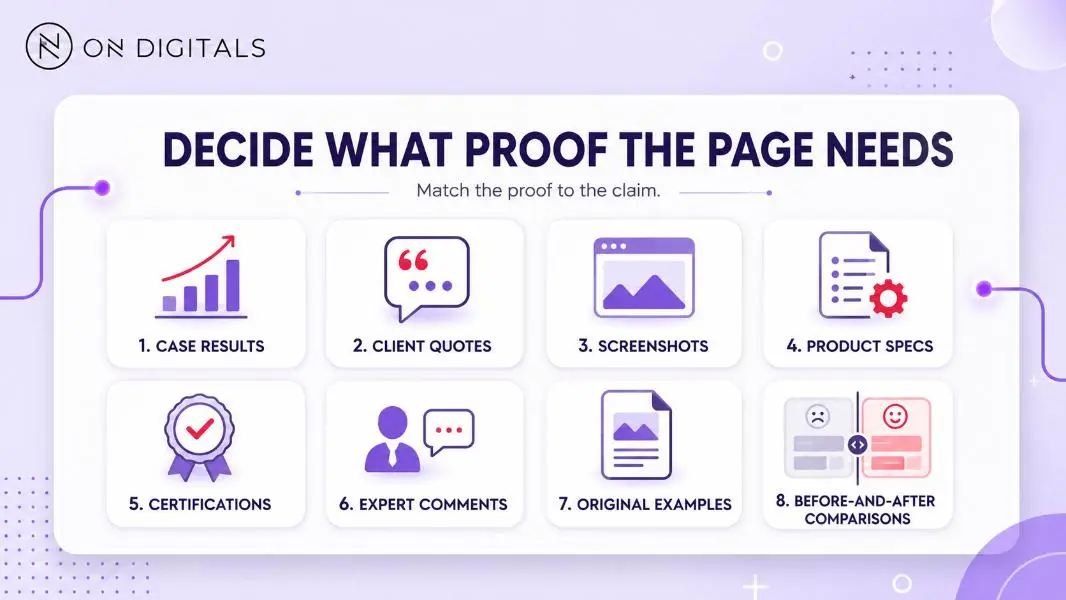 Strong page claims become more credible when they are supported with the right proof, such as real results, expert input, original examples, etc.
Create a content schedule
A content schedule helps teams publish with purpose. It should include the topic, target page, owner, deadline, primary intent, and review date. To support organic growth, the schedule should also show how each topic connects to search intent, page role, and business outcome. This makes the SEO content marketing strategy easier to manage before the team creates, refreshes, consolidates, or monitors more pages.
Planning one quarter at a time is often enough for small teams. Larger teams may need a yearly calendar with room for seasonal updates, campaign launches, and content refreshes.
How to write effective website content
Put the most important message first
Web visitors scan before they read. The first paragraph should answer the main question or confirm that the page matches the visitor’s need.
A service page should not begin with broad industry history. Meanwhile, a blog article should not hide the answer below a long setup. Lead with the useful point, then add context.
Use headings that explain the section
Headings should help users understand the page without reading every line. Generic labels such as “Overview” or “More information” are weak because they do not explain the section’s value.
Better headings tell users what they will learn. For example, “How to plan website content before writing” is clearer than “Planning.”
Keep paragraphs short and focused
Short paragraphs make web content easier to scan. Each paragraph should carry one main idea. When a section needs several related points, use bullets instead of packing everything into one long sentence.
Useful web writing habits include:
- one idea per paragraph
- clear headings
- short transitions
- direct language
- contextual links
- visible CTAs
Use the same language as your audience
Internal jargon can make content feel distant. Use the words your audience uses when describing their problem, goal, or question. Technical language can work when the audience expects it, while general users need simpler phrasing.
The right voice should feel clear, useful, and credible. Overly casual writing can weaken trust on serious service pages, while stiff corporate language can make helpful information harder to understand.
Use media with purpose
Images, videos, charts, and interactive elements should support the message. A visual should explain something faster, prove a point, or make comparison easier.
Before adding media, ask:
- Does this visual clarify the content?
- Does it support the page goal?
- Is it accessible with useful alt text or captions?
- Will it slow the page unnecessarily?
- Does it help users decide what to do next?
Decorative media can make a page heavier without improving understanding.
Add a CTA that matches page intent
Every important page should guide users toward a next step, but the CTA should fit the page role.
Blog articles can point readers to related guides, while service pages may invite users to request an audit. Case studies can lead into the relevant service, and contact pages should make the form, response time, and available options clear.
Website content SEO and accessibility checklist
Strong website content should be easy to find, easy to scan, and easy to use.
SEO checks before publishing
Review these elements before the page goes live:
- title tag matches the page intent
- H1 clearly states the topic
- intro answers the main need early
- headings support the user path
- internal links use descriptive anchor text
- images have useful file names and alt text
- meta description explains the page value
- URL slug is short and clear
Accessibility checks before publishing
Accessibility should be part of the content workflow, not a final fix.
Check whether:
- images have meaningful alt text
- videos include captions or transcripts
- headings follow a logical order
- link text makes sense out of context
- forms have clear labels
- contrast supports readability
- instructions are easy to understand
Accessible content helps more users complete their task. It also improves the quality of the page experience.
Content QA checklist
Before publishing, review the page as if you are a first-time visitor.
- Does the first paragraph answer the main user need?
- Do headings explain the section clearly?
- Does each paragraph stay focused?
- Are links contextual and useful?
- Do visuals support the message?
- Does the CTA match the page intent?
- Has the page owner been assigned?
- Is there a review date?
- Are metrics tied to the page role?
This checklist helps teams catch weak content before it becomes a performance problem.
How to measure and maintain website content
Website content should be maintained after publishing. Information changes, user expectations shift, and competitors improve their pages over time.
Track performance by page role:
|
Page role |
Useful metrics |
|
Blog article |
impressions, clicks, rankings, internal link movement |
|
Service page |
enquiries, CTA clicks, assisted conversions |
|
Product page |
product views, add-to-cart actions, conversion rate |
|
Case study |
scroll depth, service page clicks, assisted leads |
|
Careers page |
applications, role clicks, form starts |
|
Contact page |
form submissions, calls, completion rate |
Strong traffic with weak next-step action may point to CTA issues. When impressions are growing but clicks stay low, the title tag or meta description may need revision. Outdated content often needs refreshed examples, stronger proof, or a clearer structure.
Assign ownership so each important page has someone responsible for review. A homepage or high-value service page may need quarterly review, while evergreen blog articles can be checked when rankings or business priorities change.
Common website content mistakes
Writing before defining value
Content becomes vague when the page value is unclear. Define the promise before drafting so the page opens with relevance.
Treating every page like a blog article
Different page types need different structures. A product page, case study, careers page, and contact page should not follow the same format as an informational article.
Hiding the main answer too low
Long introductions can frustrate visitors. Give users the main point early, then build depth below it.
Using visuals without purpose
Images should clarify, prove, or support the message. Visuals added only for decoration can distract users and slow the page.
Publishing without ownership
Website content loses value when nobody maintains it. Assign an owner, review date, and performance metric for important pages.
Website content FAQ
How long should website content be?
Website content should be long enough to answer the user’s need clearly. A short contact page may need only essential details, while a detailed guide may need more depth, examples, and supporting sections.
How do you write content for a service page?
Start with the user problem and the service value. Then explain the offer, process, proof, and next step. The page should help users understand whether the service fits their situation.
How often should website content be updated?
Important pages should be reviewed regularly. Service pages, product pages, and high-traffic articles need updates when information changes, performance declines, or user questions shift.
What should be checked before publishing website content?
Check the page purpose, first paragraph, headings, SEO elements, internal links, visuals, accessibility, CTA, page owner, and review date. This keeps content useful after it goes live.
Final thoughts
Website content should help users understand a page and take the next step with confidence. Strong content starts with a clear value proposition, then moves through audit, audience mapping, writing, QA, publishing, and maintenance.
If your website content feels scattered, start with the pages that matter most to the business. Review what each page should do, what users need to know first, what proof is missing, and where the next step should appear. That page-level approach creates clearer content than adding more articles without a plan.

NEWEST POSTS
- Advertising Industry In Vietnam: The 2026 Trends, Channels and Market-Entry Strategy
- Best SEO Company in Vietnam: Latest Shortlist For Businesses
- How To Leverage Social Media For Customer Service Like A Pro?
- Social Media Post Tips – 8 Ways To Boost Engagement
- How To Use Social Media for Sales – In-depth Beginner Guide
Read more