
Crawled Currently Not Indexed: Practical Guide for SEO and Business Decisions
Vincent
13/01/2026
22
Crawled currently not indexed means Google has visited a URL but has not added it to the index. In 2026, SEO teams should treat this status as an indexation quality signal, while reviewing crawl budget to see whether Googlebot is spending time on priority URLs or low-value sections. It affects content pruning, ecommerce cleanup, internal links, structured data QA etc.
What crawled currently not indexed means and when it matters
Crawled currently not indexed is a Google Search Console status where Google crawled the page but left it out of the index. Google’s Page Indexing report says the page may or may not be indexed later, with no need to resubmit the URL only for crawling.
The key point is sequence. Google has already found and fetched the URL. The issue sits after crawling, during the decision about whether the page deserves index space.
This status matters when affected URLs are part of the business funnel. A blog tag archive may have low value. A product page, service page, or high-intent guide needs deeper review because the page cannot earn organic traffic while excluded.
| Status | What happened | SEO focus |
| Discovered currently not indexed | Google knows the URL exists | Crawl priority |
| Crawled currently not indexed | Google fetched the page | Indexation quality |
| Indexed | Google added the URL | Ranking and CTR |
| Alternate page with canonical | Google chose another URL | Canonical logic |
For SEO teams, this status should trigger triage instead of panic. Some excluded URLs can stay out of the index. Others need content, technical, or template-level fixes.
Why this status affects rankings, indexation, UX etc.
Crawled currently not indexed affects performance because excluded pages cannot rank in Google Search. The bigger risk appears when important page groups keep entering this status. That pattern can reveal weak content templates, duplicate URLs, poor internal linking, or conflicting technical signals.
Google does not index every crawled URL. The index is selective. A page needs enough value, clarity, and technical consistency to justify inclusion.
For business teams, the impact depends on page role:
| Page type | Risk level | Why it matters |
| Service page | High | Lost lead visibility |
| Product page | High | Lost organic revenue |
| Blog guide | Medium | Lost topic authority |
| Tag page | Low | Often low search value |
| Expired campaign page | Case by case | May deserve redirect |
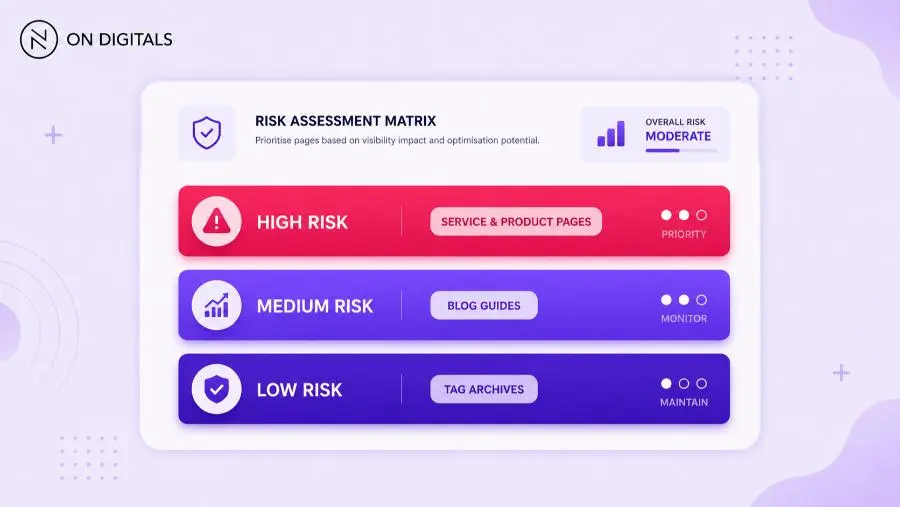 A product or service page carries a high risk of lost revenue and leads, whereas a tag page has low search value.
This is why the fix should begin with segmentation. A hundred affected URLs in one weak template require a different response from five affected URLs across unrelated articles.
Google Search Console also needs careful interpretation. The report is useful for patterns, while the URL Inspection Tool helps confirm the live state of one page. Use both before changing templates or deleting content.
Out-of-stock or expired products causing crawled currently not indexed
Out-of-stock or expired product pages often fall into crawled currently not indexed because the page loses search value. If the product has no availability, weak description, or no replacement path, Google may see limited reason to keep it eligible for search.
This issue is common in ecommerce and lead-generation sites with temporary offers. A discontinued item may still return 200 OK. Google can crawl it, but the page may no longer satisfy user intent.
Use this decision table:
| Situation | Recommended action | SEO reason |
| Product returns soon | Keep URL live | Preserve demand signal |
| Product discontinued | Redirect to closest alternative | Pass relevance |
| Product has search demand | Add replacement options | Serve user intent |
| Product has no demand | Remove from sitemap | Reduce low-value signals |
| Many expired pages | Build a cleanup rule | Protect crawl efficiency |
Avoid a blanket fix. Some unavailable products still deserve indexation when users search model names, specs, or comparisons. Others only create thin URLs.
A stronger product page can include availability status, replacement links, updated copy, review content etc. If the page keeps useful context, it has a better case for indexation.
Near-duplicate content preventing pages from being indexed
Near-duplicate pages can trigger crawled currently not indexed because Google has little reason to index many versions of the same answer. The problem often appears in category filters, location pages, product variants, service pages, or blog posts with overlapping intent.
The page may be technically fine. The issue is differentiation. If Google already has a better version from the same site or another site, a weaker near-duplicate page becomes easier to exclude.
Audit near-duplicates by grouping URLs around intent:
| Pattern | Example | Better fix |
| Same keyword, similar article | Multiple “how to fix indexing” posts | Merge into one stronger guide |
| Same service, different city | Thin local pages | Add local proof or consolidate |
| Same product, minor variant | Color-only URLs | Use canonical logic |
| Same category, filter URLs | Price or sorting pages | Control indexation |
| Same FAQ repeated | Boilerplate sections | Rewrite with page-specific context |
Canonical tags can help, but they cannot repair weak content by themselves. If several pages compete for the same intent, choose the strongest URL. Then merge useful material and redirect weaker pages where relevant.
This is where content pruning becomes strategic. Fewer strong URLs often perform better than many thin pages competing for the same query.
Reviews from real users and quality signals
Real user signals help SEO teams judge whether a page deserves improvement, consolidation, or removal. Search Console shows indexation status, while user behavior can reveal whether the page solves a real need. Use both before making a final decision.
For ecommerce pages, reviews can add useful page-specific context. They show product experience, recurring concerns, common use cases etc. That kind of content can separate one product URL from a template clone.
For service or informational pages, real user input may come from sales calls, support questions, on-site search, CRM notes, or comments. These inputs help the page answer actual objections instead of repeating generic SEO copy.
Useful review signals include:
- Specific product use cases
- Repeated customer questions
- Objections from sales conversations
- Support issues tied to the page topic
- Search terms inside site search
- Feedback from high-intent visitors
Use these signals to improve information gain. A page with original examples, real objections, or clearer next steps becomes more index-worthy than a page built only from competitor summaries.
Structured data errors that can weaken indexation confidence
Structured data errors do not automatically cause crawled currently not indexed. Still, schema problems can weaken page clarity when they misrepresent visible content or repeat stale template fields. Search systems need consistency between markup and what users can see.
Google’s structured data guidelines say markup should represent the main page content and avoid hidden or misleading information. Structured data can make a page eligible for rich result appearance, while display is never guaranteed.
For this topic, structured data review belongs inside technical SEO QA. It should sit beside crawl access, canonical tags, internal links, and content quality checks.
| Schema issue | Risk | Better action |
| Markup describes hidden content | Weak trust signal | Align schema with visible copy |
| Wrong page type | Confused entity signal | Match schema to intent |
| Missing required fields | Rich result ineligibility | Check Google documentation |
| Repeated template values | Low-quality signal | Pull real page data |
| Blocked page resources | Poor rendering context | Review crawl access |
Use Google’s Rich Results Test for eligible rich result types. Google describes rich results as search experiences beyond the standard blue link.
Schema should support the page. It should never become a workaround for thin content or unclear intent.
Step-by-step framework for marketers and SEO teams
A crawled currently not indexed fix should start with diagnosis, then move into page-level decisions. This order prevents teams from requesting indexing repeatedly without improving the page.
Before changing templates, review crawl budget monitoring tools to separate crawl waste from true indexing gaps. A page may stay excluded because Google crawled it and rejected the value, while another page may struggle because Googlebot rarely reaches it.
Use this workflow:
- Export affected URLs Open Google Search Console, go to Page Indexing, then export URLs under the status.
- Group URLs by template Separate blog posts, categories, products, service pages etc. Patterns matter more than isolated URLs.
- Mark business priority Label pages as lead-critical, revenue-critical, support content, or low-value archive.
- Inspect representative URLs Use URL Inspection to confirm crawlability, canonical selection, last crawl date, and live page status.
- Review content value Compare the page against the target intent. Look for thin copy, outdated sections, repeated blocks, or missing proof.
- Check internal links Pages with no contextual links often look less important. Add links from relevant hubs or pillar pages.
- Fix technical conflicts Review canonical tags, robots directives, sitemap inclusion, status codes, rendering etc.
- Request indexing selectively Use URL Inspection only after meaningful updates. Repeating the same request without fixes rarely changes the outcome.
- Monitor the trend Track the affected count weekly. Template-level improvement matters more than one URL moving status.
This workflow helps content, SEO, and development teams share the same diagnosis. It also keeps fixes tied to revenue or visibility impact.
Common mistakes, risks, and quality checks
The biggest mistake is treating crawled currently not indexed as one universal error. The same status can come from thin content, near-duplicates, poor architecture, expired products, technical conflict etc. Each pattern needs a different fix.
Use this QA table before action:
| Mistake | Why it wastes time | Better approach |
| Requesting indexing too early | Page has no meaningful change | Improve first |
| Fixing every excluded URL | Some pages have low value | Prioritize by business role |
| Removing pages too fast | Useful signals may be lost | Check traffic and backlinks |
| Ignoring duplicates | Google still sees overlap | Merge or canonicalize |
| Keeping expired URLs live | Thin pages accumulate | Redirect or update |
| Publishing without links | Page looks isolated | Add contextual internal links |
Also avoid sudden mass deletion. If affected URLs have backlinks, impressions, or assisted conversions, preserve value through consolidation or redirects.
Quality checks should answer three questions:
- Does this URL serve a distinct intent?
- Does the page offer stronger value than existing alternatives?
- Does the site architecture tell Google the page matters?
If the answer is weak, fix the underlying reason before asking Google to reconsider.
Tools, metrics, and examples to review before publishing
The right tool stack should make indexing decisions clearer. Marketers need a simple view of affected pages, while SEO teams need enough detail for technical and content diagnosis.
| Tool | Use case | Output |
| Google Search Console | Find affected URLs | Page status export |
| URL Inspection | Test one URL | Crawl and index signals |
| Screaming Frog or crawler | Group templates | Internal link and status data |
| Rich Results Test | Check schema eligibility | Structured data result |
| Analytics or CRM | Review business value | Traffic or lead context |
Metrics should match the page type. For blogs, review impressions, clicks, indexation status, and internal links. For service pages, add assisted leads or form submissions. For product pages, include availability, revenue contribution, and replacement demand.
A useful reporting format can group URLs into three action buckets:
| Bucket | Criteria | Action |
| Fix now | Business value and clear issue | Update or consolidate |
| Fix next | Useful page with weaker priority | Schedule sprint |
| Leave excluded | Low-value or duplicate page | Remove from sitemap or noindex if intentional |
This prevents the team from chasing every excluded URL. The goal is better indexation quality, not a perfect Search Console report.
FAQ
What does crawled currently not indexed mean?
Crawled currently not indexed means Google crawled the page but left it outside the index. The URL may appear in Search Console, while it cannot rank in Google Search until indexed. Google says the page may or may not be indexed later.
Is crawled currently not indexed a penalty?
Crawled currently not indexed is a Search Console indexing status rather than a manual penalty. It usually signals that Google fetched the page but chose to exclude it from the index. Review content value, duplication, internal links, canonical tags, and template quality before assuming a serious penalty.
How do I fix crawled currently not indexed?
Start by grouping affected URLs. Then check whether the issue comes from thin content, near-duplicate pages, expired products, weak internal links, or technical conflicts. Improve the page before using URL Inspection to request indexing. For low-value pages, consolidation or removal may be better.
Should I request indexing for every affected URL?
Request indexing only after meaningful improvements. Google’s documentation says there is no need to resubmit a URL only for crawling under this status. Use the request feature for priority URLs where content, internal links, or technical issues have already been fixed.
Can structured data fix crawled currently not indexed?
Structured data can help page understanding when it matches visible content. It cannot replace useful copy, clear intent, or strong internal links. Use schema QA as part of technical SEO review, especially for product, article, FAQ, or local pages.
Why do product pages get crawled but stay unindexed?
Product pages often stay unindexed when they are expired, out of stock, thin, duplicated, or hard to distinguish from other variants. Improve unique product information, add helpful replacement paths, review canonical logic, and remove weak URLs from sitemaps when they have no search value.
Conclusion
Crawled currently not indexed should help SEO teams prioritize better pages, not chase every excluded URL. The status shows where Google has already crawled a page but has not added it to the index.

NEWEST POSTS
- Advertising Industry In Vietnam: The 2026 Trends, Channels and Market-Entry Strategy
- Best SEO Company in Vietnam: Latest Shortlist For Businesses
- How To Leverage Social Media For Customer Service Like A Pro?
- Social Media Post Tips – 8 Ways To Boost Engagement
- How To Use Social Media for Sales – In-depth Beginner Guide
Read more