
Google Ads Audience Targeting: How to Choose and Test the Right Segments
Vincent
14/10/2025
38
Google Ads audience targeting helps advertisers analyse or prioritise people based on their interests, demographics and previous interactions with a business. It works best when it supports a clear campaign strategy. Keywords still capture active demand, while audience segments add context about who may be more valuable and how they have engaged with your brand before.
Google Ads audience targeting in 60 seconds
Audience targeting is an additional layer that helps you understand the people behind the clicks.
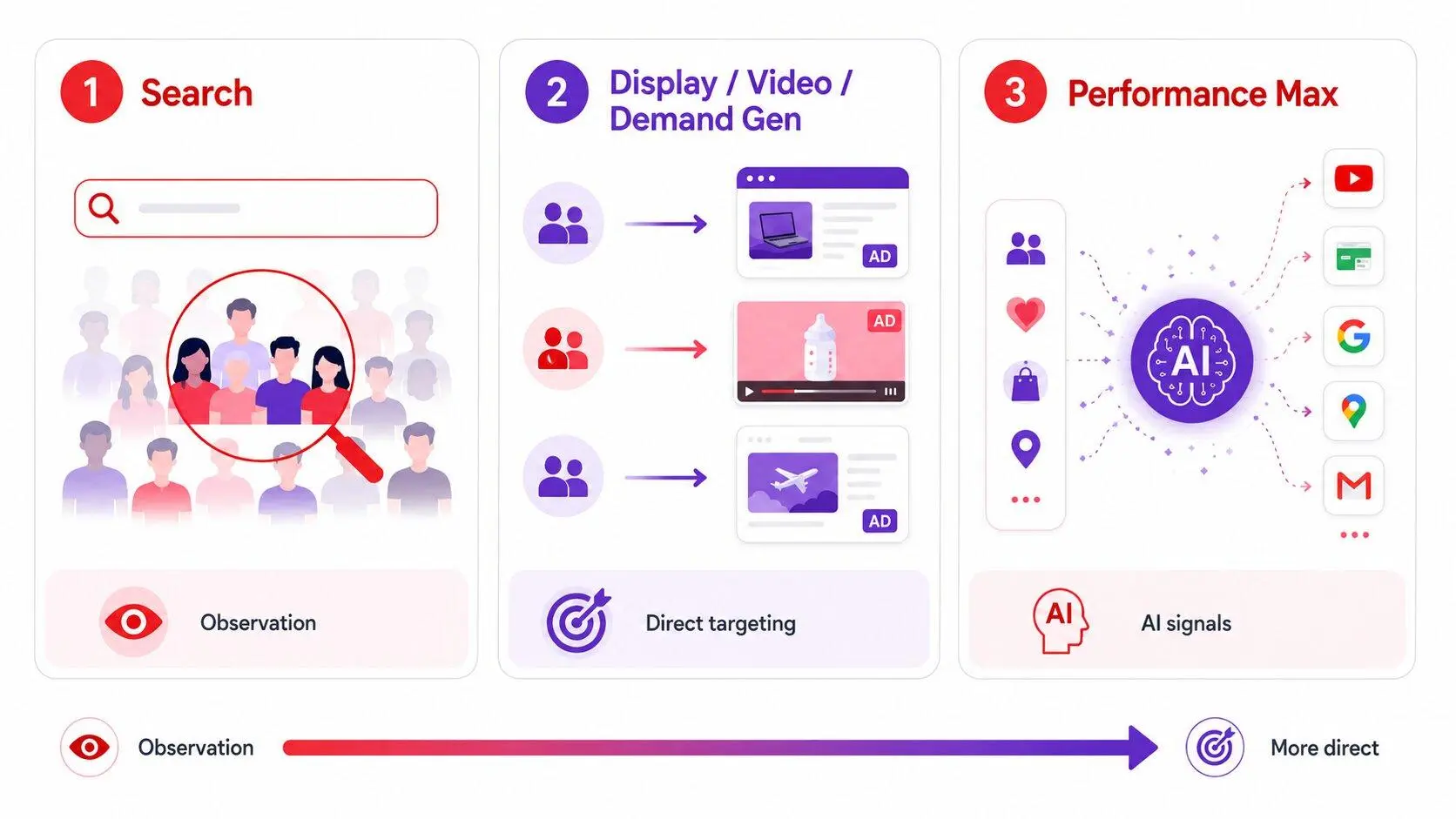
The right setup depends on campaign type.
In Search, audiences are often most useful as an observation layer before you decide whether to narrow reach.
In Display, Video and Demand Gen, audience segments can play a more direct role in determining who sees an ad.
In Performance Max, audience signals help guide Google AI but do not strictly control delivery.
|
Campaign type |
Practical role for audiences |
|
Search |
Observe audience performance before limiting reach |
|
Display |
Reach defined prospecting or remarketing groups |
|
Video |
Build awareness, consideration or sequential messaging |
|
Demand Gen |
Find new audiences and support visual discovery campaigns |
|
Standard Shopping |
Add customer and intent context to product campaigns |
|
Performance Max |
Use signals to guide automated optimisation |
A useful audience strategy starts with one question: what customer group is likely to need a different message, offer or campaign experience?
What is Google Ads audience targeting?
Google Ads audience targeting lets advertisers apply audience segments to campaigns or ad groups. These segments are estimated groups of people based on:
- Interests
- Habits
- Recent purchase intent
- Long-term demographic information
- Previous interactions with a business
For example, an advertiser may want to reach people researching a product category, people who visited a service page, existing customers from a CRM list or people with an interest related to the business.
Google Ads does not give advertisers a verified profile of every individual user. Audience segments are signals based on available activity and estimated characteristics. They should guide campaign decisions, not become assumptions about every person who sees an ad.
A good audience strategy connects four areas:
|
Campaign layer |
Main question |
|
Keyword or placement |
What is the person looking for or consuming right now? |
|
Audience segment |
What context may make this person more relevant? |
|
Creative and offer |
Why should this person choose the business? |
|
Conversion tracking |
Did the interaction produce a valuable result? |
For a Search campaign, a keyword may show active demand. An audience layer can reveal whether previous website visitors or in-market users are more likely to become qualified leads. The landing page and tracking then determine whether the campaign creates actual business value.
Google Ads audience targeting vs keyword targeting
Keywords and audiences work differently. A keyword helps advertisers respond to what someone is searching for. An audience segment adds information about the person’s likely interests, purchase stage or relationship with the business.
For example, someone searching for “commercial office cleaning company” is showing clear search intent. That search is the main reason a Search ad can appear. However, the advertiser may also want to know whether the person has previously visited its pricing page or belongs to an audience segment researching business services.
Keywords should remain the foundation of most Search campaigns. Audiences should help advertisers understand performance, adapt messaging or create more focused campaign structures where appropriate.
This distinction prevents a common mistake: using audiences to narrow a Search campaign before there is evidence that the restriction will improve results.
Targeting vs Observation
The most important Google Ads audience targeting decision is often whether to use Targeting or Observation.
Observation allows advertisers to see how selected audiences perform without limiting who can see the ads. In a Search campaign, keywords can still trigger the ads for all eligible users. The audience layer simply provides more reporting and can support automated bidding signals.
Targeting restricts delivery to the chosen audience. This can be useful when an ad group is designed for a specific group, such as previous website visitors or a defined Display audience. However, Targeting can reduce reach significantly when the selected audience is small.
|
Setting |
What it does |
Best use case |
Main risk |
|
Observation |
Reports audience performance without narrowing reach |
Search campaigns, early testing, Smart Bidding campaigns |
Drawing conclusions before enough conversion data exists |
|
Targeting |
Limits delivery to selected audiences |
Dedicated remarketing, Display, Video or controlled audience tests |
Audience becomes too narrow to generate useful volume |
|
Exclusions |
Stops selected groups from seeing ads |
Existing customers, converted leads or irrelevant users |
Removing users who may still be valuable |
For most Search campaigns, Observation is the safer starting point. It allows the advertiser to learn whether a segment performs differently while preserving the demand already captured through keywords.
For example, a B2B company may add previous service-page visitors and in-market audiences in Observation mode. If website visitors generate stronger qualified lead rates, the business can later test tailored messaging, a separate remarketing campaign or a different landing-page experience.
Targeting is more appropriate when the campaign has a deliberate audience-only purpose. A Display campaign for cart abandoners, for instance, may need to reach only people who already interacted with the product.
The main Google Ads audience segments
Google Ads offers several audience segment categories. The value of each one depends on the campaign goal, available data and stage of the customer journey.
Google-defined audience segments
Google-defined segments include affinity, in-market, detailed demographics and life events.
Affinity segments reflect broader interests and habits. They can be useful when a brand needs awareness or early-stage consideration, especially in Display and Video campaigns. A fitness brand, for example, may test relevant affinity segments before it has a large first-party audience.
In-market segments indicate recent research or purchase intent around a category. They can be useful for prospecting, but should not be treated as proof that every user is ready to buy. An in-market segment is most valuable when the ad, offer and landing page are still relevant to the user’s likely need.
Detailed demographics add long-term life or household context. They can help advertisers review who responds to a campaign, but they should not replace customer research or broad assumptions about buying behaviour.
Life events can be relevant for certain campaign types and categories, such as moving home, graduating or getting married. They are not available across every campaign type.
Your data segments
Google now refers to remarketing audiences as your data segments. These groups are built from people who have already interacted with a business.
They may include:
- Website visitors
- App users
- YouTube viewers
- Customer Match lists
- Existing customers
- Leads who have submitted a form
- People who viewed a product or service page
Your data segments are often useful because they are based on a known interaction. However, they are not automatically the highest-value audiences. A person who read one blog article may be very different from a person who viewed pricing, added a product to cart or requested a consultation.
Segment users based on meaningful actions. A pricing-page visitor may deserve a stronger proof-focused message. A past customer may need an upsell or retention campaign instead of a first-purchase offer.
Customer Match can be useful for re-engagement, exclusions or customer retention. Only use customer data that the business has collected and can use appropriately. Data quality matters as much as audience size.
Custom segments
Custom segments allow advertisers to define an audience using keywords, URLs and apps related to the ideal customer. They are especially useful in Display, Video and Demand Gen campaigns.

For example, a business selling marathon footwear could create a custom segment based on running-related searches, training websites and fitness apps. This does not mean the segment works like Search keyword targeting. Google uses those inputs to identify people with related interests or purchase intent across eligible surfaces.
Custom segments should be specific enough to reflect a real customer profile. Adding a long list of loosely related websites and keywords can make the signal unclear.
Lookalike segments
Lookalike segments help Demand Gen campaigns reach new people who share characteristics with an existing seed audience. The seed may come from customer data, website visitors or another meaningful first-party list.
Lookalikes can be useful when the seed list reflects real business value. A list of repeat customers may be more informative than a list of all website visitors.
In 2026, Google is transitioning Lookalike segments in Demand Gen toward a more suggestion-based model. That means they should be treated as a starting point for expansion, not as a guarantee that the campaign will reach only people similar to the original list.
Which audience segments work with each campaign type?
Not every audience segment is available for every Google Ads campaign. This is one reason generic audience advice can lead to poor implementation.
|
Audience segment |
Search |
Display |
Video |
Demand Gen |
Standard Shopping |
Performance Max |
|
Affinity |
Yes |
Yes |
Yes |
Yes |
Yes |
Audience signal |
|
In-market |
Yes |
Yes |
Yes |
Yes |
Yes |
Audience signal |
|
Detailed demographics |
Yes |
Yes |
Yes |
Yes |
Yes |
Audience signal |
|
Life events |
No |
Yes |
Yes |
Yes |
No |
Audience signal |
|
Custom segments |
No |
Yes |
Yes |
Yes |
No |
Audience signal |
|
Your data |
Yes |
Yes |
Yes |
Yes |
Yes |
Audience signal |
|
Lookalike segments |
No |
No |
No |
Demand Gen |
No |
Not a standard audience setting |
Performance Max works differently from traditional campaigns. Advertisers can add audience signals, but these signals do not create a strict filter. Google may show ads outside the selected signals when its systems identify other users who are likely to convert.
This makes first-party data particularly important in Performance Max. Website visitors, customer lists, high-value purchasers and engaged video viewers can all give the system a stronger starting point.
How to choose the right audience for your goal
The best audience is not always the narrowest one. Start with the customer action you need, then select the audience approach that supports that action.
|
Business situation |
Practical starting approach |
|
Search campaign with expensive keywords |
Add high-value audiences in Observation first |
|
Ecommerce store with product and purchase data |
Use your data for remarketing, exclusions and Performance Max signals |
|
New product with little first-party data |
Test in-market, affinity or custom segments in Demand Gen, Display or Video |
|
B2B business with a longer sales cycle |
Use website visitors, pricing-page audiences and Customer Match lists carefully |
|
Retention or reactivation programme |
Use Customer Match for existing-customer messaging or exclusions |
|
Brand with active YouTube content |
Build engagement audiences for follow-up messaging |
A business selling a high-consideration service may use Search to capture existing demand. It can then use website-visitor audiences to bring interested users back with case studies, comparison content or consultation offers.
An ecommerce brand may use Demand Gen or Video to create product interest, then use product-view and cart audiences to support remarketing. The audience strategy changes because the buying journey changes.
How audiences work in Google Search campaigns
In Search, keywords remain the main trigger. Audience segments should normally add insight rather than replace keyword intent.
A practical Search approach is to begin with Observation. Add a small number of relevant audience segments, such as previous website visitors, Customer Match lists or in-market segments related to the offer. Then compare their performance against the broader campaign.
Focus on commercial outcomes. A segment with a high click-through rate is not automatically valuable. Check whether it produces qualified leads, profitable purchases or stronger conversion value.
For example, an industrial equipment supplier may bid on a keyword such as “industrial automation supplier”. The campaign can observe people who previously visited technical product pages or submitted an enquiry. If these users generate stronger sales-qualified leads, the business may test audience-specific messaging or a dedicated remarketing structure.
Search audiences can also help with exclusions. A business may want to exclude existing customers from first-time acquisition campaigns. A service company may exclude leads who already booked a consultation to prevent duplicate ad exposure.
Audience strategy should support Search intent, not weaken it. Restricting a campaign too early can remove people who are actively searching for exactly what the business offers.
How audiences work in Performance Max and Demand Gen
Performance Max and Demand Gen are more automation-led, but audiences still matter.
In Performance Max, audience signals help Google AI understand which people may be more likely to convert. Strong starting signals can include high-value customer lists, website visitors, app users, product viewers and custom segments based on real category research.
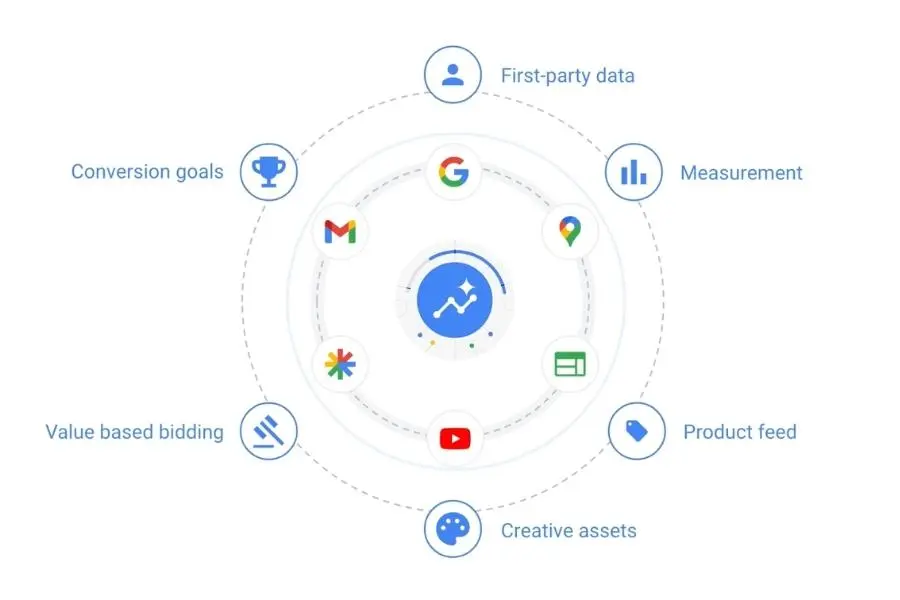
However, audience signals are not hard targeting. Performance Max can expand beyond them when it predicts other users may be valuable. This means campaign quality still depends on conversion tracking, product feeds, creative assets and the business goal selected.
Demand Gen gives advertisers more direct audience control across visual Google surfaces. It can use in-market segments, custom segments, your data and Lookalike segments. This makes it useful for brands that need to create demand before users actively search.
A practical rule is simple:
- Use Performance Max when you want Google AI to optimise across inventory toward a clear conversion goal.
- Use Demand Gen when visual discovery, audience testing and creative-led demand creation are central to the campaign.
- Use Search when customers are already expressing intent through queries.
A practical Google Ads audience testing framework
Audience testing should answer a clear question. Adding every available segment at once usually makes reporting harder, not better.
- Define the commercial outcome.
Choose the result that matters, such as qualified lead, purchase, booked meeting or conversion value. - Select a limited number of relevant segments.
Start with audiences that represent a clear hypothesis. For example, previous product viewers may be more valuable than all website visitors. - Use Observation for Search unless restriction is intentional.
This protects reach while giving you audience data. - Match creative with audience stage.
A first-time prospect may need education. A returning visitor may need proof, pricing information or a clearer call to action. - Use exclusions to protect budget and relevance.
Exclude purchasers from first-purchase campaigns. Exclude converted leads from introductory lead-generation ads. - Review conversion quality before scaling.
Evaluate cost per qualified lead, purchase value, revenue contribution or sales feedback. Do not scale an audience based on clicks alone.
For Search campaigns using Smart Bidding, first-party segments added in Observation can become useful signals for automated bidding. This is usually more reliable than applying fixed manual bid increases to every high-value audience.
Common Google Ads audience targeting mistakes
Treating audiences as a replacement for keywords
Audience segments add customer context, but they do not replace search intent. A strong keyword strategy still matters for Search campaigns.
Restricting Search campaigns too early
Applying Targeting mode without evidence can reduce reach and remove valuable searches. Observation is often the better first step.
Using old Similar Segments advice
Similar Segments are no longer a general Google Ads tactic. Lookalike segments are now associated with Demand Gen and are moving toward a more flexible suggestion-based model.
Adding too many audience layers
Combining narrow geography, demographics, interests and first-party lists can make an audience too small. Start with the fewest restrictions needed to test a meaningful hypothesis.
Using customer lists without segmentation
A generic customer list may include new buyers, inactive customers, qualified leads and low-value contacts. Segment lists by lifecycle stage before using them for acquisition, retention or exclusion.
Assuming audiences improve Quality Score directly
Audience segments can help advertisers analyse performance and refine campaign strategy. They do not automatically improve keyword Quality Score. Keyword relevance, ad quality and landing-page experience still require separate work.
For a deeper guide to the relationship between ad relevance, landing pages and keyword performance, see our article on Google Ads Quality Score.
Frequently asked questions (FAQs)
What is Google Ads audience targeting?
Google Ads audience targeting is a way to reach or analyse groups of people based on their interests, purchase intent, demographics or previous interactions with a business. It can support Search, Display, Video, Demand Gen, Shopping and Performance Max campaigns, although the available settings differ by campaign type.
What is the difference between Targeting and Observation in Google Ads?
Targeting limits ad delivery to the selected audience. Observation does not limit reach. It allows advertisers to see how selected segments perform within the existing campaign. Observation is often useful for Search campaigns because keywords can continue capturing broad relevant demand.
Should I use audience targeting for Search campaigns?
Yes, but audiences should usually support Search keyword strategy rather than replace it. A practical starting point is Observation mode. This gives you audience reporting without preventing ads from showing to other relevant searchers.
What are your data segments in Google Ads?
Your data segments are audiences built from people who have interacted with your business. They can include website visitors, app users, YouTube viewers and customers from CRM data. They are useful for remarketing, exclusions, retention and audience signals.
Can custom segments be used in Search campaigns?
No. Custom segments are designed for Display, Video and Demand Gen campaigns. They can also be used as audience signals in Performance Max. Search campaigns use other audience segment types, such as affinity, in-market, detailed demographics and your data.
Are Performance Max audience signals strict targeting?
No. Audience signals help guide Google AI toward people who may be likely to convert. Performance Max can still show ads to users outside those signals when the system predicts they may help achieve the campaign goal.
Are Lookalike segments available in Google Ads?
Lookalike segments are available in Demand Gen campaigns. They can help advertisers expand beyond a seed audience, such as high-value customers or engaged website visitors. They should be treated as a starting signal and reviewed against conversion quality.
Use audience data to improve decisions, not limit demand
Google Ads audience targeting works best when it adds useful customer context to a strong campaign foundation. Keywords capture intent. Creative explains the offer. Landing pages support the next action. Conversion tracking shows whether the result matters.
Audience segments help advertisers understand which groups respond, build relevant follow-up campaigns and guide automation with stronger first-party data. The goal is not to target as narrowly as possible. It is to find a practical balance between reach, relevance and commercial value.
On Digitals helps businesses build Google Ads strategies around audience signals, campaign structure, conversion tracking and qualified outcomes through our Google Ads services.

NEWEST POSTS
- Advertising Industry In Vietnam: The 2026 Trends, Channels and Market-Entry Strategy
- Best SEO Company in Vietnam: Latest Shortlist For Businesses
- How To Leverage Social Media For Customer Service Like A Pro?
- Social Media Post Tips – 8 Ways To Boost Engagement
- How To Use Social Media for Sales – In-depth Beginner Guide
Read more