
Insights
How To Block Content On Tiktok – 5 Methods For Safer Viewing
On Digitals
05/02/2026
49
How to block content on TikTok helps you filter unwanted videos and take control of what appears on your feed. With the right settings, you can reduce irrelevant or sensitive content easily. Let’s explore simple steps to customize your TikTok experience!
How to block content on Tiktok – Basic information
Blocking content on TikTok means using built-in tools to control what appears on your For You page. TikTok content filtering helps reduce videos that feel irrelevant, repetitive, or uncomfortable. This is the foundation of how to block content on TikTok effectively.
There are several types of content you can block or limit on TikTok. This includes specific videos, keywords, hashtags, topics, and even content from certain creators. These tools are especially useful if you are learning how to block certain content on TikTok without affecting your entire feed. You can also restrict sensitive material or enable modes designed for safer viewing.
Blocking content improves user experience by making your feed more personalized and enjoyable. When unwanted videos appear less often, engagement feels more natural and less overwhelming. Over time, these controls help create a cleaner, more relevant TikTok experience.
Understanding content control helps shape a safer viewing experience
How to block content on TikTok in detail
How to block content on TikTok in detail explains the exact settings you can use to control what appears on your feed. Follow these methods to filter unwanted videos and create a safer, more personalized TikTok experience:
Using “Not interested”
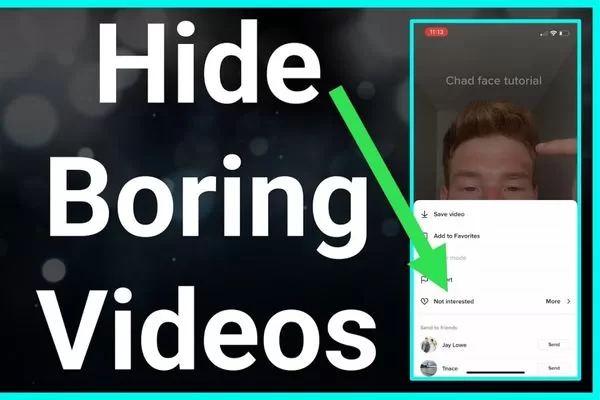
Using the Not Interested option is one of the quickest ways to block unwanted videos on TikTok. You can tap and hold on a video, then select Not Interested to signal disapproval. This action immediately reduces similar content on your For You page.
TikTok learns from your feedback by tracking how often you mark videos as Not Interested. The algorithm analyzes video topics, hashtags, sounds, and creator behavior. This feedback loop explains why how to block content on TikTok becomes more accurate over time.
This method works best when used consistently on similar content types. Marking multiple related videos helps TikTok recognize your preferences faster. It is one of the most practical ways for users who want to know how to block specific content on TikTok without changing account-wide settings. It is especially effective for trends, repetitive topics, or content you never want to see.
For example, if your feed keeps showing the same viral dance or prank videos, using Not Interested on several similar posts helps reduce that trend quickly. Combining this action with keyword filters for related hashtags makes the results more noticeable. After a few days of consistent filtering, TikTok shows fewer videos from the same trend category.
Block content with “Keyword”
Using keyword filters in settings allows you to hide content you do not want to see on TikTok. You can add specific words or phrases to automatically filter related videos. This helps keep your For You page focused on topics you actually enjoy.
How to block content on TikTok becomes easier when you block hashtags and phrases tied to unwanted trends. Filtering hashtags prevents videos with those tags from appearing in your feed. Blocking phrases also reduces similar content across different creators.
Choosing effective keywords is key to better content control. Focus on common terms used in videos you want to avoid, including repeated AI-related phrases or labels. This approach works well for users looking for how to block AI content on TikTok without relying on manual blocking.
Restrict topic-based content on TikTok
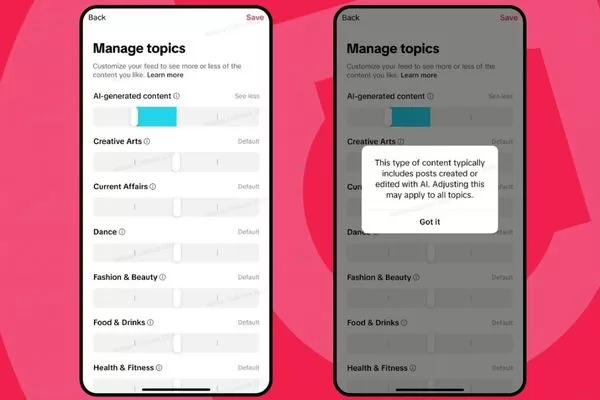
Limiting sensitive or repetitive topics helps reduce content you may find uncomfortable or annoying. TikTok allows you to lower the frequency of certain topics in your feed. This is particularly helpful for users searching for how to block inappropriate content on TikTok more effectively. This makes your viewing experience feel more balanced and relevant.
Adjusting content preferences gives you more control over what appears on your For You page. You can fine-tune interests to see more of what you like and less of what you don’t. These settings guide TikTok’s recommendations over time.
How to block content on TikTok starts with understanding TikTok’s topic controls and how they affect recommendations. Each adjustment sends signals to the algorithm about your preferences. When used consistently, topic controls improve the overall quality of your feed.
Block videos from certain TikTok accounts
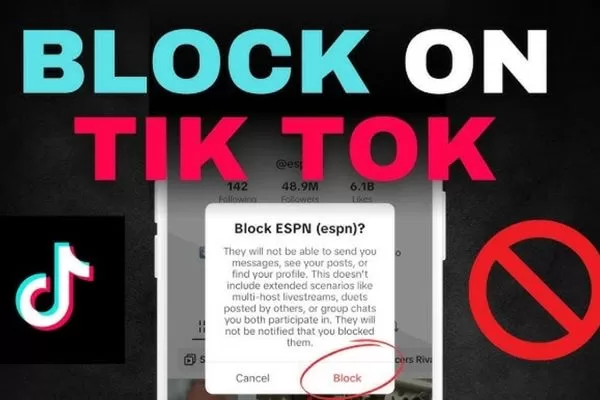
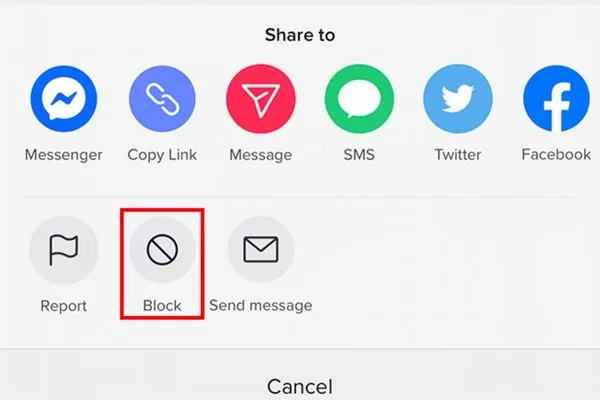
How to block content on TikTok starts with blocking individual creators you no longer want to see. When you block a creator, their videos will not appear on your feed. This also prevents them from interacting with your account.
Muting and blocking accounts serve different purposes on TikTok. Muting hides a creator’s videos while still allowing limited interaction. Blocking is the best option if you want to learn how to block a content creator on TikTok completely. Blocking is a stronger action that fully removes their content and access to your profile.
Managing your blocked accounts list helps you stay in control over time. You can review, unblock, or update your list in settings whenever needed. Keeping this list organized ensures your feed stays relevant and comfortable.
Set content limits on TikTok for kids and teens
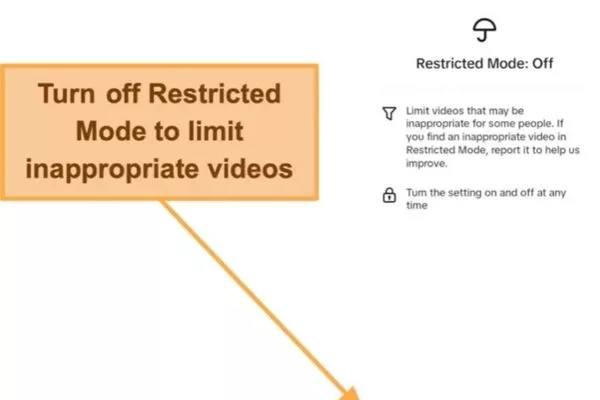
Using Restricted Mode helps limit content that may not be suitable for younger users. This feature filters out mature or sensitive videos automatically. It creates a safer viewing environment for kids and teens.
Setting up Family Pairing allows parents to link their account with their child’s TikTok account. This gives adults control over screen time, messages, and content exposure. Family Pairing makes supervision easier without constant monitoring.
Parental controls provide an overview of all safety and privacy tools available when learning how to block content on TikTok for younger users. Parents can manage restrictions, review settings, and adjust limits as needed to match their child’s age. These controls help ensure a balanced, safer, and age-appropriate TikTok experience over time.
These settings allow deeper control over what appears daily
Why blocked videos appear again on TikTok
Even after adjusting settings, some unwanted videos may still show up on your feed. This usually happens because TikTok’s system needs time and repeated signals to adapt.
Algorithm limitations
TikTok’s algorithm does not react instantly to a single action. It relies on patterns built from multiple interactions over time. This means blocked or limited content may still appear occasionally.
The platform also balances personal preferences with trending and popular content. Viral videos can override some filters temporarily. This is a known limitation in how to block content on TikTok effectively.
Improve filtering accuracy
Improving filtering accuracy requires consistent actions across your account. Using Not Interested, keyword filters, and topic controls together strengthens signals. The more consistent you are, the faster the algorithm adapts.
Regularly reviewing and updating your preferences also helps. Trends and content styles change frequently on TikTok. Keeping settings updated improves long-term results.
Common mistakes users make
One common mistake is relying on only one filtering method. Using just Not Interested without keywords or topic controls weakens results. Effective filtering requires combining multiple tools.
Another mistake is expecting instant results after a single action. TikTok needs repeated feedback to learn accurately. Understanding this process helps users apply how to block content on TikTok more successfully.
Some unwanted videos return due to algorithm learning limits
Best practices to fully control your TikTok Feed
Taking control of your feed requires more than one quick action. How to block content on TikTok works best when you apply consistent habits and use multiple tools together.
Regularly updating preferences
Regularly updating your preferences helps TikTok stay aligned with your interests. As trends change, your content tastes may also shift over time. Adjusting settings ensures your feed stays relevant.
Old preferences can weaken filtering accuracy if left unchanged. Reviewing keywords, topics, and blocked accounts keeps signals fresh. This habit improves long-term feed quality.
Mixing multiple content control options
Relying on only one blocking method often produces limited results. Combining tools such as Not Interested, keyword filters, topic controls, and account blocking creates a stronger filtering system. This layered strategy significantly improves how to block content on TikTok consistently.
Each method targets unwanted content from a different angle. When used together, they provide clearer and more reliable feedback to the algorithm. This reduces the chances of seeing the same unwanted videos repeatedly.
Shaping content suggestions gradually
Training the algorithm is a gradual process that requires patience, consistency, and repeated actions over time rather than quick, one-time adjustments. TikTok learns user preferences by analyzing ongoing behavior such as what you watch, skip, like, or block, not just single interactions. Maintaining consistent habits helps the algorithm build accurate patterns, leading to more reliable and long-lasting improvements in your feed.
Interacting with content you dislike, even briefly, can send mixed signals to the algorithm. Skipping, blocking, or filtering unwanted videos is more effective than engaging with them. Over time, clear and consistent behavior leads to a cleaner, more personalized TikTok feed.
Long-term feed quality depends on consistent and combined actions
Frequently asked questions (FAQs) about TikTok content blocking
Many users have questions about how TikTok’s content controls actually work in real situations. These FAQs explain common concerns and set realistic expectations when adjusting your feed settings:
Can you permanently block certain content?
TikTok does not offer a way to permanently block a specific topic with a single action when learning how to block content on TikTok. However, using keyword filters, topic limits, and the Not Interested option together can significantly reduce unwanted content. With consistent filtering over time, similar videos appear far less often and your feed becomes more refined.
When do content changes take effect?
Changes do not take effect instantly after one adjustment. TikTok’s algorithm usually needs repeated signals across several days to adapt accurately. The more consistent your actions are, the faster results become noticeable.
Does blocking affect your account reach?
How to block content on TikTok does not negatively affect your account reach or visibility. These actions only influence what you see, not how your own videos perform. TikTok treats content preferences separately from creator distribution.
Why do blocked videos sometimes reappear?
Blocked or limited content may still appear occasionally due to trending videos or algorithm testing. Viral content can temporarily override some preferences. Continued filtering helps reduce how often this happens.
What is the best way to block content effectively?
How to block content on TikTok works best when you combine multiple tools instead of relying on a single method. Using Not Interested, keyword filters, topic controls, and account blocking together sends stronger signals to the algorithm. This approach improves filtering accuracy and delivers better long-term feed quality.
Common concerns explain how filters affect real user experiences
Conclusion
How to block content on TikTok is most effective when you actively guide the algorithm and use every available control. Start applying these steps today to build a cleaner, safer, and more personalized TikTok feed that truly reflects your interests. If you want expert support, proven strategies, and up-to-date digital insights, On Digitals is here to help you stay in control.
Related post :
Read more