
How To Use Google Trends To Find A Niche In 10 Minutes?
Vincent
28/01/2026
18
Google Trends is one of the most underused tools for niche research. Many people check it once, glance at a graph, and move on; thus, missing the patterns that actually matter. This guide walks you through how to use Google Trends to find a niche with real demand and long-term potential.
What is Google Trends used for?
Google Trends is a free tool from Google that shows how search interest for any topic changes over time. Instead of telling you how many people searched for something, it shows you how interest moves up, down, or flat, on a scale from 0 to 100.
Google Trends is a directional tool. It provides information of whether this keyword is worth pursuing, rather than how hard it’s hard ranking. For that, you need alternative tools alongside it.
Main advantages of Google Trends
Google Trends is free and requires no setup, but its real value comes from what it shows that most tools don’t.
- Real-time search visibility: You can see what’s gaining traction currently, not only what was popular last month. It’s useful for anyone who needs to move fast on emerging topics.
- Early trend detection: Topics marked as “rising” are gaining momentum before they hit peak competition. Getting in early means lower difficulty, faster traction, and a real first-mover edge.
- Side-by-side keyword comparison: You can compare two or more queries to see which has more consistent interest. This works for keywords, brands, or product categories since it tells you where to focus.
- Regional demand breakdown: It lets you see exactly where interest is strongest, down to city level, which is helpful for local SEO, geo-targeted ads, or finding underserved markets with real demand.
- Seasonality patterns: Some niches follow predictable cycles every year. Google Trends shows you exactly when interest peaks. So you can time content and campaigns around actual demand, not guesswork.
- Historical data back to 2004: It contains 20+ years of search behavior – long enough to separate genuine long-term trends from cycles, noise, or one-off spikes.
- Works alongside existing tools: Trend data pairs well with Google Ads, Search Console, and third-party SEO platforms. It adds directional context that raw search volume alone doesn’t give you.
If you’ve wondered whether Google Trends is actually giving you traffic sources and competitor behavior, the answer is no. Although Google Trends is powerful for search trends, to see the complete picture of your competitors’ traffic, you’ll need SimilarWeb. Since the difference between Google Trends and SimilarWebs are significant.
What does it mean to use Google Trends for niche research?
Using Google Trends for niche research means evaluating whether real search demand exists for a topic before you invest time building content or a business around it. It doesn’t replace keyword tools. What it does is to show you a direction of whether interest is growing, stable, or dying, which search volume alone can’t tell you.
This guide focuses specifically on niche validation using Google Trends. It’s the right starting point if you’re asking:
- Is this niche worth pursuing?
- Is demand growing or fading?
- Which market or region should I target?
How to find niches using Google Trends? The 5-step process
Step 1: Start with a broad topic
Let’s pick a broad category you’re considering, such as fitness, personal finance, remote work, etc. These broad terms give you enough data to spot patterns. You’ll narrow down from there.
Step 2: Analyze long-term interest
Set the time range to 3-5 years. This long-term view helps you identify three distinct patterns:
- Steady upward trend, represents strong long-term signal;
- Flat but consistent, which is a signal for stable niche with lower risk;
- Sharp spike then drop, it’s likely trend-driven, you should avoid.
Step 3: Separate seasonal from evergreen niches
Some niches peak at predictable times, for example: travel, tax season, back-to-school, etc. That’s fine, but you should go in with a plan. If consistent traffic year-round is what you’re looking for, just prioritize evergreen over seasonal.
Step 4: Compare competing keywords
Use the compare feature to test 2 to 3 keyword variations. This reveals which angle has stronger and more consistent demand. It also helps you find sub-niches that are growing while the main topic flattens.
Step 5: Check regional interest
Remember to filter niches by country or subregion. High interest in less competitive markets means faster entry and lower cost. Regional data often reveals underserved audiences that broad keyword tools miss.
Here’s a quick validation checklist for your efficient process. Before committing to a niche, confirm:
- Interest is stable or growing over 3+ years;
- Multiple related keywords show similar demand;
- Regional data shows viable target markets;
- No single viral event explains the traffic spike;
- Monetization potential exists (products, services, affiliate).
Who should implement this approach?
- Freelancers & remote workers: Validate service demand before pivoting offerings; try to avoid oversaturated markets by spotting early signals.
- Bloggers & content creators: Choose topics with sustained interest rather than trending noise; consider using rising queries to plan content before competition increases.
- SEO marketers & strategists: Layer trend data over keyword research to prioritize campaigns with the strongest long-term ROI.
Common mistakes when using Google Trends to find niches
- Chasing spikes: A sudden spike usually means a viral moment or a seasonal event. Before making any decision, you should zoom out to 5 years.
- Relying on 1 keyword: A single term can decline while the niche overall is still growing. This means comparing multiple variations is always necessary.
- Ignoring regional data: Interest can vary significantly by country and region. Skipping region checking, you might be targeting the wrong market.
- Using Google Trends in isolation: Trends show direction, not volume or difficulty. Pair it with Ahrefs, SEMrush, or Google Keyword Planner would provide you a complete picture.
If you only want to use Google Trends for keyword research only, here’s how
Open Google Trends, type your keyword into the search bar; then, set your target country, and hit Explore.
The results page gives you three things worth paying attention to:
- The trend graph: Show interest on a 0 – 100 scale over time. 100 means peak popularity for that term. 0 means not enough data, instead of common misunderstanding – zero searches. Hover over any point for a more precise reading.
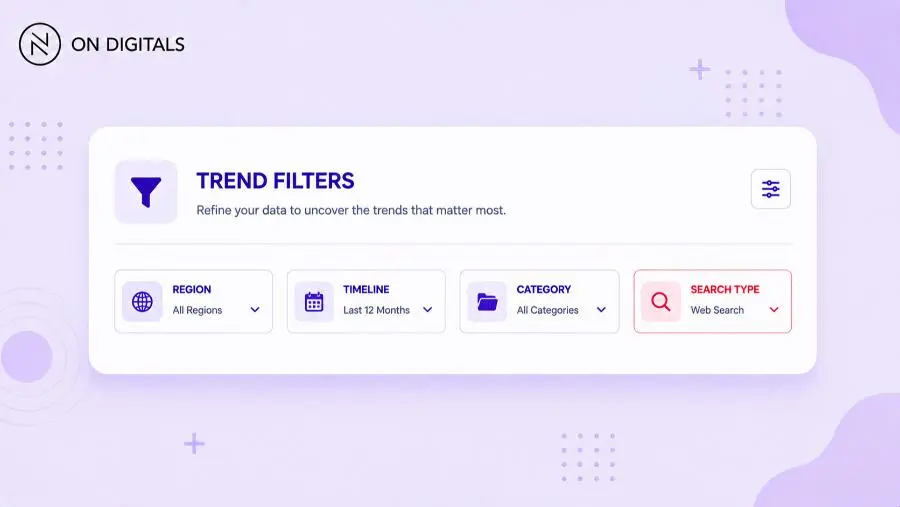
- Filters: Focus on 4 levers including Region (where searches came from), Timeline (narrow or widen the date range), Category (filter by industry context), Search type (switch between Web, YouTube, News, Image, or Shopping).
- Why the search type filter matters: A keyword trending on YouTube search may look flat on Web search. If your content lives on YouTube, filter accordingly, since you’re looking at different audiences.
Frequently Asked Questions (FAQs)
How do I find a niche with long-term potential using Google Trends?
Set the time range to 3 – 5 years and look for consistent or growing interest. You better avoid sharp peaks that drop off quickly since they usually signal short-term trends, which’s not sustainable niches.
Can Google Trends show if a niche is profitable?
Remember that Google Trends shows demand direction only and not includes revenue. Using it alongside keyword difficulty data and monetization research could help you to assess real profitability.
Is Google Trends enough on its own?
No, it’s just a directional tool. Before making a final decision, pairing it with other SEO platforms for search volume, competition data, and commercial intent might give you a comprehensive view.
How often should I check Google Trends during niche research?
You should check it at least twice. Once to validate the initial idea, and again after 4 to 6 weeks to confirm stability. Trends can evolve continuously, revisiting periodically will keep you get-up-to-date and react on time.
Conclusion
Using Google Trends to find a niche works best when you treat it as a filter, rather than a final answer. It tells you whether demand is real and whether interest is moving in the right direction. By combining that signal with keyword data, competitive research, and clear monetization potential, you’ll make niche decisions you can actually build on.

NEWEST POSTS
- Advertising Industry In Vietnam: The 2026 Trends, Channels and Market-Entry Strategy
- Best SEO Company in Vietnam: Latest Shortlist For Businesses
- How To Leverage Social Media For Customer Service Like A Pro?
- Social Media Post Tips – 8 Ways To Boost Engagement
- How To Use Social Media for Sales – In-depth Beginner Guide
Read more