
Google Trends: How to Read Search Demand for SEO Decisions
Vincent
19/01/2026
36
Google Trends shows how search interest changes across time, location, and Google surfaces. For SEO teams, it supports on-page SEO update decisions by showing when demand rises, where interest is strongest, and which topics should be refreshed before traffic opportunities fade. The data is directional, so each insight should be checked with Search Console, SERP review, or business context before action.
What is Google Trends in SEO and marketing?
Google Trends is a free tool from Google that helps users explore relative search interest for topics or search terms. Google Search Central describes it as a way to understand how people find information on Google Search, which can support content strategy and audience communication.
For SEO and marketing teams, Google Trends works best as a demand signal. It helps show whether interest is rising, where demand is strongest, which term users prefer, and when seasonal content should be refreshed. These signals are useful for planning SEO pages, campaign timing, regional content, and topic validation before the team invests in production.
For deeper use cases, marketers can use Google Trends to validate YouTube search interest, explore niche opportunities, or compare the tool with Google Trends alternatives when they need broader market data.
How Google Trends analyzes search behavior
Google Trends uses a sample of aggregated, anonymized, and categorized searches from Google and YouTube. It can show interest for a query or topic across global, national, regional, or city-level views.
The most important point is that Google Trends does not show exact search volume. Its chart uses a relative 0–100 scale. Each data point is divided by total searches for the selected geography and time range, then scaled from 0 to 100 based on the topic’s share of all searches.
|
Score |
Meaning |
SEO interpretation |
|
100 |
Highest relative interest in the selected view |
Demand peaked within that setting |
|
50 |
Half the relative interest of the peak |
Interest was lower, but not necessarily low in absolute volume |
|
0 |
Very low relative interest or insufficient data |
Validate with another time range or source |
A downward line does not always mean fewer total searches. It may mean the topic became less dominant compared with all searches in that selected market. Low-volume terms can also appear as 0, while unusual one-off spikes may reflect short-term noise rather than stable search demand.
Main advantages of Google Trends
Google Trends is useful because it shows demand movement, not just static keyword metrics. A keyword tool can show average monthly volume, while Trends can reveal whether interest is rising, seasonal, regional, or tied to a short-lived event.
Spot rising topics early
Rising topics can help content teams react before competitors notice the same pattern. A sudden increase in a related query may point to a new product term, public concern, event, or comparison need.
This signal still needs judgment. A trend that looks exciting but sits outside the site’s expertise can create weak content. Before creating a page, check whether the topic fits the audience, the business model, and the search intent behind the query.
Plan content before seasonal peaks
Seasonal topics need early planning. For SEO, the best time to update a seasonal page is usually before the demand curve rises, not when the peak has already arrived.
A practical seasonal workflow looks like this:
|
Trend pattern |
Better action |
|
Predictable yearly peak |
Refresh content 4–8 weeks before demand rises |
|
Sudden breakout |
Validate intent before publishing |
|
Regional spike |
Localize only where business fit exists |
|
Long-term decline |
Update only if the topic still supports the business |
|
Multi-year growth |
Build a cluster or supporting guide |
For example, a content team reviewing “summer skincare” in May may already be late in some markets. A better workflow checks the multi-year trend, identifies the usual rise, then schedules the refresh before that period.
Compare regional demand
Regional data can help teams decide where a campaign, landing page, or localized article deserves priority. A topic may be stable globally but concentrated in a few countries or cities.
For example, a brand entering Southeast Asia may compare topic demand in Vietnam, Singapore, Malaysia etc. The result should influence language, landing page priority, and paid campaign timing. Regional interest should then be checked against sales data or local SERPs before production.
Benchmark brand or industry interest
Google Trends can help teams understand whether a traffic change is site-specific or part of a wider market shift. If Search Console clicks fall while overall market interest also drops, the issue may be seasonality or demand change. If market interest stays stable but one URL loses traffic, the SEO owner should review rankings, snippets, indexation, competitors, and content quality.
This is useful for reporting because it separates market movement from page-level SEO issues. It also helps stakeholders decide whether a drop needs an urgent fix or a calmer seasonal explanation.
Who should use Google Trends?
Different teams can use Google Trends, but each team needs a different question.
|
Team |
Useful question |
Better action |
|
SEO team |
Is this topic worth a page update? |
Refresh, merge, or monitor |
|
Content team |
When should this article go live? |
Plan before the search peak |
|
Paid search team |
Is demand rising soon? |
Adjust budget timing |
|
Social team |
Is this topic part of a wider cultural moment? |
Build timely creative angles |
|
Ecommerce team |
Is product interest seasonal? |
Prepare category copy and inventory |
|
Leadership team |
Is traffic change market-wide? |
Compare brand data with industry demand |
This keeps Google Trends from becoming a curiosity tool. Each view should support a decision.
What is Google Trends used for?
Discover keyword and topic opportunities
Google Trends can reveal related topics and related queries that users search around a term. These sections are useful for finding supporting content angles, FAQ ideas, and emerging phrases.
When reviewing Related Queries, pay attention to three labels:
- Top: frequently searched related terms in the same context. Use these to identify stable demand.
- Rising: terms with strong growth in the selected period. Use these to find emerging content ideas.
- Breakout: queries with growth above 5,000%. Review these quickly, then validate before creating content.
A breakout query can be useful, but it should not automatically become a page. Check whether the term matches your audience, whether the SERP has stable intent, and whether the page can provide a useful answer.
Build a content calendar
Google Trends helps decide when content should be updated, not only what to write. For evergreen topics with seasonal demand, the best update window usually happens before search interest peaks.
Use these timing rules:
- When interest starts rising early, refresh the existing page before competitors update theirs.
- When the topic has a repeated yearly peak, schedule updates several weeks before the usual spike.
- When demand shifts by location, review regional landing pages before creating new local content.
- When product interest grows, update category copy or buying guides while users are still comparing options.
- When a spike looks short-lived, validate the SERP and business fit before assigning production work.
This is especially useful for ecommerce, travel, education, finance, event-driven content etc..
Validate Google Trends against Search Console
Google Trends should be paired with Search Console when an existing page is involved. Search Console shows how your site performs for actual queries, while Trends shows whether wider search interest is moving.
A practical workflow:
- Choose a priority URL in Search Console.
- Find queries with impressions but weak clicks.
- Check the same topic in Google Trends.
- Compare the trend with the page’s traffic pattern.
- Decide whether to refresh the title, opening section, internal links, or content depth.
If the market is rising but the page is flat, the issue may sit on the page. If both market demand and page clicks are falling, the team should treat it as a demand issue before rewriting heavily.
Use annual trends for campaign ideas
Google’s Year in Search turns search behavior into yearly cultural snapshots. For brand content, yearly trend data can support annual recaps, campaign themes, and editorial planning.
Use this source as inspiration, then check local relevance. A global trend may be useful for a Vietnam-facing brand only when local search behavior, audience interest, or product relevance supports it.
Compare tools when Google Trends is too limited
Google Trends works well for directional demand, but some tasks need different data. When a team needs competitor traffic, audience demographics, backlink context, or wider market intelligence, a comparison with other tools can help.
For tool selection, start with the job:
|
Need |
Better next step |
|
Directional topic demand |
Use Google Trends |
|
Competitor traffic estimate |
Compare with SimilarWeb-style data |
|
Broader market research |
Review Google Trends alternatives |
|
Tool-by-tool comparison |
This keeps the main Google Trends workflow focused while still helping users move to the right next guide when their research need changes.
How to analyze search data with Google Trends
Search term vs topic: choose the right input
Google Trends may let you compare a search term or a topic. A search term tracks the exact wording entered. A topic can group related searches under a broader concept.
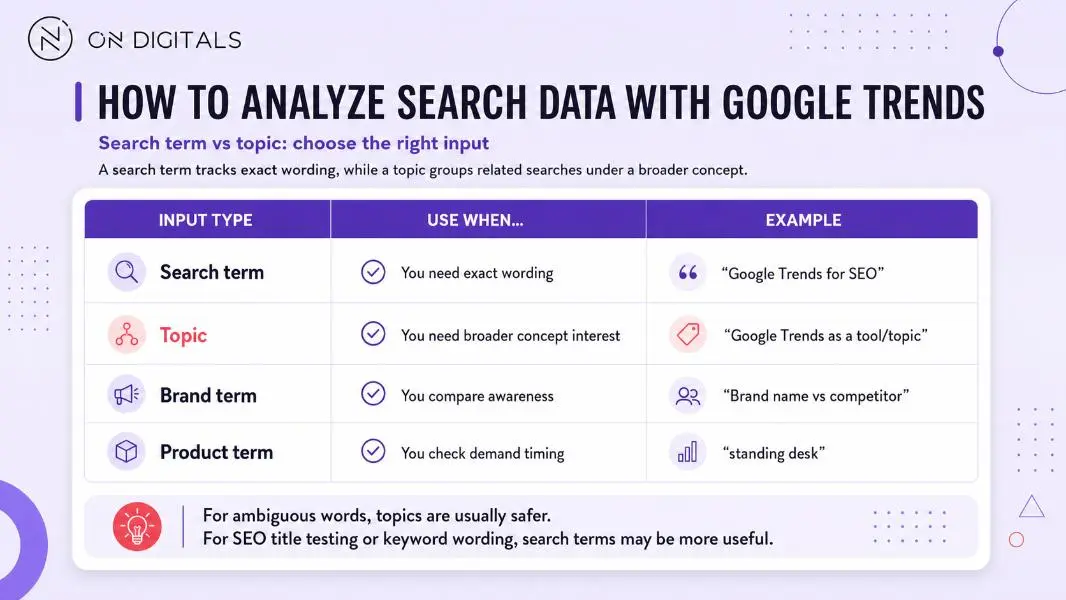 Choosing between search terms, topics, brand terms, and product terms helps teams analyze Google Trends data based on exact wording, broader interest, awareness, or demand timing.
For ambiguous words, topic selection is usually safer. For SEO title testing or keyword wording, exact search terms may be more useful.
Adjust filters before drawing conclusions
Filters change the meaning of the chart. A trend that looks strong in one country may disappear in another. A topic with weak Web Search demand may perform better in YouTube Search or Shopping Search.
|
Filter |
Best use |
|
Location |
Validate regional demand |
|
Time range |
Separate short spikes from long-term patterns |
|
Category |
Reduce ambiguity for broad terms |
|
Search type |
Compare Web, YouTube, Shopping etc. |
|
Related topics |
Find adjacent user interests |
For YouTube-specific planning, use the YouTube Search filter before moving into a more detailed Google Trends YouTube workflow. For product or market research, compare the Trends signal with sales data, ad performance, or category-level SERPs.
Treat Google Trends as one signal
Google Trends should be treated as a directional signal, not the final keyword decision. Use it to spot demand movement, then validate the opportunity with other data before creating or updating a page.
Useful validation sources include:
- Search Console
- SERP review
- keyword tools
- CRM or sales data
- paid campaign performance
- internal site search
- content engagement
This prevents one short-lived spike from becoming a low-value content task.
Common mistakes when reading Google Trends data
|
Mistake |
Why it creates risk |
Better approach |
|
Treating 0–100 as search volume |
The scale is relative |
Use it for comparison, not exact demand |
|
Reacting to every spike |
Some spikes fade quickly |
Validate with SERP and business fit |
|
Ignoring location |
Interest can shift by market |
Check target countries or cities |
|
Comparing different timeframes casually |
Scaling changes with the selected view |
Keep comparisons consistent |
|
Using Trends alone |
It lacks page-level performance |
Pair with Search Console |
|
Expanding into every use case |
The article becomes unfocused |
Use dedicated guides for deeper workflows |
A broad Google Trends guide can become less useful when it tries to cover every use case in detail. Keep the main learning path focused on how the tool works, how to read the data, and how to apply signals to SEO or marketing decisions. More specific workflows can be explored through dedicated guides when users need deeper steps.
Google Trends FAQ
Does Google Trends show exact search volume?
Google Trends does not show exact search volume. It shows normalized search interest on a 0–100 scale, which helps compare relative popularity across time, location, and selected filters.
What does Breakout mean in Google Trends?
Breakout means a related query grew by more than 5,000% during the selected period. It can reveal fast-rising demand, while the SEO team should still check intent, relevance, and business value before creating content.
Should I create content for every rising trend?
A rising trend matters when it fits the website, audience, and business context. Check whether the topic supports your expertise, search intent, and user path before adding it to the content plan.
Why does Google Trends show 0 for some terms?
Low-volume terms can appear as 0 because Google Trends only shows data for popular terms. A 0 does not always mean nobody searched for the topic, so check another time range, broader topic, or supporting data source.
Can Google Trends help diagnose traffic drops?
Yes. Google Trends can help show whether search interest is falling across the market. Compare Trends data with Search Console before deciding whether the issue is demand, ranking, snippet performance, or page relevance.
When should I use a Google Trends alternative?
Use alternatives when you need absolute keyword volume, competitor traffic, audience demographics, social trend data, or deeper market intelligence. Start with Google Trends for free directional demand, then compare options in the Google Trends alternatives guide.
Final thoughts
Google Trends is most useful when teams understand both its strengths and its limits. It can show when demand rises, where interest is strongest, which related queries are growing, and whether a traffic change reflects wider market behavior.
For general SEO and marketing planning, start with the core Trends workflow: choose the right term or topic, adjust filters, read the 0–100 scale correctly, then validate the signal before production. For deeper research, move into more specific use cases such as YouTube search interest, niche validation, tool alternatives, or competitor trend comparison.
If your team uses Google Trends but still struggles to decide which pages to update, localize, or monitor, On Digitals can help connect trend signals with Search Console data, SERP analysis, and content priorities. That turns search interest into a clearer SEO action plan instead of another disconnected research screenshot.

NEWEST POSTS
- Advertising Industry In Vietnam: The 2026 Trends, Channels and Market-Entry Strategy
- Best SEO Company in Vietnam: Latest Shortlist For Businesses
- How To Leverage Social Media For Customer Service Like A Pro?
- Social Media Post Tips – 8 Ways To Boost Engagement
- How To Use Social Media for Sales – In-depth Beginner Guide
Read more