
What Is a Search Term? Meaning and SEO Use
Vincent
13/04/2023
32
A search term is the exact word or phrase a person enters into a search engine. Marketers use search terms to understand real user language, then turn useful patterns into keyword targets, content briefs, landing pages etc. Search terms are also a noteworthy element that marketers should clearly distinguish from keywords before delving deeper into keyword strategy.
What is a search term?
A search term is the real query a user types or speaks when looking for information, products, services etc. Google Ads defines a search term as the word or set of words a person enters when searching on Google Search Network.
The term can be short, long, seasonal, or highly specific. That makes it valuable because it reflects actual user behavior rather than the cleaned-up keyword a marketer puts into a campaign or content brief.
| Search term example | Likely intent | Possible action |
| “best crm for small sales team” | Commercial research | Create comparison content |
| “how to fix slow website” | Informational | Build a troubleshooting guide |
| “running shoes size 9 red” | Product search | Improve product or category page |
| “seo agency ho chi minh city” | Local service | Optimize location/service page |
| “brand x alternative” | Comparison | Create competitor or alternative page |
Search terms matter because they show the language users choose on their own. A keyword strategy can look organized in a spreadsheet, while real search terms often reveal missing questions, unexpected pain points, or poor traffic fit.
Why search terms matter for SEO and PPC
Search terms help teams move from assumption to evidence. Instead of guessing what users want, SEO and PPC teams can review actual queries, group them by intent, then decide which pages or ads deserve attention.
For SEO, search terms can improve:
| SEO use case | How search terms help |
| Content briefs | Reveal questions and wording users prefer |
| Page optimization | Show whether an existing page matches intent |
| Topic clusters | Group related queries around one main page |
| FAQ sections | Turn repeated questions into useful answers |
| Landing page planning | Expose gaps between demand and current pages |
For PPC, search terms are even more operational. Google Ads Search Terms Report helps advertisers see which searches triggered ads. The report can also show the keyword that matched the search term and the match type used.
That data helps paid teams add strong terms as keywords, exclude irrelevant searches, refine ad copy, or adjust landing pages. When a search term gets clicks but no conversions, the issue may sit in the ad message, the page experience, the offer fit etc.
Search term vs keyword: what is the difference?
A search term comes from the user. A keyword comes from the marketer. Before the team turns raw search terms into a content plan, the right target keyword should be defined clearly. That is the simplest way to separate the two.
| Point of difference | Search term | Keyword |
| Created by | User | Marketer or advertiser |
| Appears in | Google searches, site search, ad reports etc. | SEO plans, ad groups, content briefs |
| Format | Natural language | Planned target phrase |
| Control level | Low | High |
| Main use | Understand demand | Target demand |
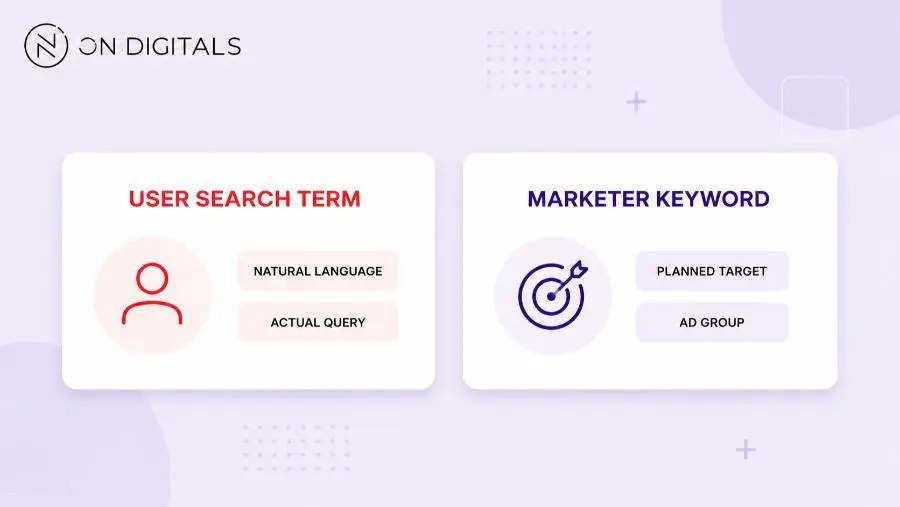
A single keyword can match many search terms. For example, an advertiser may target the keyword “running shoes.” Users may then search for “best running shoes for flat feet,” “red running shoes size 9,” or “running shoes near me.”
That difference changes the action. The keyword shows the planned target. The search term shows what people actually typed. Strong SEO teams use both, but they avoid treating every search term as a standalone keyword.
Search term vs search query
Many marketers use “search term” and “search query” almost interchangeably. In everyday SEO work, both usually refer to the user’s actual search input.
A slight distinction can help in technical discussions. “Query” often appears in analytics, search systems, databases, or search console contexts. “Search term” is more common in marketing explanations, Google Ads reports, and keyword planning conversations.
For content planning, the practical question stays the same: what did the user search, what did they expect, and which page should answer that need?
How to find useful search terms
Useful search terms come from tools that capture real demand or campaign behavior. The best source depends on the channel.
Use Google Ads Search Terms Report
Google Ads Search Terms Report shows searches that triggered your ads. This is one of the most direct sources for PPC query data because it connects user language to ad activity.
Review the report with this workflow:
| Step | What to check | Action |
| 1 | Search term | Read the exact user phrase |
| 2 | Keyword column | See which keyword triggered it |
| 3 | Match type | Understand how broad the match was |
| 4 | Clicks and conversions | Identify useful demand |
| 5 | Cost with poor results | Find wasted spend |
| 6 | Irrelevant patterns | Add negative keywords |
| 7 | Repeated high-value terms | Add new keyword or landing page |
Google Ads Help also notes that advertisers can modify the report, add columns, segment data, download results, or open it in Report Editor.
A practical example: a campaign targets “project management software,” but the report shows repeated terms around “project management template.” That search behavior may need a downloadable template page, not a software demo page.
Use Google Trends
Google Trends helps teams understand search interest over time. It is useful when seasonality, market shifts, regional demand, or sudden spikes affect planning. Google Trends describes its product around exploring what the world is searching for right now.
Use it before building content calendars, seasonal campaigns, or market-specific pages.
| Trend check | Why it matters |
| Interest over time | Shows rising or declining demand |
| Regional interest | Helps prioritize local content |
| Related queries | Reveals new search terms |
| Trending searches | Shows short-term demand shifts |
| Year in Search | Adds cultural context |
For example, a skincare brand may see higher interest in “sunscreen for oily skin” before summer. That term could guide a product guide, ad group, email campaign, or seasonal landing page.
Use Google Keyword Planner
Google Keyword Planner helps advertisers discover keyword ideas and plan campaigns. Google describes its workflow around finding new keywords, analyzing search changes, getting estimates, then making a plan.
For search term work, Keyword Planner is useful after you already see patterns in user queries. You can use search volume to check whether a term has enough demand, then decide whether it belongs in SEO content or paid campaigns.
A good sequence looks like this:
- Collect real search terms.
- Group terms by intent.
- Check related ideas in Keyword Planner.
- Review trend direction.
- Map the best terms to pages or campaigns.
How to turn search terms into keyword targets
Search terms become useful when a team decides what to do next. Once a term matches the offer and user intent, a keyword difficulty check can help estimate whether the opportunity needs a quick refresh, a new page, or a longer authority-building plan. The right action depends on intent, business fit, page availability, and channel priority.
Group terms by intent
Start by grouping terms into intent patterns. This prevents the team from creating too many thin pages from similar queries.
| Intent group | Example | Better content action |
| Informational | “what is crm pipeline” | Blog guide or glossary section |
| Commercial | “best crm for agencies” | Comparison or solution page |
| Transactional | “buy running shoes online” | Product or category page |
| Local | “seo agency near me” | Location or service page |
| Support | “how to reset password” | Help article or FAQ |
When several search terms share the same intent, one strong page may serve them better than several weak pages.
Map terms to existing pages
Before creating new content, check whether an existing page already fits the term. A service page, category page, guide, FAQ block etc. may only need better copy or clearer headings.
| Search term pattern | Page decision |
| Same intent as existing page | Optimize current page |
| Clear new intent | Create a new page |
| Question inside broader topic | Add FAQ or H3 section |
| Poor business fit | Ignore for SEO |
| Irrelevant paid click | Add negative keyword |
This step protects crawl quality and content quality. A site with many near-duplicate pages can become harder for users and search engines to navigate.
Build a search term action matrix
Use this matrix during monthly SEO/PPC reviews.
| Search term pattern | What it means | SEO action | PPC action |
| Repeated high-intent phrase | Users want a specific solution | Optimize landing page | Add as phrase or exact keyword |
| Question-based term | Users need explanation | Build FAQ or guide section | Test ad copy angle |
| Irrelevant product term | Poor fit | Avoid expansion | Add negative keyword |
| Location-based term | Local intent | Create location page if service exists | Adjust geo targeting |
| Brand comparison term | Commercial research | Build comparison content | Segment campaign |
| Common misspelling | Real user behavior | Cover naturally if useful | Let close variants handle it |
For example, an ecommerce site may see “red running shoes size 9” often in internal search or paid reports. That term points toward product filtering and category optimization. A blog post would not be the strongest answer.
Common mistakes when using search terms
Search term data is useful, but it can lead to poor decisions when teams treat every query as a keyword target.
| Mistake | What happens | Better approach |
| Turning every term into a page | Creates thin content | Group by intent |
| Ignoring negative terms | Wastes ad spend | Exclude poor-fit queries |
| Chasing only volume | Misses qualified intent | Prioritize fit |
| Skipping live SERP review | Builds wrong page type | Check ranking formats |
| Forgetting seasonality | Publishes too late | Review trends earlier |
| Reading one report once | Misses new patterns | Review monthly |
A paid report may show search terms that look attractive at first, but conversion data can tell a different story. Meanwhile, SEO teams should check whether Google already rewards a guide, product page, tool page, or local result before writing.
Search term FAQ
Is a search term the same as a keyword?
A search term is the exact phrase a user searches. A keyword is the phrase a marketer targets in SEO or ads. They can overlap, but they are not the same in planning.
What is an example of a search term?
“Best running shoes for flat feet” is a search term. It shows a specific user need and can guide a comparison page, product category section, or ad group.
How do I find search terms in Google Ads?
Open the Search Terms Report in Google Ads. Review the search term, keyword, match type, clicks, conversion data etc. to decide whether the term deserves targeting or exclusion.
How do search terms help SEO?
Search terms show real user language. SEO teams can use them to refine content briefs, add FAQ sections, improve page intent, or find gaps in existing topic clusters.
Should every search term become a keyword?
Some terms deserve a keyword target, while others should support an existing page. Terms with weak business fit may be ignored for SEO or added as negative keywords in PPC.
How often should I review search terms?
Review paid search terms at least monthly for active campaigns. SEO teams can review search behavior during content refreshes, quarterly planning, or before launching new clusters.
Final thoughts
Search terms show what users actually type. That makes them useful for both strategy and daily execution. SEO teams can turn repeated terms into better content briefs, while PPC teams can use them to refine targeting and reduce waste.
A strong workflow starts with real queries, groups them by intent, maps them to pages, then decides the right action. When search terms guide keyword targets instead of replacing strategy, they become a practical source of insight for better pages and better campaigns.

NEWEST POSTS
- Advertising Industry In Vietnam: The 2026 Trends, Channels and Market-Entry Strategy
- Best SEO Company in Vietnam: Latest Shortlist For Businesses
- How To Leverage Social Media For Customer Service Like A Pro?
- Social Media Post Tips – 8 Ways To Boost Engagement
- How To Use Social Media for Sales – In-depth Beginner Guide
Read more