
SEO Header Tags: How to Structure H1-H6 Headings
Vincent
20/07/2023
13
SEO header tags are HTML heading elements that structure a page from H1 to H6. Together with essential HTML tags, they help shape how a page communicates its topic to users and search engines. A strong heading structure uses one clear H1, logical H2/H3 sections, natural keywords, and descriptive labels.
What are SEO header tags?
SEO header tags are the heading tags used to organize content on a webpage. In HTML, these tags run from <h1> to <h6>, with <h1> usually representing the main page topic and lower levels supporting the content hierarchy.
Many people say “SEO header tags,” while the technical term is usually heading tags. The term “header tag” can also cause confusion because HTML has a separate <header> element. That element is a page section container, while <h1> to <h6> are heading elements.
| Term | Meaning | SEO use |
| Heading tag | HTML element from H1 to H6 | Structures page content |
| Header tag | Common SEO term for heading tag | Often means H1, H2, H3 etc. |
| <header> element | HTML container for intro content | Layout or page section use |
| <head> element | HTML area for metadata | Title tag, meta description etc. |
Here is a simple heading structure in HTML:
<h1>SEO Header Tags: How to Use H1-H6 Correctly</h1>
<h2>What are SEO header tags?</h2>
<h2>Why heading tags matter for SEO</h2>
<h3>They clarify page structure</h3>
<h3>They support accessibility</h3>
This structure helps both users and crawlers understand how the page is organized.
H1-H6 hierarchy explained
Heading levels work like an outline. The H1 introduces the main topic. H2 headings divide the page into major sections, while H3 headings explain details under a related H2.
| Tag | Best use | Example |
| H1 | Main page topic | SEO Header Tags Guide |
| H2 | Main section | Why heading tags matter |
| H3 | Subsection | Heading tags and accessibility |
| H4 | Detail under H3 | Screen reader navigation |
| H5-H6 | Deep nested detail | Rarely needed for most pages |
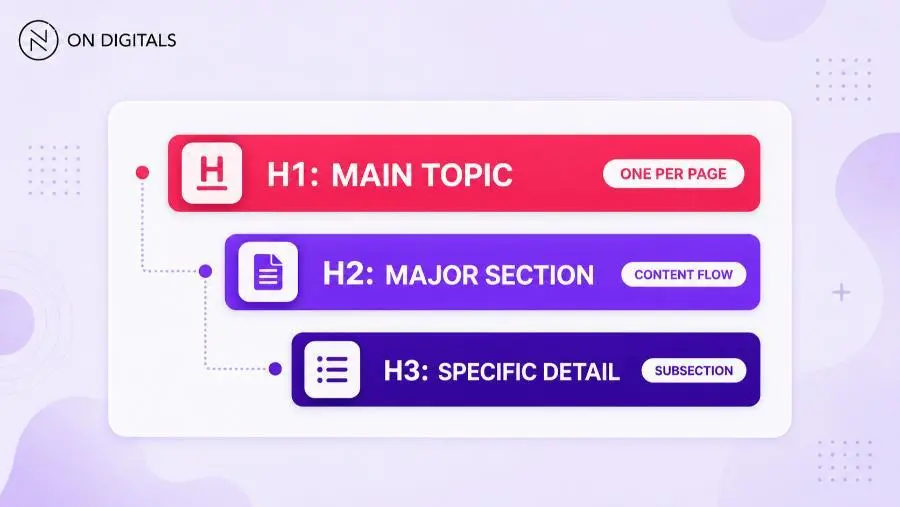
Most pages only need H1, H2, and H3. Longer technical documentation may need H4, while H5 and H6 should be used only when the content hierarchy is genuinely deep.
MDN explains that <h1> to <h6> represent six levels of section headings, and lower levels should follow a logical order for accessibility and structure.
Why SEO header tags matter
Header tags help search engines understand the page structure, but they should not be treated as a magic ranking factor. Their value comes from context, readability, accessibility, and content organization.
| Benefit | How it helps |
| Page structure | Shows how sections relate to each other |
| Readability | Makes long content easier to scan |
| Search context | Reinforces the main topic and subtopics |
| Accessibility | Helps assistive technology navigate content |
| Snippet support | Gives Google clearer section labels |
A strong heading structure makes the page easier to follow. When users can scan section labels quickly, they can decide whether the page answers their question. That improves the reading experience, especially on long SEO guides, service pages, product pages etc.
For search engines, headings give additional context. A clear H1 and relevant H2s can support topical clarity, while keyword-stuffed headings usually make the page harder to read.
SEO header tags and accessibility
Heading tags also matter for accessibility. Screen reader users often navigate a page by headings, so logical levels help them understand the page without reading every paragraph.
The W3C explains that headings communicate page organization and help users navigate content.
A skipped structure can create confusion. For example, jumping from H2 to H4 without a reason may make the outline feel broken. Decorative text should also avoid heading tags if it does not introduce a real section.
Better practice:
<h2>How to audit heading tags</h2>
<h3>Find missing H1 tags</h3>
<h3>Check H2 and H3 hierarchy</h3>
Weaker structure:
<h2>How to audit heading tags</h2>
<h4>Find missing H1 tags</h4>
<h4>Check H2 and H3 hierarchy</h4>
The second version skips a level without adding meaning.
H1 vs H2 vs H3: when to use each tag
The easiest way to choose a heading tag is to ask what job the section performs. Main topic, major section, and supporting detail each need a different level.
H1 for the main page topic
The H1 should describe the main topic of the page. It does not need to copy the title tag exactly, but both elements should point to the same search intent. When a page has rankings but weak clicks, review the heading structure together with SEO title tag guidance so the search result headline and page headline work together.
Modern HTML can technically support more than one H1 in some contexts. Still, most SEO teams should use one primary H1 for clarity, consistency, and easier auditing.
Good H1:
- SEO Header Tags: How to Structure H1-H6 Headings
Weak H1:
- Everything You Need to Know
The first version explains the page topic. The second version is too vague to guide the reader.
H2 for main sections
H2 headings divide the page into major parts. They should help users understand the article flow before reading the full content.
For this article, H2s such as “Why SEO header tags matter” and “How to audit heading tags” work because they show distinct sections of the guide.
H3 for supporting details
H3 headings belong under a related H2. They should explain a specific part of that section.
For example, under “How to audit heading tags,” H3s can cover missing H1s, duplicate headings, skipped levels etc. Those details support the broader audit topic.
SEO header tag examples by page type
Different pages need different heading structures. A blog guide often needs educational sections, while a service page should explain problems, process, proof, and next steps.
| Page type | H1 example | H2 examples |
| Blog guide | How to Use SEO Header Tags | What are heading tags? / H1 vs H2 / Common mistakes |
| Service page | Technical SEO Services for Growing Websites | What we audit / How the process works / When to request support |
| Product page | Lightweight Running Shoes for Daily Training | Key features / Size guide / Shipping details |
| Local page | SEO Services in Vietnam | Local SEO challenges / Service areas / Consultation process |
Each structure should match the page’s job. Blog headings help readers learn, service headings guide evaluation, and product headings support purchase decisions.
How to write SEO header tags
Good SEO headings are clear before they are clever. They should describe the section, match the search intent, and include keywords only when the wording feels natural.
Match search intent first
Start with the reason users searched. If the query is informational, headings should answer questions and explain steps. For commercial pages, headings may need to compare options, explain service value, or remove buying friction.
Use keywords naturally
Keywords can appear in headings when they help clarify the topic. Repeating the same exact phrase in every H2 creates a poor reading experience.
Better:
- How to audit SEO header tags
Weaker:
- SEO header tags SEO header tags audit guide
The better version uses the keyword in a readable way.
Keep headings descriptive
Vague labels make scanning harder. Headings such as “Overview,” “Details,” or “More information” rarely help readers understand the section.
Use specific labels instead:
| Vague heading | Better heading |
| Overview | What are SEO header tags? |
| Details | H1-H6 hierarchy explained |
| Tips | How to write SEO headings |
| Problems | Common heading tag mistakes |
Use question headings when useful
Question headings can work well when the page targets a direct beginner query. Place a short answer after the heading so users get value quickly.
Example:
<h2>How many H1 tags should a page have?</h2>
<p>Most SEO pages should use one clear H1 that describes the main page topic.</p>
This pattern can also help Google understand the answer format, although featured snippets are never guaranteed.
Common heading tag mistakes
Heading mistakes often happen when teams focus on design instead of structure. A large bold line can look like a heading, but it needs the correct HTML tag to function as one.
| Mistake | Why it causes issues | Better fix |
| Missing H1 | Page focus becomes unclear | Add one descriptive H1 |
| Multiple unclear H1s | Page topic feels scattered | Keep one primary H1 |
| Skipped levels | Outline becomes harder to follow | Use logical nesting |
| Keyword stuffing | Headings sound unnatural | Rewrite for intent |
| CTA marked as H3 | Decorative text becomes structure | Use button or styled text |
| Duplicate H1s across templates | Pages look less specific | Make each H1 page-level |
For example, a category template that gives every page the same H1 can weaken clarity. A better setup uses page-specific H1s based on category, location, product type etc.
How to audit heading tags across a site
A single page can be checked manually. Larger websites need a crawl-based workflow because heading issues often appear across templates.
Use this process:
Crawl site
↓
Export H1 and H2 data
↓
Find missing, duplicate, or multiple H1s
↓
Check skipped heading levels
↓
Review vague or keyword-stuffed headings
↓
Update priority templates first
Start with high-value templates. Service pages, category pages, product pages, and traffic-driving blog posts usually deserve attention before low-value archives.
| Audit issue | What to check | Priority |
| Missing H1 | Important pages without main topic | High |
| Duplicate H1 | Many pages sharing same label | High |
| Multiple H1s | Several main topics on one page | Medium |
| Skipped levels | H2 jumps to H4 without reason | Medium |
| Vague H2s | Sections labeled “Details” or “More” | Medium |
| Keyword stuffing | Repetitive exact-match headings | High |
After fixing template-level issues, review page-level headings manually. Tools can find structural problems, but humans still need to judge intent and readability.
How to add SEO header tags in a CMS
Most CMS platforms let editors choose heading levels from a formatting dropdown. The exact interface changes by platform, but the rule stays the same: use headings for structure, not decoration.
| Platform | What to check |
| WordPress | Use Heading block or paragraph toolbar |
| Shopify | Check product, collection, and page templates |
| Webflow | Choose the correct heading element |
| Custom CMS | Confirm the editor outputs real H1-H6 tags |
If a heading looks large only because of CSS, it may not be a real heading tag. Inspect the page HTML or ask a developer to confirm the markup.
Design styling should come from CSS. Semantic structure should come from proper H1-H6 tags.
SEO header tags FAQ
Are heading tags a ranking factor?
Heading tags can help search engines understand page structure and topical context. They should be used for clarity and user experience rather than treated as a guaranteed ranking lever.
How many H1 tags should a page have?
Most SEO pages should use one clear H1. Multiple H1s may be valid in modern HTML, but one primary H1 keeps the page easier to understand and audit.
Can I skip from H2 to H4?
Avoid skipping heading levels without a clear reason. Logical nesting helps readers, screen readers, and editors understand how sections relate.
Should keywords appear in H2 headings?
Keywords can appear in H2 headings when they fit naturally. A heading should still read like a useful section label instead of a keyword list.
Are header tags and heading tags the same?
SEO guides often use “header tags” to mean heading tags. In HTML, <header> is different because it is a container element, not an H1-H6 heading.
Do headings help accessibility?
Yes. Proper headings help assistive technology users navigate a page by section. A logical H1-H6 structure supports easier browsing.
What is the difference between <head>, <header>, and heading tags?
The <head> element contains metadata. The <header> element groups introductory page content. Heading tags from <h1> to <h6> structure visible content.
Final thoughts
SEO header tags help users understand a page before they read every line. A clear H1 sets the main topic, while logical H2 and H3 sections make long content easier to scan.
The strongest heading structure supports search intent, accessibility, and content audits at the same time. Keep headings descriptive, avoid forced keywords, and review important templates regularly so each page has a clear structure.

NEWEST POSTS
- Advertising Industry In Vietnam: The 2026 Trends, Channels and Market-Entry Strategy
- Best SEO Company in Vietnam: Latest Shortlist For Businesses
- How To Leverage Social Media For Customer Service Like A Pro?
- Social Media Post Tips – 8 Ways To Boost Engagement
- How To Use Social Media for Sales – In-depth Beginner Guide
Read more