
SEO Title Tag Guide for Better Search Clicks
Vincent
12/06/2024
41
An SEO title tag is the <title> element that gives a webpage its title in HTML. It sits in the <head> section near HTML meta tags that support snippets, robots rules, viewport settings etc. Google may use the title tag as the title link in search results, while browsers and social previews may also display it.
What is an SEO title tag?
An SEO title tag is an HTML element placed inside the <head> section of a page. It tells browsers and search engines what the page is about.
Example:
<head>
<title>SEO Title Tag: Guidelines for Better Search Clicks</title>
</head>
In Google Search, the title tag can influence the clickable headline that users see before they open a result. Google calls this headline a title link and explains that the <title> element is one of the sources used to generate it.
A title tag is often called a “meta title” in SEO conversations. That label is common, but it is technically imprecise because the title tag is not a <meta> tag.
| Term | Technical meaning | SEO use |
| Title tag | <title> element | Page title and search headline source |
| Meta title | Common SEO wording | Informal name for title tag |
| Title link | Google’s displayed headline | Search result headline |
| H1 | Visible page heading | Main on-page heading |
This distinction helps when content teams brief developers, update CMS fields etc. A title tag belongs in the HTML head, while the H1 appears in the visible page content.
Why SEO title tags matter
SEO title tags matter because they help users and search engines understand a page quickly. They do not guarantee rankings by themselves, but they can support relevance, search appearance, and click quality.
| Benefit | How the title tag helps |
| Search relevance | Signals the main page topic |
| User choice | Shows why the result may be useful |
| SERP clarity | Creates a clearer title link candidate |
| Browser usability | Labels tabs and bookmarks |
| Template control | Keeps large websites consistent |
For a service page, the title tag can clarify the offer before a prospect clicks. On a category page, it can help users compare the result with other options in the SERP. For high-impression blog posts, a clearer title may improve click performance when the current page already ranks but fails to attract users.
The strongest title tags connect three things:
| Element | Question to answer |
| Page intent | What does this page solve? |
| Search demand | What phrase are users likely to recognize? |
| Business value | Why does this URL matter? |
SEO title tag vs Google title link
The HTML title tag is what the website provides. The Google title link is what Google displays in search results.
These can match, but they do not always match. Google may use other page signals when it thinks another title would better explain the result. Google’s documentation mentions several issues that can lead to different title links, including half-empty titles, obsolete titles, inaccurate titles, boilerplate text etc.
| Rewrite trigger | What to check |
| Google shows the H1 instead | Title and H1 may be too different |
| Google removes brand text | Brand wording may repeat across templates |
| Google changes a year | The title may look outdated |
| Google shortens the wording | The title may be too long |
| Google replaces keyword lists | The title may look stuffed |
| Google uses anchor text | Page content may not clarify the topic well |
A title rewrite is a signal to review the page. It does not always mean the title is bad, but repeated rewrites on commercial URLs deserve attention because the search result may no longer match the message the team intended.
SEO title tag vs H1 heading
The title tag and H1 should support the same search intent, although they do not need to be identical.
The title tag appears in search-related contexts. The H1 appears after the visitor lands on the page. When these two elements point to different topics, users may feel a mismatch between the search result and the page experience.
| Element | Where users see it | Main job |
| Title tag | Search result, browser tab etc. | Set the external page promise |
| H1 | Page body | Confirm the page topic after click |
Example:
| Element | Better alignment |
| Title tag | Technical SEO Services for Growing Websites |
| H1 | Technical SEO Services That Find Crawl and Indexing Issues |
This pair works because both elements stay on the same topic. The title is short enough for search, while the H1 adds more context for users already on the page.
How long should an SEO title tag be?
A practical SEO title tag usually stays around 50–60 characters, but character count is only a guideline. Google displays title links based on available pixel width, device, query context etc.
A short title can still perform poorly if it is vague. Meanwhile, a longer title can be useful when the most important words appear near the front and the message remains clear.
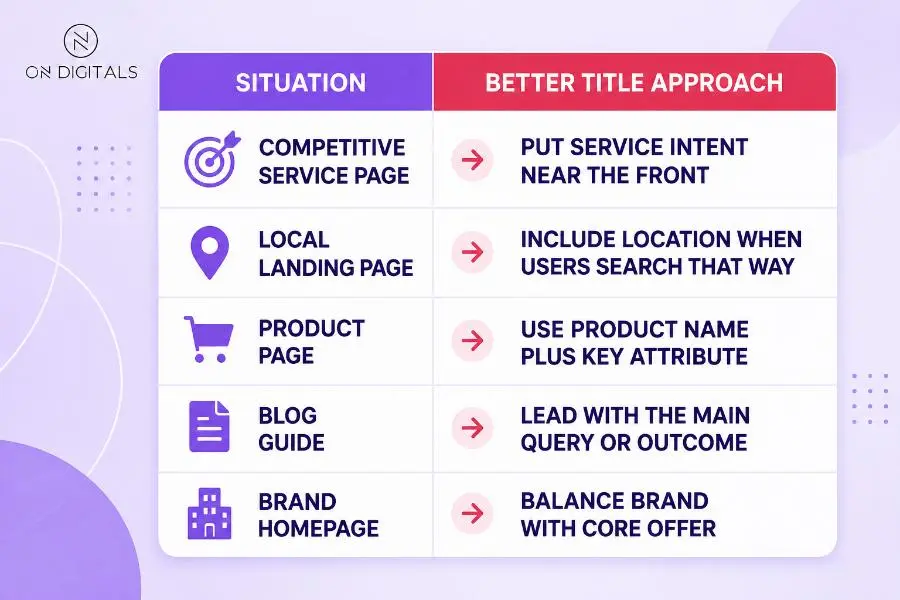
A title should be long enough to explain the page, while the front section should carry the main meaning in case Google truncates it.
How to write a strong SEO title tag
A strong title tag starts with the page’s role in the user path. Before writing, decide whether the URL is meant to educate, convert, compare, or support navigation.
Match the page intent
The title should reflect the page’s role in the user path and the wording users actually recognize. For service pages, the priority is qualified prospects; blog posts usually need a direct topic promise, while category pages should help users understand the collection before they click deeper.
Weak:
- Digital Marketing Tips You Need to Know
Better:
- SEO Title Tag Guide for Better Search Clicks
The better title names the topic and the outcome clearly.
Use the primary keyword once
The keyword should appear naturally, preferably near the front. Repeating close variations usually makes the title weaker.
Good:
- SEO Title Tag: Guidelines for Better Search Clicks
Weak:
- SEO Title Tag Guide, SEO Title Tips, SEO Title Best Practices
The weak version reads like a keyword list, so Google may rewrite it or users may ignore it.
Add value without clickbait
A useful title shows why the page deserves attention. The value point can come from the format, audience, use case, or outcome.
| Page need | Useful value angle |
| Beginner guide | Clear definition and examples |
| Service page | Problem solved or audience served |
| Product page | Key feature or product type |
| Comparison page | Decision support |
| Local page | Location and service fit |
Avoid exaggeration. A title that promises instant rankings or guaranteed traffic creates trust issues before the user reaches the page.
Use brand names selectively
Brand names can help when the brand is known or when the title needs trust. For smaller brands, the main keyword and value may deserve the front position.
| Page type | Brand placement |
| Homepage | Usually important |
| Service page | Often useful at the end |
| Blog guide | Optional |
| Product page | Depends on brand demand |
A repeated brand suffix across every template can also make titles longer than needed. Review templates before adding the same brand text everywhere.
SEO title tag examples by page type
Templates help large websites stay consistent, but each template should leave room for page-specific context.
| Page type | Weak title | Better title |
| Blog post | Everything About Title Tags | SEO Title Tag Guide for Better Search Clicks |
| Service page | Our SEO Service | Technical SEO Services for Growing Websites |
| Product page | Running Shoes | Lightweight Running Shoes for Daily Training |
| Category page | Products | Women’s Running Shoes for Road Training |
| Local page | SEO Agency | SEO Agency in Vietnam for B2B Growth |
| Comparison page | Tool A vs Tool B | Tool A vs Tool B: Which Fits SEO Teams? |
For service pages, the best title usually reflects the offer and the buyer’s intent. Product pages need recognizable product context, while category titles should help users understand the collection before they browse.
How to update title tags in a CMS
Most CMS platforms give editors a title field inside SEO settings. The field name may vary, so always check the rendered page after saving.
| Platform | Where to check |
| WordPress | SEO plugin or page settings |
| Shopify | Search engine listing preview |
| Webflow | Page settings |
| Static HTML | <title> inside the <head> |
| Custom CMS | Template field or frontend output |
After updating a title, inspect the live HTML. The CMS preview may look correct while the rendered source still uses a fallback template.
For headless websites, confirm who owns the title logic. Content editors may update fields in the CMS, while the technical owner controls how those fields appear on the frontend.
How to audit SEO title tags
A title tag audit should combine crawl data and Search Console performance. Crawlers show structural issues, while Search Console shows which pages have impressions but weak clicks.
Use this workflow:
Export pages with impressions
↓
Filter positions 4–15 or high impressions with weak CTR
↓
Compare the current title with SERP intent
↓
Rewrite one title per URL
↓
Request recrawl for key pages
↓
Compare CTR after enough impressions
Prioritize pages by business impact. A service page with qualified impressions should be reviewed before an old archive post. A category template affecting hundreds of URLs may need technical owner support before editors rewrite individual titles.
| Issue | Priority | Better action |
| Missing title | High | Add one descriptive title |
| Duplicate template | High | Add page-specific variables |
| Long boilerplate | Medium | Shorten repeated text |
| Google rewrite | Medium–High | Compare title, H1, and visible content |
| Low CTR with impressions | High | Test clearer value wording |
| Outdated year | Medium | Update content before changing the title |
Do not rewrite every title just because a crawler flags length. Focus on URLs where the title problem affects search appearance, user path, or revenue opportunity.
Common SEO title tag mistakes
Title tag mistakes often come from template defaults, keyword pressure, or outdated publishing habits.
| Mistake | Why it hurts | Better fix |
| Same title across many pages | Pages look indistinct | Add page-specific variables |
| Vague title like “Home” | Searchers get no context | Describe brand and offer |
| Keyword stuffing | Title feels unnatural | Use one primary keyword |
| Misleading promise | Users may bounce quickly | Match page content |
| Long boilerplate suffix | Important words get pushed back | Shorten repeated text |
| Outdated year | Page looks stale | Refresh content first |
| Title and H1 mismatch | Page promise feels inconsistent | Align topic and intent |
A good audit should identify the affected template. When a product template creates duplicate titles across thousands of pages, the technical owner and content owner need to fix the pattern together.
SEO title tag FAQ
Is a title tag the same as a meta title?
“Meta title” is common SEO shorthand, but the technical element is the <title> tag. It is not a <meta> tag.
How many characters should an SEO title tag have?
A practical range is around 50–60 characters. Pixel width, device, and query context can change how Google displays the title link.
Does Google always use my title tag?
No. Google may generate a different title link when the supplied title is unclear, outdated, repetitive, or inconsistent with the page.
Should the title tag and H1 be the same?
They can be similar, but exact matching is not required. The important part is intent alignment, so users see a consistent topic before and after clicking.
Should I include my brand name?
Use the brand when it adds trust or clarity. For many blog posts, the main topic deserves more space than a long brand suffix.
Can I change a title tag after publishing?
Yes. For important pages, track the change date and compare Search Console data after enough impressions. Avoid changing many variables at once.
How do I know whether a title tag improved CTR?
Use Search Console to compare impressions, clicks, CTR, and average position before and after the change. Review the SERP as well because competitor titles may change during the same period.
Final thoughts
An SEO title tag should give users a clear reason to choose the page. The strongest titles match the page intent, stay specific, and align with the H1 after the click.
For existing pages, prioritize title updates where business impact is visible. High-impression service pages, important category templates, and ranking blog posts with weak CTR usually deserve attention first. After each change, monitor Google’s displayed title link and Search Console data before making another round of edits.

NEWEST POSTS
- Advertising Industry In Vietnam: The 2026 Trends, Channels and Market-Entry Strategy
- Best SEO Company in Vietnam: Latest Shortlist For Businesses
- How To Leverage Social Media For Customer Service Like A Pro?
- Social Media Post Tips – 8 Ways To Boost Engagement
- How To Use Social Media for Sales – In-depth Beginner Guide
Read more