
Site Indexer: Practical Guide for SEO and Business Decisions
Vincent
27/01/2026
35
A site indexer helps SEO teams check whether important URLs are included in search engine indexes. In 2026, it supports indexation audits, sitemap QA, crawl budget review, URL Inspection checks etc. Use it to separate true indexing gaps from ranking problems before changing content or templates.
What site indexer means and when it matters
A site indexer is a tool or workflow used to check whether search engines have added a page to their index. It matters when a published URL cannot generate organic visibility because search engines have not stored it as eligible for search results.
Indexing comes before ranking. A page can have strong copy, useful visuals etc., but it cannot earn Google Search traffic if it remains outside the index. This makes index checks a practical SEO control point after publishing, migration, template changes, or large content updates.
Google Search Console is the main source for Google indexing data. Its Page Indexing report shows the Google indexing status for URLs Google knows about in a property.
| Check | What it tells you | Best use |
| Page Indexing report | URL status groups | Site-level diagnosis |
| URL Inspection | One URL’s Google view | Page-level debugging |
| Site search operator | Quick public check | Fast spot review |
| Third-party index checker | Bulk index checks | Large URL batches |
| Site crawler | Template and link context | Technical audit |
A site indexer matters most for pages tied to business value. Service pages, product pages, high-intent articles, campaign pages etc. deserve closer monitoring than low-value archive URLs.
Why site indexer data affects rankings, indexation etc.
Site indexer data affects SEO decisions because it shows whether a visibility issue starts before ranking. If a page is outside the index, keyword tweaks or backlink work will not solve the core problem. The page first needs crawl access, index eligibility, and enough quality signal.
For marketers, this distinction saves time. A low-ranking indexed page needs SERP and content work. A missing URL needs indexation diagnosis first. The fix may involve internal links, canonical logic, sitemap cleanup, rendering review, or content consolidation.
Google’s URL Inspection tool provides details about Google’s indexed version of a specific page. It can also test whether a live URL may be indexable, including information about structured data and indexing status.
| Business question | Site indexer use |
| Why is a new article invisible? | Confirm index status first |
| Which products lost organic reach? | Check product URL indexation |
| Did a migration affect visibility? | Compare indexed URLs before launch versus after launch |
| Are sitemap URLs useful? | Match sitemap URLs with index status |
| Which templates waste crawl attention? | Group excluded URLs by pattern |
This is why a site indexer should sit inside technical SEO reporting. It turns indexation into a measurable workflow instead of a one-off check.
Bing Webmaster Tools and IndexNow for Microsoft ecosystem
Bing Webmaster Tools and IndexNow are relevant when SEO teams need faster URL discovery outside Google. IndexNow is an open protocol that helps websites notify participating search engines about content changes, which can support faster discovery for updated URLs.
IndexNow does not replace quality review. It sends a signal that a URL changed. Search engines still decide whether to crawl, index, or show the page.
Bing describes IndexNow as a free, open-source protocol that gives website owners a faster way to notify search engines about content updates.
Use this direction when your audience or market uses Microsoft search surfaces. It is also useful for sites that publish time-sensitive content, update product availability, or refresh important pages often.
| Scenario | Why IndexNow may help |
| Product updates | Faster discovery of changed inventory |
| News or timely content | Shorter discovery delay |
| Large site updates | Clearer change notification |
| Microsoft search visibility | Better fit for Bing ecosystem |
For Google, IndexNow is not the main route. Google Search Console, sitemaps, internal links, and URL Inspection remain central to Google-focused indexation workflows.
Connect indexation checks to pipeline and revenue
Site indexer work becomes more useful when it connects index status with business impact. Instead of reporting “200 URLs missing,” SEO teams should show which missing URLs affect leads, product demand, or paid campaign support.
A page outside the index may be a technical detail. A high-intent service page outside the index is a revenue risk. The difference comes from connecting indexation data with analytics, CRM notes, and page role.
Use a simple priority layer:
| URL group | Business signal | Action |
| Lead page | Form or consultation intent | Fix first |
| Product page | Search demand or revenue history | Review urgently |
| Blog guide | Topic authority support | Update by cluster priority |
| Old archive | Low traffic and weak intent | Leave out or remove from sitemap |
| Duplicate URL | Competes with stronger page | Canonicalize or redirect |
This framing helps SEO teams avoid vanity reporting. The goal is not to index every URL. Instead, the goal is to make sure the right URLs can appear in search.
For On Digitals, this is also where Search and AI Marketing becomes relevant. Index status, entity clarity, structured data, and content quality should support the same commercial goal: better visibility for pages that can influence qualified demand.
Screaming Frog SEO Spider for technical index audits
Screaming Frog SEO Spider is useful for technical index audits because it can crawl a site and combine page-level SEO data with Google Search Console integrations. That gives SEO teams a broader view of index status, internal links, directives, canonicals etc.
Screaming Frog states that its SEO Spider can connect to Google Search Analytics and URL Inspection APIs to collect performance and index status data in bulk.
This is valuable because Google Search Console alone can show the status, while a crawler can explain the surrounding technical context. For example, a URL may be excluded because it is orphaned, canonicalized, blocked, or buried too deeply in the site structure.
| Audit field | Why it matters |
| Indexability | Shows whether a URL can be indexed |
| Canonical target | Explains duplicate handling |
| Internal inlinks | Indicates page importance |
| Status code | Finds broken or redirected URLs |
| Sitemap presence | Checks priority signals |
| Structured data | Adds page context where relevant |
Screaming Frog also has a tutorial for collecting URL Inspection data, including workarounds around the 2,000 URL per property per day limit.
For large audits, group URLs by template before fixing. A repeated issue across one template often matters more than one isolated page.
Step-by-step implementation framework for marketers and SEO teams
A site indexer workflow should start with important URLs, then move into status checks, pattern diagnosis, and business prioritization. This order keeps the audit actionable and prevents teams from chasing low-value exclusions.
Use this framework:
- Define priority URL groups Start with pages that affect leads, product discovery, or topic authority. Avoid checking every URL with the same urgency.
- Export known URLs Pull URLs from XML sitemaps, CMS exports, Search Console etc. Keep the source visible in the working sheet.
- Check Google index status Use Search Console Page Indexing for site-level status. Use URL Inspection for priority URLs that need closer review.
- Add crawler context Run a crawl to collect canonical tags, status codes, internal links, meta robots, title tags etc.
- Group issues by pattern Separate product issues, blog issues, service page issues, parameter URLs etc. Pattern diagnosis leads to faster fixes.
- Prioritize by business value Fix high-intent pages first. Keep low-value pages out of the index when that supports crawl efficiency.
- Request indexing after real fixes Use URL Inspection after meaningful updates. Google Search Console allows URL submission for crawling, while indexing still depends on Google’s systems.
- Track indexation velocity Monitor how quickly new or updated priority URLs enter the index. A sudden slowdown can signal crawl, quality, or architecture problems.
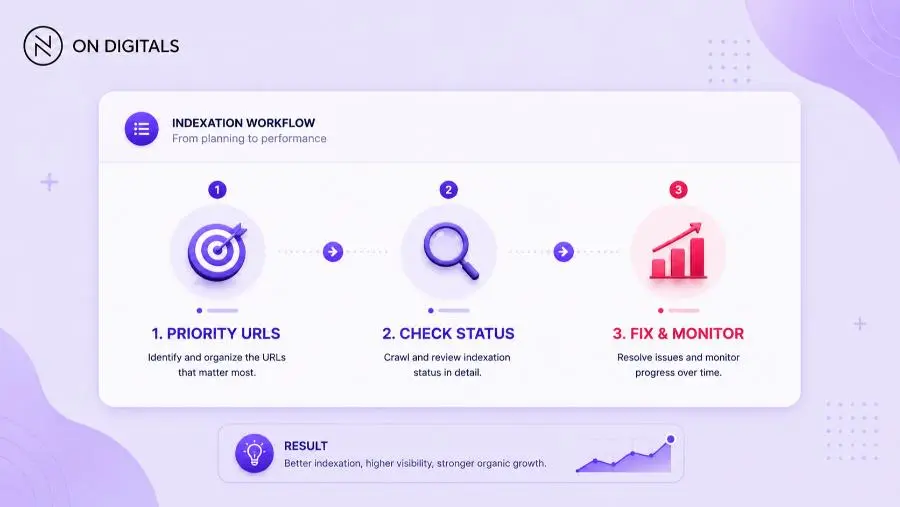 An effective workflow prioritizes critical URLs, groups technical issues by template patterns, and monitors indexation velocity after fixes are deployed.
For special page types, keep Google’s Indexing API rules clear. Google says the Indexing API is for pages with JobPosting or BroadcastEvent markup in VideoObject, so regular blog posts or product pages should rely on standard discovery channels.
Common mistakes, risks, and quality checks
Site indexer mistakes usually come from treating indexation as a tool problem. Tools can reveal gaps, while the real fix often sits in content quality, crawl paths, canonical logic, or page value.
If a URL is crawled but still missing from the index, compare the finding with the crawled currently not indexed status before treating it as a tool issue. In many cases, the problem sits in page value, duplication, internal links, or template quality.
Use this QA table before changing URLs:
| Mistake | Risk | Better action |
| Forcing every URL into the index | Weak pages dilute focus | Prioritize useful URLs |
| Trusting only site: results | Data can be incomplete | Use Search Console |
| Ignoring canonical tags | Wrong URL may be selected | Check declared and Google-selected canonical |
| Checking one page only | Template issues stay hidden | Group by URL type |
| Repeating indexing requests | No underlying improvement | Fix first |
| Using risky index tools | Possible spam patterns | Use official workflows |
A reliable site indexer workflow should answer three questions:
- Is the URL known to search engines?
- Is the URL technically indexable?
- Is the page valuable enough to deserve indexation?
If the answer is unclear, build a stronger diagnosis before asking developers or writers to make changes.
Tools and metrics to review before publishing
The best site indexer setup combines official data with bulk analysis. Google Search Console gives the clearest Google-specific view, while third-party tools make large checks faster.
| Tool | Role | Best use |
| Google Search Console | Source of Google index data | Primary diagnosis |
| URL Inspection | Page-level Google check | Priority URL review |
| Bing Webmaster Tools | Microsoft search visibility | Bing and IndexNow workflows |
| Screaming Frog SEO Spider | Crawl plus technical context | Template audits |
| Ahrefs Webmaster Tools | Backlink and SEO health context | Link-related index review |
| Site index checker | Bulk status checks | Monitoring large batches |
Metrics should match the page role. For articles, monitor impressions, indexed status, internal links etc. For product pages, add availability and revenue contribution. For service pages, connect indexation with qualified traffic or lead actions.
A practical indexation dashboard can group URLs into three buckets:
| Bucket | Criteria | Next step |
| Fix now | High-value URL outside the index | Diagnose and update |
| Monitor | Indexed but weak performance | Improve ranking signals |
| Exclude intentionally | Low-value page | Remove from sitemap or use noindex when appropriate |
This keeps the team focused on index quality. A healthy site does not need every URL indexed. It needs the right pages eligible for search.
FAQ about site indexers
Is Google Search Console a site indexer?
Google Search Console can function as the main indexing source for Google. Its Page Indexing report shows indexing status for URLs Google knows about, while URL Inspection provides page-level detail. Third-party tools can help with bulk checks, automation, and template-level workflows.
Does faster indexing improve rankings?
Faster indexing helps a page become eligible for search sooner. It does not guarantee stronger rankings. Ranking still depends on relevance, content quality, authority, user experience etc. Site indexer data helps confirm whether the page has entered the search system before ranking work begins.
What is the best site indexer tool?
The best site indexer tool depends on the workflow. Google Search Console is essential for Google data. Screaming Frog is strong for technical index audits. Bing Webmaster Tools and IndexNow support Microsoft search discovery. Bulk checkers can help when speed and scale matter.
Is it safe to use instant indexing tools?
Instant indexing tools should be used carefully. Google’s Indexing API is intended for JobPosting and livestreaming event pages. For standard SEO pages, safer workflows use sitemaps, internal links, Search Console, and crawlable site architecture. Avoid tools that promise guaranteed indexing.
How often should SEO teams check indexation?
High-change websites should review indexation weekly or daily for priority templates. Smaller sites can run monthly checks, then inspect new high-value pages after publishing. After migrations, CMS changes, or sitemap updates, monitor more often until index status stabilizes.
Conclusion
A site indexer helps SEO teams understand whether important URLs are actually eligible for search. Instead of chasing every missing page, the workflow should focus on business-critical URLs first: service pages, product pages, high-intent articles etc. From there, teams can check index status, review crawl context, and decide whether the fix should be content improvement, internal linking, sitemap cleanup, or template-level technical work.
For On Digitals, site indexer should sit inside a broader technical SEO workflow. Google Search Console gives the core indexation data, while crawlers and bulk checkers help diagnose patterns at scale.

NEWEST POSTS
- Advertising Industry In Vietnam: The 2026 Trends, Channels and Market-Entry Strategy
- Best SEO Company in Vietnam: Latest Shortlist For Businesses
- How To Leverage Social Media For Customer Service Like A Pro?
- Social Media Post Tips – 8 Ways To Boost Engagement
- How To Use Social Media for Sales – In-depth Beginner Guide
Read more