
Sitemaps for Crawl Budget: Practical Guide for SEO and Business Decisions
Vincent
27/01/2026
14
Sitemaps for crawl budget means using clean XML sitemap files to guide search engines toward priority URLs. In 2026, SEO teams use sitemap segmentation, accurate lastmod dates, Search Console reports etc. to improve crawl budget efficiency, reduce wasted URLs, and support faster indexation for large or fast-changing websites.
What sitemaps for crawl budget means and when it matters
Sitemaps for crawl budget means treating the sitemap as a curated URL signal, not a full dump of every page on the site. It matters when Googlebot needs a cleaner path to important content across large, frequently updated, or technically complex websites.
Google’s crawl budget guidance is mainly for very large or fast-changing sites. Google says smaller sites that are crawled soon after publishing usually only need updated sitemaps and regular index coverage checks.
For SEO teams, this distinction matters. A sitemap will not force Google to index a page. It helps Google discover or revisit URLs that the site owner considers important. The page still needs crawl access, unique value, and consistent technical signals.
| Sitemap use | What it supports | Business value |
| Clean URL discovery | Priority page discovery | Faster review for key pages |
| Sitemap segmentation | Template-level monitoring | Clearer SEO reporting |
| Accurate lastmod | Freshness signal | Better recrawl focus |
| Canonical URL inclusion | Duplicate control | Less crawl waste |
| Error cleanup | Better crawl efficiency | Fewer wasted bot requests |
This is especially useful for ecommerce, publishing, marketplace, and multi-location websites. These sites often create many URLs through filters, expired products, archives etc.
Why sitemaps affect indexation, user experience, and conversions
Sitemaps affect SEO because they help search engines find the URLs your team wants evaluated. They also make technical issues easier to monitor. When sitemap files contain only useful, indexable URLs, crawl reports become cleaner and indexing decisions become easier to prioritize.
Google defines crawl budget as the set of URLs Google can and wants to crawl. That budget depends on crawl capacity limit and crawl demand, while each crawled page still needs evaluation before indexation.
This means sitemap quality affects the discovery layer, while page quality affects the indexation layer. A clean sitemap helps Googlebot reach the right places. Strong content and technical health then make those pages worth keeping in the index.
For business teams, the impact appears in three places:
- New product or content discovery.
- Updated page recrawling.
- Reduced waste on duplicate or low-value URLs.
If a site keeps submitting expired URLs, parameter pages, broken links etc., Googlebot receives a noisy map. That can slow review for the URLs that actually influence leads or revenue.
How crawl limit and host load work in practice
Crawl limit is Google’s way of protecting your server while crawling. If the server responds quickly, Google may crawl more. If the server slows down or returns server errors, Google lowers crawl activity to avoid creating more load.
Google describes crawl capacity limit as the maximum number of parallel connections Google can use, plus the delay between fetches. Crawl health affects that limit: fast responses support more crawling, while slow responses or server errors reduce crawl activity.
Sitemaps cannot fix server performance. They can only help Google choose better URLs once crawling is possible. If sitemap URLs return 5xx errors, redirect chains, or slow responses, the sitemap becomes a crawl efficiency problem instead of a guide.
| Server signal | Crawl budget risk | Sitemap action |
| 5xx errors | Lower crawl capacity | Remove broken URLs after fixing |
| Slow response | Reduced crawl activity | Prioritize fast key templates |
| Redirect chains | Extra crawl cost | List final 200 URLs |
| Soft 404 pages | Poor URL quality | Remove or consolidate |
| Blocked resources | Weak rendering context | Review crawl access |
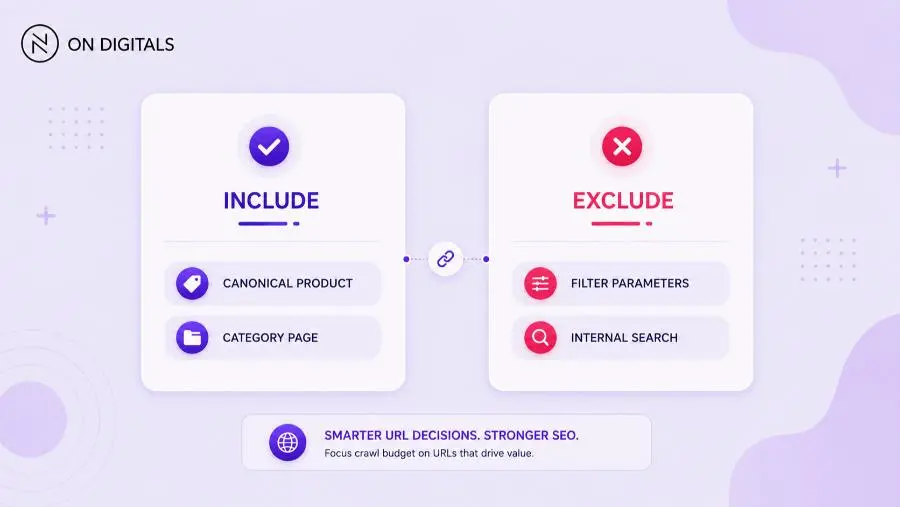 Control your crawl demand by guiding Googlebot only to URLs with clear commercial or discovery value.
For large sites, server health and sitemap hygiene should be reviewed together. A clean sitemap still underperforms when the listed URLs are slow or unstable.
How crawl demand and crawl scheduling work in practice
Crawl demand reflects how much Google wants to crawl a site or URL. Popularity, update frequency, perceived inventory, and site-wide events can influence demand. Sitemaps help by clarifying which URLs represent your priority inventory.
Google says crawl demand varies based on factors such as site size, update frequency, page quality, relevance, popularity, staleness, and events like site moves. Perceived inventory is especially controllable because duplicate or unwanted URLs can waste Google’s crawling time.
In practice, sitemap management should guide crawl demand toward pages with clear value. A product URL with stock, demand, and unique content deserves a stronger signal than a filtered URL with no standalone value.
| URL type | Sitemap decision | Reason |
| Canonical product page | Include | Commercial value |
| Main category page | Include | Discovery and navigation value |
| Filter parameter URL | Usually exclude | Duplicate risk |
| Expired product | Review case by case | Redirect or update |
| Internal search page | Exclude | Low search value |
| High-value guide | Include | Topic authority |
Crawl scheduling becomes more useful when the sitemap reflects real change. If every URL receives a fake freshness update, Google may learn to trust the sitemap less. If lastmod reflects meaningful updates, Google gets a clearer recrawl signal.
Crawl capacity of the system itself
Crawl capacity depends on more than page count. Server stability, database speed, CDN setup, rendering load, and template performance can affect how efficiently Googlebot processes a site. Sitemap work should therefore sit inside a broader technical SEO review.
Google’s documentation notes that Google has many machines, yet resources are still limited. Its systems make choices about where crawling time should go.
This matters for large websites that generate many URLs. If the CMS produces millions of parameter combinations, the sitemap may stay clean while Google still discovers crawl traps through internal links. In that case, the fix sits in faceted navigation control, canonical logic, robots rules, and link architecture.
A sitemap helps most when the surrounding system is also clean:
| System layer | What to check | Why it matters |
| CMS rules | Which URLs enter sitemap | Prevents low-value URLs |
| Database response | Page fetch speed | Protects crawl capacity |
| Internal links | Crawl paths | Signals page importance |
| Canonical tags | Preferred URL | Reduces duplicates |
| Robots rules | Crawl access | Controls crawl traps |
| Structured data | Entity clarity | Supports page interpretation |
The practical takeaway is simple. Sitemap optimization is a priority map. It still needs a technical system that can serve the right URLs quickly.
Step-by-step implementation framework for marketers and SEO teams
A sitemap crawl budget workflow should begin with URL inventory, then move into curation, segmentation, validation, and monitoring. This order keeps the work tied to indexation quality rather than sitemap size alone.
Use this framework:
- Define priority URL groups Start with pages that affect revenue, lead generation, or strategic visibility. Product pages, service pages, core categories etc. usually come first.
- Export current sitemap URLs Pull all submitted sitemap files from the CMS or Google Search Console. Keep each sitemap source visible in the audit sheet.
- Remove low-value URLs Exclude noindex pages, blocked URLs, soft 404s, internal search pages, parameter URLs etc.
- Keep only canonical 200 URLs Google’s sitemap guidance says to include URLs you want in Google Search results, and Google generally shows canonical URLs in search.
- Segment sitemap files Split by template or business group. For example, product, category, blog, location, or guide pages.
- Use lastmod only for real updates Update lastmod when the main content changes. Avoid refreshing dates for cosmetic edits or footer changes.
- Validate file limits Google states each sitemap file is limited to 50MB uncompressed or 50,000 URLs. Larger sets should be split into multiple sitemaps or a sitemap index.
- Monitor after submission Track submitted versus indexed URLs by sitemap group. Then connect issues back to template quality, crawl access, or page value.
This workflow gives marketers a clearer way to brief developers. It also gives SEO teams a better report than “we submitted all URLs.”
Common mistakes, risks, and quality checks
Most sitemap mistakes come from treating the file as an automatic export. A sitemap should be a curated list of URLs that deserve search evaluation. When the file includes weak or conflicting URLs, it can create noisy crawl signals.
Use this QA table before publishing:
| Mistake | Risk | Better action |
| Listing noindex pages | Conflicting signal | Remove from sitemap |
| Listing redirect URLs | Extra crawl requests | Use final URL |
| Listing 404 URLs | Crawl waste | Fix or remove |
| Adding parameter URLs | Duplicate inventory | Canonicalize or block crawling |
| Updating lastmod without changes | Trust issue | Use real update events |
| Mixing all templates | Weak reporting | Segment by URL type |
Google’s crawl budget guidance recommends managing URL inventory. It also warns that spending too much time on unwanted URLs can reduce attention for the rest of the site.
Quality checks should answer four questions:
- Is this URL indexable?
- Is this URL canonical?
- Is this URL useful for search?
- Is this URL important enough to submit?
If the answer is weak, keep the URL out of the sitemap until the page earns its place.
Tools and metrics to review before publishing
Sitemap optimization works best with a small, repeatable tool stack. Google Search Console shows submitted sitemap status and indexing patterns. A crawler can validate status codes, canonicals, meta robots, depth etc. Server logs can show how Googlebot behaves after the cleanup.
| Tool | What it checks | Best use |
| Google Search Console | Sitemap and indexing reports | Official Google view |
| Site crawler | Status, canonical, depth | Technical validation |
| Log file analysis | Googlebot activity | Crawl behavior review |
| CMS export | Published URL inventory | Sitemap source check |
| Analytics or CRM | Business value | Priority decisions |
Useful metrics include submitted URLs, indexed URLs, crawl requests, average response time, 5xx count, redirected sitemap URLs, noindex-in-sitemap count etc.
A practical sitemap dashboard can group issues into three buckets:
| Bucket | Criteria | Next action |
| Fix now | Priority URL missing or broken | Update template or sitemap |
| Fix next | Medium-value sitemap noise | Schedule cleanup |
| Leave out | Low-value URL | Exclude intentionally |
This keeps sitemap work tied to business outcomes. The goal is a cleaner crawl path for valuable URLs, not a larger sitemap file.
After cleaning sitemap files, use a site indexer workflow to check whether priority URLs are actually entering the index. This helps SEO teams separate sitemap discovery issues from page-level quality or canonical problems.
FAQ about sitemaps for crawl budget
Do sitemaps improve crawl budget?
Sitemaps can improve crawl efficiency by giving search engines a cleaner list of important URLs. They do not create unlimited crawl budget. For large or fast-changing sites, clean sitemaps help Google discover updated pages while reducing wasted attention on duplicate or low-value URLs.
Should every URL be in a sitemap?
Every URL should not be included automatically. A sitemap should include canonical, indexable, useful URLs that the site owner wants in search results. Exclude noindex pages, redirected URLs, broken pages, duplicate parameter URLs etc. Google recommends including URLs you want in Google Search.
How many URLs can one sitemap contain?
Google follows the sitemap protocol limit of 50,000 URLs or 50MB uncompressed per sitemap file. Larger sites should split URLs across multiple sitemap files and may submit a sitemap index file. Segmentation also helps SEO teams monitor indexation by template or section.
Does lastmod help crawl budget?
Lastmod can help search engines understand which submitted pages changed recently. It should reflect meaningful content updates. If a CMS refreshes lastmod for every small layout change, the signal becomes less useful for crawl scheduling and sitemap trust.
Are HTML sitemaps still useful?
HTML sitemaps can still help when they reduce crawl depth and provide crawlable internal links to important pages. XML sitemaps guide bots through submitted URL lists. HTML sitemaps support discovery through internal linking, which can also help users navigate large sites.
Can sitemaps fix crawled currently not indexed pages?
Sitemaps can help Google discover or revisit a URL, but they cannot make a weak page index-worthy. If a URL is crawled currently not indexed, review page value, internal links, duplication, canonical signals, and content quality before relying on sitemap submission.
Conclusion: treat sitemaps as crawl budget control points
Sitemaps for crawl budget work best when they act as a clean priority map. They should highlight canonical, indexable, business-relevant URLs while leaving noisy inventory out. For large websites, this helps SEO teams guide crawling toward pages that can influence organic visibility.
For On Digitals, the updated article should position sitemap management as part of technical SEO and Search and AI Marketing. A strong workflow connects sitemap cleanup with crawl capacity, crawl demand, internal linking, indexation status, and business value.

NEWEST POSTS
- Advertising Industry In Vietnam: The 2026 Trends, Channels and Market-Entry Strategy
- Best SEO Company in Vietnam: Latest Shortlist For Businesses
- How To Leverage Social Media For Customer Service Like A Pro?
- Social Media Post Tips – 8 Ways To Boost Engagement
- How To Use Social Media for Sales – In-depth Beginner Guide
Read more