
Website Speed Optimization for SEO, Mobile UX, and Conversions
Vincent
23/01/2026
16
Website speed optimization improves how fast a page loads, responds, and stays stable for real users. In 2026, SEO teams should measure LCP under 2.5 seconds, INP under 200 milliseconds, and CLS below 0.1 before assigning fixes. These checks work best inside a broader technical SEO foundation for site performance, where speed issues connect with templates, scripts, media, and hosting.
What website speed optimization means and when it matters
Website speed optimization means improving the parts of a website that shape real user performance. It matters when users wait too long for main content, tap a button without feedback, or see layout movement near key actions.
MDN defines web performance through objective measurements and perceived user experience. That includes load time, runtime behavior, responsiveness, and smoothness during interactions.
For SEO teams, speed work should start with page value. A slow service page affects inquiry intent. A slow product template affects product discovery. A slow landing page can waste paid traffic before users reach the offer.
| Speed issue | What users feel | Business risk |
| Slow main content | Page feels unfinished | Weak first impression |
| Delayed tap response | Action feels ignored | Fewer form completions |
| Layout movement | Page feels unstable | Misclicks near CTA areas |
| Slow server response | Page starts late | Higher bounce risk |
| Heavy scripts | Mobile feels sluggish | Lower campaign efficiency |
Website speed matters most before redesigns, campaign launches, tracking updates, plugin changes, and high-value template releases.
Why website speed optimization affects SEO, UX, and conversions
Website speed optimization affects SEO because Google uses Core Web Vitals to evaluate page experience. It affects conversions because users decide quickly whether a page feels usable, trustworthy, and responsive enough to continue.
Google Search Central explains that Core Web Vitals measure LCP, INP, and CLS. Google recommends good Core Web Vitals for Search success and stronger user experience, while relevance and content quality remain essential.
For metric-specific fixes, connect this section with Core Web Vitals optimization. That helps the team decide whether the issue belongs to loading speed, tap response, or layout stability before assigning technical work.
Speed should work as a business filter. A weak metric on an old archive may wait. A weak mobile experience on a lead page deserves faster review.
| Page type | Speed priority | What to protect |
| Service page | High | Trust before inquiry |
| Product page | High | Product discovery |
| Landing page | High | Paid traffic efficiency |
| Blog article | Medium | Reading experience |
| Homepage | High | Brand confidence |
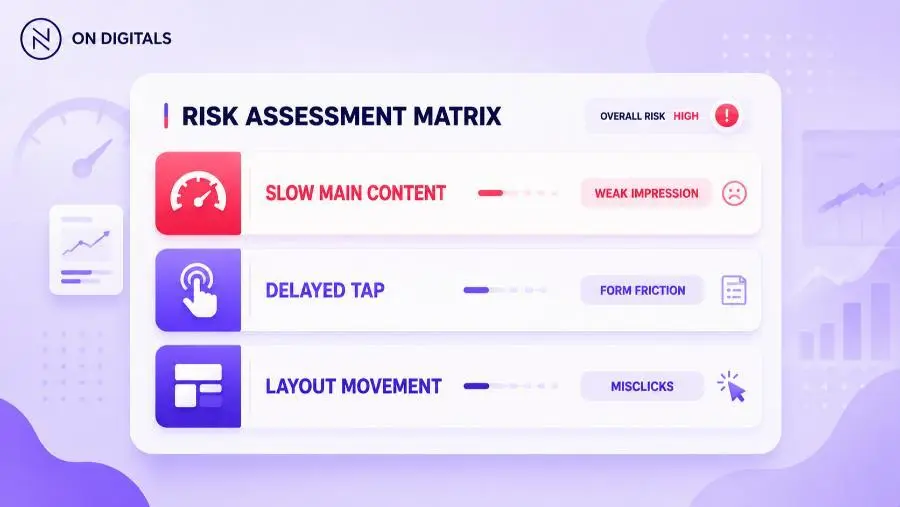 Every technical delay creates a severe behavioral consequence: slow main content destroys first impressions, delayed tap responsiveness kills form completions, and layout movements actively cause misclicks.
A useful speed audit should identify the affected page type, the weak metric, and the resource causing friction. That gives developers a clearer brief than “make the site faster.”
Bandwidth competition: which resources should load first?
Bandwidth competition happens when many page resources request attention at the same time. A strong speed workflow gives early priority to resources that shape the first useful screen, while secondary scripts wait until the page becomes usable.
A hero image may need early loading when it controls LCP. A chat widget can usually wait. A tracking tag may support reporting, while it should avoid blocking main content.
Cloudflare’s speed guidance highlights practical actions such as image optimization, HTTP request reduction, browser caching, render-blocking JavaScript cleanup, external script control, and redirect reduction.
| Resource | Priority decision |
| Hero image | Load early if it controls LCP |
| Main CSS | Keep critical rules fast |
| Chat widget | Delay until needed |
| Analytics tags | Avoid blocking main content |
| Below-fold media | Lazy load safely |
| Web fonts | Preload key fonts only |
The loading sequence matters. Critical resources should help users understand the page first. Supportive resources can load after the main experience becomes stable.
How to check when website resources load
Website speed optimization needs timing analysis, not guesswork. A page may use compressed files and still feel slow when the key resource loads late or a script blocks rendering.
Use PageSpeed Insights as the first URL-level check when the team needs both field data and lab diagnostics. The report helps show whether real users feel the issue before developers inspect the resource waterfall.
PageSpeed Insights reports mobile and desktop experience, then provides suggestions for improvement. It combines field data from real users with Lighthouse lab diagnostics when enough data is available.
| Timing signal | What it reveals |
| TTFB | Server response starts late |
| LCP | Main content appears late |
| INP | User action waits for feedback |
| CLS | Visible elements shift |
| Waterfall delay | Resource waits behind others |
| JavaScript execution | Main thread stays busy |
Start with field data to confirm user impact. Then use lab tools to locate the resource, script, or template pattern behind the issue. This keeps the audit tied to real sessions instead of one clean test run.
Modern performance standards for SEO teams
Modern website speed optimization has moved beyond page-load scores. SEO teams now need field data, lab diagnostics, Core Web Vitals, and release checks that protect high-value user paths.
MDN explains that perceived performance describes how fast, responsive, and reliable a website feels to users. This matters because user perception can differ from raw load time.
| Data source | Best use |
| Field data | Prioritize real user impact |
| Lab data | Debug technical causes |
| Search Console | Track URL groups |
| DevTools | Inspect resource behavior |
| RUM data | Segment business journeys |
This split prevents a common reporting problem. A lab score can improve while mobile users still struggle. Field data shows whether production users experience the same improvement.
Step-by-step website speed optimization framework
A website speed optimization workflow should start with business priority, then move into measurement and technical ownership. This order helps marketers avoid broad checklists that do not change important user paths.
- Choose priority pages
Start with pages tied to revenue, leads, or paid traffic. - Check field data first
Review PageSpeed Insights and Search Console Core Web Vitals. - Find the weakest metric
Separate loading delay, slow interaction, and layout movement. - Identify the resource or component
Check server response, hero media, scripts, fonts, tags etc. - Assign the right owner
Match each issue with hosting, frontend, tracking, or design support. - Fix one template first
Test one representative URL before wider rollout. - Validate in lab tools
Use Lighthouse, DevTools, or WebPageTest before release. - Monitor after launch
Field data needs real visits before trends become reliable.
This workflow turns speed optimization into a controlled process. It also helps stakeholders understand why one technical fix deserves priority over another.
Common mistakes and quality checks
Many speed projects fail because teams chase every warning. Better results come from finding the specific user moment that feels slow, then fixing the technical cause behind that moment.
Use this QA table before launch:
| Mistake | Risk | Better action |
| Testing only desktop | Mobile friction remains | Start with mobile field data |
| Chasing perfect scores | Low-impact work expands | Prioritize user paths |
| Lazy loading hero media | LCP can get worse | Keep critical media eager |
| Removing scripts blindly | Tracking or forms break | Audit script value first |
| Compressing every file | Sprint loses focus | Fix the blocking resource |
| Skipping post-launch review | Regression returns | Track field trends |
A strong speed task should answer three questions. Which page type is affected? Which user moment feels slow? Which technical change can reduce that friction?
Tools and metrics to review before publishing
A practical website speed optimization stack should show real user impact, technical causes, and post-release movement. Each tool should support a clear decision before the team changes production code.
Search Console’s Core Web Vitals report is based on actual user data for LCP, INP, and CLS. It groups URLs by status so teams can review patterns across similar pages.
| Tool | Best use |
| PageSpeed Insights | URL-level field and lab review |
| Search Console CWV report | URL group monitoring |
| Chrome DevTools | Network and rendering diagnosis |
| Lighthouse | Pre-release lab validation |
| WebPageTest | Waterfall and visual load sequence |
| Analytics or CRM | Business impact review |
Before release, test priority templates in lab tools. After release, use field data and analytics to confirm whether users experience a better path.
Useful review areas include:
- Mobile LCP.
- INP on key interactions.
- CLS near CTA areas.
- TTFB.
- JavaScript execution.
- Third-party script pressure.
- Image transfer size.
- Conversion path behavior.
If a tool does not help the next decision, the team can leave it out of the review.
Website speed optimization for WordPress
WordPress sites often slow down when themes, plugins, media libraries, tracking tags, and hosting choices accumulate over time. The safest fix starts with diagnosis before adding another performance plugin.
| WordPress issue | Better review |
| Slow server response | Hosting and cache layer |
| Heavy theme | Template scripts and CSS |
| Large image library | Media compression workflow |
| Plugin overlap | Script output and conflicts |
| Slow forms or filters | INP and JavaScript behavior |
| Layout shifts | Media dimensions and ad slots |
A WordPress performance plugin can help when it matches the real issue. Cache settings can improve server response. Image optimization can improve LCP. Script control can improve INP. Random plugin stacking can create new conflicts.
For WordPress teams, staging is essential. Test forms, checkout, search, menus, consent banners etc. before deploying speed settings to production.
FAQ about website speed optimization
What is website speed optimization?
Website speed optimization is the process of improving how quickly a website loads, responds, and stays stable during real user sessions. It covers server response, media delivery, script behavior, caching, and layout stability. The strongest workflows use field data first, then lab tools for technical diagnosis.
Does website speed optimization improve SEO?
Website speed optimization can support SEO because it improves page experience and Core Web Vitals. Google recommends good LCP, INP, and CLS thresholds for better user experience. Strong content still matters most, while speed helps reduce friction after searchers click through.
What should I optimize first?
Start with the most valuable page type and its weakest metric. If main content appears late, review LCP. If taps feel delayed, review INP. If content moves unexpectedly, review CLS. This approach keeps speed work tied to user impact.
Which tools should I use to check website speed?
Use PageSpeed Insights for one URL, Search Console for URL groups, and Chrome DevTools for technical debugging. WebPageTest is useful when the team needs a visual waterfall. PageSpeed Insights is especially useful because it combines field data with Lighthouse lab diagnostics.
How often should website speed be reviewed?
Review speed after major template changes, tracking updates, plugin changes, or campaign launches. Stable websites can use monthly checks. High-change websites should review performance around every release, especially when mobile traffic or paid campaigns depend on the affected templates.
Can website speed affect conversions?
Yes. Website speed can affect conversions because slow content delays trust, weak INP interrupts user actions, and layout shifts can cause misclicks near CTAs. The highest-priority fixes should focus on pages that influence revenue, leads, or campaign performance.
Conclusion: make speed part of page quality
Website speed optimization works best when it becomes part of how pages are planned, tested, and released. Field data shows where real users struggle. Lab tools help teams find the technical cause. Business priority decides which template gets fixed first.
For On Digitals, speed optimization should work like a quality check before important pages reach users. If a site feels slow on mobile, loses users before key actions, or keeps failing Core Web Vitals after repeated fixes, On Digitals can help separate template issues from script, media, hosting, and measurement problems before they become larger SEO risks.

NEWEST POSTS
- Advertising Industry In Vietnam: The 2026 Trends, Channels and Market-Entry Strategy
- Best SEO Company in Vietnam: Latest Shortlist For Businesses
- How To Leverage Social Media For Customer Service Like A Pro?
- Social Media Post Tips – 8 Ways To Boost Engagement
- How To Use Social Media for Sales – In-depth Beginner Guide
Read more