
Core Web Vitals Optimization: How to Improve Real User Experience
Vincent
09/12/2025
11
Core Web Vitals optimization helps teams improve how real users experience loading, interaction, and layout stability. In 2026, the focus should be field data, mobile UX, INP responsiveness, LCP resource priority, and conversion paths. To make those fixes sustainable, connect CWV work with a broader technical performance review instead of treating page speed as a standalone score.
What Core Web Vitals optimization means and when it matters
Core Web Vitals optimization means improving the parts of page performance that users can actually feel. It matters when important pages load slowly, respond late after a tap, or shift while users are reading or converting.
Google defines Core Web Vitals as a subset of Web Vitals that apply to all web pages and measure real-world user experience. The current stable metrics are LCP for loading, INP for interaction, and CLS for visual stability. Google recommends judging them at the 75th percentile of page loads across mobile and desktop.
| Metric | What users feel | Good threshold |
| LCP | Main content appears fast enough | 2.5 seconds or less |
| INP | Page responds quickly after action | 200 milliseconds or less |
| CLS | Layout stays stable during use | 0.1 or less |
Core Web Vitals optimization matters most on pages tied to business value. A slow blog archive may wait. A slow service page, paid landing page, or ecommerce template deserves faster action because performance friction can affect leads or revenue.
Why Core Web Vitals optimization affects SEO and conversions
Core Web Vitals optimization affects SEO because Google uses these metrics to evaluate page experience. It affects conversion because users respond to what they feel on the page: delayed content, slow taps, unstable buttons, or form friction.
Google Search documentation says site owners should aim for good Core Web Vitals for Search success and to support a better user experience. It also explains that poor Core Web Vitals do not block ranking entirely, because many ranking systems still evaluate relevance and other signals.
For On Digitals, Core Web Vitals should be treated as a business prioritization layer. The report should help answer one question: which user journey loses trust because the page feels slow or unstable?
| Page type | Main CWV risk | Business priority |
| Landing page | Slow LCP | Campaign efficiency |
| Product page | Weak INP | Purchase friction |
| Service page | Slow hero content | Lead confidence |
| Publisher page | Poor CLS | Reading interruption |
| Checkout flow | Slow interaction | Revenue loss |
The best optimization work starts with the page’s role. From there, the team can choose the metric that affects the user action most.
The most effective ways to improve Core Web Vitals
The most effective Core Web Vitals fixes start with the metric that is failing for real users. A broad “speed optimization” checklist often wastes time because each metric has a different cause.
Web.dev’s Core Web Vitals guidance explains that field tools such as CrUX, PageSpeed Insights, and Search Console help assess real user performance, while lab tools such as Lighthouse and Chrome DevTools help debug before release.
Use this decision table before creating tasks:
| Weak metric | First question | Better fix direction |
| LCP | What is the LCP element? | Prioritize main content delivery |
| INP | Which action feels slow? | Reduce main-thread blocking |
| CLS | Which element moves? | Reserve stable layout space |
| Mobile field issue | Which template is affected? | Test real mobile paths |
| Lab-only issue | Can it become production risk? | Validate before rollout |
This keeps the team from over-optimizing low-impact warnings. A fix should improve the user moment that matters: seeing the main content, getting feedback after action, or trusting that the layout will stay in place.
Make the LCP resource discoverable and prioritized
LCP optimization should start with the element users wait for. On many pages, that element is the hero image, product photo, main text block, or video poster. If the browser discovers that element too late, the first meaningful page moment is delayed.
For deeper diagnosis, review Largest Contentful Paint to identify which visible element controls the first meaningful page moment and why it appears late.
Web.dev’s LCP optimization guide recommends making the LCP resource discoverable from the HTML source and prioritizing it so the browser can fetch it earlier. It also explains that delays can come from server response, resource load, or render delay.
| LCP problem | What to check | Possible owner |
| Slow server response | TTFB and cache behavior | Backend or hosting |
| Hero image discovered late | HTML source and preload logic | Frontend |
| Image too heavy | Size and format | Design or content ops |
| CSS blocks rendering | Critical CSS path | Frontend |
| JavaScript delays render | Hydration and script priority | Development team |
For marketers, the key is to avoid vague tickets like “improve LCP.” A stronger brief says which page template is affected, which element controls LCP, and why the element appears late.
Break up long tasks to improve INP
INP optimization focuses on responsiveness after the user acts. A page can look loaded but still feel slow when a user taps a menu, opens a filter, or submits a form. That is why INP has become central to modern Core Web Vitals work.
For slow taps, delayed forms, or heavy interactive components, use Interaction to Next Paint as the follow-up guide to trace which user action blocks the next visual response.
Web.dev’s INP guidance recommends yielding often to the main thread so the browser can respond to user interactions sooner. It also explains that long tasks can delay input handling and visual feedback.
| INP issue | User symptom | Better fix direction |
| Long JavaScript task | Tap feels ignored | Split work into smaller chunks |
| Heavy event handler | Button responds late | Reduce handler logic |
| Third-party tag pressure | Page feels laggy | Audit tag value |
| Expensive render | UI updates slowly | Simplify component updates |
| Large DOM update | Filter feels stuck | Batch visual changes |
INP work needs real interaction testing. Instead of testing only page load, the team should record important actions in Chrome DevTools. The best INP ticket identifies the interaction target, the delay type, and the next visual response users expect.
Stabilize layout to reduce CLS
CLS optimization protects user trust while content loads. A page may load fast, but it still feels broken if a banner pushes text down or a button shifts before the user taps it. When the issue is visual movement rather than loading speed, review Cumulative Layout Shift to find which page element moves and how to reserve stable space before users interact.
Core Web Vitals guidance defines CLS as the visual stability metric, with a good score of 0.1 or less at the 75th percentile.
| CLS source | User problem | Better fix direction |
| Image without dimensions | Content jumps after load | Add width, height, or aspect ratio |
| Ad slot changes size | Reading flow breaks | Reserve container space |
| Font swap | Text reflows | Tune font loading |
| Embed loads late | Page structure changes | Use placeholder wrapper |
| Banner pushes content | CTA moves | Change placement behavior |
CLS work is often a template problem. If one ad module or embed wrapper appears across many pages, fixing one URL is not enough. The shared component needs a stable layout rule.
Step-by-step framework for marketers and SEO teams
Core Web Vitals optimization should start with field data, then move into diagnosis and technical fixes. This order keeps the work tied to real users instead of lab-score chasing.
Use this framework:
- Choose priority templates
Start with pages tied to leads, sales, paid media etc. These pages carry the clearest business risk. - Check field data first
Use Search Console Core Web Vitals or PageSpeed Insights to see whether real users are affected. - Identify the failing metric
Separate LCP, INP, and CLS. Each metric needs a different fix. - Pick a representative URL
Test one page from the affected group before changing the whole site. - Find the technical cause
Use PageSpeed Insights, Chrome DevTools, Lighthouse, or RUM data based on the metric. - Assign the right owner
Hosting, frontend code, image handling, tracking tags etc. may need different teams. - Validate in lab tools
Confirm the fix before release with controlled testing. - Monitor field data after launch
Field data needs real visits before the trend moves. Timestamp releases so the team can connect changes with results.
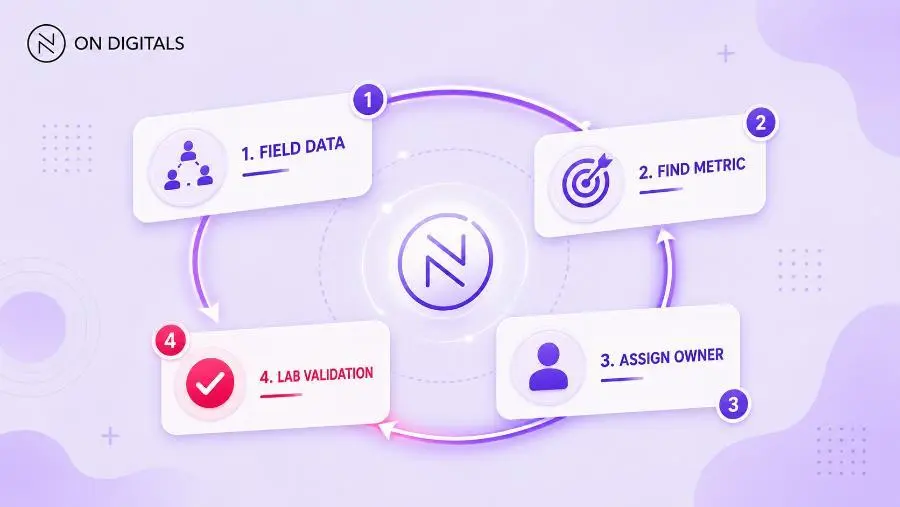 A strict workflow starts with field data to find user pain points, identify the specific failing metric, assign the correct technical owner, and validate fixes in the lab before launch.
Web.dev’s workflow guidance recommends evaluating site health, debugging and optimizing issues, then monitoring to prevent regressions.
Common mistakes, risks, and quality checks
Most Core Web Vitals mistakes come from treating performance as one score. A page can pass LCP but fail INP. A page can load quickly while the layout shifts near a CTA. The metric should decide the fix.
Use this QA table before assigning work:
| Mistake | Risk | Better action |
| Chasing 100/100 | Low-impact work expands | Focus on CWV thresholds |
| Testing homepage only | Template problems stay hidden | Use URL groups |
| Ignoring mobile data | Real friction remains | Start with mobile field data |
| Fixing every warning | Sprint loses focus | Prioritize by user impact |
| Skipping INP testing | Slow taps remain hidden | Record real interactions |
| Closing work too early | Field trend stays unproven | Monitor after release |
A strong Core Web Vitals ticket should answer three questions. Which metric is weak? Which template or user path is affected? Which technical owner can fix the cause?
If those answers are missing, the team needs one more diagnostic step before development starts.
Tools and metrics to review before publishing
A practical Core Web Vitals workflow uses tools by decision stage. Search Console helps prioritize URL groups. PageSpeed Insights explains one page. DevTools helps developers trace specific causes. RUM data adds production-level detail when the team needs more context.
For tool selection, use the Core Web Vitals tools guide to decide which platform fits each stage of the workflow. Tool choice should follow the question the team needs to answer, such as field monitoring, lab validation, interaction tracing etc.
Search Console’s Core Web Vitals report groups URL performance as Poor, Need improvement, or Good. This grouping helps teams identify patterns across similar pages rather than testing random URLs.
| Tool | Best use | Decision it supports |
| Search Console CWV report | URL group monitoring | Which template needs attention |
| PageSpeed Insights | Page-level field and lab view | Which metric is weak |
| Chrome DevTools | Element and interaction debugging | What causes the delay |
| Lighthouse | Pre-release lab audit | Did the fix improve the test |
| RUM or web-vitals library | Owned field data | Which users or paths are affected |
Before publishing a major template update, review the first viewport, key tap targets, and layout stability around conversion areas. Then check the metric most likely to fail for that page type.
Useful QA areas include:
- Mobile field data.
- URL group status.
- LCP element.
- Slow interaction target.
- Layout shift source.
- Third-party script pressure.
- Release timestamp.
- Post-launch field trend.
The goal is not to run every tool. The goal is to reach the next clear decision.
FAQ about Core Web Vitals optimization
What is Core Web Vitals optimization?
Core Web Vitals optimization is the process of improving LCP, INP, and CLS so users get faster loading, smoother interaction, and more stable layouts. The work should focus on real-user field data, then use lab tools for technical diagnosis.
What Core Web Vitals should I optimize first?
Start with the metric failing on the most valuable template. If landing pages fail LCP, prioritize main content loading. If product pages fail INP, review slow interactions. If publisher pages fail CLS, stabilize ads and embedded content.
Does Core Web Vitals optimization improve rankings?
Core Web Vitals can support page experience, which is part of Google’s broader search evaluation. Better scores do not replace relevance, content quality, or authority. They help reduce UX friction when users reach the page.
How long does it take to see Core Web Vitals improvement?
Lab tools can show improvement right after a fix. Field data takes longer because it depends on real user visits. CrUX-based reporting often reflects a rolling collection period, so teams should monitor trends after release rather than expect instant confirmation.
Why do lab data and field data differ?
Lab data uses controlled test conditions. Field data reflects real users across different devices, networks, and page states. Web.dev notes that lab measurement is useful during development, while field measurement captures the complete real-user picture.
What is the best tool for Core Web Vitals optimization?
Use Search Console for URL group priority, PageSpeed Insights for page-level triage, DevTools for debugging, and RUM when the team needs deeper production data. The best tool depends on the decision the team needs to make.
Conclusion: turn Core Web Vitals into a performance roadmap
Core Web Vitals optimization works best when it becomes part of how a website is planned, built, and reviewed. Field data should show where real users struggle. Lab tools should help teams find the technical cause. From there, every release should protect the pages that matter most to revenue, lead generation, or organic growth.
For On Digitals, the next step is not another one-time speed checklist. It is a performance review that connects templates, tracking scripts, mobile behavior, and conversion paths into one clear action plan. On Digitals can help your team identify which Core Web Vitals issues deserve priority with our result-oriented technical SEO.

NEWEST POSTS
- Advertising Industry In Vietnam: The 2026 Trends, Channels and Market-Entry Strategy
- Best SEO Company in Vietnam: Latest Shortlist For Businesses
- How To Leverage Social Media For Customer Service Like A Pro?
- Social Media Post Tips – 8 Ways To Boost Engagement
- How To Use Social Media for Sales – In-depth Beginner Guide
Read more