
Largest Contentful Paint: How to Find and Fix Slow Main Content
Vincent
14/01/2026
13
Largest Contentful Paint helps SEO teams measure when the main visible content becomes useful to users. In 2026, LCP should be reviewed inside a broader Core Web Vitals performance workflow, especially across field data, mobile templates, hero sections, server response, and conversion paths where a slow first impression can reduce trust before users act.
What Largest Contentful Paint means and when it matters
Largest Contentful Paint measures when the largest visible content element in the viewport appears on screen. For SEO teams, LCP answers a practical question: how long does the user wait before the page’s main promise becomes clear?
Chrome’s Lighthouse documentation explains that LCP approximates when the main content of a page becomes visible to users. A good LCP threshold is 2.5 seconds or less, judged at the 75th percentile of page visits.
In business terms, LCP matters because users do not wait for the whole page to finish loading. They judge the page when the key content appears. If the hero image, product photo, or service message loads late, the page feels slow even when smaller elements appeared earlier.
| LCP element | What users experience | Business risk |
| Hero image | Main message appears late | Weak first impression |
| Product image | Product value feels delayed | Lower purchase intent |
| Main text block | Reading starts slowly | Lower engagement |
| Video poster | First screen feels heavy | Higher bounce risk |
| Service banner | Offer clarity is delayed | Fewer consultation actions |
The goal is not to make every file load first. The goal is to make the most important visible content appear fast enough for users to continue.
Why Largest Contentful Paint affects rankings, user experience, and conversions
Largest Contentful Paint affects SEO because it belongs to Core Web Vitals. It affects conversion because users judge trust before every script finishes loading. When the main content appears late, the page delays the moment where users understand the offer.
Google’s Core Web Vitals guidance lists LCP as the loading metric, while INP measures responsiveness and CLS measures visual stability. LCP should occur within 2.5 seconds for a good user experience.
LCP should be reviewed with related Core Web Vitals instead of being treated as a standalone speed metric. If the page loads quickly but responds slowly after a tap, review Interaction to Next Paint. If the layout moves while users read or click, check Cumulative Layout Shift as the next priority.
For On Digitals, LCP should be treated as a first-impression metric. A slow LCP on a landing page can weaken paid traffic efficiency. A slow LCP on a service page can reduce consultation intent. A slow LCP on a product page can make the product feel unavailable or low-quality.
| Page type | LCP priority | What to protect |
| Service page | High | Hero message and lead CTA |
| Product page | High | Main product image |
| Landing page | High | Offer clarity |
| Blog article | Medium | Main content access |
| Homepage | High | Brand confidence |
This is why LCP work should not stop at “make the page faster.” The better question is: which first visible element creates trust, and why does it appear late?
How to identify the real LCP element
The LCP element is usually the largest visible image, text block, or media element in the first viewport. Before giving optimization advice, teams need to identify the actual LCP element on each important template.
Many teams start by compressing every image. That can waste time when the real LCP delay comes from server response, font loading, render-blocking CSS, or JavaScript hydration.
Use this diagnosis table:
| Possible LCP element | First area to inspect |
| Hero image | File size, preload, CDN path |
| Main heading block | Font loading and critical CSS |
| Product photo | Responsive image rules |
| Background image | CSS discovery delay |
| Video poster | Poster size and request priority |
Web.dev explains that LCP measures the largest image or text block rendered within the viewport. The key SEO action is to connect that metric with the template component users actually see first.
Once the element is clear, the team can stop using generic speed checklists. The fix should target the element controlling the first useful page moment.
How element changes affect LCP during page load
Largest Contentful Paint can change while the page loads. A text block may appear first, then a larger hero image becomes the final LCP element after it renders. This makes LCP diagnosis more complex than checking one static screenshot.
This issue appears often on pages with sliders, late hero images, client-side rendering, large background media etc. If the final LCP candidate arrives late, users still experience a slow main content moment.
| Scenario | Why LCP changes |
| Hero image loads after text | The image becomes the largest visible element |
| Slider swaps content | A later block changes the candidate |
| Font loads late | Text size changes after render |
| Video poster appears late | Poster becomes the main visual |
| CSS background loads late | Browser discovers it too slowly |
Chrome’s LCP breakdown guidance separates LCP delay into subparts so teams can see whether the issue comes from server response, resource load, or render delay.
For On Digitals, this is where template QA matters. If the same hero module delays LCP across service pages, fixing one URL is not enough. The shared layout rule needs review.
How to optimize Largest Contentful Paint by delay source
Optimizing LCP means making the main visible content discoverable, loadable, and renderable earlier. The right fix depends on where the delay happens. A slow backend needs a different owner from a late-discovered hero image.
Web.dev’s LCP optimization guidance explains that delays can happen before the LCP resource starts loading, during the resource load, or while the browser renders the element.
Use this fix map:
| LCP delay source | Better fix |
| Slow TTFB | Improve hosting, caching, or backend response |
| Resource discovered late | Put the LCP image in HTML or preload it |
| Large image file | Resize and use a better format |
| Render-blocking CSS | Prioritize critical CSS |
| JavaScript render delay | Defer non-critical scripts |
| Font delay | Preload key fonts and tune font display |
This section should replace long lists of general tips. A good LCP task should state the element, the delay source, the owner, and the expected user impact.
Step-by-step implementation framework for marketers and SEO teams
An LCP workflow should start with field data, then move into element diagnosis. This order keeps performance work tied to real user experience instead of lab-score chasing.
Use this framework:
- Choose priority templates
Start with pages tied to leads, sales, paid traffic etc. These pages carry more business risk when LCP is slow. - Check field data first
Use PageSpeed Insights or Search Console Core Web Vitals to confirm whether real users experience weak LCP. - Find the LCP element
Use PageSpeed Insights, Lighthouse, or Chrome DevTools to locate the element controlling the first visible content moment. - Break down the delay
Check whether the issue comes from server response, resource discovery, file load, or render delay. - Assign the right owner
Hosting, frontend code, image handling, or tag management may need separate teams. - Fix the shared template
Review whether the same issue appears across similar URLs before closing the task. - Validate in lab tools
Lighthouse can confirm technical improvement quickly after a code change. - Monitor field data after release
Field data needs real visits before the trend moves.
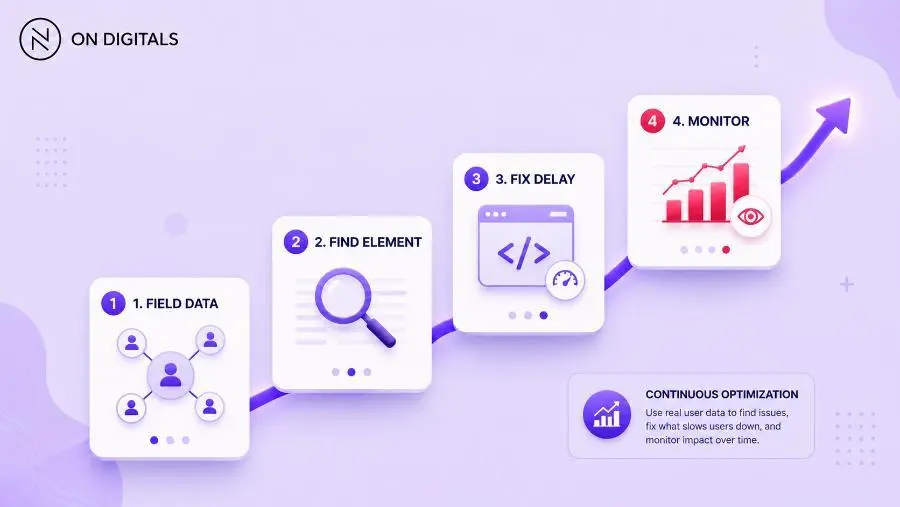 An effective LCP workflow starts with CrUX field data on priority templates, locates the exact controlling element, assigns the specific technical owner, and monitors post-launch trends.
This workflow helps marketers brief developers clearly. It also helps stakeholders understand why one LCP issue may affect many business pages.
Common mistakes, risks, and quality checks
Most LCP mistakes happen when teams optimize random assets instead of the actual LCP element. A page may contain many large images, while only one controls the first viewport. Fixing the wrong asset can lower page weight without improving what users feel.
Use this QA table before assigning work:
| Mistake | Risk | Better action |
| Testing only desktop | Mobile LCP stays weak | Start with mobile field data |
| Compressing every image | Sprint gets unfocused | Identify the LCP resource |
| Ignoring server response | LCP starts late | Review TTFB first |
| Hiding hero image in CSS | Browser discovers it late | Make the resource easier to preload |
| Loading all scripts early | Rendering gets blocked | Defer non-critical scripts |
| Fixing one URL only | Template issue remains | Test a URL group |
A strong LCP ticket should answer one question: what content is the user waiting for, and why does it arrive late?
If that answer is unclear, the task needs better diagnosis before development starts.
Tools and metrics to review before publishing
LCP review works best with a focused tool stack. PageSpeed Insights shows field and lab context. Search Console shows affected URL groups. Chrome DevTools helps developers inspect the resource behind the delay.
| Tool | Role | Best use |
| PageSpeed Insights | Page-level field and lab view | URL review |
| Search Console Core Web Vitals | Real-user URL grouping | Template priority |
| Lighthouse | Lab audit | Pre-release validation |
| Chrome DevTools | Element and network inspection | Debugging |
| WebPageTest | Visual load review | Filmstrip timing |
Before publishing a major template update, review the first viewport like a user. Check whether the main content appears quickly. Then inspect whether the LCP image is discoverable early, and whether scripts delay rendering.
Useful LCP QA areas include:
- Mobile LCP field data.
- LCP element identity.
- TTFB trend.
- Hero image size.
- Resource discovery path.
- Critical CSS behavior.
- JavaScript render delay.
- Font loading behavior.
This keeps LCP work tied to page experience. The score matters, while the visible user moment matters more.
FAQ about Largest Contentful Paint
What is Largest Contentful Paint?
Largest Contentful Paint is a Core Web Vitals metric that measures when the largest visible content element in the viewport finishes rendering. It helps teams understand when the main content becomes useful to users.
What is a good LCP score?
A good LCP score is 2.5 seconds or less. Scores from 2.5 to 4 seconds need improvement. Scores above 4 seconds are poor. Google recommends judging LCP at the 75th percentile of page visits.
What causes poor Largest Contentful Paint?
Poor LCP often comes from slow server response, late resource discovery, heavy media, render-blocking CSS, JavaScript delay, or font loading issues. The right fix depends on which element controls LCP and which delay happens before it renders.
How do I improve LCP on mobile?
Start with mobile field data, then identify the LCP element. If the element is an image, make it discoverable early and serve a properly sized file. If rendering is delayed, review CSS, JavaScript, fonts etc. Validate the fix on several URLs from the same template.
Does LCP affect SEO?
LCP is part of Core Web Vitals, which Google uses in page experience evaluation. Better LCP can support a faster user experience, especially on mobile. Ranking still depends on search intent, content quality, authority, and other systems.
Is Lighthouse enough to diagnose LCP?
Lighthouse is useful for lab diagnosis, but field data should guide priority. A lab test may miss issues from real devices, network conditions, user location, or production scripts. Use PageSpeed Insights and Search Console to confirm whether real users experience poor LCP.
Conclusion: use LCP to protect the first meaningful page moment
Largest Contentful Paint helps teams understand when users can actually see the main value of a page. A strong LCP workflow should start with field data, identify the real LCP element, then fix the delay at template level instead of applying generic speed tips.
For businesses, improving LCP is not only a technical task. It protects the first impression on service pages, landing pages, product pages etc., where slow main content can reduce trust before users take action. If your team needs to diagnose LCP issues across important templates, On Digitals can help turn performance data into a clear roadmap for faster pages, stronger UX, and better search visibility.

NEWEST POSTS
- Advertising Industry In Vietnam: The 2026 Trends, Channels and Market-Entry Strategy
- Best SEO Company in Vietnam: Latest Shortlist For Businesses
- How To Leverage Social Media For Customer Service Like A Pro?
- Social Media Post Tips – 8 Ways To Boost Engagement
- How To Use Social Media for Sales – In-depth Beginner Guide
Read more