
Insights
Crawl Budget – 4 Ways To Optimize It For Seo In 2026
On Digitals
16/01/2026
22
Crawl budget determines how Google crawls and indexes your website pages. Managing it properly ensures that important content gets discovered quickly. Let’s explore simple strategies to improve SEO results!
Crawl budget defined: Insights for webmasters
The crawl budget is essentially a value that Google assigns to your website, representing how many pages its bots can crawl. Think of it like a daily allowance for Googlebot to explore your site’s pages, images, and files. Using Google Search Console, you can track exactly how many resources are downloaded and scanned each day.
A higher budget signals greater importance in the eyes of Google. In other words, if Google is crawling many pages from your site daily, it indicates that your content is considered valuable and high-quality, contributing meaningfully to its search results.
Mainly, there are two key values to consider: the number of pages Google crawls daily and the time it takes to do so:
Pages crawled daily
Ideally, the total number of pages crawled should exceed the total number of pages on your website. However, even if they are equal, that’s still acceptable. The more pages Google scans, the more it signals interest and value in your content.
Elapsed time for downloading
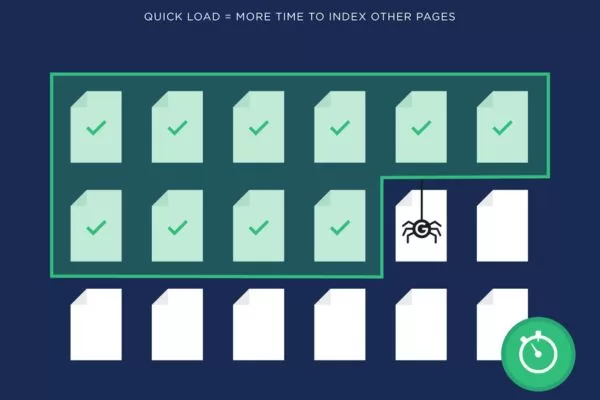
This measures how long it takes Googlebot to crawl your pages. Keeping this value low requires improving your website speed. Faster sites not only reduce crawl time but also allow Google to download more content efficiently, meaning your pages are indexed quickly and accurately.
How search engines locate and crawl pages on a website
How crawl budget impacts your website’s search performance
A high budget allows search engine bots to visit your website more frequently and spend more time analyzing its pages, which is why understanding crawl budget SEO is essential for improving site performance. This increased attention means that more of your content is considered for indexing. Efficient crawling ultimately improves your site’s visibility and performance in search results, making crawl budget a critical factor.
When a website suffers from a low budget, search engines may not discover new content promptly. Important pages might be indexed later than competitor sites, delaying their chance to rank. This lag can reduce the effectiveness of your SEO efforts and slow down organic growth.
Additionally, limited crawling makes it harder for search engines to notice updates to existing content. Improvements or fixes may take longer to be reflected in search results. Ensuring your site is crawl-friendly helps maintain fast and accurate indexing.
Why efficient indexing directly affects your website’s search rankings
Crawl signals explained: directing Googlebot’s focus
Google uses multiple signals to determine which pages on your site deserve more frequent crawling. Understanding what is crawl budget and managing these signals helps optimize crawling efficiency and ensures important content is indexed properly.
Robots.txt
The robots.txt file tells Googlebot which sections of your site to avoid. By blocking admin pages, staging environments, or low-value content, you prevent unnecessary crawling. This helps preserve your crawl budget for your most important pages.
You can edit robots.txt directly via FTP or through your CMS file manager. On platforms like WordPress, SEO plugins such as Yoast or Rank Math make management simple. Proper implementation ensures Googlebot avoids restricted areas without affecting key content.
Noindex tags
Include a meta tag in the <head> section: <meta name=”robots” content=”noindex”>. Many SEO plugins provide a simple toggle for this. Proper use ensures pages are crawled but not indexed, keeping Googlebot focused on important content.
Canonical tags
Canonical tags consolidate similar pages by indicating the primary version to Google. They are especially helpful for e-commerce sites with filters or UTM parameters. Correct use prevents crawl budget waste and consolidates ranking signals to the preferred page.
Add a link tag in the <head> section: <link rel=”canonical” href=”https://www.example.com/preferred-page/”>. Most SEO plugins handle this automatically or offer configuration options. This ensures Google indexes the main page without duplicating effort.
Sitemap entries
Sitemaps guide Googlebot to your most important pages, like blog posts or product listings. Keep them clean, well-structured, and updated regularly. A properly maintained sitemap helps preserve your crawl budget and ensures critical content is crawled efficiently.
Generate an XML sitemap through your CMS or tools like Yoast SEO, then submit it via Google Search Console. Remove broken or expired URLs to avoid wasted crawling. Regular updates improve the chances that Google indexes new content quickly.
Internal linking depth
The number of clicks needed to reach a page from the homepage affects its perceived importance. Search engines give higher crawling priority to pages closer to home. Optimizing internal linking helps manage crawl budget by directing Googlebot to key content efficiently.
Review your navigation structure and ensure important pages are no more than 2–3 clicks from the homepage. Use meaningful anchor text when linking within your site. Effective internal linking improves both user navigation and Googlebot crawling efficiency.
How search engine cues determine which pages get priority crawling
Monitoring Googlebot activity to maximize crawl budget
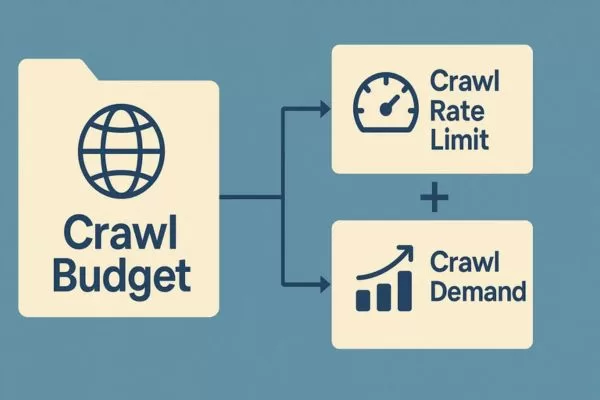
The Google crawl budget represents the number of URLs Googlebot is able and willing to crawl. It essentially dictates how many pages search engines scan during a single indexing session. Technically, this value is determined by two factors: the site’s crawl capacity limit (also called crawl rate) and the crawl demand.
Key differences between crawl rate and crawl demand
“Crawl rate” refers to how many requests per second a bot makes to your site and the interval between each fetch. Sites with many pages or auto-generated URLs must pay attention to these factors, as they directly affect the crawl budget. Crawl demand, on the other hand, indicates how frequently Googlebot revisits your pages, making it important to balance both rate and demand for optimal indexing.
Crawl rate limits: How Googlebot manages server load
Googlebot is designed to crawl sites efficiently without overloading servers. The crawl rate limit defines the maximum simultaneous connections and the delay between requests. This ensures that all important content is indexed while maintaining site stability.
The crawl rate can change based on site performance and server health. If pages respond quickly, Googlebot can increase connections; if the site is slow or errors occur, it reduces the rate. This dynamic adjustment helps protect user experience during crawling.
Site owners can set crawl budget limits in Search Console, but increasing the limit does not automatically raise crawl frequency. Google also has its own resource limits and prioritizes which sites and pages to crawl. Balancing server health, site settings, and Google’s capacity ensures optimal indexing without overload.
Understanding crawl demand: Popularity and page updates
Crawl demand is primarily driven by a site’s popularity and the need to avoid stale content. URLs that are widely visited or highly relevant tend to be crawled more frequently to ensure they remain fresh in Google’s index. Google also monitors changes to pages and site-level events, such as migrations, to adjust crawl demand and keep content up-to-date.
There are several important factors that influence a website’s crawl demand, determining how often Googlebot decides to visit and scan its pages for indexing purposes, which ultimately affects your crawl budget.
- Perceived inventory: If Googlebot encounters many duplicate or unnecessary URLs, it may spend extra time crawling them. This is a factor that webmasters can control.
- Popularity: The most visited or widely referenced pages are prioritized and crawled more frequently.
- Missing updates: Pages that change often trigger more frequent scans to ensure the index stays fresh.
- Site-level changes: Events such as site migrations or URL updates increase the need for re-indexing.
- Overall balance: Crawl demand is adjusted based on site size, update frequency, page quality, and relevance relative to other sites.

Tracking search engine behavior to improve website content visibility
Main factors impacting crawl budget efficiency
Managing crawl efficiency is essential for any website looking to rank well in search engines. Google allocates a limited amount of crawling resources to each site, so understanding the factors that affect it is critical.
Low-quality URLs
Low-quality URLs can significantly reduce the effectiveness of your crawl budget. Faceted navigation, session identifiers, and infinity spaces create multiple unnecessary URLs that Google crawls repeatedly. Optimizing or removing these URLs ensures that crawling resources are used on your most valuable pages.
Faceted navigation
Faceted navigation is commonly used on e-commerce sites to filter products. However, it often generates numerous URL combinations for the same content. Understanding how to optimize crawl budget helps prevent these extra URLs from diluting crawling efficiency and slowing down the indexing of important pages.
Session identifiers
Session identifiers add unique parameters to URLs, creating multiple versions of the same page. Googlebot may waste time crawling these duplicates instead of focusing on meaningful content, which can reduce your crawl budget. Proper handling of session IDs can improve overall site indexing and performance.
Infinity spaces
Infinity spaces are pages with very little or no content that still get crawled. Crawling these low-value pages wastes resources and can reduce the speed at which important content is indexed. Removing or blocking them in robots.txt helps preserve crawl budget optimization and ensures that Google focuses on high-value pages.
Duplicate content
Pages with low-quality or duplicate content negatively impact crawl budget. URLs that don’t provide value to users, contain keyword stuffing, or duplicate other pages can waste crawling resources. Ensuring content uniqueness and quality allows Googlebot to focus on pages that matter most.
Pages with soft errors and security issues
Pages with low-quality or duplicate content negatively impact crawl budget. URLs that don’t provide value to users, contain keyword stuffing, or duplicate other pages can waste crawling resources. Ensuring content uniqueness and quality allows Googlebot to focus on pages that matter most.

Elements that affect how effectively search engines explore your site
Methods to ensure search engines crawl your pages effectively
Optimizing your website’s crawl budget is essential to ensure that Google indexes your most important pages efficiently. By following best practices, you can make the crawling process more effective and improve your site’s SEO performance.
Designing your site structure for efficient crawling
A well-structured website makes it easier for crawlers to navigate and discover every page. Pages with clear hierarchies and proper internal linking are visited more frequently. This ensures that Google serves up the latest content to users without missing important pages.
Good website architecture also enhances user experience, which indirectly supports SEO. Pages that are easier to find help reduce crawl errors and wasted crawling. Prioritizing important pages in navigation guides benefits both users and bots effectively.
Faster page load
Website speed plays a critical role in maximizing crawl budget usage. A slow-loading site limits the number of URLs crawlers can process within a given time. Faster websites allow Googlebot to visit and index more pages efficiently.
Optimizing images, scripts, and server response time can dramatically improve crawling efficiency. Enhanced performance also benefits user engagement, reducing bounce rates. By improving site speed, both users and crawlers get a better experience.
Using internal links to help crawlers discover pages
Internal links are essential for helping crawlers explore all parts of your website. Every page should be connected through internal links to avoid orphan pages. This ensures that Googlebot can discover and index all valuable content.
Strategically placed links also distribute link equity, boosting SEO performance. Internal links guide crawlers to important content and can reduce the risk of important pages being overlooked. Proper linking creates a smooth flow for both users and search engines.
Budget efficiency through unique content
Duplicate content can waste precious crawl budget and reduce indexing efficiency. Google prioritizes unique content, so pages that are repeated may receive lower crawl attention. Ensuring originality helps maintain optimal crawl allocation.
Regularly auditing your site for duplicates or near-duplicates is crucial. Canonical tags and proper redirects help consolidate content. By avoiding duplication, you make sure Googlebot focuses on the pages that matter most.

Techniques to ensure search engines discover your most valuable pages
Factors that help Google decide your crawl budget
Google determines your site’s budget based on several factors that balance indexing efficiency with server performance. Understanding these elements helps ensure that your most important pages are crawled frequently and effectively.
Crawl demand
Crawl demand refers to how often Google crawls your site depending on perceived importance. Pages that are seen as valuable or high-traffic are crawled more frequently, maximizing your crawl budget. Factors such as page relevance, backlinks, and site updates influence this demand.
This element is also affected by perceived inventory. Google may attempt to crawl all known pages unless instructed otherwise through robots.txt or 404/410 status codes. Controlling duplicates and unimportant URLs ensures that crawlers spend resources on meaningful content.
Detected page listings
Googlebot tries to visit all or most pages it knows about on your site. If duplicate or removed pages are not properly managed, crawlers may waste time indexing them. Using proper redirects, canonical tags, and robots.txt helps Google focus on valuable pages.
Maintaining a clean inventory ensures better crawl efficiency. Removing or blocking low-value URLs prevents wasted resources. Proper site organization helps both users and crawlers navigate your content.
Popularity
Google generally prioritizes pages with more backlinks and higher traffic, which affects your crawl budget. Popular pages are considered important and are crawled more frequently to stay fresh in the index.
Backlinks should be relevant and authoritative, not just numerous. Pages with few links may be crawled less often, so developing a backlink strategy is important. Using tools like Semrush Backlink Analytics helps identify pages that attract the most links.
Staleness
Google aims to crawl content often enough to detect changes. Pages that rarely change may be crawled less frequently, while sites with frequent updates are prioritized.
For example, news websites are crawled multiple times a day because of constant new content. The goal is not to make frequent trivial updates but to focus on high-quality, meaningful changes. Prioritizing content quality ensures efficient crawling.
Crawl capacity limit
Crawl capacity limits prevent Googlebot from overloading your server, which directly impacts your crawl budget. A site that responds quickly can be crawled more extensively, while slow responses reduce the number of pages crawled.
Server errors also decrease crawl capacity, limiting indexing frequency. Monitoring performance and fixing errors ensures Googlebot can efficiently crawl all important pages. Optimizing both speed and stability maximizes crawl allocation.
Your site’s health
Site responsiveness affects how fast Google can crawl pages. A healthy server allows Googlebot to visit more URLs in less time.
Tools like Semrush Site Audit can identify load speed issues and server errors, which is essential if you want to understand how to track and improve crawl budget effectively.
Google’s crawling limits
Google has finite resources for crawling websites, which is why crawl budgets exist. Not every page can be crawled at the same frequency, so prioritization is essential.
Sites with limited or complex resources may experience slower crawling. Understanding Google’s constraints helps webmasters optimize which pages receive more frequent indexing. Efficient use of resources ensures that important content is not missed.

Elements influencing how search engines prioritize pages for crawling
Crawl budget essentials: FAQs for webmasters
Ensuring search engines crawl your website efficiently is key to improving visibility. These FAQs answer key questions to help you manage and make the most of your crawl budget.
How is a crawl budget determined?
A crawl budget is the number of pages Googlebot can crawl on your website within a given timeframe. This dictates how well search engines locate and catalog your pages. Managing your crawl budget ensures that important pages are crawled more frequently while low-value pages do not consume unnecessary resources.
Why is crawl budget crucial for SEO?
Crawl budget directly affects how quickly new or updated content gets indexed. If Googlebot spends too much time on low-value or duplicate pages, critical pages may be crawled less often. Optimizing the budget helps your site rank faster and ensures that search engines focus on your most valuable content.
What’s the best way to monitor crawl budget activity?
You can track your budget for crawling using Google Search Console under the Crawl Stats report. This shows how many pages Googlebot crawls per day and the time spent downloading them. Regular monitoring helps identify crawl issues and opportunities to improve indexing efficiency.
What factors effect my website’s crawl budget?
Several elements influence crawling, including site speed, server performance, duplicate content, and URL structure. Pages that are frequently updated or receive high traffic are crawled more often. Proper site management ensures Googlebot uses its resources efficiently and prioritizes important pages.
Methods to increase the number of pages crawled on my site?
To improve crawl budget, remove low-value or duplicate pages, optimize internal linking, and speed up your website. Use robots.txt and noindex tags to block irrelevant content from being crawled. Maintaining a clean sitemap and structured site architecture also helps Googlebot discover and index important pages faster.
Conclusion
A crawl budget is essential for ensuring that search engines efficiently discover and index your website’s most important content. Optimizing site structure, fixing errors, and prioritizing valuable pages can significantly improve crawling efficiency. Working with On Digitals allows you to implement effective strategies to maximize results. We also offers comprehensive SEO services to help implement these strategies effectively.
Recommended post:
Read more