
Google Search Ads vs Display Ads: How to Choose by Intent and Funnel Stage
Vincent
16/03/2026
13
Google Search Ads capture people who are actively looking for a product or solution. Google Display Ads can introduce an offer earlier in the buying journey, reinforce consideration or bring previous visitors back. The right choice depends on your advertising strategy and goals.
Google Search Ads vs Display Ads in 60 seconds
Search and Display should not be treated as interchangeable campaign types. Search responds to a query. Display reaches people while they browse websites, use apps or engage with online content. One captures visible demand; the other can create, reinforce or recover demand.
| If your business needs to… | Start with |
| Reach people searching for a solution now | Google Search Ads |
| Generate calls, bookings, quote requests or product comparisons | Google Search Ads |
| Introduce a visual or unfamiliar offer | Google Display Ads |
| Stay visible during a longer decision process | Google Display Ads |
| Reconnect with product viewers or past leads | Display remarketing |
| Create demand and capture it later | A planned Search and Display mix |
Search is often the stronger first move when demand already exists. Display becomes more useful when people need to see, understand or remember the offer before they are ready to search.
What is the difference between Search Ads and Display Ads?
The main difference is how each campaign reaches a potential customer.
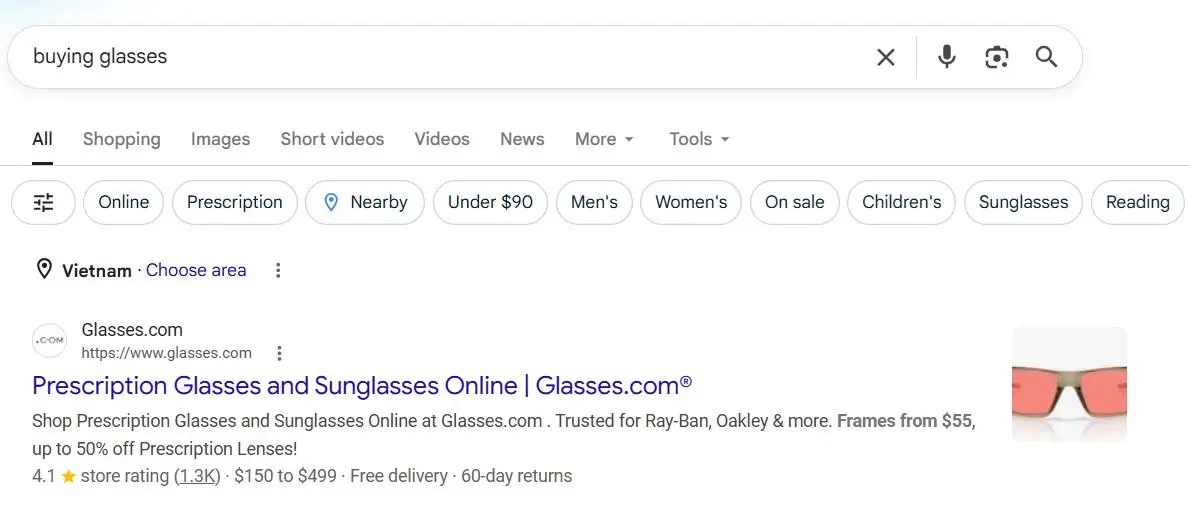
Google Search Ads appear when a person enters a relevant query. The query gives the advertiser a direct clue about what the person wants at that moment. A business selling emergency plumbing, for example, can appear when someone searches for urgent repair help in a specific area.
Google Display Ads appear while people browse online content. They may be shown based on audience signals, content context, previous interactions with the advertiser or other campaign settings. The person may not be searching for the product at that moment.
That does not make Display less valuable. It gives the campaign a different job. Display can make a new offer visible, explain a product visually or support remarketing after a user has shown interest.
A useful way to think about the comparison is simple:
- Search answers an existing question.
- Display creates attention before that question is searched.
- Remarketing uses Display to continue a conversation after an earlier visit.
Capture demand or create it?
Search Ads are strongest when customers already know the category and use Google to find answers. This is common for local services, B2B solutions, specialist products and urgent needs. The customer may not know your brand, but they understand the problem well enough to search.
Display Ads are useful when customers are earlier in the journey. They may not know the brand, the product category or the exact language to use in a search. A visual message can introduce the offer before demand becomes explicit.
| Customer stage | More useful campaign role |
| Has a clear need now | Search |
| Is comparing providers or products | Search plus remarketing |
| Does not know the offer exists | Display |
| Has visited but delayed action | Display remarketing, then Search when intent returns |
| Has already purchased | Retention or upsell activity, often using customer data |
This difference matters because the same message will not work at every stage. A person searching for “accounting software for construction firms” may need proof, pricing or a demo. Someone browsing an industry publication may first need to understand why a construction-specific platform exists.
Search Ads vs Display Ads
| Criterion | Google Search Ads | Google Display Ads |
| Delivery trigger | A relevant keyword search | Audience, context, previous interaction or placement opportunity |
| Typical customer intent | Explicit and often active | Earlier-stage, passive or returning |
| Main creative | Text assets, headlines, descriptions and ad assets | Images, logos, headlines, descriptions and sometimes video |
| Best role | Capture existing demand | Create awareness, nurture consideration and remarket |
| Landing-page expectation | Directly answer the query | Continue the visual message or audience-specific offer |
| Useful measurement | Qualified leads, purchases, calls, bookings and conversion value | Reach quality, landing-page engagement, qualified conversions and returning-user outcomes |
| Main risk | Paying for irrelevant queries or weak landing-page match | Broad delivery without clear audience logic, creative or conversion path |
| Better first use | A business with known search demand | A business with visual proof, a longer sales cycle or usable audience data |
Neither format is automatically better. Search may deliver high-intent traffic but fail if the landing page is vague or the sales team responds slowly. Display may generate broad reach but waste budget if the creative says little and the business cannot define who should see it.
When should you start with Google Search Ads?
Start with Search Ads when people already use Google to find the product or service you offer. The campaign should be able to match a clear query with a relevant page and a useful next step.
When customers have urgent intent
Search is often appropriate for urgent or time-sensitive needs. A person looking for a locksmith, repair service, emergency dentist or technical support provider is actively seeking a solution. The ad should focus on relevance, location, availability and a clear action.
Urgency alone does not guarantee a conversion. The landing page or call flow still needs to make contact easy. If the business cannot respond quickly, more Search traffic may only create missed opportunities.
When local demand matters
Local businesses can use Search to reach people looking for a service in a particular area. The query may include a city, district or “near me” modifier. In these cases, the campaign should reflect the actual service area and avoid clicks from locations the business cannot serve.
A focused local Search campaign can be easier to assess than a broad awareness campaign because the next action is usually clear: call, request a quote, make a booking or visit a location.
When the offer already has category demand
Many B2B, professional-service and established-product categories already have clear search demand. Prospects may search for a supplier, software category, compliance service or industrial solution before they have chosen a provider.
Search can help a business enter that comparison stage. It should not rely on broad promises such as “best solution.” Strong ads explain a meaningful differentiator, while the landing page provides proof, process details and a relevant conversion option.
When budget is focused and measurement is ready
Search is not automatically cheap, but it can be a practical place to begin when a business knows what a qualified result looks like. The campaign should track outcomes that matter, such as a qualified enquiry, booked meeting, purchase or call.
Do not judge Search only by click-through rate or cost per click. An expensive keyword may still be worthwhile if it leads to profitable customers. A cheap keyword can be wasteful if it attracts research traffic with no commercial fit.
When should you start with Google Display Ads?
Start with Display Ads when the business needs to create awareness, explain a visual offer or reconnect with people who have already interacted with the brand. Display is most useful when it has a defined audience and a clear role in the customer journey.

When the offer needs to be seen
Visual products often benefit from Display Ads because an image, animation or short video can communicate something that a text ad cannot. Furniture, travel, fashion, beauty, home products and consumer goods are common examples.
The goal is not simply to make the creative attractive. The visual should clarify the product, use case or result. A crowded banner with several benefits and multiple calls to action may receive attention but still leave the user unsure what to do.
When customers are not searching yet
Some products solve a problem people do not yet know how to search for. A new consumer product, unfamiliar service or category innovation may need discovery activity before Search volume can grow.
Display can introduce the offer in environments where relevant audiences already spend time. The follow-up plan matters. A person who sees a display ad may later search the brand, visit a landing page or return through a remarketing audience. The business should be ready to measure those next steps.
When the sales cycle is longer
High-consideration purchases often involve multiple visits. Education, property, automotive, enterprise services and complex financial decisions may require more than one interaction before the customer is ready to act.
Display can keep a relevant message visible while the buyer evaluates options. It should not replace useful content, sales support or a clear offer. It works best as part of a wider journey.
When remarketing is the main role
Display is often a useful way to reconnect with people who already visited a website or app. However, the message should match what they did before.
| Previous action | More relevant follow-up |
| Viewed a product or service page | Benefit, review, use case or comparison |
| Added an item to cart | Delivery, return policy or a genuine offer |
| Viewed a pricing page | Value explanation, case study or consultation CTA |
| Became a customer | Upgrade, renewal or complementary product |
Remarketing should also use exclusions. People who have already purchased or booked should not keep seeing the same first-conversion ad.
How Google Display campaigns work today
Display Ads are no longer limited to one fixed banner placed on a selected website. Modern Display campaigns often use responsive assets. The advertiser provides images, headlines, logos and descriptions, while Google can assemble different combinations for available placements.
This makes asset quality important. A campaign needs enough useful creative material for the system to test, but every asset should still support the same core message. Mixing unrelated headlines, images and offers can create inconsistent ads.
Display also uses more automation in targeting and bidding than many older guides suggest. The system can use audience and landing-page signals to look for users who are likely to help achieve the campaign goal. That does not remove the advertiser’s responsibility to define a good conversion, provide strong assets and review where the campaign is heading.
Avoid changing budget, targeting, bids and creative all at once. When several variables change together, it becomes difficult to understand why performance moved. Give the campaign time to collect meaningful data, then improve one major element at a time.
When should businesses use Search and Display together?
Use both when Search can capture existing demand but the business also needs to create, nurture or recover demand over a longer journey.
| Business situation | Search role | Display role |
| Ecommerce with clear category searches | Capture product and brand searches | Bring product viewers and cart abandoners back |
| B2B service with a long sales cycle | Capture high-intent solution searches | Share proof, case studies or useful content with returning visitors |
| New consumer product | Capture emerging category and branded searches | Build discovery through visual product education |
| Local service business | Reach active local searchers | Remind previous visitors who did not book |
Running both does not mean duplicating the same campaign on two networks. Each format should have a different audience, message and measurement role.
For example, a B2B company may run Search ads for solution queries and use Display remarketing for visitors who read a service page. The Search landing page can focus on the immediate problem. The remarketing ad can focus on a case study or consultation process that reduces decision risk.
How should you measure Search and Display differently?
Search and Display should not be compared only through cost per click, click-through rate or last-click revenue. Their jobs differ, so the measurement should reflect the job.
For Search, measure the value of the demand captured. This may include qualified enquiries, calls, bookings, purchases, revenue or conversion value. Review search terms as well. A campaign can look efficient while attracting queries that do not match the business.
For Display prospecting, look at whether the campaign is reaching relevant people and moving them into a useful next step. Depending on the goal, this may include quality visits, engaged sessions, branded-search lift, qualified leads or assisted conversions where the measurement setup supports that view.
For Display remarketing, focus on returning-user outcomes. Consider conversion rate, cost per returning lead or purchase, audience size, frequency and the quality of exclusions. A small warm audience can become saturated quickly, so more spend is not always better.
The most important question is whether the campaign creates commercial value. Cheap Display traffic without meaningful action is not a win. High-cost Search clicks that consistently create profitable customers may be a strong investment.
Common mistakes when choosing Search or Display
Treating Display as awareness-only. Display can support traffic, leads, sales and remarketing when the campaign has suitable data and a clear conversion path.
Assuming Search is only for direct purchases. Search can support education, lead generation and longer B2B decisions when the query shows relevant intent.
Starting Display without a creative or audience plan. Broad reach does not fix a vague offer. Build assets around one clear message and decide who should see it.
Sending both formats to the same generic homepage. Search pages should answer the query. Display pages should continue the visual or audience-specific message.
Making decisions after only a few days. Display campaigns need enough data to judge audience, creative and conversion patterns. One weak day does not explain the full result.
Combining the campaigns without separate goals. Search and Display can support each other, but only when each campaign has a defined role in the journey.
For a deeper guide to how audiences work across Search, Display and automated campaigns, see our article on Google Ads audience targeting. For more on query relevance and landing-page alignment, explore Google Ads Quality Score.
Does Performance Max replace Search and Display?
Performance Max is a goal-based campaign type that can access inventory across Search, Display, YouTube, Discover, Gmail and Maps. It can be useful when a business has reliable conversion tracking, enough assets and a clear objective.
However, Performance Max does not remove the need to understand where demand comes from. A business still needs to know whether people search for the offer, discover it visually or return after a previous visit. Those insights help shape creative, landing pages, audiences and the conversion signals used by the campaign.
Frequently asked questions about Google Search Ads vs Display Ads
Are Google Search Ads better than Display Ads?
Search Ads are often the better choice when people already search for the solution you sell. Display Ads can be more useful for awareness, visual explanation and remarketing. The right option depends on demand maturity, sales cycle and the next action your business can measure.
Are Display Ads only for brand awareness?
No. Display Ads can also support website traffic, leads, sales and remarketing. Their performance depends on audience logic, creative quality, conversion tracking and the role assigned to the campaign.
Which is cheaper: Search Ads or Display Ads?
Display often has lower impression or click costs, but lower cost does not always mean stronger value. Compare qualified leads, purchase quality, conversion value and customer acquisition cost instead of choosing a channel based on cost per click alone.
Should a new business start with Search or Display?
Start with Search when customers already search for the product or service. Start with Display when the offer needs visual discovery or when the business wants to introduce a new category. Many businesses begin with focused Search, then add Display remarketing once traffic grows.
Can Search and Display use the same landing page?
They can, but one generic page is rarely the strongest choice. A Search landing page should answer the query directly. A Display landing page should continue the visual message or audience-specific offer.
Choose campaign roles before choosing an ad format
Google Search Ads and Display Ads can work well together, but they should not be judged by the same immediate metric. Search is built to capture existing demand. Display can introduce an offer, reinforce consideration and reconnect with people who did not act on the first visit.
Choose the format based on the customer journey, the clarity of your offer and the outcome you can measure. Then build landing pages, audiences and creative that support the same next action.
On Digitals helps businesses plan Google Ads channel roles, conversion tracking, landing-page strategy and campaign measurement through our Google Ads services.

NEWEST POSTS
- Advertising Industry In Vietnam: The 2026 Trends, Channels and Market-Entry Strategy
- Best SEO Company in Vietnam: Latest Shortlist For Businesses
- How To Leverage Social Media For Customer Service Like A Pro?
- Social Media Post Tips – 8 Ways To Boost Engagement
- How To Use Social Media for Sales – In-depth Beginner Guide
Read more