
Content Overload SEO: How to Fix Too Many Low-Value Pages
Vincent
24/07/2025
16
Content overload SEO becomes a problem when a website publishes too many pages without clear search intent, unique value, or a useful role in the site structure. For teams building an SEO content system, a large library can still perform well, while overloaded content often creates cannibalization, crawl waste, weaker internal links, poor user experience, and lower content ROI.
Is content overload bad for SEO?
Content overload can hurt SEO when pages repeat the same purpose, answer the same query, or add little value beyond what already exists on the site. The issue is rarely the number of pages alone. A site can have thousands of strong URLs if each page has a distinct role, clear demand, and useful information.
This is why content overload should be judged through website content quality, not page count alone. A short page with a clear purpose can be useful, while a long page with repeated sections may still create clutter.
Google’s guidance on creating helpful, reliable, people-first content focuses on usefulness, originality, expertise, and whether users leave feeling satisfied. That makes content quality and purpose more important than publishing volume.
Content overload usually appears when a site grows without a clear content system. Blog teams chase every keyword variation. Service pages repeat the same promise across locations. Resource hubs keep adding articles without pruning old content. Over time, search engines and users have more pages to process, but fewer pages that deserve attention.
When content volume becomes an SEO problem
Content overload becomes visible when the extra pages create friction.
Common SEO risks include:
- Multiple URLs competing for the same keyword
- Thin pages getting crawled without earning traffic
- Internal links spread across weak pages
- Outdated content still indexed
- Similar articles splitting backlinks
- Users struggling to find the best answer
The problem is not growth. The problem is growth without a quality control system.
Content overload vs cannibalization vs information overload
These terms overlap, but they do not mean the same thing. Separating them makes the audit process easier.
|
Concept |
What it means |
SEO impact |
Main fix |
|
Content overload |
Too many pages with weak or repeated purpose |
Low-value URLs dilute crawl, links, and topical focus |
Audit and consolidate |
|
Content cannibalization |
Multiple URLs compete for the same search intent |
Rankings may fluctuate or split across pages |
Merge, differentiate, or redirect |
|
Information overload |
Users receive more information than they can process |
Engagement and comprehension may fall |
Simplify page structure |
|
Content decay |
A once-useful page becomes outdated |
Traffic drops despite good original intent |
Refresh and improve |
|
Content clutter |
Pages exist because they were published, not because they help |
Poor site architecture and wasted maintenance |
Prune or noindex |
Content cannibalization is one of the clearest symptoms of overload. When several URLs keep targeting the same query, review whether the issue comes from overlapping search intent across URLs before creating another page on the topic.
A content overload audit should not treat every low-performing URL as a failure. Some pages need a refresh. Some need consolidation. Others still support conversions even with limited organic traffic.
How much content is too much for SEO?
There is no fixed page-count limit for SEO. A website with 50 weak pages can be overloaded, while a website with 5,000 useful pages can perform well.
A better question is:
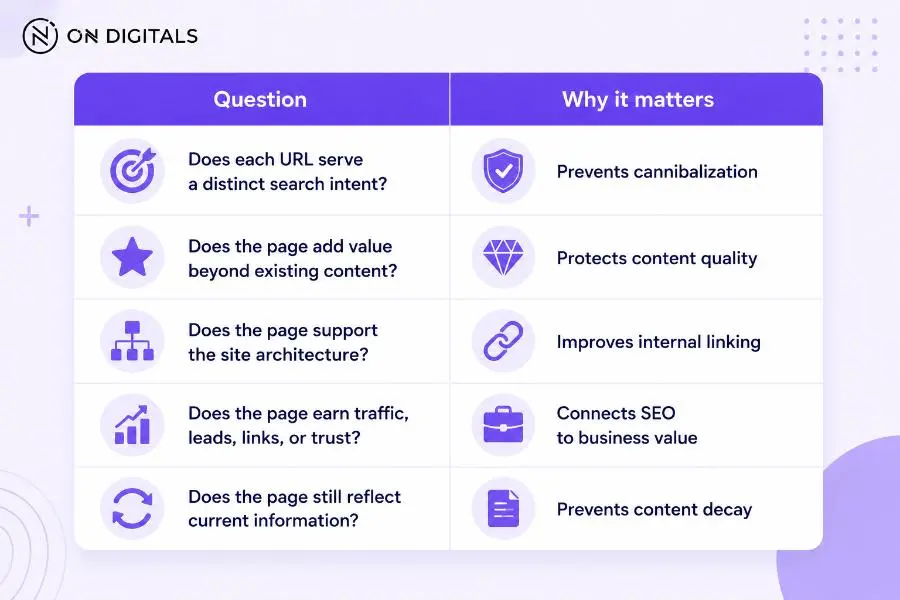 A page should stay in the content strategy when it serves a clear search intent, adds real value, supports site structure, and remains useful to users and the business.
Large websites should also care about crawl efficiency. Google’s crawl budget guidance explains that duplicate content and low-value URLs can affect how efficiently Googlebot crawls very large sites. Smaller websites may feel the impact less technically, though content clutter can still weaken relevance and user experience.
Signs your website has content overload
Content overload rarely shows up as one obvious issue. It usually appears across search visibility, indexing, content quality, and user behavior.
Traffic plateaus or drops across a content cluster
A single article losing traffic may come from search intent changes, stronger competitors, seasonality, or outdated information. A full cluster losing traction often points to a deeper issue.
Look for patterns such as:
- Several similar posts losing impressions
- One article ranking briefly, then another replacing it
- Pages getting impressions without clicks
- Many pages ranking beyond page two
- Old URLs still indexed despite weak content
A traffic drop should lead to diagnosis before action. Deleting or merging pages too quickly can remove value that still supports the site.
Multiple pages rank for the same query
Keyword overlap is one of the clearest signs of content overload. Open Google Search Console, choose a query, then check which pages receive impressions for that query.
If several URLs compete for the same phrase, ask:
- Which URL best satisfies the intent?
- Does each page serve a different funnel stage?
- Should one page become the main resource?
- Should weaker URLs link to the stronger one?
- Would a merge create a better result?
This separates real cannibalization from healthy topic coverage. Two pages can mention the same topic while still serving different search needs.
Thin pages get crawled but do not earn traffic
Some pages exist because a team wanted more keyword coverage. They may have short copy, repeated sections, no unique examples, no backlinks, and no clear conversions.
These pages create maintenance debt. Writers update them. Developers keep them in templates. Search engines crawl them. Users may find them and leave quickly.
A thin page with no traffic, no links, and no business role is a candidate for consolidation or removal.
Internal links point everywhere with no priority
Content overload can weaken internal linking. When every article links to every related article, the site stops telling search engines which page matters most.
A stronger structure needs priority. Pillar pages should receive consistent internal links. Supporting articles should clarify subtopics. Commercial pages should receive links when the intent fits.
Internal links should help users choose the next useful page. They should not exist only to move link equity.
How to audit content overload page by page
A content overload audit works best when each URL receives a clear decision. Use data first, then apply editorial judgment.
Step 1: Export your URL list
Start with every indexable URL from your CMS, sitemap, crawler, or Search Console export. Include blog posts, service pages, category pages, tag archives, location pages, resources, etc.
Add useful data points:
- Organic clicks
- Impressions
- Average position
- Conversions
- Backlinks
- Internal links
- Last updated date
- Word count
- Main query
- Search intent
Step 2: Group URLs by intent
Do not group pages only by keyword. Group them by what the searcher wants.
For example, these topics may look similar but serve different needs:
|
URL type |
Search intent |
|
“What is SEO?” |
Learn the concept |
|
“SEO audit checklist” |
Follow a process |
|
“SEO audit service” |
Evaluate a provider |
|
“Technical SEO audit tools” |
Compare tools |
When pages share the same intent, they may need merging. When they serve different needs, they should stay separate and link clearly.
Step 3: Check query overlap in Search Console
Step 3: Check query overlap in Search Console
Use Search Console to identify competing URLs. Open a query, review the pages receiving impressions, then compare intent and performance.
A few patterns can guide the decision:
- If one URL gets most clicks, keep it as the main page and strengthen its internal links.
- If several URLs rotate positions for the same query, check for possible cannibalization.
- If many URLs get impressions but no clicks, the SERP fit may be weak.
- If an old URL outranks a newer URL, internal signals may be unclear.
- If a commercial page competes with a blog post, the funnel intent may need separation.
This step prevents random pruning. The data shows which URL Google already associates with the topic.
Step 4: Score each page by value
A page can have value beyond traffic. Some pages support sales teams, answer customer questions, attract links, or build trust.
Score each URL across four layers:
|
Layer |
Question |
Main signal |
|
Intent |
Does the URL serve a distinct search need? |
Query and SERP fit |
|
Quality |
Does it add unique value? |
Examples, depth, originality |
|
Performance |
Does it earn traffic or conversions? |
GSC and GA4 |
|
Architecture |
Does it support the cluster? |
Internal links and crawl depth |
Pages that score low across every layer need action. Pages with one strong layer may deserve improvement instead of removal.
When the issue looks like repeated copy across several URLs, use duplicate-content review tools as one supporting check. These tools cannot decide the final SEO action, but they can help confirm whether pages are too similar before the team merges, rewrites, or removes anything.
What should you do with overloaded content?
The right fix depends on the page’s purpose, data, and overlap with other URLs. Use a decision matrix before editing.
|
Action |
Use when |
Main check |
|
Keep |
The page has unique intent and stable value |
Search intent |
|
Refresh |
The topic is still useful but the content is outdated |
Last updated date |
|
Merge |
Two pages answer the same core query |
Query overlap |
|
Redirect |
A weak URL has links or historical traffic |
Backlink value |
|
Noindex |
The page is useful for users but not for search |
Index purpose |
|
Delete |
The page has no traffic, links, or business value |
Risk review |
Google’s guidance on canonicalization and duplicate URLs explains that site owners can use redirects or canonical tags to help Google understand the preferred URL when similar content exists across pages.
When to refresh a page
Refresh a page when the intent is still correct but the information is outdated, thin, or weaker than competitors.
Good candidates include:
- Pages with impressions but low clicks
- Old guides with outdated examples
- Articles ranking near page two
- Pages with strong backlinks but weak content
- Posts that still support a core cluster
A refresh should improve the answer, not only add more words. Update examples, remove weak sections, add clear tables, improve title/meta, and strengthen internal links.
When to merge pages
Merge pages when two or more URLs answer the same search intent. Choose the strongest URL as the main destination, then combine the useful parts from weaker pages.
Before merging, check:
- Which URL ranks better
- Which URL has stronger backlinks
- Which URL matches intent more clearly
- Which URL is easier to update
- Which URL fits the cluster structure
After merging, redirect old URLs when appropriate. Update internal links so they point to the new main resource.
When to noindex or delete
Noindex is useful when a page helps users but does not need search visibility. Examples include internal search pages, filtered pages, login-related pages, thin tag pages, etc.
Deletion should be the most cautious option. Use it only when the page has no traffic, no links, no conversions, no user purpose, and no reason to preserve history.
How to prevent content overload before publishing
Content overload usually starts before publishing. A content governance process can stop low-value pages from entering the site.
This prevention step should sit inside a broader search-led content marketing strategy, where each new URL has a role before it goes live. Without that system, teams often keep producing keyword variations instead of improving the pages that already matter.
Define one primary intent per URL
Every new page should answer one main search intent. Related subtopics can support the page, while a different intent usually deserves a separate URL.
Before approving a brief, ask:
- What query should this page satisfy?
- Which existing page is closest?
- What unique value will this page add?
- Which page should it link to?
- Which page should link back?
This prevents keyword variation pages that repeat the same idea.
Build topic clusters before writing
A cluster should have a clear hierarchy. The pillar handles the broad intent. Supporting pages explain specific subtopics. Commercial pages should be linked when the reader shows service or purchase intent.
A weak cluster grows randomly. A strong cluster makes each page’s role obvious.
Add a content differentiation rule
Before drafting, write one sentence that explains why the new page deserves to exist.
Use this format:
|
Brief field |
Example |
|
Existing related page |
“SEO audit checklist” |
|
New page angle |
“Technical SEO audit for JavaScript websites” |
|
Unique value |
“Covers crawl/rendering checks with examples” |
|
Main internal link |
“SEO audit service page” |
|
Page action if overlap appears |
Merge or reposition |
This small step prevents future cannibalization.
Review AI-assisted content before publishing
AI-assisted workflows can increase publishing speed, but speed without editorial control can create overload quickly. Use AI drafts as input, then apply human review for search intent, originality, examples, source quality, and brand fit.
AI-generated pages should not be published only because they are easy to produce. They need the same standard as any other page.
Tools and metrics to monitor content overload
Use tools to support decisions, not to replace judgment.
|
Tool |
What to check |
Why it matters |
|
Google Search Console |
Queries, pages, clicks, impressions |
Finds overlap and weak SERP fit |
|
Google Analytics 4 |
Engagement and conversions |
Shows user and business value |
|
Screaming Frog |
Duplicate titles, crawl depth, word count |
Finds structural clutter |
|
Backlink tools |
Referring domains and link value |
Protects pages worth preserving |
|
CMS exports |
Publish dates and categories |
Reveals outdated clusters |
|
Internal link tools |
Link distribution |
Shows whether priority pages are clear |
A useful audit combines data with manual review. A page with low traffic can still be valuable if it converts, supports sales, or answers an important customer question.
FAQs about content overload SEO
Can having too many pages hurt rankings?
Having many pages does not automatically hurt rankings. Rankings can suffer when many pages are low quality, outdated, duplicated, or competing for the same query. The problem is weak purpose, not page count alone.
Should I delete low-performing blog posts?
Do not delete low-performing posts without checking traffic, backlinks, conversions, and search intent. Some posts should be refreshed or merged instead. Deletion is safer when a URL has no measurable value and no useful role.
How do I know whether to merge or keep two similar pages?
Merge pages when they answer the same search intent and compete for the same query. Keep them separate when each page serves a distinct user need, funnel stage, or topic angle. Search Console query overlap can help confirm the decision.
Is keyword cannibalization the same as content overload?
Keyword cannibalization is one type of content overload. It happens when multiple URLs compete for the same search intent. Content overload is broader and can include thin pages, outdated pages, weak clusters, poor internal linking, and user-facing information overload.
Can AI-generated content cause content overload?
Yes. AI-assisted publishing can create content overload when teams publish many similar pages without enough differentiation, fact-checking, examples, or editorial review. A clear brief and human quality control process help prevent this.
How often should I audit old content?
Most websites should review important content at least once or twice a year. Large websites, news sites, ecommerce sites, and fast-moving industries may need more frequent reviews because content decay and overlap appear faster.
Final thoughts
Content overload SEO is easier to fix when every URL receives a clear role. The strongest websites do not publish endlessly; they build content libraries where each page supports a search intent, a business purpose, or a useful next step.
Start with the pages already causing confusion. Check query overlap, review content quality, protect pages with value, then choose the right action: keep, refresh, merge, redirect, noindex, or delete. A smaller set of stronger pages often performs better than a larger set of pages that repeat the same ideas.

NEWEST POSTS
- Advertising Industry In Vietnam: The 2026 Trends, Channels and Market-Entry Strategy
- Best SEO Company in Vietnam: Latest Shortlist For Businesses
- How To Leverage Social Media For Customer Service Like A Pro?
- Social Media Post Tips – 8 Ways To Boost Engagement
- How To Use Social Media for Sales – In-depth Beginner Guide
Read more