
Insights
PageSpeed Insights mobile optimization tips to improve mobile performance
On Digitals
21/01/2026
45
Mobile users now account for the majority of global web traffic, and page speed has become a critical factor in both user experience and SEO performance. When a mobile page loads slowly, users are more likely to leave before engaging with the content, reducing conversions and rankings.
PageSpeed Insights helps website owners evaluate mobile performance and identify issues that slow down pages. However, many businesses struggle to understand mobile scores or apply the recommendations correctly, leading to missed optimization opportunities.
In this guide, you’ll learn practical and actionable pagespeed insights mobile optimization tips, understand how mobile scores work, and discover how to improve mobile performance step by step for better SEO and user experience using pagespeed insights mobile optimization tips that align with real user behavior.
Why mobile performance matters for PageSpeed Insights
Mobile performance is critical because most web traffic now comes from mobile devices, and users expect pages to load almost instantly. With mobile-first indexing, Google primarily evaluates the mobile version of a website, meaning poor pagespeed insights mobile performance can negatively impact SEO rankings, even if desktop performance is strong.
Mobile browsing is more challenging due to slower networks, smaller screens, and less powerful devices. As a result, issues like large images, render-blocking JavaScript, and slow server response times affect mobile users more severely. PageSpeed Insights highlights these mobile-specific problems through separate mobile scores and actionable recommendations.
Improving mobile speed goes beyond SEO benefits. Faster mobile pages reduce bounce rates, increase engagement, and drive higher conversions, especially in competitive and mobile-driven markets. This makes applying PageSpeed Insights mobile optimization tips a strategic decision for both user experience and business growth.

Why mobile performance is critical for search rankings
How to read and understand PageSpeed Insights mobile scores
Many website owners feel confused when they first review a PageSpeed Insights report. The PageSpeed Insights mobile score often appears lower than desktop results, which can be frustrating without understanding how mobile testing works. One of the primary PageSpeed Insights mobile optimization tips for you, knowing how the report is structured helps you focus on meaningful improvements instead of chasing a perfect score. Also, since mobile and desktop interfaces are two very different worlds, they will give out different scores depending on which one you focus on more.
PageSpeed Insights assigns a performance score from 0 to 100 using color coding. Scores between 90 and 100 are considered good, 50 to 89 indicate room for improvement, and anything below 50 signals poor performance. Mobile scores are tested under stricter conditions, including slower networks and mid-range devices, so lower results are normal.
To interpret the report correctly, you should look beyond the overall score and focus on the Performance section. Core Web Vitals play a major role here, especially Largest Contentful Paint, Interaction to Next Paint, and Cumulative Layout Shift. These metrics reflect loading speed, responsiveness, and visual stability on mobile.
Supporting metrics like First Contentful Paint, Total Blocking Time, and Speed Index provide additional context. They help explain how quickly content appears and how much JavaScript blocks user interaction during loading.
The Opportunities section highlights specific actions you can take, such as optimizing images or reducing render-blocking resources. Each suggestion includes estimated time savings to help you prioritize fixes.
Diagnostics go deeper into technical issues like slow server response or inefficient JavaScript execution. A smart PageSpeed Insights mobile score interpretation focuses on fixing red and yellow issues first, then re-testing regularly to track real improvements over time.
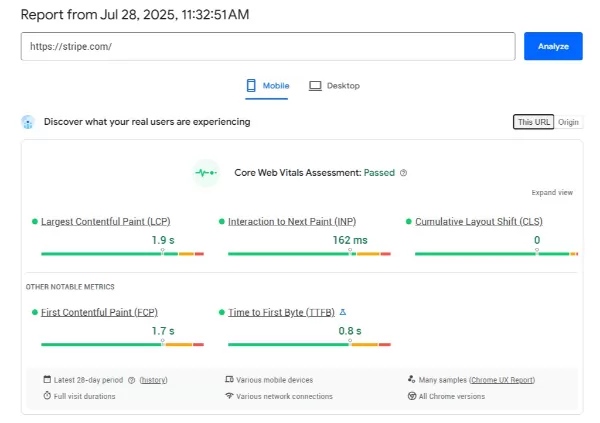
How to understand mobile website speed scores
PageSpeed Insights mobile optimization tips based on Core Web Vitals
Core Web Vitals are the foundation of mobile performance optimization in PageSpeed Insights. Google uses these metrics to evaluate how fast a page loads, how responsive it feels, and how stable the layout is on mobile devices. When applying PageSpeed Insights mobile optimization tips, focusing on Core Web Vitals helps improve both performance scores and real user experience.

PageSpeed Insights mobile optimization tips based on Core Web Vitals
Improve largest contentful paint (LCP) on mobile
Largest Contentful Paint measures how long it takes for the main content of a page to appear on the screen. On mobile, LCP is often slowed down by large hero images, unoptimized videos, or slow server response times.
To improve LCP, prioritize optimizing above-the-fold images. Compress images, use modern formats like WebP or AVIF, and serve responsive image sizes that match mobile screens. Reducing render-blocking resources also has a strong impact on LCP. Defer non-critical JavaScript, minimize CSS files, and preload key assets such as the main image or important fonts.
Finally, server performance plays a major role in mobile LCP. Faster hosting, server-side caching, and a content delivery network help reduce load time and are essential pagespeed insights mobile optimization tips for mobile performance.
Reduce interaction delay to improve mobile PageSpeed performance
Interaction delay measures how quickly a page responds when a user taps, scrolls, or interacts with on-screen elements. On mobile devices, this delay is often caused by heavy JavaScript blocking the main thread. To reduce interaction delay, focus on optimizing JavaScript execution. Minify scripts, remove unused code, and defer non-critical JavaScript so it does not block rendering or user input.
Breaking long JavaScript tasks into smaller chunks allows the browser to process interactions sooner. In more complex cases, moving heavy computations to Web Workers helps free the main thread and improves responsiveness.
Improving interactivity has a direct impact on mobile PageSpeed Insights results. Faster response times make the site feel smoother and significantly improve PageSpeed Insights mobile performance for real users.
Fix layout shifts to stabilize the mobile experience
Cumulative Layout Shift measures visual stability during loading. On mobile, layout shifts often occur when images or ads load without defined dimensions. Always set width and height attributes for images, videos, and iframes. Using CSS aspect-ratio helps reserve space and prevent unexpected movement. A stable layout improves usability, reduces accidental taps, and supports better pagespeed insights mobile performance.
Step-by-step PageSpeed Insights mobile optimization tips
Once you understand the key metrics, it is time to apply optimization techniques in a structured way. These PageSpeed Insights mobile optimization tips focus on high-impact actions that improve mobile performance in a measurable and sustainable way.
Step 1: Analyze your site with PageSpeed Insights
Before making any changes, you need a clear baseline of how your page performs on mobile. This step helps you identify the most critical issues affecting speed and user experience.
- Enter your URL into PageSpeed Insights and run the test
- Focus on the Mobile tab, as it reflects real-world constraints more accurately
- Review Core Web Vitals, especially Largest Contentful Paint (LCP), Interaction to Next Paint (INP), and Cumulative Layout Shift (CLS)
- Check the Opportunities and Diagnostics sections to spot high-impact fixes
Step 2: Implement high-impact mobile optimizations
Once problem areas are identified, prioritize fixes that have the biggest effect on mobile speed and interactivity. These changes typically address images, code, and server performance.
- Optimize images by compressing files, using modern formats like WebP or AVIF, and enabling lazy loading
- Eliminate render-blocking resources by deferring non-critical CSS and JavaScript
- Improve server response time (TTFB) through better hosting, server-side optimization, and a CDN
- Enable Gzip or Brotli compression and browser caching for faster repeat visits
- Minimize redirects, unused code, and excessive third-party scripts

Implement high-impact mobile optimizations
These actions support how to improve mobile PageSpeed Insights score in a sustainable way, especially when combined with continuous testing and monitoring through mobile PageSpeed Insights reports.
Step 3: Retest, iterate, and monitor performance
Mobile speed optimization is not a one-time task. Continuous testing ensures that improvements are effective and remain stable over time.
- Re-run PageSpeed Insights after each major change to measure progress
- Continue addressing the most impactful warnings until Core Web Vitals are in a healthy range
- Monitor mobile performance regularly to prevent new issues from accumulating

Retest, iterate, and monitor performance
Common PageSpeed Insights mobile optimization mistakes to avoid
Even with good intentions, many site owners still make critical mistakes when optimizing for mobile performance. One common reason is focusing too much on desktop results while overlooking mobile-first design, which often explains the gap between PageSpeed Insights mobile vs desktop scores.
- Large, unoptimized images: Using oversized image files without compression or lazy loading significantly slows down mobile load times. This directly affects metrics like Largest Contentful Paint and creates a poor experience for users on slower mobile networks.
- Render-blocking JavaScript and CSS: Heavy scripts and stylesheets that load before visible content delay rendering and interaction. As a result, users perceive the page as slow, even if the content itself is not complex.
- Poor mobile responsiveness: Designs with tiny text, small tap targets, or layouts wider than the screen make navigation difficult on mobile devices. These issues frustrate users and signal poor usability to search engines.
- Excessive HTTP requests: Loading too many images, scripts, and font files increases page size and creates performance bottlenecks, especially on mobile connections with limited bandwidth.
- Slow server response time: Even well-optimized pages struggle if the server takes too long to respond. A slow Time to First Byte prevents content from loading quickly and undermines all other optimization efforts.
- Ignoring Core Web Vitals: Neglecting metrics such as LCP, INP, and CLS allows performance issues to accumulate over time, leading to unstable layouts and delayed interactions.
FAQs about PageSpeed Insights mobile optimization tips
Why is my PageSpeed Insights mobile score lower than desktop?
Mobile scores are tested under stricter conditions, including slower network speeds and limited device performance, which makes issues like large images and render blocking scripts more impactful.
How important is mobile PageSpeed Insights for SEO?
Mobile PageSpeed Insights is crucial for SEO because Google uses mobile first indexing, meaning mobile speed directly affects rankings, visibility, and organic traffic.
Can mobile speed affect conversions?
Yes, slow mobile pages increase bounce rates and abandoned actions, while faster mobile experiences improve engagement, trust, and conversion rates significantly.
Final thoughts
Mobile performance is no longer a technical nice-to-have, but a core requirement for SEO success and user satisfaction. Poor mobile speed affects rankings, engagement, and conversions, especially in a mobile-first search environment.
Through this guide, On Digitals hopes you now have a clear understanding of PageSpeed Insights mobile optimization tips, from reading mobile scores to improving Core Web Vitals and avoiding common performance mistakes. When applied consistently, these strategies help build faster, more reliable, and more competitive websites.
If your business needs expert support to improve mobile speed and SEO performance, On Digitals’ SEO services can help turn PageSpeed Insights data into real, measurable growth.
Read more