
Insights
The Role of Sitemaps in Managing Crawl Budget for Large Websites
On Digitals
27/01/2026
14
On large websites, crawl resources are finite, and wasting them can delay the indexation of important pages. Understanding the role of sitemaps in managing crawl budget helps search engines focus on your most valuable content while avoiding low-value or redundant URLs. When used correctly, sitemaps improve crawl efficiency and ensure priority pages are discovered and indexed faster.
Understanding crawl budget and why it matters for large sites
Before discussing the role of sitemaps in managing crawl budget, it is important to understand why crawl budget matters for large websites. It influences how quickly new and updated pages are discovered and how effectively your site can grow organic traffic.
Crawl capacity vs. crawl demand
Google’s crawling process operates on two fundamental constraints: crawl capacity and crawl demand. Understanding the relationship between these factors is essential to grasping the role of sitemaps in managing crawl budget.
- Crawl capacity refers to the maximum number of simultaneous connections Googlebot can make to your server without causing performance degradation. Google automatically adjusts this based on your server’s response times and error rates. If your server starts returning slow responses or 5xx-class errors, Google reduces crawl capacity to avoid overloading your infrastructure. Conversely, if your server handles requests efficiently with fast response times, Google may increase crawl capacity over time.
- Crawl demand represents Google’s determination of how often your URLs should be crawled based on their popularity and how frequently they change. High-authority pages that receive significant external links and user engagement signal higher crawl demand. Pages that are updated regularly also generate more crawl demand compared to static content that hasn’t changed in months.
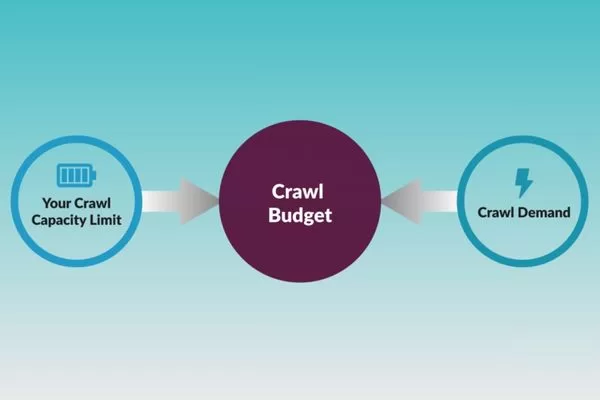
Crawl budget depends on the balance between crawl capacity and crawl demand
Your actual crawl budget is where these two factors intersect. Even if Google wants to crawl your site more frequently due to high crawl demand, it won’t exceed your crawl capacity. Similarly, even if your server can handle massive crawling, Google won’t waste resources on pages with low crawl demand. The optimal scenario is ensuring your crawl capacity can accommodate the crawl demand for your most important pages.
For large websites, this balance becomes critical because you might have millions of URLs competing for limited crawl resources. An eCommerce site might have thousands of product pages, category pages, filter combinations, and pagination sequences. Without proper management, Googlebot could spend 80% of its allocated crawl budget on low-value filtered URLs while missing newly launched products or updated inventory information.
The impact on indexation and organic traffic
The consequences of poor crawl budget management extend directly to your bottom line through reduced indexation and lost organic traffic opportunities. When search engines waste your crawl budget on unimportant pages, your valuable content suffers in multiple ways:
- New content discovery delays represent the most immediate impact. If you publish fresh blog posts, launch new products, or update service pages, but Googlebot doesn’t crawl these URLs for days or weeks, you’re missing time-sensitive traffic opportunities. News sites and trending content platforms feel this pain acutely since their content’s value diminishes rapidly over time.
- Updated content remains stale in Google’s index when crawl budget is exhausted on redundant URLs. You might update product specifications, refresh pricing information, or correct outdated statistics, but if Googlebot doesn’t recrawl those pages, users continue seeing obsolete information in search results. This creates a poor user experience and can damage trust in your brand.
- Index bloat occurs when Google crawls and indexes thousands of low-value pages instead of your priority content. Your site might have 50,000 URLs in Google’s index, but only 10,000 of them actually drive traffic or conversions. The remaining 40,000 dilute your site’s overall quality signals and waste crawl resources that could be better allocated.
- Organic traffic stagnation happens when your most profitable pages don’t get crawled frequently enough to reflect competitive updates. If your competitors update their content weekly while your pages only get recrawled monthly due to crawl budget constraints, they’ll gradually outrank you for important keywords even if your content quality is comparable.
Challenges unique to large-scale websites
Large websites face crawl budget challenges that small sites never encounter. The complexity and scale create unique problems that require sophisticated solutions, highlighting the role of sitemaps in managing crawl budget as a strategic necessity rather than a basic SEO task.
Actionable mini case study
An eCommerce platform selling home furniture had approximately 120,000 product URLs in their catalog. However, they also generated faceted navigation URLs for every possible filter combination (color, size, material, price range, brand). This created over 800,000 indexed URLs, with the vast majority being filtered variations of the same products.
Analysis of their Google Search Console crawl stats revealed that Googlebot was spending 65% of its daily crawl budget on these filtered URLs, leaving only 35% for actual product pages, category pages, and blog content. New products took 2-3 weeks to appear in search results, and seasonal inventory updates weren’t reflected in Google’s index until weeks after implementation.
The solution
The solution involved implementing strategic sitemap management. They created a clean sitemap containing only canonical product URLs, main category pages, and editorial content, totaling approximately 135,000 URLs. They simultaneously used the robots.txt file to prevent crawling of filtered URLs and implemented rel=”canonical” tags to consolidate indexing signals. Within 45 days, Google’s crawl distribution shifted dramatically, with 85% of the crawl budget now allocated to valuable pages, and new product indexation time dropped to 3-5 days.
How sitemaps influence search engine crawling behavior
Understanding the role of sitemaps in managing crawl budget means knowing how search engines use sitemap data to guide crawling and discovery. While sitemaps do not guarantee indexation, they influence crawl priorities, discovery patterns, and resource allocation.
Sitemaps as a priority signal
Many website owners misunderstand the role of sitemaps in managing crawl budget by expecting sitemaps to function as direct commands to search engines. In reality, sitemaps work as suggestions or hints that help search engines make more informed decisions about crawling priorities.
- Submission and Significance: When you submit a sitemap to Google Search Console, you’re essentially saying, “These are the URLs I consider important and want indexed.” Google takes this signal into account alongside many other factors including internal linking structure, backlink profile, content quality, user engagement metrics, and historical crawl data. The sitemap provides valuable input, but it doesn’t override other signals.
- The Discovery Phase: Google uses sitemaps most effectively during the URL discovery phase. When Googlebot encounters your sitemap, it adds all listed URLs to its crawl queue for evaluation. URLs that appear in sitemaps but haven’t been discovered through internal links get flagged for potential crawling, which is particularly valuable for deep pages that might otherwise remain hidden in your site architecture.
- The Priority Attribute: The priority attribute in sitemaps (ranging from 0.0 to 1.0) is often misunderstood. While you can assign priority values to indicate relative importance within your own site, Google has officially stated that it ignores this attribute. Instead, Google relies on its own algorithms to determine priority based on factors like link equity, content freshness, and user engagement.
- The Changefreq Attribute: The changefreq attribute (always, hourly, daily, weekly, monthly, yearly, never) provides useful context about how often content updates occur. However, Google largely ignores this tag in favor of the lastmod (last modified) attribute. If you mark a page as updating “daily” but it actually changes monthly, Google will eventually recognize the discrepancy and adjust its crawling frequency accordingly.
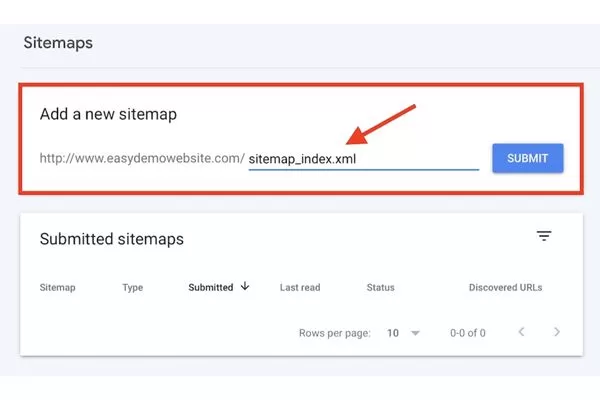
Sitemaps signal important URLs but do not override other SEO signals
What truly matters in the role of sitemaps in managing crawl budget is that clean, accurate sitemaps help Google make efficient crawling decisions by providing a comprehensive view of your important URLs. This reduces the time Googlebot spends discovering pages through random exploration and allows it to focus crawl budget on actually fetching and processing valuable content.
Reducing crawl waste with clean sitemaps
One of the most powerful aspects of the role of sitemaps in managing crawl budget is using sitemaps as filters that guide crawlers toward valuable content while implicitly discouraging waste on problematic URLs. A “clean” sitemap acts as a curated list of your best pages, helping search engines avoid common crawl traps.
- Faceted Navigation: Clean sitemaps exclude faceted navigation and filter URLs that generate near-duplicate content. For eCommerce sites, this means listing category pages and individual product pages while omitting URLs with parameters like ?color=red&size=large&sort=price. These filtered views don’t add unique value for search results and waste crawl budget when included in sitemaps.
- Pagination: Pagination URLs should typically be excluded from sitemaps unless each paginated page contains substantially unique content. For most sites, listing only the canonical view-all page or the first page of a paginated series is sufficient. This prevents Google from crawling through dozens of pagination sequences that could be consolidated.
- Tracking Parameters: Session ID URLs and tracking parameters must be eliminated from sitemaps. URLs containing parameters like ?sessionid=abc123 or ?utm_source=newsletter create duplicate content issues and waste crawl resources. Your sitemap should only include clean, canonical URLs without any tracking elements.
- Noindexed Pages: Noindexed pages have absolutely no business appearing in your sitemap. If you’ve instructed Google not to index a page using the noindex directive, including it in your sitemap sends contradictory signals. This confusion wastes crawl budget and may trigger “Sitemap contains URLs marked noindex” warnings in Google Search Console.
- Redirects: Redirect chains and temporary redirects shouldn’t appear in sitemaps. If a URL in your sitemap returns a 301, 302, or 307 redirect, Google must make additional requests to reach the final destination. This multiplies the crawl cost for that URL and wastes valuable crawl budget. Always update your sitemap to reflect final, canonical destination URLs.
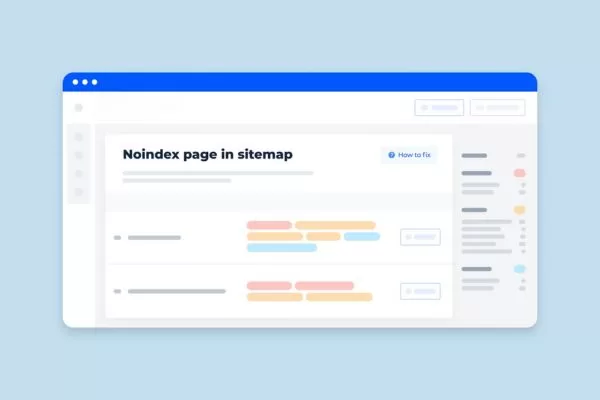
Noindexed pages should not appear in sitemaps
Implementing these clean sitemap practices fundamentally changes the role of sitemaps in managing crawl budget from passive documentation to active crawl optimization. By giving Google a precise map of your valuable content, you help the search engine allocate more crawl budget to pages that actually deserve indexation.
What sitemaps cannot fix
While understanding the role of sitemaps in managing crawl budget is crucial, it’s equally important to recognize the limitations of sitemaps. Sitemaps are tools that work within your existing site infrastructure; they cannot compensate for fundamental technical SEO problems.
- Poor Site Architecture: This cannot be overcome by sitemaps alone. If your important pages are buried six or seven clicks deep from your homepage, adding them to a sitemap helps with discovery but doesn’t solve the underlying authority distribution problem.
- Weak Internal Linking: This creates orphan pages that depend entirely on sitemaps for discovery. While sitemaps can help Google find these pages, they’ll still carry less authority than well-linked pages. Google considers internal linking patterns as signals of importance; if you don’t link to a page from anywhere on your site, the sitemap alone won’t convince Google it’s valuable.
- Blocked Resources: URLs blocked in robots.txt should not be included in your sitemap. If you block a URL in robots.txt but include it in your sitemap, Google will be unable to crawl the content to index it properly, and it will flag a warning in Search Console.
- Server Performance: Server performance issues won’t be solved by better sitemaps. If your server response times are slow, returns frequent errors, or struggles under crawl load, Google will reduce your crawl capacity regardless of how well-optimized your sitemap is.
- Content Quality: Content quality problems persist regardless of sitemap optimization. If pages listed in your sitemap contain thin content, duplicate information, or poor user experience, Google won’t prioritize crawling them frequently just because they appear in a sitemap.

Weak internal linking creates orphan pages despite sitemaps
Understanding these limitations helps you approach the role of sitemaps in managing crawl budget with appropriate expectations. Sitemaps are powerful tools when combined with solid technical SEO foundations, but they’re not standalone solutions for crawl budget problems.
Types of sitemaps and their specific roles
The role of sitemaps in managing crawl budget extends beyond standard XML sitemaps to include specialized formats designed for specific content types. Each sitemap type serves distinct purposes in helping search engines discover and understand different kinds of content on your website.
- Standard XML Sitemaps: These form the foundation and list your essential HTML pages including homepage, category pages, product pages, and blog posts. These sitemaps can include up to 50,000 URLs or be 50MB uncompressed, whichever limit is reached first. For sites exceeding these limits, sitemap index files can reference multiple individual sitemaps.
- Video Sitemaps: These enhance visibility in Google Video Search by providing metadata about video content embedded on your pages. These specialized sitemaps tell Google where videos are located, their titles, descriptions, thumbnails, duration, and other relevant attributes.
- Image Sitemaps: These help Google discover images that might not be easily found through regular crawling, particularly images loaded via JavaScript or buried in complex galleries. Image sitemaps can list multiple images per URL and include attributes like title, caption, geographic location, and license information.
- News Sitemaps: These are exclusively for Google News publishers. These sitemaps only include articles published in the last 2 days and require specific elements like <news:publication> and <news:publication_date>.
Code sample for video sitemap structure:
<?xml version=”1.0″ encoding=”UTF-8″?>
<urlset xmlns=”http://www.sitemaps.org/schemas/sitemap/0.9″
xmlns:video=”http://www.google.com/schemas/sitemap-video/1.1″>
<url>
<loc>https://www.example.com/video-page</loc>
<video:video>
<video:thumbnail_loc>https://www.example.com/thumbs/video-thumb.jpg</video:thumbnail_loc>
<video:title>How to optimize crawl budget for large sites</video:title>
<video:description>Learn advanced techniques for managing crawl budget using strategic sitemap implementation and internal linking optimization.</video:description>
<video:content_loc>https://www.example.com/videos/crawl-budget-guide.mp4</video:content_loc>
<video:duration>720</video:duration>
<video:publication_date>2026-01-05T08:00:00+00:00</video:publication_date>
</video:video>
</url>
</urlset>
Strategic sitemap optimization to maximize crawl efficiency
Mastering the role of sitemaps in managing crawl budget means using advanced optimization strategies to improve crawl efficiency. These techniques help search engines prioritize high-value pages while reducing wasted crawls on low-value URLs.
Curating Indexable URLs Only
The single most important principle in understanding the role of sitemaps in managing crawl budget is that your sitemap should function as a curated list of pages you genuinely want indexed, not a comprehensive dump of every URL on your site. This curation process requires careful analysis and strategic decision-making.
- Identify Money Pages: Start by identifying your “money pages” which are the URLs that directly contribute to business goals through transactions, lead generation, brand awareness, or organic traffic. For eCommerce sites, these include product detail pages, main category pages, and high-value content pages. For publishers, these are article pages, cornerstone content, and resource hubs. Everything else should be evaluated critically.
- Exclude Non-Canonicals: Exclude non-canonical URLs rigorously. If you use canonical tags to consolidate duplicate content variations, only the canonical version should appear in your sitemap. Including non-canonical variants wastes crawl budget because Google will discover the canonical relationship and deprioritize those URLs anyway.
- Remove Noindexed Pages: Remove all noindexed pages immediately. Including them in your sitemap sends contradictory signals to Google, wasting crawl budget on URLs that you have explicitly asked not to be in the index.
- Systematic Filtering: Filter out low-value URLs systematically. This includes thin content pages with minimal unique information, tag archive pages with duplicate content, author archive pages unless they serve specific SEO purposes, search result pages, and any dynamically generated URLs that don’t provide unique value.
- Utility Pages: Eliminate technical utility pages like “thank-you” pages, cart/checkout pages, and admin sections.
- Regular Audits: Regularly audit your sitemap to remove deleted pages (404/410 errors). Sitemaps containing broken links can lead Googlebot to reduce its crawl frequency due to perceived site quality issues.
Include only canonical URLs in sitemaps
This curation approach fundamentally changes the role of sitemaps in managing crawl budget from documentation to optimization. By limiting your sitemap to genuinely valuable indexable URLs, you concentrate crawl budget where it matters most.
Leveraging the lastmod tag correctly
The <lastmod> tag represents one of the most underutilized elements in optimizing the role of sitemaps in managing crawl budget. When implemented correctly, this tag helps search engines identify which pages have been updated recently and deserve recrawling priority. However, incorrect implementation can actually harm crawl efficiency.
- Meaningful Updates: The lastmod tag should reflect meaningful content updates only. Google has explicitly warned that faking the lastmod date to force a recrawl without actual content changes can lead to Googlebot ignoring the tag entirely for your site.
- Correct Formatting: Use the correct W3C Datetime format (e.g., YYYY-MM-DD or YYYY-MM-DDThh:mm:ss+00:00).
- Systematic Updates: Implement systematic lastmod updates based on actual content management system (CMS) events. When editors update article text, when products are restocked, when specifications change, or when new sections are added, these should trigger lastmod updates. Crucially, cosmetic changes such as sidebar widgets, footer links, or timestamp refreshes without content updates should not trigger a change. Googlebot tracks the checksum of your page; if you update lastmod but the main content remains identical, Google will eventually stop trusting your sitemap’s signals.
- Intelligent Strategies: For large sites with frequent updates, consider implementing intelligent lastmod strategies that prioritize high-value sections. Instead of a blanket update policy, prioritize the recrawl of “money pages” by ensuring their lastmod reflects every meaningful enhancement. Your most valuable pages might signal freshness more frequently through genuine updates, while less critical pages (like archived content) should only update when content genuinely changes. This ensures Google’s limited crawl budget is always spent on the content most likely to drive conversions or rankings.
- Consistency: Consistency matters enormously. If Google learns to trust your lastmod dates, it can significantly improve its crawl efficiency by skipping unchanged pages and focusing on fresh content.

The lastmod tag signals which pages deserve recrawling priority
Code sample for proper lastmod implementation:
<?xml version=”1.0″ encoding=”UTF-8″?>
<urlset xmlns=”http://www.sitemaps.org/schemas/sitemap/0.9″>
<url>
<loc>https://www.example.com/seo-guide</loc>
<lastmod>2026-01-04T15:30:00+00:00</lastmod>
</url>
<url>
<loc>https://www.example.com/product/widget-pro</loc>
<lastmod>2026-01-05</lastmod>
</url>
</urlset>
Segmenting sitemaps for large site architectures
For enterprise websites with hundreds of thousands or millions of URLs, understanding the role of sitemaps in managing crawl budget requires implementing segmented sitemap architectures. Breaking your sitemaps into logical sections provides multiple benefits including improved performance monitoring, easier maintenance, and more granular crawl insights.
- Content Type Segmentation: Create separate sitemaps for products, categories, blog posts, and videos. This allows you to track indexation performance for each section independently in the Google Search Console Indexing Report.
- Numerical Segmentation: Implement numerical segmentation for extremely large content sets. Instead of one massive file, create multiple files with a maximum of 50,000 URLs each (or 50MB uncompressed).
- Sitemap Index Files: Use a sitemap index file to organize multiple sitemaps hierarchically. This master file is the only one you need to submit.
- Geographic Segmentation: Consider geographic segmentation for international sites using subdirectories or subdomains for different countries or languages. This helps track indexation performance across different regional markets.
- Temporal Segmentation: This works well for news sites. You might have current-month.xml and archive.xml sitemaps to help Google understand update patterns.
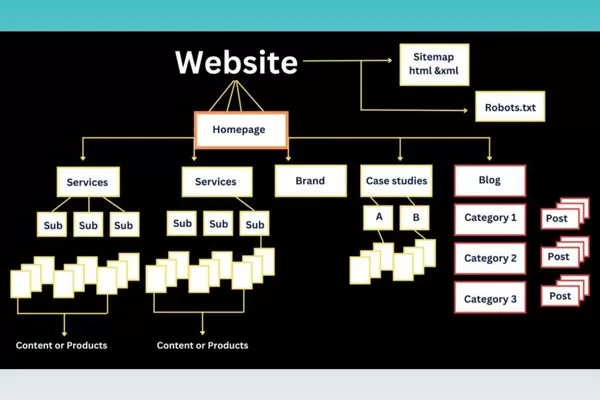
Segmented sitemaps improve crawl budget control on large sites
Case study in sitemap segmentation
A global eCommerce marketplace restructured its sitemap into category-based segments. This revealed that while “electronics” had a 92% indexation rate, “fashion” only achieved 67%.
By isolating the fashion category into its own sitemap, the SEO team could identify that the issue was not crawl budget per se, but “quality-based crawling”. Google was discovering the URLs but choosing not to index them due to thin content. After improving the descriptions in that specific segment, indexation rates rose to 85% within three months.
Synergizing sitemaps with internal linking for better results
While the role of sitemaps in managing crawl budget is important, they work best when combined with strong internal linking. Together, sitemaps guide search engines and internal links create clear paths, improving overall crawl efficiency.
Sitemaps vs. internal links
To fully appreciate the role of sitemaps in managing crawl budget, you need to understand the distinct but complementary functions of sitemaps and internal links in search engine crawling and indexation. Each serves specific purposes, and their combined implementation creates the most effective crawl optimization strategy.
- Sitemaps as Discovery Mechanisms: Sitemaps function as discovery mechanisms that tell search engines, “These URLs exist and I want them considered for indexation.” They are particularly valuable for helping Google find deep-level pages that might be difficult to reach through normal crawling patterns.
- Internal Links as Authority Channels: Internal links serve as both discovery pathways and PageRank distribution channels. When you link from Page A to Page B, you are not just helping Google discover Page B; you are also passing ranking signals and signaling that Page B is important enough to reference.
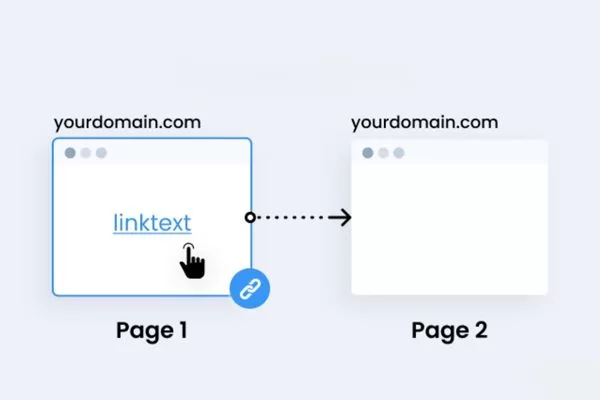
Sitemaps aid discovery, while internal links drive crawl priority and authority
Google’s crawling algorithms prioritize URLs based on multiple signals, with internal linking patterns being far more influential than sitemap presence. A page that receives dozens of internal links from high-authority pages will be crawled more frequently than a page that only appears in your sitemap. For crawl budget optimization, internal links reduce the “crawl depth” (the number of hops from the homepage). Every additional click needed to reach a page from your homepage dilutes its authority and decreases its crawl priority.
Fixing orphan pages and deep crawl issues
One critical application of understanding the role of sitemaps in managing crawl budget involves rescuing high-value pages that suffer from orphan status or excessive crawl depth. Orphan pages, which have no internal links pointing to them, and deep pages requiring many clicks to access both waste crawl budget and miss traffic opportunities.
Actionable workflow for rescuing buried pages:
- Identify Orphan and Deep Pages: Export all URLs from your sitemap and cross-reference them with your internal linking structure. Identify pages that appear in your sitemap but have zero internal links or require more than three to four clicks from the homepage.
- Evaluate Business Value: Not every orphan page deserves rescue. Assess each page’s potential value based on keyword opportunities and strategic importance.
- Create Strategic Internal Links: For high-value orphan pages, add contextual internal links from relevant, authoritative pages. Aim to bring important pages within a 3-click radius of the homepage.
- Implement Breadcrumb Navigation: This creates automatic, structured internal links that reduce crawl depth while improving user experience and helping Google understand site hierarchy.
- Leverage Sitemap Freshness: Keeping rescued pages in your sitemap with accurate lastmod dates ensures Googlebot is prompted to recrawl them after you’ve improved their internal linking.

Fixing orphan pages improves crawl efficiency and SEO value
Monitoring crawl performance via Google Search Console
Effective implementation of the role of sitemaps in managing crawl budget requires ongoing monitoring and optimization based on actual crawl behavior data. Google Search Console provides essential insights into how search engines interact with your sitemaps.
- Sitemaps Report: Access this under “Indexing” to see the status of all submitted sitemaps. Large discrepancies between “Submitted” and “Indexed” URLs indicate potential problems with content quality or crawl budget constraints.
- Page Indexing Report: Identify specific issues such as “Crawled – currently not indexed” (often a sign of low quality) or “Discovered – currently not indexed” (often a sign of crawl budget issues).
- Crawl Stats Report: Found under Settings > Crawl Stats, this report is the most direct way to monitor the role of sitemaps in managing crawl budget. Review it to understand Google’s overall crawling behavior, including total crawl requests and average response time.
- Crawl Anomalies: Monitor for sudden decreases in crawl requests or increases in crawl errors (such as 404s or 5xx errors). These anomalies often indicate technical problems that prevent your sitemap from functioning as intended.

Google Search Console helps monitor crawl behavior and sitemap effectiveness
By creating custom reports tracking key performance indicators, such as sitemap indexation percentage and average time from sitemap submission to first crawl, you can quantify the effectiveness of your sitemap optimization efforts.
Common pitfalls: Why your sitemap might be wasting crawl budget
Many websites weaken the role of sitemaps in managing crawl budget through common technical mistakes that waste crawl resources and harm indexation. Identifying and fixing these issues is essential to keep sitemaps effective.
Including non-200 status code URLs
One of the most damaging mistakes is including URLs that return status codes other than 200 OK. Every non-functional URL in your sitemap forces Googlebot to waste crawl budget on dead ends.
- 404 Not Found: Pages in sitemaps represent pure crawl budget waste. Each verification check consumes resources that should be allocated to your “money pages”.
- Soft 404 Errors: These are even more problematic because they return 200 status codes but display “page not found” content. Google must fully render and analyze the page to identify it as a soft 404, consuming significantly more CPU and crawl budget than a standard 404.
- 301 Redirect Chains: These create multiplied crawl costs. Googlebot has to make multiple requests (Hops) to reach the final destination. Always update your sitemaps to list the final canonical destination URL (200 OK) directly.
- Temporary Redirects (302/307): These signals suggest uncertainty. Google may continue to crawl the original URL, wasting budget on a page that isn’t meant to be the permanent version in the index.
- 5xx Server Errors: These suggest hosting instability. Google will proactively reduce your crawl rate (Crawl Capacity) to avoid crashing your server, leading to a drastic drop in your overall crawl budget.

Including non-200 URLs in sitemaps wastes crawl budget and harms indexation
Implement automated monitoring that regularly crawls your sitemap URLs and alerts you when non-200 status codes are detected. This proactive approach prevents crawl budget waste before it impacts indexation performance.
Conflicts with robots.txt and noindex signals
Perhaps the most confusing problem occurs when your sitemap includes URLs that are blocked by other technical directives. These contradictory signals trigger “Indexed, though blocked by robots.txt” or “Sitemap contains URLs marked noindex” warnings in Google Search Console.
Actionable troubleshooting workflow:
- Issue 1: URLs in sitemap but blocked in robots.txt.
- Solution: Export your sitemap URLs and run them through a robots.txt validator. Remove any disallowed URLs from the sitemap.
- Issue 2: URLs in sitemap with noindex tags.
- Solution: Implement automated checks to flag any URL with a noindex meta tag or X-Robots-Tag header. A sitemap is a list of “Indexable” pages; including noindexed pages is a direct waste of discovery resources.
- Issue 3: Canonical conflicts.
- Solution: Ensure only canonical URLs are included. If Page A canonicals to Page B, only Page B should be in the sitemap.
- Issue 4: Hreflang implementation conflicts.
- Solution: Ensure that for every URL in an international sitemap, all return-tag (self-referencing and cross-referencing) URLs are also present and crawlable.

Conflicting sitemap, robots.txt, and noindex signals waste crawl budget
Regular technical audits identifying these conflicts demonstrate the ongoing maintenance required to preserve the role of sitemaps in managing crawl budget effectively.
Outdated or dynamically broken sitemaps
Sitemaps that fail to stay current with your site’s content changes gradually lose their effectiveness in managing crawl budget, eventually becoming liabilities rather than assets.
- Static Sitemaps: Sitemaps manually created and rarely updated are the most common problem. They often become “ghost maps” of a site that no longer exists.
- Implementation Bugs: Common issues include sitemaps that timeout during generation due to database size, or XML parsing errors that prevent Google from reading the file entirely.
- Caching Issues: Aggressive caching prevents fresh updates from reaching search engines. Set your sitemap’s cache headers to no-cache or a very short TTL (Time To Live).
- Missing Update Triggers: If you launch new products, they should appear in your sitemap in real-time. Delay in sitemap update equals delay in discovery.
- Inappropriate URLs: Refine your generation rules to exclude staging URLs, dev environments, or internal tracking parameters (e.g., ?debug=true).
Test your sitemap generation process thoroughly before implementation by comparing generated sitemaps against expected output, validating XML format, checking for duplicate URLs, and confirming that all URLs return 200 status codes while the role of sitemaps in managing crawl budget remains the priority.
FAQs: Common questions about sitemaps and crawl budget
When discussing the role of sitemaps in managing crawl budget, many common questions reflect misunderstandings about how sitemaps really work. Addressing these questions helps clarify their true capabilities and limitations.
Does a sitemap guarantee faster indexing of new content?
This question shows a common misunderstanding of the role of sitemaps in managing crawl budget. While sitemaps significantly accelerate the discovery phase, discovery does not guarantee immediate crawling or indexation. These final steps depend on your available crawl budget, page importance, and content quality. To improve indexation speed, sitemaps should be combined with strong internal links, accurate lastmod signals, and high-quality, unique content.
Do small websites need to worry about crawl budget?
The role of sitemaps in managing crawl budget becomes critical as websites grow in size and complexity. For most small websites (under 1,000 pages), crawl budget is rarely a bottleneck. However, for medium to large sites, or any site with significant technical debt (such as infinite crawl traps or duplicate content), crawl budget optimization becomes essential to prevent delayed discovery and stale search results.

Small sites rarely need crawl budget optimization
Are HTML sitemaps still relevant for crawl budget in 2026?
This question highlights the role of sitemaps in managing crawl budget when comparing HTML and XML formats. XML sitemaps are designed for bots, while HTML sitemaps are designed for both users and bots. In 2026, HTML sitemaps remain highly relevant for crawl budget because they act as a powerful internal linking hub. They help reduce crawl depth, prevent orphaned pages, and distribute Link Equity (PageRank) more effectively across large and complex website architectures.
Final thoughts: The strategic value of sitemaps
Understanding the role of sitemaps in managing crawl budget means treating them as dynamic assets rather than static files. When optimized continuously, sitemaps guide crawlers to priority pages, improve indexation speed, reduce crawl waste, and strengthen overall organic performance on large websites.
For high-scale sites, the role of sitemaps in managing crawl budget becomes a strategic advantage when combined with regular audits, accurate freshness signals, clean technical SEO, and strong internal linking. Treated as part of a holistic SEO strategy, sitemaps help ensure valuable content is crawled efficiently and remains competitive as search engines and AI-driven discovery evolve.
In an ever-evolving digital landscape, staying ahead of the curve is the key to maintaining a competitive edge. Visit On Digitals to stay updated with the latest in-depth insights and practical Digital Marketing strategies. If your business is looking for professional SEO services to dominate search rankings and optimize conversions, explore our comprehensive solutions at our service page. Let On Digitals help you elevate your brand on the digital map!
Read more