
Google Ads Search Term Filters: A Practical Guide to Better Campaign Decisions
Vincent
30/07/2025
37
Google Ads search term filters help turn a crowded Search Terms Report into a clearer decision system. They do not improve campaign performance on their own, but they make it faster to find wasted spend, intent mismatches, valuable search demand, and query patterns that should influence keywords, ads, landing pages, and content.
For Search campaigns, this matters because the keyword you bid on is not always the exact phrase a customer used. A broad, phrase, or close-variant match can surface demand you want to keep, terms you need to exclude, and language that reveals what customers actually care about.
The goal is not to add negative keywords as quickly as possible. It is to make better decisions about which queries to block, monitor, scale, or serve differently.
Why Google Ads search term filters matter
Search Terms Reports become difficult to review as campaigns expand. A growing account may contain thousands of queries across different campaigns, locations, devices, match types, and conversion paths.
Without a filtering process, teams often make one of two mistakes:
- They review too little and allow irrelevant spend to continue.
- They overreact to limited data and block terms that could have become valuable.
Google Ads search term filters help you prioritise the queries that deserve attention first. They can surface high-cost terms with weak outcomes, brand terms appearing in non-brand campaigns, broad category searches, location mismatches, and high-value demand worth investigating further.
A filter is not an optimisation action. It is a diagnostic view that should lead to one of several decisions:
- Exclude the query or theme.
- Keep monitoring it.
- Improve ad or landing-page relevance.
- Change campaign structure.
- Add a managed keyword when more control is useful.
- Validate quality through CRM, sales, booking, or ecommerce data.
- Turn recurring research queries into SEO or content opportunities.
What Google Ads search term filters are—and what they are not
What is a search term?:
A search term is the actual phrase a person entered before your ad was shown. A keyword is the targeting signal inside your Google Ads account that helped trigger the ad.
For example, you may target the keyword commercial cleaning services, while the search term report shows queries such as:
- office cleaning company near me
- industrial cleaning contract
- free commercial cleaning checklist
- cleaning jobs in Ho Chi Minh City
Those terms can have very different business value, even though they may be related to the same keyword.
What are Google Ads search term filters?:
Google Ads search term filters are reporting conditions that help narrow a large report into a smaller group of queries. You can filter by text, cost, clicks, impressions, conversions, conversion value, campaign, match type, device, location, and other available attributes.
The filter shows a pattern. It does not decide what should happen next.
Google’s documentation explains that the Search Terms Report can help advertisers review the queries that triggered ads, the keyword involved, and the relationship between the query and match type. The report can then inform negative keyword, match-type, and broader keyword-management decisions. Read Google’s search terms report guidance.
Search term filters vs negative keywords vs match types:
These tools work together, but they serve different purposes:
- Search term filters help you analyse historical query data.
- Negative keywords prevent ads from showing for selected terms or themes.
- Keyword match types influence how your keywords may match with user searches.
The useful workflow is:
Filter → investigate → validate → take the right action.
Do not confuse a filter with a negative keyword. A filter only helps you see the data more clearly.
Set the analysis context before building filters
Before applying any filter, decide what success means for that campaign.
A query with no conversion may not be a problem if the campaign has a long sales cycle, limited data, or a conversion lag of several weeks. A query with many conversions may still be poor-quality traffic if those conversions are low-value form submissions or unqualified calls.
Start with five questions:
- What outcome should this campaign drive?
- Which conversion is primary?
- How long does a click usually take to become a qualified lead or sale?
- Which locations, services, products, or audiences can the business genuinely support?
- Is Google Ads data aligned with CRM, call tracking, booking, or ecommerce data?
For example, a local clinic may value booked appointments more than contact-form submissions. An ecommerce brand may care about profit contribution, return rate, and stock availability, not only reported revenue. A B2B advertiser may need to distinguish webinar sign-ups from sales-qualified opportunities.
Choose a reporting window that reflects spend velocity and conversion lag. High-spend campaigns may need weekly hygiene checks. Lower-volume campaigns may need a longer window before you make a decision.
How to build and save search term filter views
The exact Google Ads interface can change, but the process is broadly consistent:
- Open the Search Terms Report.
- Set the date range and campaign scope.
- Choose a text, performance, conversion, or attribute-based condition.
- Combine filters when you need a more specific view.
- Save useful views by decision type.
Filters can be applied across different account views, but available columns and report depth vary by campaign type and setup. Search Engine Roundtable recently noted that some accounts display additional quick views for AI Max and Dynamic Search Ads, even where those options are not actively used. See the reporting update.
Useful saved views include:
- Waste-risk terms.
- Brand leakage.
- High-impression, low-engagement terms.
- High-value query opportunities.
- Location or service-area mismatch.
- One-word query audit.
- Landing-page mismatch.
- Organic-content opportunities.
Filter group 1: Find wasted spend and poor-fit demand
Search terms with cost but no meaningful conversion
This is often the first filter advertisers create. It can surface queries that have generated spend, clicks, or volume without producing a meaningful result.
However, do not automatically add every zero-conversion term as a negative keyword. First check:
- Was there enough cost or click volume to judge it?
- Is the conversion lag still open?
- Does the query match your offer?
- Did the landing page answer the search intent?
- Did the query produce low-quality leads that Google Ads cannot see?
A high-cost query with no business relevance may deserve a negative keyword. A relevant query with weak results may need a better ad, clearer offer, more suitable landing page, or more observation time.
SEOteric correctly frames filters as part of continuous refinement rather than a one-time cleanup. Their practical point is that cost, volume, and conversion context should be considered together. Read their search-term filter overview.
Queries outside your service area or product scope
Search terms can reveal demand that your business cannot serve:
- Locations outside your delivery area.
- Services you do not offer.
- Products you do not stock.
- Job-seeker searches.
- Education-only or free-resource queries.
- Use cases that do not fit your commercial model.
This is especially useful for local services, franchises, multi-location businesses, ecommerce stores with shipping limits, and B2B businesses with strict qualification criteria.
Possible actions include:
- Add service- or location-specific negatives.
- Adjust geo settings.
- Clarify service areas in ad copy.
- Improve location pages.
- Update landing pages to pre-qualify clicks.
One-word query audit
A “does not contain space” style filter can surface short, broad searches. This is a useful audit view, but it is not an automatic exclusion rule.
A one-word query can still be valuable if it is:
- A brand search.
- A high-intent category term.
- A recognised product type.
- A local service query.
- A commercially relevant B2B term.
Assess the query by relevance, commercial intent, conversion quality, historical performance, and budget tolerance. Use the filter to identify queries worth reviewing, not to judge them purely by word count.
Filter group 2: Find brand leakage and keyword-control issues
Brand terms appearing in non-brand campaigns:
Brand leakage occurs when your brand name, product brand, misspelling, or branded location query appears in a campaign intended to report on non-brand demand.
This can distort CPA, ROAS, and conversion-rate reporting because branded traffic often behaves differently from new-customer or discovery traffic.
Use filters to review brand-related query patterns, then decide whether you need cleaner reporting, different campaign controls, or selective negatives.
Do not assume every account must fully block brand traffic from every non-brand campaign. The right structure depends on competition, campaign design, brand awareness, and your commercial objective.
Negative keyword conflict review:
Negative keywords protect budget, but old negatives can also block opportunities.
Search term filters cannot show queries that were prevented from triggering an ad. However, they can reveal valuable themes, brand variations, or product concepts that should prompt a manual review of account-level, campaign-level, and shared negative lists.
Review negative lists when:
- You launch a new product or service.
- You enter a new location or market.
- You change campaign structure.
- You see a valuable theme emerge in another campaign.
- Brand strategy changes.
- Old exclusions were created without documentation.
The goal is not simply to add more negatives. It is to keep exclusions aligned with the business you are running now.
Filter group 3: Find message mismatch and missed demand
High impressions with low CTR
This filter helps identify queries where Google shows your ad often but users rarely engage.
Low CTR can indicate several different problems:
- The ad does not match the query.
- The offer is unclear or uncompetitive.
- The search intent is early-stage research.
- The ad is in a weak position.
- The SERP is dominated by maps, shopping results, videos, or other features.
- The landing page promise is not obvious from the ad.
- The query is irrelevant to your business.
Do not assume low CTR means the query should be excluded. It may point to an ad-copy, offer, asset, or landing-page problem.
KlientBoost recommends using layered filters to focus reports on the metrics tied to an account’s actual goals. Their broader guide is useful for seeing how text filters, cost conditions, keyword context, and saved views can be combined. Explore their Google Ads filter examples.
Strong queries that reveal new demand
A query with valuable clicks, qualified leads, sales, or conversion value can reveal a demand theme worth protecting or expanding.
But a high-performing search term does not always need to become an exact-match keyword immediately.
Consider the next step carefully:
- Keep monitoring when volume is low.
- Add it as a managed keyword when you need more control.
- Create a dedicated ad group only when intent, economics, or landing-page needs differ.
- Update ad copy using the customer’s language.
- Improve product, service, comparison, or FAQ content.
- Validate lead quality or profit before increasing budget.
Search terms should not be promoted because they look good in Google Ads alone. They should be promoted because they create outcomes that matter to the business.
Queries that signal a landing-page mismatch
Look for groups of related queries that earn clicks but underperform downstream compared with similar terms.
For example, people searching “Google Ads audit service” may need proof of methodology, deliverables, and commercial outcomes. Sending them to a broad agency homepage creates more friction than a dedicated audit page.
Use search-term patterns to review:
- Headline and message match.
- Offer clarity.
- Proof points.
- Pricing context where appropriate.
- Service scope.
- Location coverage.
- Conversion CTA.
- Form or booking friction.
Filter group 4: Turn query data into wider marketing insight
Queries better served by SEO or content
Some queries show interest but are not efficient paid-search targets. They may be early-stage questions, broad research topics, educational searches, or recurring customer objections.
Instead of buying every click, use the data to create:
- SEO guides.
- Comparison pages.
- Videos.
- Product FAQs.
- Service explainers.
- Calculators.
- Sales enablement content.
- Support resources.
A discussion in the PPC community illustrates the real operational challenge: when an account produces thousands of search terms, teams must prioritise by cost, clicks, conversion impact, and recurring themes rather than trying to inspect every line equally. See the PPC discussion.
Query patterns by location, device, and season
Search-term data can reveal more than keyword quality.
Review whether the same theme behaves differently by:
- City or service area.
- Desktop versus mobile.
- Weekday or daypart.
- Promotion period.
- Season.
- Product availability.
- Landing page.
These patterns can inform geo strategy, budget allocation, ad messaging, mobile UX, sales capacity planning, and content priorities.
What to do after a filter reveals a pattern
A filter should lead to one of five decisions:
Exclude:
Use a negative keyword when the query is clearly irrelevant, outside your service scope, or repeatedly produces low-value traffic with enough evidence.
Monitor:
Keep watching when the data is limited, the sales cycle is long, the intent is unclear, or the query could become strategically important.
Improve message match:
Update ads, assets, offers, or landing pages when the query is relevant but the current experience does not satisfy it.
Restructure carefully:
Create new keywords, ad groups, campaigns, or landing pages only when a query theme has different commercial value, geography, margin, user intent, or conversion requirements.
Validate outside Google Ads:
Check whether reported conversions become qualified calls, booked meetings, sales, profit, repeat purchases, or other valuable outcomes.
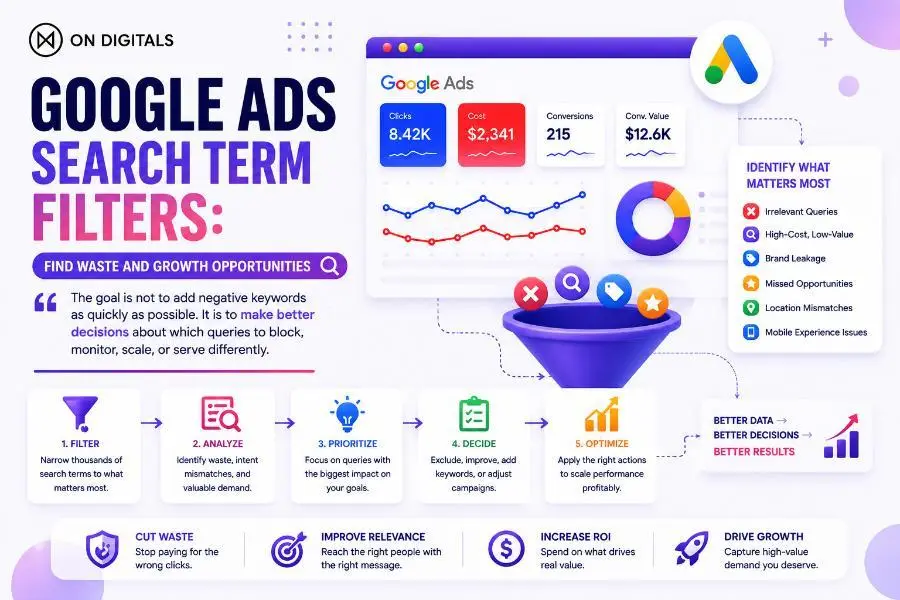
Use search term filters to turn raw query data into better decisions: identify the pattern, assess its business value, then exclude, monitor, improve, restructure, or validate before taking action
Common mistakes when using Google Ads search term filters
- Treating filters as an optimisation action instead of a reporting tool.
- Applying the same click, CTR, cost, or conversion threshold to every account.
- Adding negatives based on too little data.
- Assuming every one-word query is poor quality.
- Assuming high CTR means a query is profitable.
- Promoting every good query into exact match.
- Ignoring old negative keyword conflicts.
- Looking only at Google Ads data without CRM or ecommerce validation.
- Using search-term filters only to reduce waste rather than improve messaging, landing pages, and content strategy.
Search-term review cadence for Google Ads teams
Weekly: query hygiene:
Review waste-risk terms, sudden spend changes, new negative opportunities, major location or device anomalies, and high-cost queries needing investigation.
Monthly: performance and structure:
Review brand leakage, high-value demand themes, landing-page alignment, negative keyword lists, ad-message patterns, and search-term behaviour across campaigns.
Quarterly: strategic learning:
Validate query quality with CRM, sales, profit, booking, or ecommerce data. Refresh negative keyword strategy, review campaign structure, assess seasonal patterns, and identify content opportunities from recurring search themes.
FAQ
What is the difference between a search term and a keyword in Google Ads?
A search term is the actual phrase a user searched. A keyword is the targeting term in your Google Ads account that helped trigger the ad.
Do Google Ads search term filters change which queries trigger my ads?
No. Filters only help you analyse historical data. To change future delivery, you may need to add negative keywords, adjust keywords, revise match types, update targeting, or change campaign structure.
How many clicks or impressions should a search term have before I act?
There is no universal threshold. Use a level that reflects your campaign budget, conversion lag, average CPA, sales cycle, and risk tolerance. High-cost irrelevant terms may need action sooner than low-volume terms with unclear potential.
Should I add every high-converting search term as an exact-match keyword?
No. Add a managed keyword only when more control would improve the campaign. Some useful terms can remain in the existing structure, especially when volume is low or the query fits the current theme.
Can search term filters help find negative keyword conflicts?
They can reveal valuable themes that should trigger a review of negative lists. However, blocked queries do not appear in the Search Terms Report, so the conflict check must also include a manual audit of your account, campaign, and shared negative keyword lists.
How often should I review my Google Ads Search Terms Report?
High-spend campaigns often need weekly reviews. Lower-volume campaigns may need longer windows. The right cadence depends on spend velocity, query volume, conversion lag, and how quickly the business can respond to new demand.
Are Google Ads search term filters available for every campaign type?
Availability and detail can vary by campaign type and account configuration. Google notes that Search Terms Reports work differently across formats, including Performance Max, Dynamic Search Ads, and Shopping-related targeting. Review the reporting options available in your own account before building a fixed process.
Turn search-term data into better campaign decisions
Google Ads search term filters are most valuable when they lead to better decisions, not faster exclusions. A filter can reveal wasted spend, but it can also reveal a poor landing page, an unclear offer, a brand-reporting issue, a new product opportunity, or a query that belongs in your SEO strategy rather than your paid campaign.
On Digitals helps businesses turn paid-search data into clearer targeting, stronger message match, more reliable conversion measurement, and controlled campaign growth. Explore our Google Ads services or broader Paid Performance platforms to build campaigns around qualified demand—not just clicks.

NEWEST POSTS
- Advertising Industry In Vietnam: The 2026 Trends, Channels and Market-Entry Strategy
- Best SEO Company in Vietnam: Latest Shortlist For Businesses
- How To Leverage Social Media For Customer Service Like A Pro?
- Social Media Post Tips – 8 Ways To Boost Engagement
- How To Use Social Media for Sales – In-depth Beginner Guide
Read more