
Insights
Google Trends YouTube: How to analyze search demand
On Digitals
20/01/2026
34
Understanding what your audience is actively searching for on YouTube can determine whether your video gets ignored or gains real traction. Google Trends YouTube can help creators and marketers uncover viewer intent by revealing what people are truly searching for, not just watching.
In this guide, you’ll learn how to use the Google Trends YouTube search filter to validate video ideas, identify untapped content opportunities, and build a data-driven strategy that consistently attracts engaged viewers and delivers measurable results.
What is Google Trends for YouTube and how does it work?
Google Trends for YouTube is a specialized filter that shows what users are actively searching for on YouTube, not just what they’re watching. The anonymized and aggregated search data uncovers trending topics, search popularity, and interest over time, allowing creators and businesses to harness these findings and refine their approach.
What is “relative interest” in YouTube search?
One of the most misunderstood aspects of Google Trends YouTube is the scoring system. The numbers you see ranging from 0 to 100 don’t represent actual search volumes or view counts. Instead, they indicate relative interest compared to the highest point on the chart for the given time and region.
- Score of 100: Represents peak popularity for your selected time period.
- Score of 50: Means the term was half as popular during that specific moment.
This relative measurement allows for meaningful comparisons regardless of absolute search volume. A niche topic with 1,000 searches can be compared to a mainstream topic with millions of searches because the system normalizes the data on a scale of 0 to 100 based on a topic’s proportion to all searches. When you see a score of 75, it means that during that week or month, the search interest was at 75% of the highest point recorded in your selected timeframe.
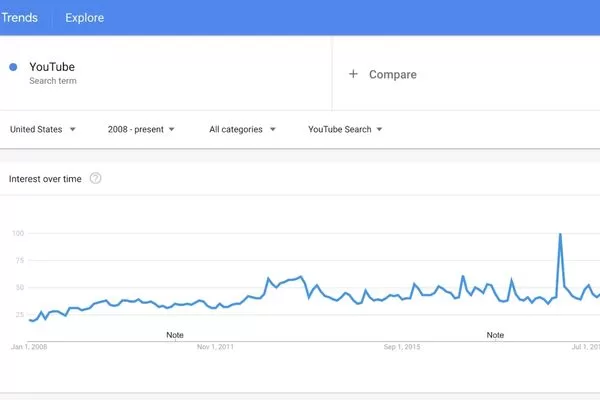
Google Trends YouTube uses a 0 to 100 scale to show relative search interest
A declining line doesn’t necessarily mean the total number of searches is low. It just means interest is decreasing relative to the peak you’re examining. Similarly, consistent scores around 80-90 might indicate stable, high-interest searches relative to other topics in that period, rather than just declining interest. This nuanced view helps you avoid misinterpreting temporary dips as permanent declines or artificial spikes as sustainable trends.
YouTube search vs. Google web search
The difference between Google Trends for YouTube and standard Google web search Trends reveals fundamental distinctions in user behavior and intent.
- User Intent: When someone searches on Google, they’re typically looking for information, answers, or websites. On YouTube, they’re doing the same thing, but with a more visualized, specifically seeking video content, entertainment, tutorials, or visual explanations.
- Trend Patterns: These platform-specific behaviors create different patterns. For example, “how to fix a leaky faucet” might show steady interest on Google as a general query, but on YouTube, it may see higher engagement during weekends or holidays when DIYers have time to watch long-form tutorials. Entertainment searches like “movie trailer” dominate YouTube but might have a different search trajectory on Web Search, where users often look for showtimes or reviews instead of the video itself.
- Educational Content: Complex topics like “quantum physics explained” might have moderate web interest but explosive YouTube demand, as people often prefer visual learning for difficult subjects.
The power of the Google Trends YouTube search filter
The Google Trends YouTube search filter turns broad trend data into YouTube-specific insights, showing what users are actively searching for in video format rather than on the web. This precision helps you focus on topics with real YouTube demand, avoid wasted production effort, and invest in video content that aligns with how audiences prefer to consume information.
Why you may need help using the Google Trends YouTube search filter
Many creators struggle with the tool not because it is inherently complex, but because effective data interpretation requires understanding multiple variables simultaneously. Google Trends YouTube search filter help becomes essential when you need to differentiate between temporary viral moments and sustainable content opportunities.
Common mistakes that lead to misleading data include:
- Ignoring Geography: Analyzing Trends without adjusting for location results in content that appeals to audiences outside your target market.
- Overlooking Categories: Searching for broad terms like “football” without filters mixes signals from American football and soccer fans, yielding ambiguous data.
- Misinterpreting Timing: Without knowing how to use Google Trends for YouTube filtering properly, you might chase fleeting Trends that have already peaked or ignore emerging opportunities that unfiltered data fails to reveal.
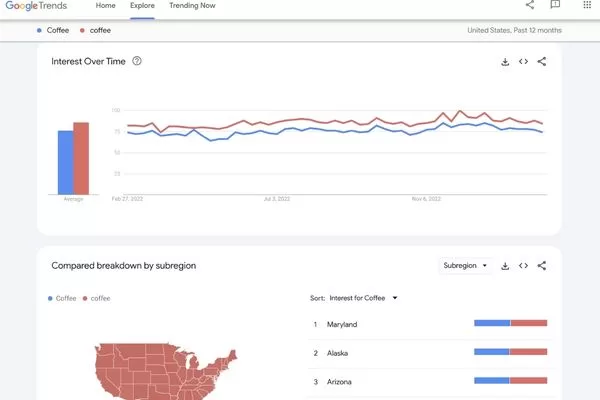
The Google Trends YouTube search filter prevents misreading trend data
Narrowing down by location and category
Geographic and category filtering transforms Google Trends for YouTube from a general awareness tool into a precision targeting instrument.
- Location Filtering: Reveals where your potential audience is searching from. This helps you decide on language, local references, and the best time zones for publishing. A gaming channel targeting the US requires vastly different insights than one focused on Southeast Asian markets.
- Category Selection: Refines your data by isolating Trends within specific verticals like Gaming, Beauty & Fitness, or Technology. When you select a specific category, you eliminate “noise” from searchers who might search for the same terms for entirely different reasons.
This combination creates highly actionable intelligence. For example, searching “building” without filters shows mixed results from construction, Minecraft, muscle-building, and brand-building contexts. Apply the Gaming category filter, and suddenly you’re seeing pure Minecraft and game development Trends. Add a geographic filter for your target region, and now you’re looking at exactly what your specific audience segment is searching for, enabling confident content decisions.
Google Trends YouTube search filter: how to use step by step
Learning how to use Google Trends for YouTube effectively means following a clear, structured process to access, filter, and interpret data with purpose. By defining your objective first, such as validating video ideas or identifying seasonal Trends, you can turn raw search data into focused insights that support smarter content decisions and sustainable channel growth.
Accessing the YouTube search database
To begin using the Google Trends YouTube search filter, navigate to Trends.Google.com and enter your initial search term in the “Explore” bar. By default, Google Trends shows web search data, so your first critical step is changing the filter. Look for the dropdown menu at the end of the filter bar (usually labeled “Web Search”) and click it to reveal additional options including “YouTube Search.”
Selecting “YouTube Search” completely transforms your data view. The graphs, related queries, and geographic distributions now reflect only YouTube-specific search behavior. This foundational step is where many users make their first mistake by analyzing web data while thinking they are seeing YouTube Trends. Always verify your filter selection before drawing any conclusions about video demand.
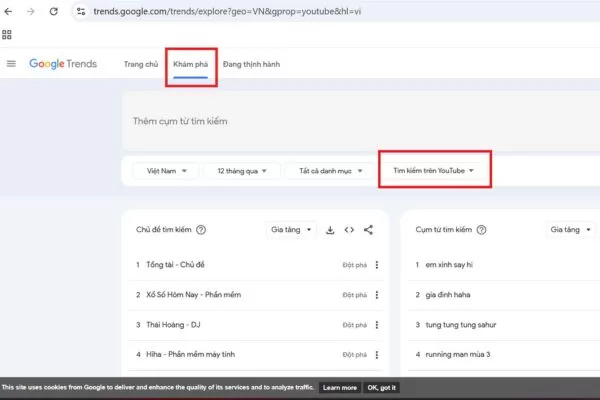
Choose YouTube Search to see real YouTube demand in Google Trends
Once you have activated the Google Trends YouTube search filter, the interface displays the same powerful analytical tools available for web search. Every data point specifically represents the relative search interest of YouTube users, giving you direct insight into video content demand.
Analyzing time ranges to identify content patterns
Time range selection dramatically affects your insights when learning how to use Google Trends for YouTube. The platform offers several preset options such as the past 4 hours, 1 day, 7 days, 30 days, or 12 months. Each timeframe reveals different strategic opportunities:
- Short-term ranges (7 or 30 days): These help you identify immediate trending topics perfect for rapid-response content. If you see a sharp spike in the past week, you might have a chance to create timely content while interest remains high.
- Longer ranges (12 months or 5 years): These reveal sustainable content opportunities. Topics that maintain consistent interest over years represent evergreen content potential. You can also identify seasonal patterns that repeat annually to plan content calendars months in advance.
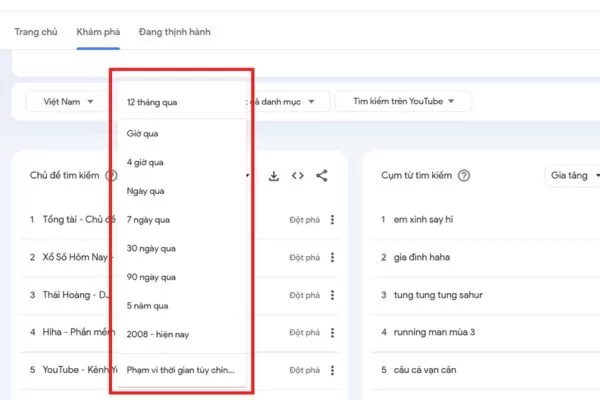
Time range selection shapes how you spot Trends and evergreen topics on YouTube
Comparing multiple keywords for maximum impact
The comparison feature in Google Trends for YouTube allows you to analyze up to five search terms simultaneously. This reveals competitive dynamics that single-term analysis cannot show. This capability helps you identify higher-demand alternatives to popular topics or discover which variation of a phrase resonates better with the audience.
To compare keywords, simply add additional terms to your initial search using the “+ Compare” option. This is particularly powerful when examining different ways people phrase the same question:
- Terminology Prioritization: Comparing “iPhone tips” versus “iPhone hacks” might reveal that one has triple the relative search interest, telling you which to use in titles.
- Content Sequencing: Comparing “beginner guitar” versus “intermediate guitar” helps you sequence your content series based on actual audience demand levels.
How to use Google Trends for YouTube keyword research
Google Trends for YouTube is a powerful keyword research tool that reveals real search behavior and momentum, not just static search volumes. By showing which terms are rising or declining and uncovering related queries, it helps you discover new opportunities, validate topic demand, and optimize content based on actual viewer interest rather than assumptions.
Discovering rising queries before they peak
The “Rising” section within Google Trends for YouTube is arguably the most valuable feature for forward-thinking creators. While “Top” queries show you what is currently popular, “Rising” queries reveal what is gaining momentum rapidly, often before mainstream creators notice.
- Breakout Status: A query marked as “Breakout” has experienced growth of over 5000%, indicating explosive interest. Creating content around these topics quickly can position you as an early authority.
- Evaluation: Not every rising search represents a sustainable opportunity. You must cross-reference rising queries with the interest-over-time graph to see if the rise is the beginning of a trend or simply a temporary spike. Sustainable Trends show steady upward movement over weeks, while temporary spikes show sharp vertical increases followed by equally sharp declines.
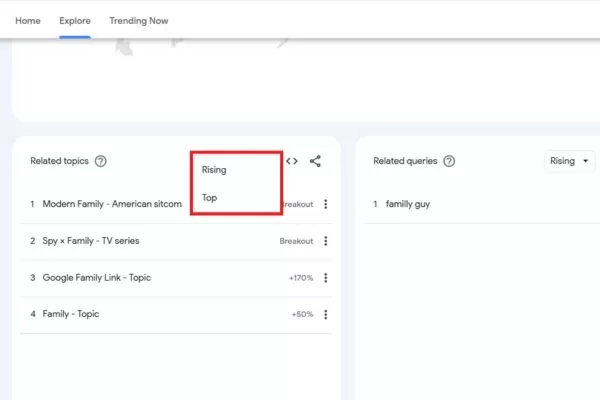
Rising queries reveal fast-growing topics on YouTube
Identifying top keywords for video titles and descriptions
The “Top” queries section in Google Trends for YouTube shows you the most popular search variations related to your main topic, providing a goldmine for title optimization and metadata selection.
- Title Optimization: Examine the top queries list for natural title ideas that incorporate high-demand search terms. If you create content about “social media marketing” and the top queries include “social media marketing for beginners,” you have identified a title direction that aligns with actual search demand.
- The Role of Tags: While tags play a minimal role in modern YouTube discovery, using specific phrases from the top queries list in your title and the first two lines of your description provides much stronger signals to the algorithm about your video’s focus.
Validating search demand to avoid “dead” topics
Before investing hours into video production, use Google Trends for YouTube to validate that meaningful search interest actually exists for your planned topic. This validation step prevents the disappointment of creating excellent content that nobody searches for.
To validate demand, search your exact planned topic with the YouTube search filter active:
- High Demand: If the interest graph shows consistent activity above 25 or 30 on the relative scale, you have confirmation that viewers are regularly searching for this content.
- Low Demand: Scores consistently below 10 suggest limited search interest, meaning discoverability will rely primarily on suggested videos and home page browse features rather than search traffic.
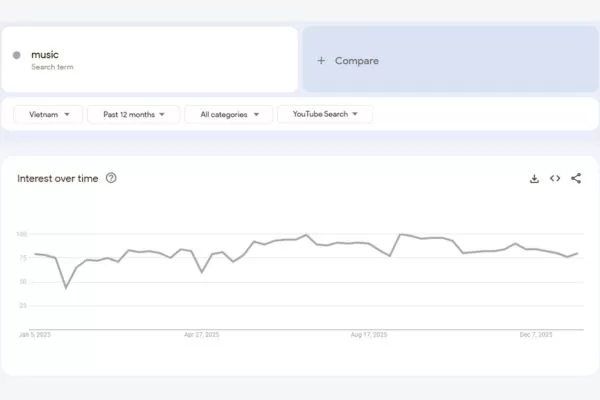
Google Trends for YouTube validates search demand before production
Pay special attention to the trend direction. A topic showing steady or increasing interest over the past year represents a safer investment than one showing a clear decline. A declining trend doesn’t always mean “dead” content, but it requires a more unique angle to capture the shrinking search audience.
Strategic content planning with Google Trends for YouTube
Turning Google Trends YouTube data into a content calendar requires proactive planning that balances trend timing, production capacity, and audience growth goals. By mixing trending, seasonal, and evergreen topics, creators can maintain consistent channel growth while staying flexible for new opportunities.
Leveraging seasonal Trends for viral content
Seasonal content represents some of the most predictable high-traffic opportunities available to creators. Google Trends for YouTube makes seasonal planning straightforward by revealing historical search patterns that repeat annually.
- Timing is Key: Search interest typically begins building 4 to 6 weeks before the actual event or season peaks. Publishing your video too late means missing the initial surge of search traffic.
- Proactive Analysis: Analyze when interest begins rising in previous years and aim to publish just as the upward trend starts to capture the full wave of traffic.
- Backward Scheduling: Create a seasonal content calendar by reviewing the past 2 or 3 years of trend data. If interest in a topic starts rising in early October, your production should be complete by late September to allow time for editing, thumbnail testing, and optimization.
Google Trends for YouTube helps plan seasonal content with precise timing
Building an evergreen content library
While trending and seasonal content drives traffic spikes, evergreen content provides the stable foundation that makes your channel sustainable long-term. Google Trends for YouTube helps you identify evergreen topics by revealing searches that maintain consistent interest throughout the year without significant seasonal variation.
Look for topics where the interest-over-time graph shows steady lines hovering between 40-80 on the relative scale year-round. These represent fundamental questions, problems, or interests within your niche that people continuously search for regardless of season or current events. For example, “how to tie a tie,” “basic guitar chords,” or “beginner yoga poses” show consistent interest because these are fundamental skills people need year-round.

Google Trends for YouTube reveals evergreen topics with steady demand
Evergreen content compounds over time, continuing to attract views and subscribers months or even years after publication. Building a library of high-quality evergreen videos creates a stable traffic baseline that supports your channel during periods when you’re not actively publishing or when trending content underperforms. Allocate roughly 40-60% of your production effort to evergreen topics, ensuring channel stability while still pursuing viral opportunities.
Mapping your editorial calendar with search peaks
Creating an editorial calendar aligned with search behavior patterns ensures your content reaches audiences when they are most receptive. Google Trends YouTube provides the historical data needed to predict when interest in various topics will peak, allowing you to schedule content for maximum impact.
- Identify Peaks: Use the 2-year or 5-year view in Google Trends to find months where interest consistently rises.
- Schedule Production: Working backward from each peak, schedule your content production to ensure videos are live and indexed by YouTube before the bulk of search traffic arrives.
- Build Authority: Publishing a video slightly before the peak allows early viewers to generate watch time. This tells the algorithm your content is valuable, ensuring your video is better positioned in search results and recommendations when the traffic peak officially arrives.
Practical use cases for creators and marketers
Understanding how to use Google Trends for YouTube in real scenarios helps turn theory into measurable results by guiding smarter, data-driven content decisions. These practical use cases show how trend insights can be applied from idea generation to competitive analysis, reducing guesswork and improving overall content performance.
Expanding content ideas with related topics
The “Related topics” and “Related queries” sections in Google Trends for YouTube function as an automatic content idea generator. These sections reveal what viewers interested in your main topic are also searching for, often uncovering unexpected angles or adjacent topics that you had not considered.
- Prioritizing Momentum: The rising queries in this section show you which specific aspects are gaining momentum. This helps you decide which related topics to tackle first to stay ahead of the curve.
- Building Content Clusters: Use related topics to build series or playlists that comprehensively cover subject areas. If you create a video on your main topic and then follow up with the top 5 to 10 related queries, you serve viewers throughout their entire learning journey.
- Algorithmic Benefits: YouTube rewards this comprehensive coverage because your videos are more likely to appear in “Up Next” recommendations for each other, which increases overall channel watch time and session duration.
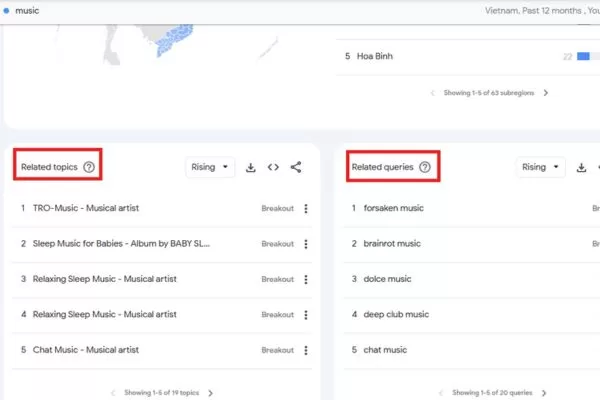
Related topics and queries reveal new YouTube content ideas
Competitor insight and market gap analysis
Google Trends for YouTube reveals market gaps by showing you what viewers are searching for that is not being adequately served by existing content. By comparing search interest against the actual supply of content, you can identify underserved topics where competition is relatively low but demand is growing.
To perform a gap analysis, follow these steps:
- Identify Interest: Use Google Trends for YouTube to find high-interest topics within your niche.
- Evaluate Content: Search for those exact terms on YouTube to check the quality, relevance, and upload dates of existing videos.
- Spot the Gap: If you find strong search interest but only outdated, poorly produced, or irrelevant videos, you have discovered a content gap.
These gaps represent opportunity zones where your content can quickly gain traction. Focus particularly on rising queries with limited existing content, as these represent emerging markets where you can establish authority before the topic becomes saturated.
Limitations and best practices when using Google Trends for YouTube
While Google Trends for YouTube is highly valuable, understanding its limitations helps you avoid overconfidence and make more balanced decisions. The data is most effective when combined with channel analytics, audience feedback, and market insight, allowing you to validate Trends and apply them wisely before investing significant resources.
Why some data appears small or missing
Google Trends doesn’t display data for searches that fall below certain volume thresholds. When you search highly specific or niche terms, you might see messages like “Not enough data” or graphs that show minimal activity. This doesn’t necessarily mean nobody is searching for these topics, it means search volume is too low for Google to include in its aggregated trend data while maintaining anonymity and data integrity.
Niche topics and long-tail keywords frequently fall below visibility thresholds even when they represent genuine opportunities. A highly specific tutorial might receive hundreds of searches per month, which is too small for Google Trends to display but could still represent excellent content opportunity, especially if those searchers are highly targeted and likely to subscribe.
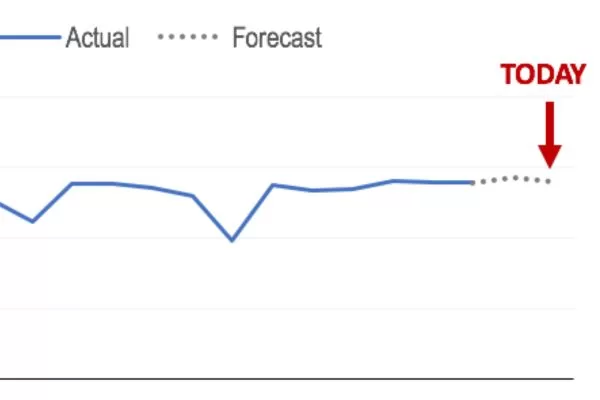
Missing data in Google Trends does not mean zero demand for niche topics
When you encounter missing data, consider searching for broader related terms to understand the general topic’s trajectory. If “advanced Python data visualization libraries” shows no data, try “Python data visualization” or simply “Python tutorials” to gauge the broader category’s health. You can also use the YouTube Search bar’s autocomplete feature and related searches to validate that real people are searching for your niche topic even if Google Trends can’t visualize it.
Combining Google Trends with YouTube analytics
The most powerful insights emerge when you combine Google Trends for YouTube market data with your own YouTube Analytics channel data. Google Trends shows you what the entire market is searching for, while YouTube Analytics shows you what’s actually working specifically for your channel and audience. These two perspectives together create complete intelligence.
Compare your top-performing videos against Google Trends data to understand whether your success comes from choosing topics with strong search demand or from exceptional execution on topics with modest demand. Videos that perform well despite low trend interest indicate you’ve found a unique angle or content-market fit that resonates, suggesting you should explore similar approaches on other topics.
Google Trends for YouTube and Analytics show demand and performance
Conversely, if you’ve created content on topics with strong Google Trends interest but your videos underperform, the issue likely lies in execution, optimization, or timing rather than topic selection. This diagnosis helps you improve by focusing on the actual problem area, whether that’s thumbnail design, title clarity, video pacing, or CTR (Click-Through Rate) optimization rather than abandoning good topics due to poor initial execution.
| Data source | What it tells you | How to use it | Limitations |
| Google Trends for YouTube | Market-wide search demand and interest trajectory | Topic validation, trend timing, keyword research | Doesn’t show actual search volumes; anonymizes low-volume data |
| YouTube Analytics | Your specific channel performance and audience behavior | Understanding what works for your audience specifically | Only shows your channel’s data, not market potential |
| YouTube Search suggest | Real-time long-tail queries people are typing | Finding exact keyword phrases and user-specific intent | No historical data, trend momentum, or trend direction |
| Competitor research | What’s working for similar audiences | Identifying content gaps and proven video formats | Time-intensive; lagging indicator (shows what already worked) |
FAQs: Common questions about Google Trends YouTube search data
When using Google Trends YouTube, questions often arise about data interpretation and practical application. Addressing these common concerns helps you avoid misreading trend data and apply insights more confidently within a well-rounded content strategy.
Why is Google Trends data different from my YouTube Analytics?
Google Trends for YouTube shows overall search interest across the entire platform, while YouTube Analytics reflects how your own videos perform with your specific audience. High trend interest signals market demand but does not guarantee success, which depends on content quality, optimization, and the platform’s recommendation algorithm. Used together, Google Trends for YouTube helps validate broad topic demand, and YouTube Analytics shows whether your execution effectively captures that specific opportunity.
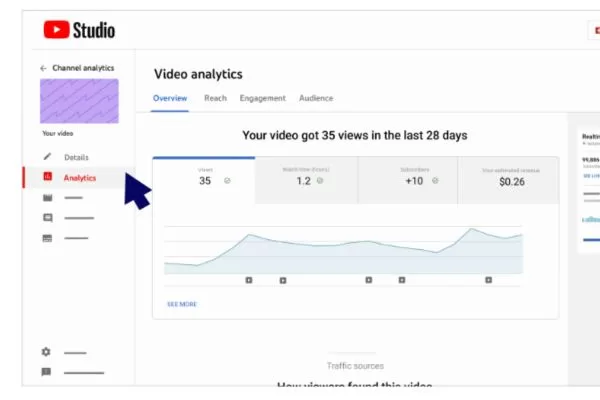
Google Trends for YouTube shows demand, Analytics shows performance
How can you tell a short-term fad from a sustainable trend?
Using Google Trends YouTube, it is important to separate short-term spikes from long-term Trends. Temporary fads (often called “spikes”) appear as sharp, vertical peaks that rise and fall quickly, while sustainable Trends show steady growth or consistently high interest over time. By reviewing the 2-year or five-year view, you can identify topics with lasting demand and focus on evergreen content that continues to attract viewers well beyond initial publication.
Should you rely only on rising keywords for content ideas?
While rising keywords in Google Trends for YouTube can offer early opportunities, relying on them alone makes your content strategy unstable. A balanced approach combines rising topics, established high-demand subjects, and evergreen content to ensure both growth and long-term stability. Rising keywords are most effective when you can publish rapid-response content, while slower production cycles benefit more from historical, high-volume topics with lasting appeal.
Final thoughts: Turning Google Trends YouTube data into actionable content
Google Trends YouTube turns content creation into a data-driven strategy by revealing what audiences are actively searching for, helping you decide what to create, when to publish, and how to position your videos for maximum discoverability. Successful creators consistently use trend data to validate ideas, confirm demand, and time their releases, avoiding the common mistake of producing content that lacks a clear audience interest.
Google Trends for YouTube works best as part of a broader workflow, supporting creativity rather than replacing it. By starting small and learning how to use Google Trends for YouTube to analyze a few topics regularly, you can uncover missed opportunities, plan stronger content clusters, and steadily build a channel that attracts the right audience and drives sustainable long-term growth. Remember, data points you in the right direction, but your unique voice and quality execution are what turn a searcher into a loyal subscriber.
Are you ready to turn trend data into real revenue? At On Digitals, we go beyond data analysis to build sustainable growth strategies for your brand across every digital platform. Let our SEO and Content Marketing services help you lead the market today. Contact On Digitals now for a personalized one-on-one consultation.
Related contents
Read more