
Insights
Largest Contentful Paint – All Things Every SEO Should Know
On Digitals
14/01/2026
13
Largest contentful paint measures how quickly the biggest piece of content, usually the main one of a page, loads for users. This metric plays a critical role in Core Web Vitals, directly impacting SEO performance and user experience. Find out more about how optimizing LCP can improve page speed and engagement!
What is Largest contentful paint? A beginner-friendly explanation
Simply put, this metric measures how long it takes for a page to display its largest visible element to users. LCP focuses on when this key content is fully loaded and ready. The measurement stops once a user interacts with the page, such as clicking, scrolling, or typing. Google considers this approach more meaningful than older metrics like DOM or DOMContentLoaded. It reflects perceived loading speed instead of just technical completion.
Only above-the-fold content is included in this evaluation, meaning elements visible without scrolling. If a large image or video loads slowly, the overall performance score will suffer. This makes optimizing critical resources essential for improving largest contentful paint.
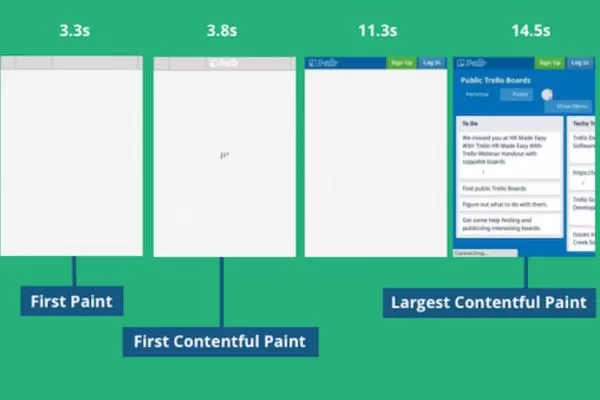
A simple guide explaining core web performance metrics clearly
Why monitoring your site’s largest contentful paint time matters
Caring about page speed isn’t just a technical concern. The time it takes for your main content to appear directly impacts users and search rankings.
User experience
The biggest reason to focus on largest contentful paint (LCP) is that it reflects how quickly users see the main content. Users don’t wait for every script or element to load; they want value immediately. A fast LCP ensures visitors can interact with your site without frustration. By optimizing this metric, you create a smoother and more engaging experience.
Most users judge a website by how quickly they can access important information or visuals. A slow main content load can increase bounce rates and reduce engagement. Focusing on LCP helps you understand the true user experience. Combined with good design and usability, it ensures visitors stay longer and take desired actions.
Techniques to boost a site’s search presence
Google includes largest contentful paint as a key part of its Core Web Vitals, making it an SEO ranking factor for websites using professional SEO services. Websites with poor LCP scores may struggle to appear prominently in search results. While content relevance and backlinks remain critical, performance metrics now play a bigger role than ever. Optimizing LCP ensures you don’t lose visibility due to slow loading pages.
In addition, fast LCP signals to Google that your website provides a smooth, user-friendly experience. This can indirectly improve ranking potential and organic traffic. Pages with optimized LCP often see better engagement and lower bounce rates. Prioritizing largest contentful paint alongside other performance metrics maximizes both SEO and user satisfaction.
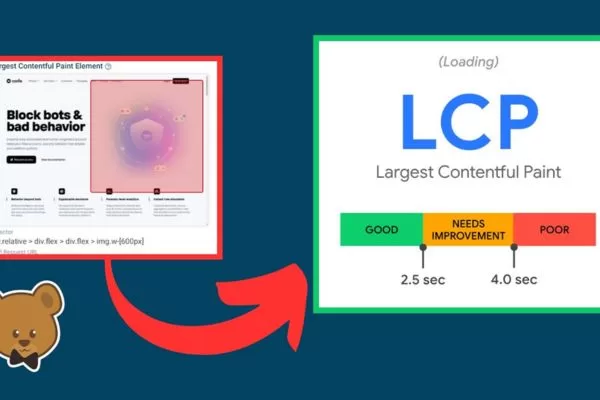
Understanding why your website’s load speed impacts visitors
What is the recommended largest contentful paint score?
An optimal page load time is considered to be under 2.5 seconds, which helps deliver a smooth browsing experience. Understanding the largest contentful paint meaning helps you interpret why the main content load speed matters. Keep in mind that factors such as device type, network speed, and user behavior can influence load times. Achieving consistently fast performance across different conditions is essential to maintain a high-quality user experience.
- To better interpret LCP results, consider these general benchmarks:
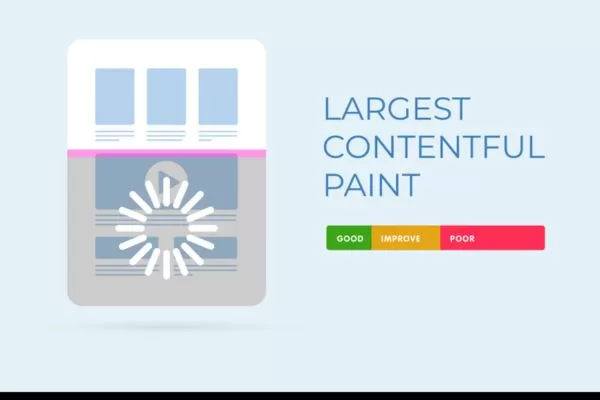
- Good: under 2.5 seconds – the main visible element loads swiftly, offering users an immediate and responsive experience.
- Needs improvement: 2.5 to 4 seconds – the page remains functional, but users may notice a slight lag before the primary content appears.
- Poor: over 4 seconds – the page loads slowly, which can frustrate visitors and increase bounce rates.
Ultimately, these ranges serve as general guidance. Evaluating your site’s largest contentful paint in the context of its specific goals and audience is key. Strive to optimize LCP as much as possible to provide visitors with fast and enjoyable browsing.
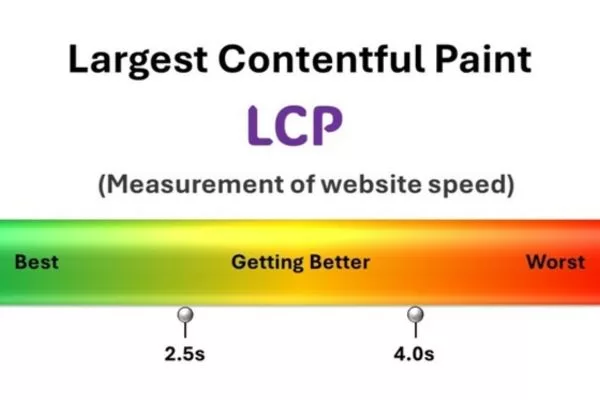
Ideal performance benchmarks every site should strive to achieve
Factors that negatively affect LCP performance
Slow page load times often lead to user frustration and higher bounce rates. Understanding what causes a low score helps you take targeted actions to improve performance.
Scripts and styles that prevent fast rendering
Certain JavaScript and CSS files can prevent the browser from rendering a page quickly. These blocking resources stop the main content from appearing on the screen promptly. Optimizing or deferring these files can greatly improve the largest contentful paint, ensuring users see the main content faster.
Server delays causing longer load times
When a server takes too long to respond, your page’s main elements cannot render quickly. Delayed responses can frustrate users and lead to higher bounce rates. Addressing these issues is essential if you want to fix largest contentful paint effectively. Improving server infrastructure or using faster hosting can significantly reduce load times and enhance overall performance.
Delays caused by client-side rendering processes
Heavy client-side rendering can significantly slow down the display of visible page elements. Scripts that take too long to process delay the main content, frustrating visitors. Reducing unnecessary JavaScript and optimizing client-side rendering can improve overall speed and boost the largest contentful paint.
Slow asset loading
High-resolution images, videos, or other media can take significant time to load, especially if placed above the fold. Users may experience delays before the main content becomes visible. Compressing and optimizing these assets ensures that critical elements appear faster and improves perceived performance.
Key reasons why your webpage may load more slowly
8 ways to achieve better largest contentful paint results
Optimizing page speed is critical for both user experience and search engine performance. These eight practical strategies help improve largest contentful paint and ensure your site loads efficiently.
Analyze which visual component dominates LCP
Before attempting to optimize your largest contentful paint, it’s essential to pinpoint the elements that most influence this metric. Follow these steps to accurately identify the LCP element:
- Use performance tools: Leverage browser developer tools or performance monitoring platforms like Lighthouse, PageSpeed Insights, or WebPageTest. These tools provide detailed reports highlighting the elements contributing to LCP.
- Analyze timing data: Review largest contentful paint timing metrics to see which element takes the longest to render and affects page load speed the most.
- Spot visually significant elements: Focus on components that dominate the page’s appearance, such as hero images, large videos, banners, or prominent text blocks.
- Inspect the DOM: Check the page’s DOM structure for elements with large dimensions or substantial visual weight, which are likely to impact LCP.
- Consider CSS selectors: Identify elements via CSS selectors that correspond to key visual components on the page.
- Validate with real users: Conduct user testing to confirm that the identified element aligns with what visitors perceive as the most important content.
Improve server response times
Improving your largest contentful paint requires speeding up how quickly your server responds to requests. Slow server responses can delay the rendering of key content, so consider these effective strategies:
- Optimize server configuration: Ensure Apache, Nginx, or other server software is set up for maximum efficiency. Implement server-side caching or reverse proxy caching to reduce response delays.
- Minimize database queries: Streamline your database schema and use efficient queries. Reduce the number of queries needed to generate a page, and leverage caching for frequently accessed data.
- Use content delivery networks (CDNs): Store static assets like images, CSS, and JavaScript on geographically distributed servers. Users are served resources from the closest CDN node, reducing latency and improving load times.
Reduce image load times
Images play a major role in determining your LCP performance. Knowing how to improve largest contentful paint can help you prioritize visual content optimization. To enhance LCP, focus on optimizing visual content using the following approaches:
- Compress and resize images: Reduce image file sizes without sacrificing noticeable quality. Tools like TinyPNG, ImageOptim, or modern formats like WebP can help you achieve leaner files that load faster.
- Implement lazy loading: Defer the loading of images until they are about to enter the user’s viewport. This ensures the most important LCP elements appear first while non-critical visuals load later.
- Prioritize above-the-fold media: Ensure that hero banners, featured images, and other prominent visuals render quickly to improve perceived page speed and overall user experience.
Cache and optimize client-side files
Managing JavaScript and CSS efficiently is essential for speeding up your website. Proper optimization ensures that your main content appears quickly and reduces delays for visitors.
- Minify and combine files: Remove unnecessary characters like whitespace and comments, and merge multiple JS and CSS files into one. This reduces HTTP requests and helps the largest contentful paint render faster.
- Leverage browser caching: Configure caching headers so that JavaScript and CSS files are stored locally in the browser. This enables subsequent page visits to load resources from the cache instead of the server, boosting overall speed.
- Asynchronous or deferred loading: Load non-critical scripts and styles asynchronously or defer them until after the critical content is visible. This prevents blocking the rendering of the LCP element, improving perceived page speed. These methods are especially useful if you’re looking for how to improve largest contentful paint WordPress sites.
Make sure above-the-fold content appears first
Optimizing your website’s load time requires fetching critical files early. Preloading ensures main content appears quickly, enhancing overall user experience.
- Identify critical resources: Determine which CSS, JavaScript, and image files are essential for rendering the main content. Optimizing these ensures your page achieves a better largest contentful paint.
- Use preload tags: Add <link rel=”preload”> to the HTML head for important assets. This lets the browser fetch and cache files early, helping key content render faster.
- Prioritize above-the-fold assets: Ensure hero images, main scripts, and essential styles load first. These steps directly contribute to improving LCP timing.
Refine CSS strategy to reduce delays
Reducing render-blocking CSS is a crucial step to speed up page load and improve user experience. Applying largest contentful paint optimization techniques ensures critical content appears faster. Efficient CSS delivery ensures that the main content appears quickly, positively affecting your website’s largest contentful paint.
- Eliminate blocking CSS: Identify stylesheets that delay the rendering of main content. Prioritize critical CSS, inline essential styles in the HTML, or load non-essential CSS asynchronously, helping the LCP render sooner.
- Optimize CSS delivery: Minify and compress CSS files to reduce their size. Use lazy loading, deferred loading, or asynchronous techniques for non-critical styles to ensure the page’s primary content loads faster, improving overall LCP performance.
- Focus on above-the-fold content: Ensure that styles needed for immediately visible content are delivered first. This prioritization helps shorten perceived load time and enhances largest contentful paint.
Use high-performance servers
A fast and stable hosting solution plays a crucial role in overall site performance. Investing in the largest contentful paint optimization through better hosting can accelerate main content rendering. The right web host can help your main content render faster, improving user experience across devices.
- Optimize server performance: Select a hosting provider with powerful hardware, efficient server configuration, and reliable network connectivity. This reduces response times and accelerates page rendering.
- Ensure scalability and reliability: Use a hosting platform that can handle traffic spikes and maintain consistent uptime. A dependable host prevents performance bottlenecks during high-traffic periods.
- Regularly monitor hosting efficiency: Track server response times and network latency to identify potential issues early. Maintaining optimal hosting conditions helps improve your largest contentful paint.
Streamline text files to enhance overall site speed
Compressing text-based resources is a highly effective way to improve website load times. Reducing the size of HTML, CSS, and JavaScript files ensures users see content faster and enjoy a smoother browsing experience.
- Enable Gzip compression: Activate Gzip on your server to compress text-based files before sending them to the browser. This decreases file sizes and speeds up data transfer, helping your site load more efficiently.
- Implement Brotli compression: Brotli offers higher compression ratios than Gzip and can further shrink text-based resources. If supported by your server and client, Brotli helps enhance overall page speed, positively affecting the largest contentful paint.
- Combine and optimize files: Merge smaller CSS or JavaScript files when possible, and remove unnecessary comments or whitespace. This reduces the number of requests and ensures the browser can render content faster.
Practical strategies to enhance your website’s perceived speed
Best 4 tools to monitor website loading and metrics
Measuring your site’s performance manually can be slow and cumbersome. Fortunately, there are several specialized tools designed to simplify testing and provide actionable insights. These tools help identify bottlenecks and improve user experience efficiently.
PageSpeed Insights
PageSpeed Insights evaluates how a webpage performs using real user data from the Chrome User Experience Report (CrUX). It tracks various metrics such as Cumulative Layout Shift (CLS) and First Contentful Paint (FCP). This tool also provides detailed recommendations to help optimize your page speed.
Chrome developer tools
Chrome Developer Tools is a built-in feature of the Chrome browser that allows developers to record and analyze page load behavior. Using the Performance tab or Lighthouse audit, you can track the largest contentful paint and other key metrics. These insights help pinpoint issues and opportunities for improving how quickly the main content appears.
Google Search Console
Google Search Console is a free platform that helps website owners monitor their site’s visibility in search results. It offers Core Web Vitals reports that highlight overall performance trends across multiple pages. By identifying underperforming pages, you can take steps to enhance user experience and page efficiency.
Webpagetest
WebPageTest is an online tool for running customizable performance tests on websites. It measures loading speed across different locations, devices, and network conditions, providing detailed metrics including largest contentful paint. Developers can use these insights to fine-tune site performance and ensure faster content rendering.
Useful applications to measure and analyze website performance efficiently
Frequently asked questions (FAQs) on largest contentful paint
Largest contentful paint (LCP) is a key metric in website performance and Core Web Vitals. These FAQs answer the most common questions to help you understand, measure, and improve your LCP effectively:
How is the largest contentful paint (LCP) defined?
LCP measures how long it takes for the largest visible element on a webpage – like a hero image, video, or block of text – to fully load for users. It helps assess perceived page speed and user experience.
Why does LCP matter for your website?
LCP directly affects both user experience and SEO rankings. Faster LCP ensures that visitors see your main content quickly, reducing bounce rates and improving engagement.
What factors can negatively impact LCP?
Slow server response, render-blocking JavaScript and CSS, large images, and heavy client-side rendering can all delay LCP. Optimizing these elements improves page speed and perceived performance.
What steps can boost my largest contentful paint?
Strategies include compressing images, optimizing server response, preloading critical resources, and minimizing render-blocking CSS and JavaScript. Using these techniques can significantly enhance LCP scores.
Which tools can I use to measure LCP?
Tools like Google PageSpeed Insights, Chrome Developer Tools, WebPageTest, and Google Search Console provide insights into LCP performance. They help identify slow-loading elements and offer suggestions for improvement.
Common questions and answers about improving site speed performance
Conclusion
Largest contentful paint is a crucial metric for enhancing website performance and overall user experience. It measures the time it takes for the largest and most visually important element on a page to appear for users. By focusing on optimizing LCP, On Digitals can significantly reduce perceived load times and deliver a more engaging experience for visitors.
Recommended blogs
Read more