
Insights
Site Indexer Explained: How to Check and Improve Website Indexing
On Digitals
27/01/2026
35
Getting your pages indexed is essential for search visibility. Without successful indexing, even high-quality content cannot reach users. This guide explains how a site indexer works, along with practical tools and strategies to help you accelerate indexing speed, monitor performance, and grow organic traffic effectively.
The fundamentals of website indexing
Website indexing is the foundation upon which all search engine visibility is built. Before any page can appear in search results, it must first be discovered, processed, and added to a search engine’s massive database. This process involves multiple technical steps that work together to determine which pages deserve inclusion in the index and which should be excluded. Understanding these fundamentals helps you identify potential issues before they impact your site’s performance.
The Three-Step Journey: Crawl, Render, and Index
The path from publishing a URL to appearing in search results follows a rigorous three-step system.
- Crawling: Initially, Googlebot finds your URL through paths such as XML sitemaps, internal links, or external backlinks. This discovery phase is known as crawling. It is the gatekeeper stage that determines if a search engine will even attempt to process your content.
- Rendering: After discovery, the URL enters the rendering phase. Googlebot executes JavaScript and applies CSS styles to see the page exactly as a user would. This is vital for modern sites using dynamic frameworks. A Google index checker can often identify if rendering errors are preventing a page from being indexed even when it is crawlable.
- Indexing: Once rendered, Google analyzes content quality and technical health. If the page provides sufficient value, it is added to the index. This evaluation relies on numerous factors, including uniqueness, mobile-friendliness, and core web vitals. Only indexed pages are eligible to compete for search queries.
Read more: Essential Core Web Vitals Optimization Guide
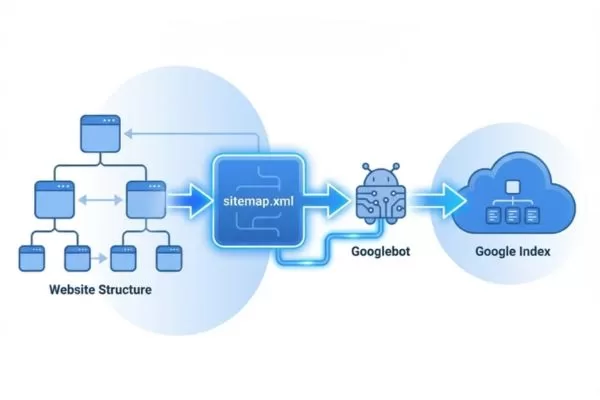
Pages reach search results through crawling, rendering, and indexing
Common reasons pages fail to get indexed
Even with high-quality content, many pages fail to enter the index due to technical barriers.
- Noindex Directives: The most direct obstacle is the noindex tag. This command tells engines to ignore the page. It is common for developers to accidentally leave these tags active after moving a site from a staging environment to live production.
- Robots.txt Restrictions: While useful for managing crawl budgets, overly strict rules in the robots.txt file can block access to vital sections. Using a Search engine index checker helps identify if your own site rules are accidentally locking Googlebot out.
- Canonicalization Issues: These problems occur when a page is technically healthy but points to a different “preferred” URL via a canonical tag. If implemented incorrectly, search engines will honor the tag and exclude the current page from the index in favor of the specified version.
- Crawled – Currently Not Indexed: This frustrating status in Google Search Console means Google saw the page but chose not to include it yet. This often happens due to “thin” content, quality thresholds, or a lack of internal linking. A Google indexed pages checker can reveal how many opportunities for visibility are being lost to this specific status.
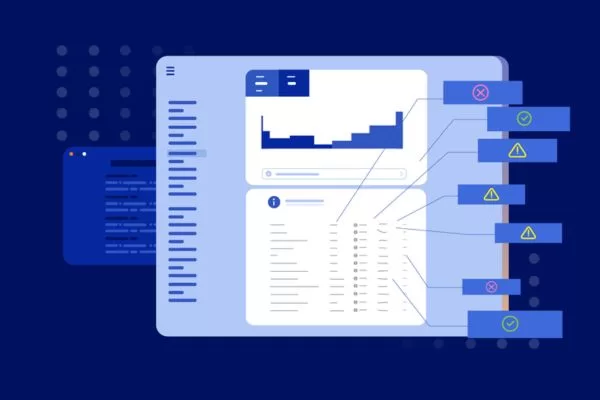
Pages fail indexing mainly due to technical or quality issues
The difference between indexing and ranking
A fundamental rule of SEO is that indexing and ranking are separate processes.
- Indexing is binary for a specific URL. A page is either in the database or it is not. It is the entry requirement for the search ecosystem. Think of it as being admitted to a race. If you are indexed, you are at the starting line.
- Ranking is the actual competition. Once indexed, your page competes against millions of others for top positions. Ranking depends on authority, relevance, and user experience. A page can be successfully indexed but rank so low that it remains invisible to users.
This distinction is vital for your strategy. If traffic is low, you must first verify your indexing status before worrying about ranking factors. A Site indexer tool allows you to distinguish between a visibility problem and a competition problem. Trying to rank a page that has not been indexed is a waste of resources because the page has not yet been admitted to the race.
How to check your website’s indexing status
Monitoring your website’s indexing status should be a fundamental part of your SEO routine. Without regular checks, you might discover months after publication that important pages never made it into search engine indexes, costing you valuable traffic and revenue opportunities. Fortunately, several methods exist for checking indexing status, each with distinct advantages and limitations.
Using manual methods with search operators
The most basic technique for an indexing audit involves using the site: search operator in the Google search bar. By entering “site:[yourwebsite.com]”, you get a fast glimpse of which pages are currently in the database. This method is highly accessible because it requires no specialized software or account configurations.
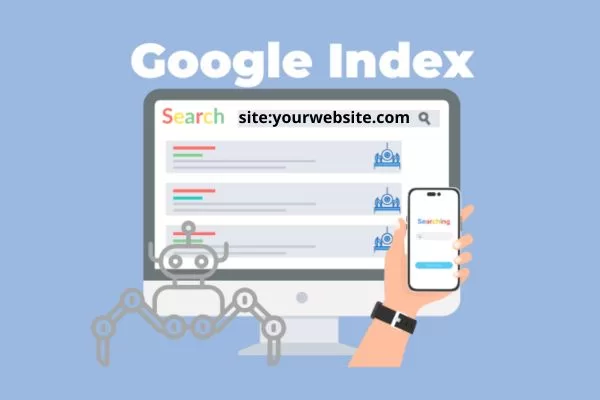
The site: operator offers a quick but limited way to check indexing
However, manual checks have limitations that professionals must recognize. The result count provided by the site: operator is notoriously unstable. These numbers are approximations that can change daily and often fail to match the data found in official sources. Furthermore, this method offers no diagnostic data. It shows what is indexed but fails to explain why other pages are missing, such as crawl errors or technical blocks. While useful for a quick look, it should not be your primary monitoring system.
Using Google Search Console as the source of truth
Google Search Console is the definitive authority for understanding how your site is indexed. The Page Indexing report provides direct insights into which URLs were successful, which were excluded, and which carry warnings. Because this tool connects directly to Google’s backend, it provides a level of data integrity that external tools cannot replicate.
The report organizes your URLs into two primary groups (Indexed and Not Indexed) with specific status labels:
- Indexed: These pages are in Google’s database and eligible for search.
- Not Indexed: These pages are not in the index, often due to specific directives, technical choices, or quality issues.
- Warning: Some pages may be indexed but have underlying issues (such as being indexed despite being blocked by robots.txt) that require attention.
Understanding the specific exclusion reasons is vital for technical SEO.
- “Duplicate without user-selected canonical” means Google chose a different version as the master page.
- A “Soft 404” indicates a page looks like an error to Google despite its functional 200 OK status code.
- “Discovered – currently not indexed” suggests Google knows the URL exists but has not crawled it yet.
Relying solely on this platform has risks, as seen during historical reporting delays where technical glitches caused data to lag. This proves why it is essential to have diverse monitoring strategies to avoid a single point of failure in your data chain.
When to use third-party site indexer tools
While Search Console is the source of truth, professional SEO workflows often require a dedicated Site indexer for better efficiency. The main drawback of official tools is the data lag, which usually spans 2 to 4 days. In fast-paced environments like e-commerce or news publishing, this delay is unacceptable.
A high-quality Google index checker excels at processing bulk URLs at scale. If you are managing thousands of product pages, checking each one through a manual interface is impossible. Professional tools allow you to analyze massive batches of links simultaneously and provide instant feedback on whether your new content is live.
Third-party site indexers speed up and automate indexing checks
Advanced platforms like Indexly or Giga Indexer provide specialized features such as:
- Automated indexing submissions via Google Indexing API (for supported content types).
- Instant alerts if high-value pages drop out of the search results.
- CMS integration for real-time notifications.
- Bulk processing that turns indexing into a proactive strategy.
For the best results, use Google Search Console for deep technical diagnostics and leverage a third-party Site indexer for speed, automation, and real-time oversight. This hybrid approach ensures your content remains visible without constant manual intervention.
Core features of a professional site indexer tool
Professional site indexer tools have evolved far beyond simple index checking to provide comprehensive indexing management capabilities. Understanding which features deliver the most value helps you choose the right tools for your specific needs and budget, whether you’re managing a single blog or dozens of client websites.
Bulk URL discovery and automated index checks
The capacity to analyze thousands of URLs simultaneously is the most transformative feature of modern software. Instead of manually inspecting pages one by one, a high-quality Google indexed pages checker can process entire sitemaps and perform automated crawls to discover every live page for bulk analysis.
This functionality is essential for large-scale ecommerce platforms managing massive product catalogs. For example, if a site launches 500 new products, checking them manually would require hours of labor. A professional tool completes this task in minutes and immediately flags any URLs that failed to index. Automated scheduling enhances this by running checks at set intervals, ensuring that new content is monitored periodically without any manual intervention.
Monitoring indexation velocity over time
Indexation velocity refers to the speed at which search engines add new or updated content to their database. This metric offers deep insights into your site’s crawl priority and crawl efficiency. Websites with clean technical structures typically see content indexed within hours, whereas sites with low authority might wait for weeks.
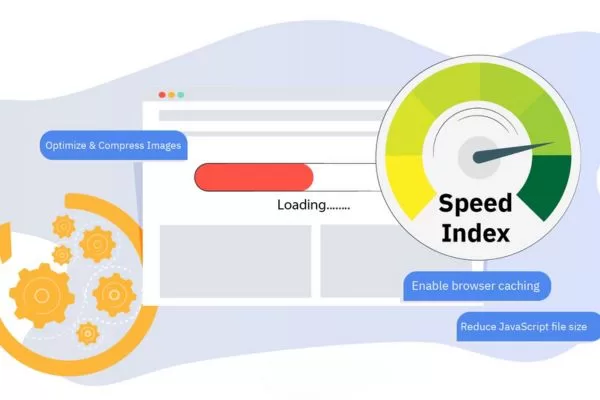
Indexation velocity shows how quickly search engines add your content
A professional search engine index checker tracks this velocity over time to determine if your performance is improving or degrading. A sudden drop in speed often signals emerging technical hurdles, server instability, or a shift in how search engines perceive your content quality. Detecting these trends early allows you to resolve issues before they result in a loss of organic traffic. Many experts view indexation velocity as a critical proxy for overall site health.
De-indexing alerts and issue detection
The most vital safety feature of professional tools is near-real-time alerting for de-indexing events. Pages can drop out of the search results due to server errors, security breaches, or accidental configuration changes like a robots.txt mistake. Without active monitoring, these problems might remain hidden until your revenue is already affected.
Modern platforms provide instant notifications via email or Slack when high-value pages are removed from the index. This immediate awareness allows you to fix the underlying technical cause and request re-indexation through official channels right away. Advanced tools also provide holistic detection for:
- Broken internal links that obstruct crawling.
- Misconfigured canonical tags or meta robots directives.
- Sitemap errors and crawl budget waste on low-value pages.
By moving from reactive troubleshooting to proactive maintenance, these features ensure your website remains healthy and visible at all times.
Strategic methods to improve your indexing rate
Understanding the technical mechanisms behind indexing is valuable, but implementing practical strategies to improve your indexing rate delivers tangible business results. These proven methods help search engines discover, crawl, and index your content more efficiently while signaling that your pages deserve inclusion in their indexes.
Technical SEO improvements for better crawlability
The foundation of a high indexing rate is a technical setup that makes crawling effortless for search bots.
- Error Resolution: Start by fixing all 404 errors and broken links. These issues waste your crawl budget and create a negative experience for both bots and users.
- Strategic Redirects: Use 301 redirects for permanent moves and 302 redirects for temporary changes. It is vital to avoid redirect chains that force crawlers through multiple hops before they can reach the final content.
- Sitemap Management: Your XML sitemap acts as a roadmap for search engines. Maintain a clean file that includes only canonical URLs. You should exclude pages blocked by noindex tags, duplicate variations, and low-value pages like filter combinations. Ensure your sitemap is referenced in the robots.txt file and submitted directly via Google Search Console.
- Site Architecture: Follow a logical internal hierarchy, which suggests any page should be reachable within a few clicks from the homepage. This optimized architecture ensures crawlers find important content without getting lost in deep hierarchies. Remember that orphaned pages with no internal links are unlikely to be indexed, even if they appear in your sitemap.
Internal linking strategies that guide search bots
Strategic internal linking serves a dual purpose by helping users navigate while guiding crawlers to your highest-value content.
- Hub-and-Spoke Structure: Hub pages that cover broad topics should link to detailed subtopic pages to create a logical information hierarchy. This helps both users and search engines understand your site’s topical depth.
- Contextual Weight: Links within your body text carry more weight than footer or sidebar links. Using descriptive anchor text helps engines understand the relationship and semantic relevance between pages.
- Accelerated Discovery: Linking to new pages from established, frequently crawled sections (such as your homepage or high-traffic blog posts) can significantly accelerate the discovery process. This is especially helpful for deep-level pages that crawlers might otherwise miss.
- Link Equity Distribution: A strong internal link profile signals importance to search engines. Pages with many internal pointers are treated as higher priority for both crawling and indexing.
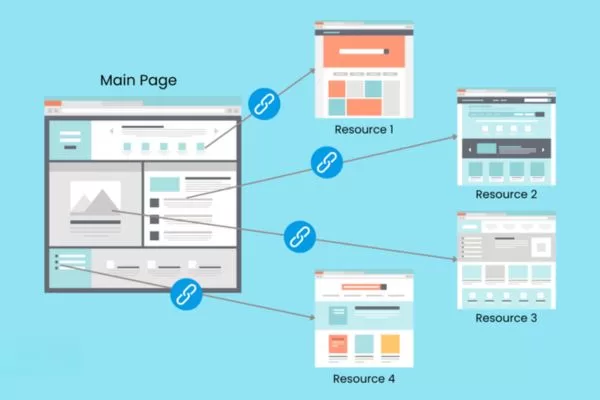
Strategic internal links guide crawlers to important pages faster
Content quality and the indexing threshold
Search engines have finite resources and apply a strict quality threshold to decide which pages deserve a spot in the index. They deliberately exclude content that provides minimal value.
- Avoiding Thin Content: Pages with minimal text or superficial treatment of a topic often receive the “Crawled – currently not indexed” status. The solution is ensuring each page offers substantial and unique value that satisfies a specific search intent.
- Aligning with Intent: Content must answer user questions comprehensively. Before publishing, you should ask if you would find the page helpful if you were the searcher. If the answer is no, the page may fail to meet the indexing threshold.
- Technical Quality Signals: Page speed, mobile-friendliness, and secure connections (HTTPS) play a role in quality assessments. Poor technical performance signals low quality, which might push your page out of the index.
- Professional Presentation: Clear formatting and readability demonstrate expertise. Search engines want to reward high-quality presentation with better indexing and higher rankings in the long term.

Only high-quality, intent-focused content meets the indexing threshold
Site indexers vs. rankings: clearing common misconceptions
The relationship between indexing tools, indexing speed, and search rankings is frequently misunderstood, leading to unrealistic expectations and inefficient optimization strategies. Clearing up these misconceptions helps you focus your SEO efforts on tactics that actually move the needle rather than chasing marginal gains.
Does faster indexing automatically improve rankings?
A common misconception suggests that pages indexed more quickly will automatically rank better than slower competitors. While there is a correlation between speed and site authority, the relationship is not directly causal. Fast indexing typically indicates strong technical SEO but the speed itself does not directly boost your position in search results.
However, faster indexing provides indirect SEO advantages:
- Time-Sensitive Content: For news or trending topics, a difference of a few hours can be the deciding factor in capturing traffic.
- Accumulating Signals: Updated content that gets re-indexed quickly can start gathering ranking signals (such as user engagement and backlinks) sooner than content waiting for a recrawl.
- Freshness Boost: Sites that consistently publish new content may receive a freshness boost for specific queries where recent information is a priority.
- Trust Signals: Fast indexing is often a byproduct of a strong technical foundation and quality content, both of which are essential for ranking success.
Managing crawl budget on large-scale websites
Crawl budget refers to the number of pages search engines will crawl on your site within a specific timeframe. This is determined by crawl capacity (server health) and crawl demand (how popular/important your pages are). For massive websites, wasting this budget on low-value pages means fewer resources are available for indexing your critical content.
Common crawl budget wasters include:
- Faceted Navigation and Session Identifiers: URL parameters that create near-duplicate content or infinite variations.
- Crawler Traps: Features like “load more” buttons or calendar widgets that create endless URL variations.
- Low-Value Pages: Internal search results that have been indexed, and duplicate content variations.
- Thin Content: Automatically generated tag pages that offer little unique value to users.

Crawl budget management ensures search engines focus on your most important pages
A professional site indexer helps identify these drains so you can address them through robots.txt rules or noindex directives. For ecommerce sites, this might involve blocking crawlers from filter combinations while ensuring product pages are visited regularly. For news sites, it may involve deprioritizing old archives in favor of recent articles.
It is important to note that crawl budget concerns apply primarily to very large sites (typically those with over 10,000+ unique URLs). Smaller sites with only a few hundred or thousand pages typically do not reach these limits. If a small site has indexing issues, the cause is usually related to content quality, technical barriers, or lack of authority (backlinks) rather than budget constraints.
Frequently asked questions about website indexing
Website indexing raises common questions among SEO professionals and website owners alike. Addressing these frequently asked questions provides practical guidance for the real-world situations you’re likely to encounter when managing your site’s indexing performance.
Why is my new article still not indexed after a week?
The safety of instant indexing depends on the tool and method used. Official solutions like Google’s Indexing API are strictly intended for pages with short-lived content like Job Postings or Livestream events; using it for regular blog posts or product pages may not produce results as Google’s algorithms evolve. Reliable services and a reputable Google index checker use white-hat methods such as sitemap pinging, natural link discovery, and API-based notifications where appropriate. Risky tools that promise guaranteed or instant results through spammy link farms should be avoided, as no tool can force indexing if the content does not meet search engine quality standards.
Is it safe to use instant indexing APIs or tools?
The safety of instant indexing depends on the tool and method used. Official solutions like Google’s Indexing API are safe only for their intended use, while misuse can cause issues. Reliable services and a reputable Google index checker use white-hat methods such as natural link discovery, official submission channels, and Google Search Console. Risky tools that promise forced or instant results should be avoided, as no tool can index low-quality content without meeting search engine standards.
Instant indexing is safe only when using approved, white-hat tools correctly
How often should you audit your website’s indexing status?
The ideal indexing audit frequency depends on your site’s size and update rate. Large enterprise or e-commerce sites need daily checks, medium sites benefit from weekly reviews, and small blogs can rely on monthly audits with spot checks for new content. Major site changes (such as migrations or domain moves) require daily monitoring after launch. Using a professional site indexer with automated alerts simplifies this process and helps catch indexing issues before they impact traffic.
Conclusion
Website indexing is the foundation of SEO success because content that is not indexed cannot generate organic traffic. By understanding how indexing works, tracking status in Google Search Console, and leveraging professional site indexer tools, you can improve crawlability, content quality, and overall search visibility in a structured way.
Indexing should be managed proactively, not only when problems appear. Combine Google Search Console for deep technical insights with a reliable Google index checker for automation and monitoring. By running regular audits, resolving technical barriers, optimizing internal links, and prioritizing helpful content, you can ensure a healthy indexation rate. This approach turns indexing into a controlled SEO process that consistently helps your pages get discovered and ranked.
If you are struggling with indexing, managing your crawl budget, or looking to drive a breakthrough in organic traffic, On Digitals is here to partner with you. With a team of seasoned experts, we don’t just help you resolve technical barriers; we build a sustainable, holistic SEO strategy.
- Stay Updated with the Latest Insights: Explore our repository of digital marketing resources and trends on our blog.
- Professional SEO Solutions: Comprehensive optimization from Technical SEO to Content Marketing to elevate your brand’s presence.
Read more