
Google Ads Mistakes: A Practical Checklist for Better Campaign Decisions
Vincent
13/10/2025
26
Google Ads mistakes rarely waste money in isolation. Weak conversion tracking can mislead bidding, irrelevant search terms can burn budget before the click, and a poor landing page can turn valid traffic into lost revenue. This guide helps marketers identify the most costly errors in the right order: data, traffic quality, post-click experience, and controlled scaling.
What Google Ads mistakes are and when they matter
Google Ads mistakes are decisions in tracking, targeting, campaign setup, creative, landing pages, budget, or optimisation that move spend away from meaningful business outcomes.
They can affect every campaign type differently. A Search campaign may lose budget through irrelevant queries, while a Performance Max campaign may suffer from poor feed data, weak conversion signals, or unclear reporting. A local service business may pay for clicks outside its service area, while an ecommerce brand may scale products with low margins because revenue data looks stronger than actual profit.
The core principle is simple: fix data quality before optimising bids, budgets, or ad copy. Without reliable inputs, even well-built campaigns can make the wrong decisions.
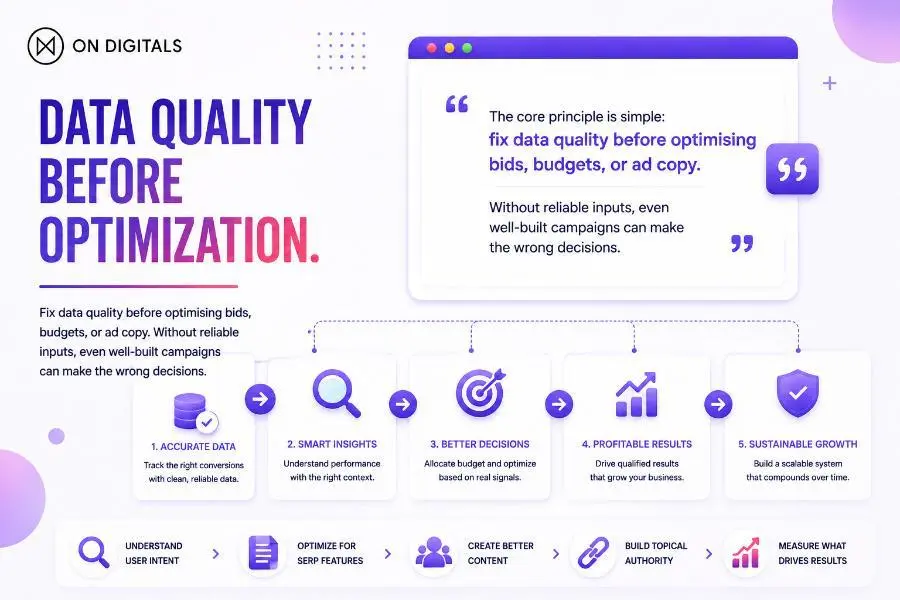
Reliable campaign data is the foundation of profitable Google Ads decisions—fix conversion quality before changing bids, budgets, targeting, or ad copy.
Why Google Ads mistakes affect budget, lead quality, and revenue
Most Google Ads mistakes create a chain reaction.
Wrong conversion setup can train automated bidding toward low-value actions. Weak keyword and location controls can attract clicks from people who are unlikely to buy. Generic landing pages can then lose the users who were genuinely interested.
The right outcome also depends on the business model:
- Lead-generation campaigns should care about qualified leads, booked calls, sales opportunities, and close rate.
- Ecommerce campaigns should consider revenue, contribution margin, average order value, returns, and stock availability.
- Local businesses may prioritise calls, direction requests, bookings, quote requests, and service-area coverage.
Clicks are not the outcome. They are only the cost of reaching a potential outcome.
Google Ads mistakes that corrupt decision-making
Mistake 1: Optimising for the wrong conversion data
A campaign cannot optimise toward profitable outcomes if it is trained on incomplete, duplicated, or low-value conversions.
Common errors include tracking page views, contact-page visits, button clicks, or form starts as primary conversions when the real goal is a completed purchase, qualified lead, booked consultation, or confirmed appointment. Duplicate tracking can also make a campaign appear more successful than it is.
Zapier’s guide to Google Ads mistakes highlights how tracking non-conversion events or duplicate actions can inflate results and distort later decisions.
How to fix it:
- Define one or two primary conversion actions for each campaign objective.
- Keep softer actions, such as brochure downloads or page engagement, as secondary observations where appropriate.
- Check whether conversion settings, attribution windows, and counting methods are consistent across similar campaigns.
- Feed lead-quality or sales outcomes back into reporting whenever possible.
Mistake 2: Treating ROAS or CPL as the only source of truth
Platform reporting is essential for optimisation, but it is not the full business picture.
A high ROAS may include branded demand that would have converted anyway. A low cost per lead can hide poor lead quality. Revenue may look strong while discounting, returns, product margins, or fulfilment costs erode profitability.
SavvyRevenue’s account-audit perspective is especially relevant here: campaign decisions need to reflect product economics and reliable business data, not only what the Google Ads interface reports.
How to fix it:
- Compare Google Ads results with CRM, ecommerce, booking, or backend revenue data.
- Separate qualified leads from all form submissions.
- Review brand and non-brand performance before deciding which campaigns deserve more budget.
- For ecommerce, include margin, stock status, returns, and promotional periods in performance reviews.
Mistake 3: Blending branded and non-branded performance
Brand searches often behave differently from discovery searches. Someone searching for your brand name may already know your business, while a non-branded searcher is still comparing providers or solutions.
Combining both into one account-level result can make CPA or ROAS look healthier than the true cost of acquiring new demand.
How to fix it:
- Report brand and non-brand results separately.
- Review whether branded traffic is masking weak non-brand performance.
- Use separate budget logic only when the business case supports it.
- Avoid rigid account structures; the right setup depends on competition, budget, brand awareness, and campaign goals.
Google Ads mistakes that waste budget before the click
Mistake 4: Ignoring search terms and negative keyword hygiene
Keywords are not the same as the exact searches that trigger your ads. Even tightly managed campaigns can appear for close variants, related phrasing, research-only queries, job-seeker searches, irrelevant product use cases, or locations you do not serve.
Red Evolution’s Google Ads checklist correctly treats negative keywords as a core budget-control tool. But negative keyword management is not just about adding exclusions forever.
Old negative lists can block relevant demand after products, services, markets, or customer language change. Search Engine Land also warns that stale negatives can create conflicts with valuable keywords. Their 2026 Google Ads mistakes guide recommends checking whether exclusions are blocking current opportunities.
How to fix it:
- Review the Search Terms Report weekly.
- Add irrelevant terms to negative lists when the intent clearly does not fit.
- Revisit old negative lists during account audits.
- Promote consistently valuable search terms into managed keywords or more relevant campaign groups when appropriate.
- Check that negative keywords are not blocking important terms.
Mistake 5: Using broad targeting, locations, or defaults without guardrails
Broad reach is not always wrong. It can help campaigns discover demand, especially when conversion data is reliable. The mistake is using broad settings without understanding who can buy, where you can serve, and which actions matter.
Common issues include broad location targeting, irrelevant languages, weak audience exclusions, unsuitable schedules, and device settings that do not reflect real customer behaviour.
For local businesses, location settings deserve special attention. People who show interest in an area are not always people who can visit or use your service there.
How to fix it:
- Start with service areas, sales capacity, delivery rules, and customer availability.
- Check location, device, schedule, and audience performance regularly.
- Use exclusions where they protect budget without removing viable demand.
- Treat broader targeting as a monitored test, not a default assumption.
Mistake 6: Over-segmenting campaigns and splitting budgets too thin
More campaigns do not automatically mean more control. Excessive segmentation can fragment data, slow learning, complicate reporting, and spread budget too thinly across similar objectives.
Campaign separation makes sense when there are real differences in margin, geography, language, product category, customer value, or conversion goal. It is less useful when campaigns only separate minor keyword variations with the same economics.
How to fix it:
- Consolidate campaigns that share the same objective and budget logic.
- Keep segmentation only where it changes the business decision.
- Review whether each campaign has enough volume to produce meaningful insight.
- Simplify account structure before adding more layers.
Google Ads mistakes that waste valid clicks after the click
Mistake 7: Sending paid traffic to generic or mismatched landing pages
A relevant ad cannot compensate for a landing page that fails to continue the user’s search intent.
A user searching for “enterprise SEO agency pricing” needs a different experience from someone searching for “how to improve Google Ads conversion tracking.” Sending both users to a generic homepage adds friction and makes the next step unclear.
How to fix it:
- Align keyword, ad message, landing-page headline, proof points, and CTA.
- Use service pages, product pages, local pages, comparison pages, or dedicated landing pages based on intent.
- Include practical trust signals: testimonials, certifications, customer outcomes, expert information, pricing context where appropriate, and clear contact options.
- Audit landing pages by campaign intent, not only by traffic volume.
Mistake 8: Ignoring mobile friction and conversion barriers
High mobile traffic is not automatically valuable if users cannot complete the intended action easily.
Slow pages, difficult forms, hidden phone numbers, weak CTA placement, broken booking flows, intrusive pop-ups, and long checkouts can make paid traffic more expensive without improving outcomes.
How to fix it:
- Test the full journey from ad click to confirmation on a real mobile device.
- Check form length, button visibility, checkout steps, booking tools, and call functionality.
- Use page-speed tools as diagnostics, but validate decisions with conversion data.
- Make the next action obvious and easy to complete.
Mistake 9: Using generic ads and irrelevant Google Ads assets
Google Ads assets should help users decide, not simply fill more space.
Sitelinks, call assets, location assets, price assets, promotion assets, image assets, and structured snippets can add value when they match the campaign’s purpose. Generic assets or generic ad copy can create noise and weaken message match.
The beginner-focused Google Ads mistakes video reinforces a useful principle: campaigns become harder to improve when keyword focus, ad messaging, and business priorities are not aligned.
How to fix it:
- Build ads around one clear offer, audience need, or objection.
- Use proof points that are specific and supportable.
- Add assets only when they help users compare, contact, visit, or buy.
- Test one meaningful variable at a time, such as CTA, value proposition, proof point, or offer.
Google Ads mistakes that prevent controlled scaling
Mistake 10: Using Smart Bidding or automation with unreliable inputs
Automation can improve efficiency when conversion goals, conversion value, and campaign objectives are clear. It can also amplify bad data.
Wrong primary conversions, unstable budgets, frequent target changes, poor lead-quality feedback, and unmanaged auto-applied recommendations can all make automation less useful.
How to fix it:
- Confirm that the system is optimising toward a meaningful conversion.
- Document major changes in a change log.
- Assign an owner to review recommendations and automated settings.
- Monitor performance after significant changes.
- Keep a rollback plan for changes that reduce lead quality or profitability.
Do not reject every recommendation automatically, but do not accept one without understanding its likely impact on your account.
Mistake 11: Making reactive budget and bidding changes too quickly
Campaigns need attention, but constant intervention can make it difficult to understand what caused performance changes.
The opposite is also risky: leaving weak campaigns untouched for months allows irrelevant spend and poor lead quality to continue.
Promotions, stock changes, sales capacity, seasonality, and pricing changes should be planned before they affect campaign performance.
How to fix it:
- Separate weekly hygiene from monthly strategic decisions.
- Make budget or target changes deliberately rather than emotionally.
- Avoid changing multiple core variables at the same time.
- Consider promotions, inventory, and sales-team capacity before scaling spend.
Mistake 12: Testing without a hypothesis or operating cadence
“Test everything” is not a strategy. Testing should answer a defined question.
For example:
- Will a pricing-focused headline improve qualified leads for a high-intent service query?
- Will a shorter form increase booking completion without reducing lead quality?
- Will a location-specific landing page improve conversion rate for a service-area campaign?
How to fix it:
- Define one hypothesis per test.
- Choose a success metric before launching.
- Give the test enough time and volume to produce usable insight.
- Record what changed, what happened, and what the team learned.
Google Ads checklist before launch
Before launching or significantly changing a campaign, check:
- Primary conversion goals are correctly configured.
- Conversion values reflect business priorities.
- The campaign objective matches the buyer journey.
- Keywords, search intent, and negative keywords are aligned.
- Locations, languages, schedules, devices, and exclusions are reviewed.
- Ads and assets match the landing page.
- The landing page is mobile-friendly and action-focused.
- Budget and bidding logic suit the available data.
- Reporting ownership and change control are clear.
Weekly and monthly Google Ads optimisation checklist
Weekly review:
Review search terms, spend anomalies, conversion quality, disapprovals, location and device performance, audience patterns, and changes made by automation or account managers.
Monthly review:
Review budget allocation, brand versus non-brand results, landing-page conversion quality, bid strategy suitability, lead-to-sale feedback, campaign consolidation opportunities, and test outcomes.
Quarterly review:
Review revenue and profit contribution, CRM or backend data alignment, attribution assumptions, pricing and margin changes, automation governance, and account structure.
FAQ
What are the most common Google Ads mistakes?
The most common Google Ads mistakes include poor conversion tracking, irrelevant search terms, weak negative keyword management, broad location settings, generic landing pages, fragmented budgets, and optimisation based on incomplete data.
Which Google Ads mistake wastes the most money?
For many accounts, the most expensive mistake is optimising toward the wrong conversion. When bidding learns from low-value actions, budget, targeting, and creative decisions can all move in the wrong direction.
Should I use Smart Bidding for Google Ads?
Smart Bidding can be useful when conversion tracking, business goals, and conversion quality are reliable. It should be monitored as part of a wider strategy, not treated as autopilot.
How often should I review Google Ads campaigns?
Search terms, spend anomalies, conversion quality, and disapprovals should usually be reviewed weekly. Budget allocation, bidding, landing pages, and campaign structure need a more strategic monthly review.
Do negative keywords still matter in Google Ads?
Yes. Negative keywords help prevent ads from showing for irrelevant queries. They should also be reviewed over time, because old exclusions can block valuable traffic.
Is a high ROAS always a sign of a successful Google Ads campaign?
Not always. ROAS can be influenced by branded demand, attribution settings, discounts, product margins, returns, and incomplete data. Compare platform reporting with real business outcomes before scaling.
Avoid Google Ads mistakes by improving the decisions behind them
The strongest Google Ads accounts do not win because they add more keywords, raise bids faster, or follow every platform recommendation. They win because measurement is reliable, traffic aligns with business demand, landing pages reduce friction, and optimisation decisions are tied to qualified outcomes.
Explore Paid Performance Platforms to build a Google Ads strategy around accurate tracking, controlled experimentation, relevant demand, and performance data that supports real business growth.

NEWEST POSTS
- Advertising Industry In Vietnam: The 2026 Trends, Channels and Market-Entry Strategy
- Best SEO Company in Vietnam: Latest Shortlist For Businesses
- How To Leverage Social Media For Customer Service Like A Pro?
- Social Media Post Tips – 8 Ways To Boost Engagement
- How To Use Social Media for Sales – In-depth Beginner Guide
Read more